

Email Deliverability Tools: The Complete Guide to Landing in the Inbox (Not Spam)
- Sophie Ricci
- Views : 28,543
Table of Contents
You just spent 30 minutes crafting the perfect email campaign. You hit ‘send,’ picturing the responses rolling in. But there’s a problem you can’t see: your emails landed straight in the spam folder. All that effort, wasted.
Sound familiar? It’s a silent killer for any business relying on email marketing. You don’t get a bounce-back notification. You just get silence. You assume recipients aren’t interested, but the truth is, they never even saw your message.
This isn’t just a minor annoyance; it’s a direct hit to your revenue. Nearly 65% of businesses say email deliverability issues have directly cost them revenue or customers. For companies depending on email outreach, that’s not just a lost opportunity; it’s money walking out the door.
📨 Bypass Email Deliverability Completely
LinkedIn outbound reaches decision-makers directly—no spam folders, no authentication setup, no reputation damage
This isn’t just another list of tools. This is your complete playbook. We’ll break down why your emails fail, show you the exact tools professionals use to fix it, and give you a simple framework to pick the right one in the next 10 minutes. By the end of this guide, you won’t need to Google this topic ever again.
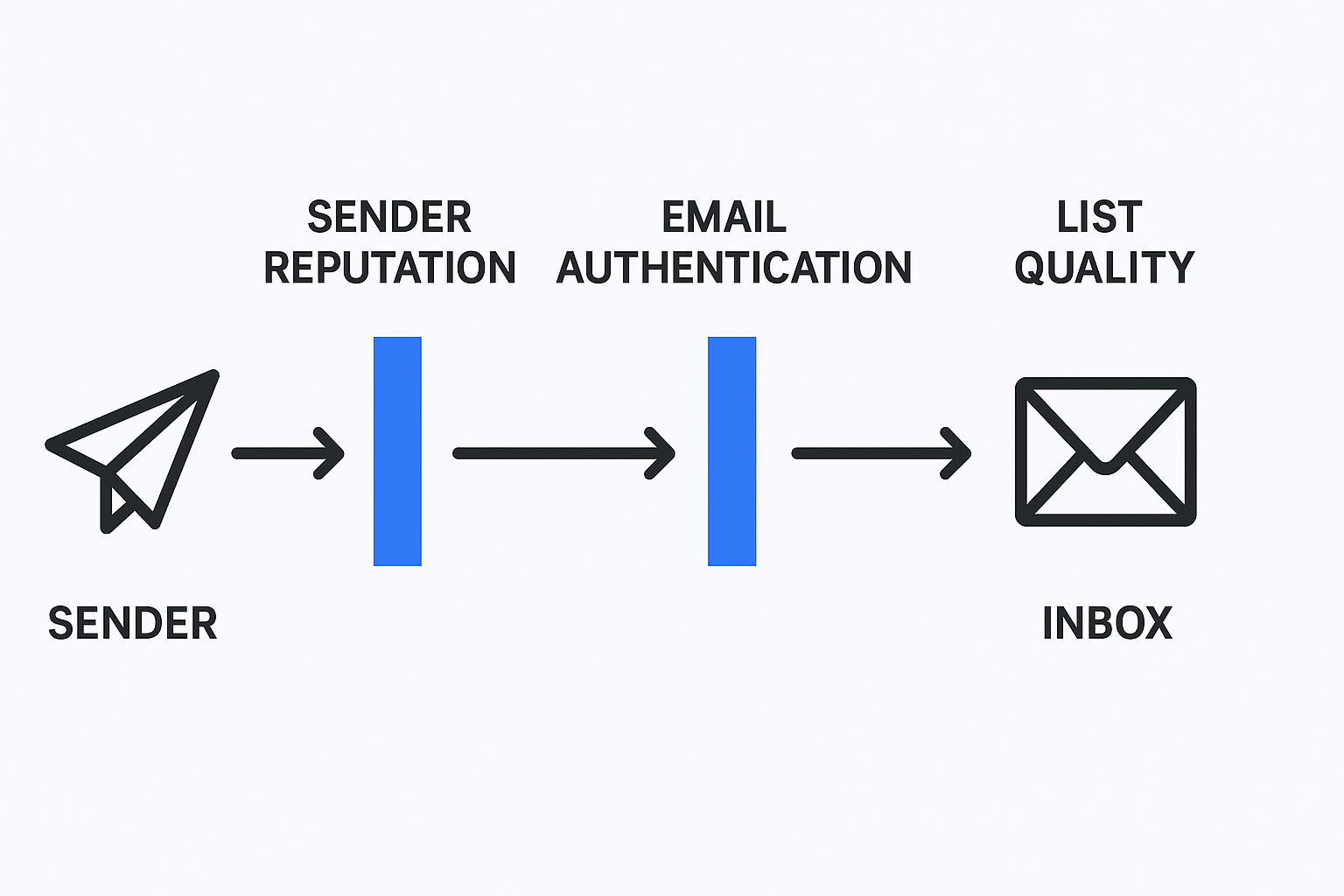
The 3 Invisible Walls Blocking Your Emails (And How Tools Tear Them Down)
Before we dive into the tools, let’s quickly pull back the curtain on the three gatekeepers that decide if your email gets seen or sent to the digital graveyard. Understanding these is the key to knowing why certain email deliverability tools are so powerful.
Your Reputation Precedes You (Sender Reputation)
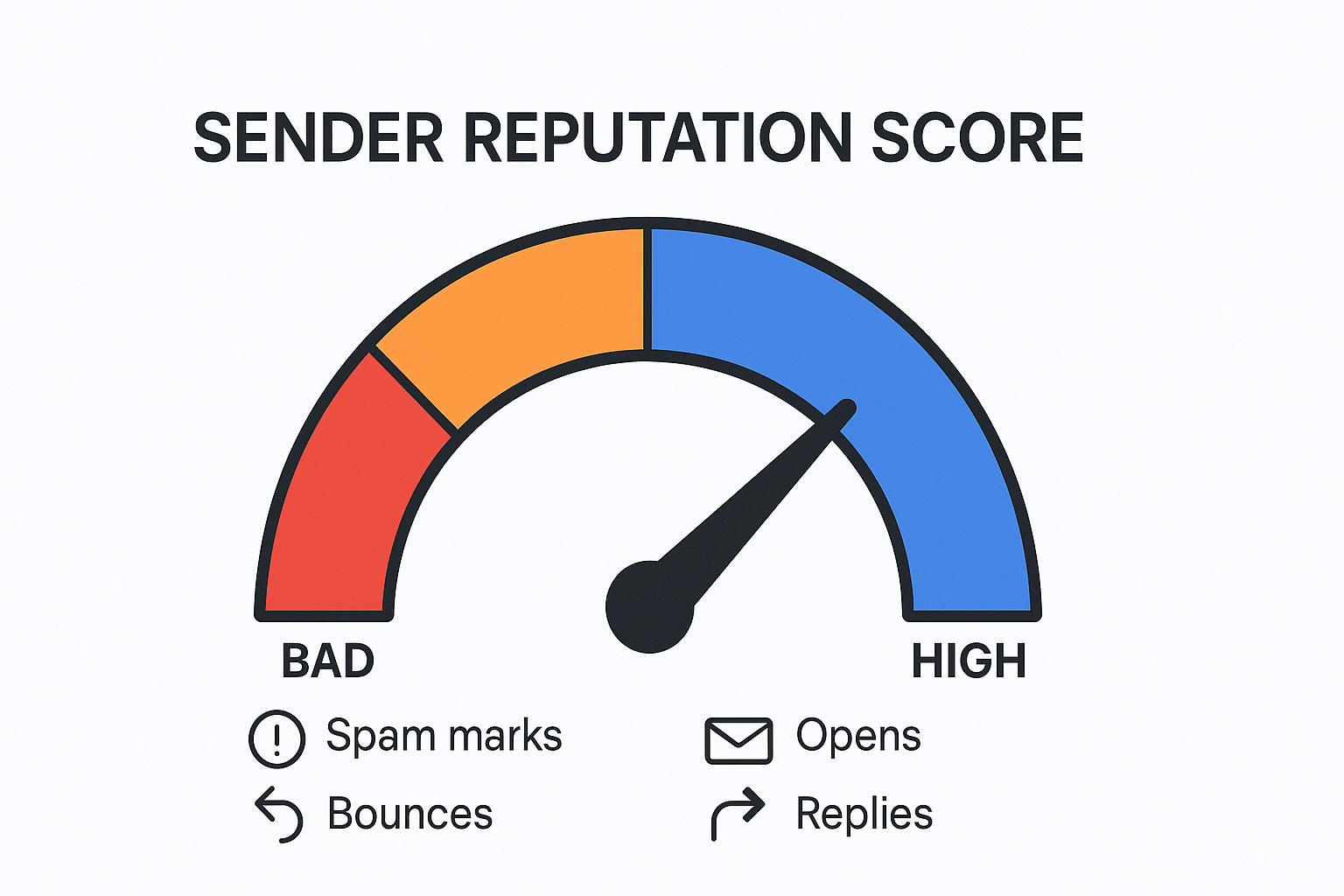
Think of your sender reputation like a credit score for your email address and domain. Every action you take—sending emails that get opened, replied to, or marked as spam—either builds or damages this score. A low score tells email providers like Google and Outlook that you’re not trustworthy, and they’ll hide your emails in the spam folder or block them entirely.
🎯 Zero Reputation Risk Required
Our LinkedIn targeting and campaign design eliminate sender scores, warm-ups, and technical configuration entirely
This isn’t just a vague concept; it’s the single most important factor in email deliverability. A poor sender reputation is a primary reason for bad inbox placement, leading to wasted marketing budgets and eroded customer trust. These tools help you build and protect that score like a hawk.
Your Digital Handshake (Email Authentication)
SPF, DKIM, and DMARC sound complicated, but they’re just a digital handshake. They are technical records on your domain that prove to the recipient’s email server that you are who you say you are, and not a scammer spoofing your domain.
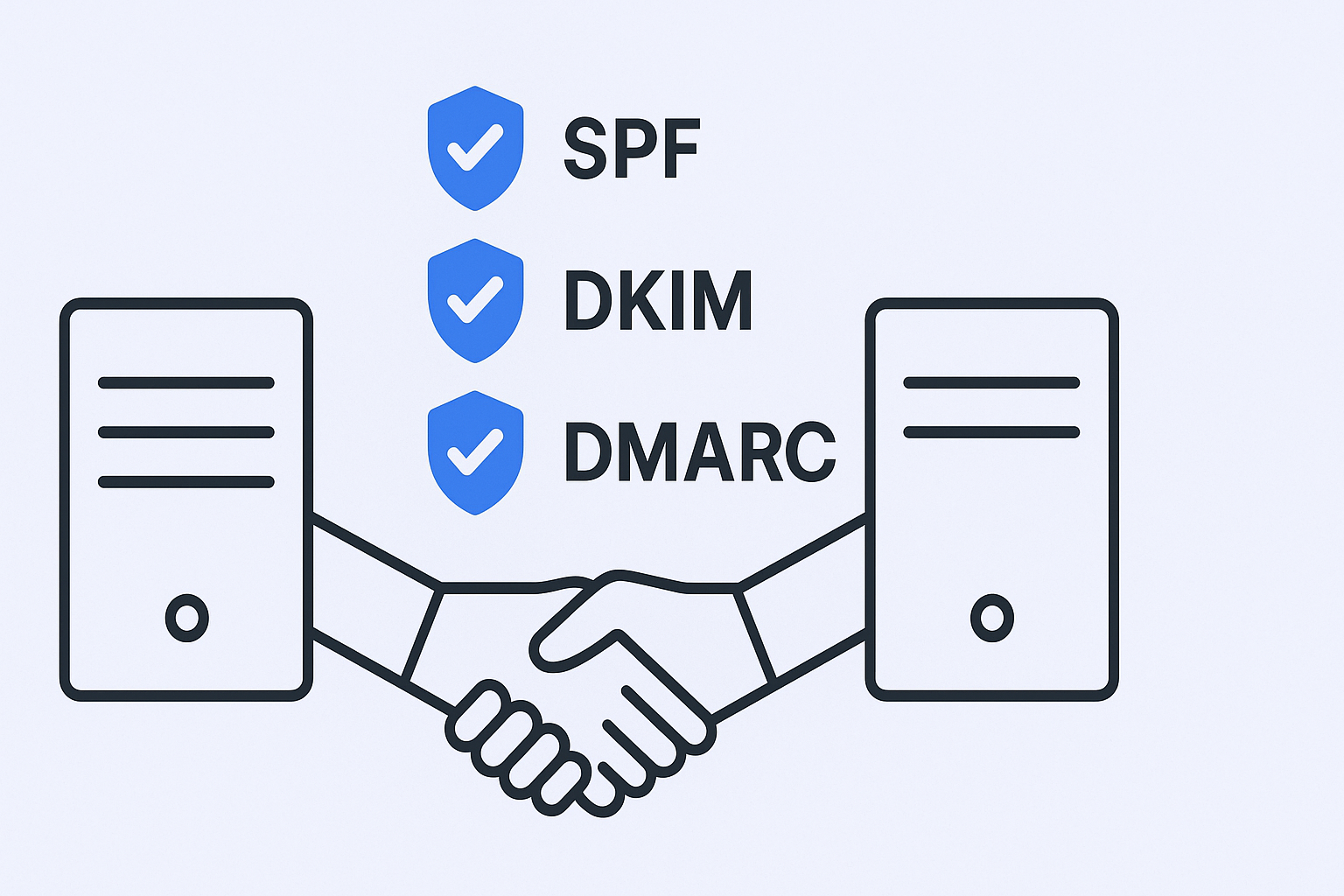
Without this handshake, you look suspicious, and you’re getting sent straight to spam. It’s no longer a “nice-to-have.” Major providers like Google and Microsoft now require proper authentication for anyone sending bulk emails, making it a foundational piece of your setup.
Your List is Your Foundation (Email List Quality)
This is the part everyone overlooks. You can have the best reputation and a perfect digital handshake, but if you’re sending emails to a list full of outdated, invalid addresses, you’re going to get a high bounce rate. A bounce rate over 3-5% is a massive red flag to email providers. It screams ‘spammer!’ and tanks your reputation overnight.
🚀 Scale Without List Hygiene Drama
LinkedIn outbound targets verified professionals with our proven targeting methodology—no bounces, no verification tools needed
The quality of your email list has a huge impact on your deliverability. Ignoring list hygiene is a surefire way to watch your deliverability drop below 80%, meaning one out of every five emails you send is essentially thrown away.
How We Evaluated These Tools to List Them
We didn’t just pull these names out of a hat. Our team analyzed dozens of email deliverability tools through the lens of busy marketing professionals. Here’s what we looked for:
- Real-World Effectiveness: Does it actually move the needle on inbox placement and reply rates? We looked at user reviews and case studies to see what really works.
- Ease of Use for Non-Techies: Can a marketer set it up in under 15 minutes without needing help from the IT department? We prioritized intuitive interfaces and clear instructions.
- Workflow Integration: Does it live where you work? We considered whether it’s an all-in-one email marketing platform or a specialized add-on that requires juggling multiple tabs.
- Value for Marketing Budget: Is the price justified by the potential increase in conversions and revenue? We analyzed pricing models—per user vs. per mailbox—to find the best ROI for marketing teams.
Top 9 Email Deliverability Tools Discussed in Detail
Alright, let’s get to the good stuff. Here are the top 9 email deliverability tools that will help you land more emails in the inbox and spend less time worrying about the spam folder. We’ve broken them down into two main groups: All-in-One Outreach Platforms (where you can send and manage deliverability) and Specialized Deliverability Tools (which you add to your existing workflow).
Salesso (All-in-One Outreach Platform)
Best For: Businesses serious about scaling their email outreach while maintaining excellent deliverability rates.
What It Is & Why It Matters for You: Salesso is your complete cold email solution that combines email finding, inbox warming, and campaign sending in one powerful platform. Unlike other tools that only focus on one aspect, Salesso ensures your entire email deliverability pipeline is optimized from start to finish.
Key Deliverability Features:
- Advanced Email Warming: Automatically builds your sender reputation with human-like interactions across a network of high-quality accounts
- Real-time Deliverability Monitoring: Track your inbox placement rates and get instant alerts when issues arise
- Email Verification: Clean your lists before sending to maintain low bounce rates
- Domain Health Monitoring: Continuous monitoring of your domain’s reputation and blacklist status
- Smart Sending: AI-powered sending patterns that mimic human behavior to avoid spam filters
Pricing Snapshot: Competitive pricing with all features included—no hidden costs or per-feature charges.
Smartlead (All-in-One Outreach Platform)
Best For: Agencies and sales teams scaling high-volume cold email outreach.
What It Is & Why It Matters for You: Smartlead is a powerhouse for sending a lot of emails without destroying your sender reputation. Its standout features are built for scale, allowing you to manage a massive outreach operation from a single dashboard.
Key Deliverability Features:
- Unlimited Mailboxes & Auto-Rotation: Connect as many sending accounts as you want and automatically spread your sending volume across them
- Unlimited Email Warmups: Automatically builds the reputation of all your connected inboxes with human-like interactions
- Unified Master Inbox: Manage replies from all your sending accounts in one place
- AI-Powered Deliverability Booster: Auto-moves warm-up emails from spam to inbox to signal importance to email providers
Pricing Snapshot: Starts at around $39/month when billed monthly, or about $32.50/month with annual billing.
Instantly.ai (All-in-One Outreach Platform)
Best For: Growing teams that want an all-in-one solution for lead sourcing, sending, and deliverability.
What It Is & Why It Matters for You: Instantly is famous for popularizing the “unlimited” model in cold outreach. It combines a robust sending platform with a built-in lead database, making it a nearly complete top-of-funnel solution.
Key Deliverability Features:
- Unlimited Email Accounts & Warmup: Scale your outreach by adding more sending accounts without paying per seat
- Automatic Domain Setup: Purchase sending domains directly within the platform with auto-configured technical records
- Campaign Builder & Analytics: Robust tools for creating multi-step sequences and tracking performance
- SISR System: For high-volume senders, automatically assigns dedicated servers and IPs for enterprise-level protection
Pricing Snapshot: Starts at $37/month for the Growth plan, which includes unlimited email accounts and warm-up.
Saleshandy (All-in-One Outreach Platform)
Best For: Small teams and solo entrepreneurs looking for a simple, affordable, and effective outreach tool.
What It Is & Why It Matters for You: Saleshandy focuses on being user-friendly and cost-effective. It’s less complex than other platforms but provides all the core functionality needed to run effective campaigns without a steep learning curve or hefty price tag.
Key Deliverability Features:
- Sender Rotation & ESP Matching: Improves inbox placement by rotating through connected accounts and matching email providers when possible
- Spam Word Detection: AI-powered checker that flags problematic words and phrases before sending
- Inbox Radar & TrulyInbox Integration: Built-in placement testing and integration with dedicated warming tools
Pricing Snapshot: Cold outreach plans start at an affordable $25/month.
Woodpecker (All-in-One Outreach Platform)
Best For: B2B companies that prioritize safety and deliverability monitoring within a straightforward interface.
What It Is & Why It Matters for You: Woodpecker is a veteran in the cold email space, known for its reliability and strong focus on deliverability. It’s a great choice for teams who want a tool that “just works” and has built-in guardrails.
Key Deliverability Features:
- Deliverability Monitoring & Domain Audit: Proactively checks your technical setup and predicts potential sending issues
- Adaptive Sending & Bounce Shield: Automatically adjusts sending speed to stay within provider limits
- Free Warm-up & Inbox Rotation: Includes free warm-up for multiple inboxes and allows campaign distribution
- Free Email Verification: Detects invalid and risky email addresses before sending
Pricing Snapshot: Plans start at $29/month, allowing contact with up to 500 prospects.
MailReach (Specialized Deliverability Tool)
Best For: Anyone needing a powerful, dedicated email warm-up and spam testing solution to add to their existing workflow.
What It Is & Why It Matters for You: MailReach doesn’t send your campaigns. Its one and only job is to make sure that when you do send them, they land in the inbox. It’s a specialist tool focused entirely on building and monitoring your sender reputation.
Key Deliverability Features:
- AI-Powered Warm-up Engine: Uses smart algorithms and a large network of high-reputation accounts for human-like conversations
- MailReach Co-Pilot: AI assistant that analyzes your sending activity and provides actionable improvement tips
- Spam Tester: Send test emails to real inboxes to see exactly where your emails land across major providers
- Blacklist Monitoring & Health Checks: Continuously monitors over 50 blacklists and checks technical setup
Pricing Snapshot: Starts at $25/mailbox/month (or $20/month if billed annually).
Lemwarm (Specialized Deliverability Tool)
Best For: Users of the Lemlist ecosystem or those who want an industry-specific warm-up process.
What It Is & Why It Matters for You: Lemwarm is the dedicated warm-up tool from the creators of Lemlist. Its unique selling point is the “Smart Cluster” feature that intelligently groups you with other users in your specific industry.
Key Deliverability Features:
- Smart Cluster Warming: Groups you with similar senders in your industry for more authentic warm-up activity
- Deliverability Score & DNS Check: Simple score tracking and technical setup verification
- Custom Warm-up Templates: Test your actual email templates with spam filters before sending to prospects
Pricing Snapshot: Starts at $29/month per email address.
GlockApps (Specialized Deliverability Tool)
Best For: Technically-minded users or teams needing to perform deep diagnostics and troubleshoot serious deliverability problems.
What It Is & Why It Matters for You: GlockApps is like an MRI for your email deliverability. It’s a highly detailed testing and analytics platform that you turn to when you need to figure out exactly why your emails are going to spam.
Key Deliverability Features:
- Comprehensive Inbox Placement Tests: Uses over 70 real accounts across all major providers for detailed placement reports
- Spam Trigger Analysis: Scans email content using filters like SpamAssassin to pinpoint specific issues
- DMARC Analyzer & Blacklist Monitoring: Deep analytics on authentication setup and monitoring of 50+ blacklists
Pricing Snapshot: Free plan with 2 test credits. Paid plans start at $59/month when billed annually.
MxToolbox (Specialized Deliverability Tool)
Best For: Quick, free health checks on your domain’s technical setup and blacklist status.
What It Is & Why It Matters for You: MxToolbox is the go-to diagnostic tool for IT professionals, but its free features are incredibly useful for any marketer. Get a quick snapshot of your domain’s health before launching campaigns.
Key Deliverability Features:
- Free Blacklist Monitoring: Instantly check if your domain or IP is on over 100 different blacklists
- SPF, DKIM, DMARC Lookup: Simple, free tools to verify authentication records are correct
- Delivery Center (Paid): Advanced monitoring, inbox placement testing, and detailed DMARC reporting
Pricing Snapshot: Core lookup tools are 100% free. Paid plans with advanced monitoring start at $129/month.
Google Postmaster Tools (Specialized Deliverability Tool)
Best For: Any team sending significant email volume to Gmail or Google Workspace addresses.
What It Is & Why It Matters for You: This is a free tool directly from Google that gives you data on how Gmail’s servers see your domain. If a large portion of your prospect list uses Gmail, this is a non-negotiable tool to set up.
Key Deliverability Features:
- IP & Domain Reputation: Shows Google’s direct assessment of your reputation (High, Medium, Low, Bad)
- Spam Rate: Tracks the percentage of your emails that Gmail users mark as spam
- Delivery Errors: Reports on technical issues Google’s servers had accepting your mail
- Authentication Dashboard: Clear pass/fail grade on SPF, DKIM, and DMARC checks
Pricing Snapshot: 100% Free.
Pick the Best Email Deliverability Tool, Leave the Rest!
Feeling overwhelmed? Don’t be. Let’s cut through the noise with a quick comparison and simple guide to help you pick the right email deliverability tool in the next 30 seconds.
At-a-Glance Comparison of Top Email Deliverability Tools
Tool | Type | Best For | Standout Feature | Starting Price |
Salesso | All-in-One | Complete Email Solution | End-to-End Platform | Contact for Pricing |
Smartlead | All-in-One | High-Volume Teams | Unlimited Mailboxes | ~$32.50/mo |
Instantly.ai | All-in-One | Scaling Outreach | Auto-Domain Setup | ~$30/mo |
Saleshandy | All-in-One | Small Teams | Cost-Effective | ~$25/mo |
Woodpecker | All-in-One | Safety-Focused Teams | Adaptive Sending | ~$20/mo |
MailReach | Dedicated | Warm-up & Testing | AI Co-Pilot | ~$20/mailbox/mo |
Lemwarm | Dedicated | Industry Clustering | Smart Clusters | ~$24/mailbox/mo |
GlockApps | Technical | Deep Diagnostics | Comprehensive Testing | ~$59/mo |
MxToolbox | Technical | Health Checks | Free Monitoring | Free |
Google Postmaster | Free Tool | Gmail Reputation | Direct Google Data | Free |
Your Quick Decision Guide
“I need a complete solution that handles everything from finding emails to ensuring delivery.”
Your Best Bet: Salesso. It’s the only platform that combines email finding, verification, warming, and sending with advanced deliverability monitoring in one place. Perfect for businesses serious about email marketing.
“I’m a small team or solo entrepreneur and need one affordable tool to do it all.”
Your Best Bet: Saleshandy or Woodpecker. They are affordable, easy to set up, and cover all the basics of sending and deliverability without overwhelming you.
“I’m on a team that’s serious about scaling our email outreach volume.”
Your Best Bet: Smartlead or Instantly.ai. Their “unlimited mailboxes” and “unlimited warm-up” features are built specifically for high-volume sending while protecting your reputation.
“I already have a sending tool, but I know my deliverability is terrible.”
Your Best Bet: MailReach or Lemwarm. These are specialists that will warm up your inboxes and repair your sender reputation while working alongside your current platform.
“I think something is seriously broken, and I need to diagnose the root cause.”
Your Best Bet: Start with free tools from MxToolbox and Google Postmaster Tools to check for obvious issues. If you’re still stuck, GlockApps will give you the most detailed diagnostic report available.
Other Useful Resources
Beyond email deliverability tools, explore these resources to maximize your outreach success and discover alternative channels:
Additional Email Testing Solutions:
- MailGenius Alternatives – Compare top email testing platforms for comprehensive deliverability checks
- Mailreach Alternatives – Explore additional email warmup solutions to protect sender reputation
LinkedIn as a Deliverability-Free Alternative:
- LinkedIn Message Automation – Scale outreach without spam filters or authentication headaches
- Automate LinkedIn Messaging – Systematic approach to LinkedIn prospecting that bypasses email deliverability issues
- Check LinkedIn SSI Score – Optimize your LinkedIn presence for better outreach results
- LinkedIn Group Statistics – Leverage groups for warm engagement opportunities
LinkedIn Network Management:
- LinkedIn How to Remove a Connection – Maintain a professional network
These guides complement your email deliverability strategy while showcasing LinkedIn outreach as a powerful alternative that eliminates inbox placement concerns, authentication complexity, and sender reputation risks entirely
