
🎉Find Prospects and Send Cold Emails & LinkedIn Outbound | All in One Place

How to Verify Email Address: The Complete Guide to Better Email Deliverability

Table of Contents

You’ve spent hours crafting the perfect cold email sequence. You’ve researched your prospects, personalized every message, and you’re confident this campaign will drive results. But then reality hits – your inbox floods with bounce notifications instead of replies.

Sound familiar? You’re not alone. Email bounce rates above 2% can severely damage your sender reputation, turning your carefully planned outreach into a deliverability nightmare. This is where email verification becomes your lifeline.

This guide will show you exactly how to verify email addresses to ensure your messages land in the inbox, not the spam folder. Whether you’re looking to verify email address for free or want professional-grade tools, we’ve got you covered.

What is Email Verification?

Email verification is the process of checking whether an email address is valid, active, and capable of receiving messages. Think of it as quality control for your contact database – it separates the wheat from the chaff before you hit send.

When you verify email addresses, you’re essentially asking: “Does this inbox exist, and can it receive my message?” The answer determines whether your carefully crafted outreach reaches a real person or bounces back to haunt your sender reputation.

The verification process checks multiple factors:

  • Email syntax and formatting
  • Domain validity and DNS records
  • Mailbox existence and activity
  • Spam trap detection
  • Catch-all domain identification

Why Does Email Verification Matter for Cold Email Outreach?

🎯 Skip Verification. Get Direct Replies.

LinkedIn outbound reaches decision-makers without bounces, verification costs, or deliverability nightmares.

Your Sender Reputation is Everything

Your sender reputation is like a credit score for your email address. Internet Service Providers (ISPs) like Gmail and Outlook use this score to decide whether your emails deserve the inbox or the spam folder.

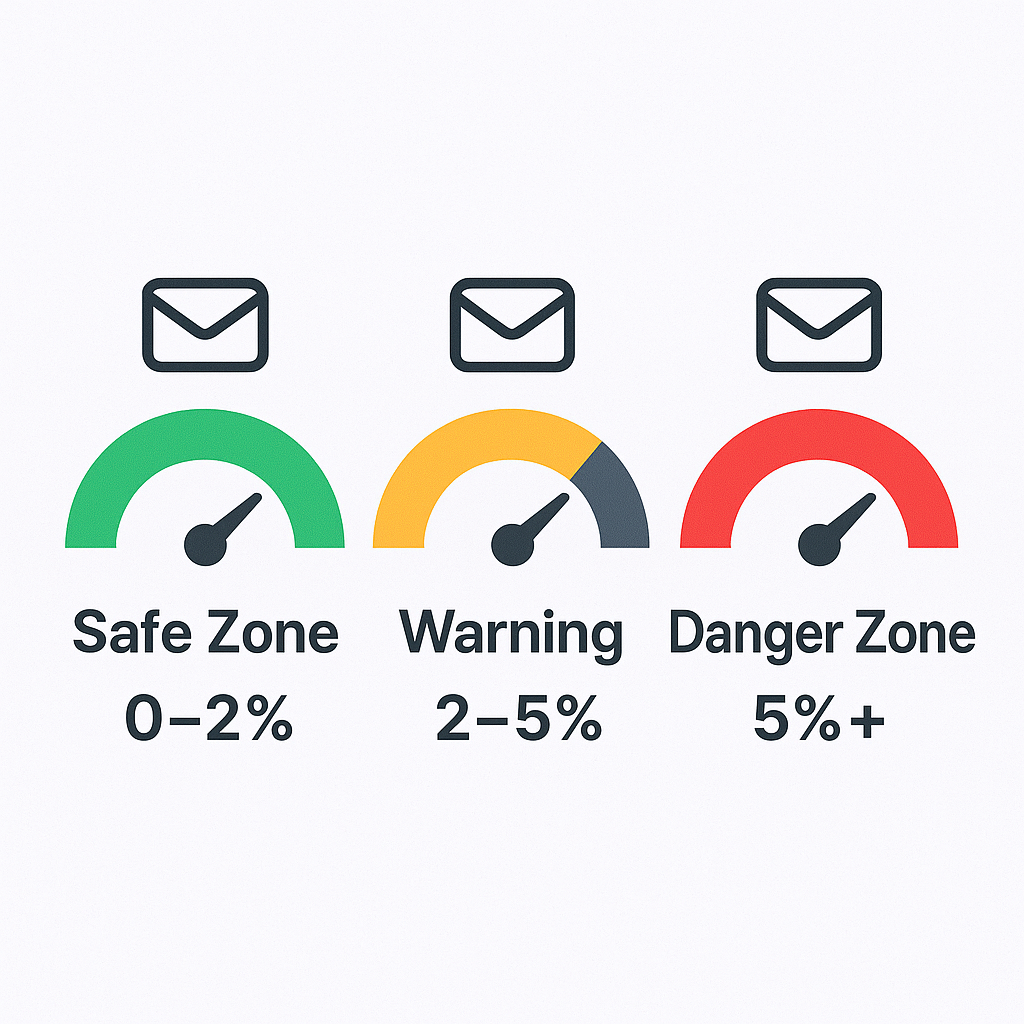
Here’s the brutal truth: A bounce rate above 2% signals to ISPs that you have poor list hygiene. Cross the 5% threshold, and you’re in critical danger of domain blacklisting. Once blacklisted, even your legitimate emails to valid prospects won’t get delivered.


The Hidden Cost of List Decay

Your email database isn’t a static asset – it’s depreciating every single day. Research shows that email lists naturally decay by 22.5% to 28% annually. This means by next year, more than a quarter of your contacts could be unreachable.
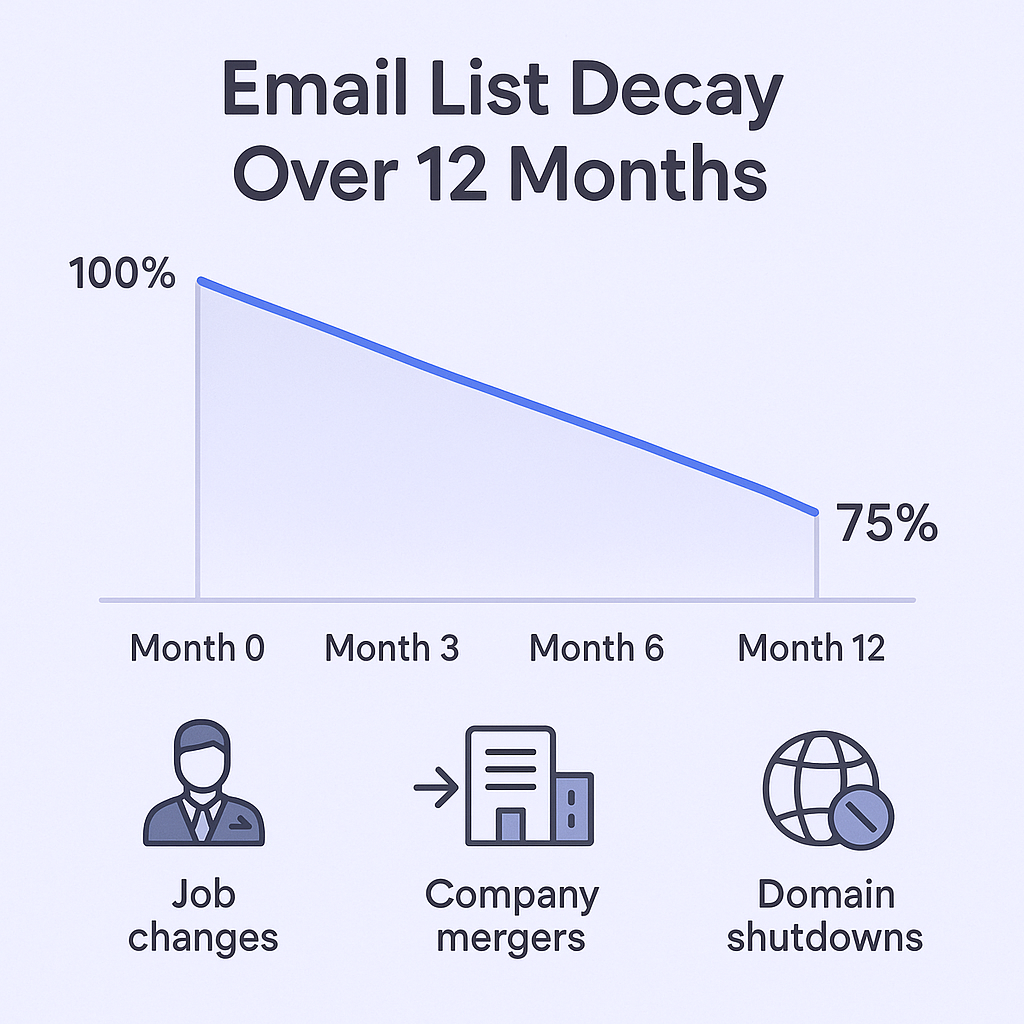


In the B2B world, this decay happens for predictable reasons:

  • Job changes and promotions
  • Company mergers and acquisitions
  • Inbox abandonment
  • Domain shutdowns

The Deliverability Death Spiral

💬 Escape Email Deliverability Hell

Our LinkedIn outbound engine handles targeting, campaign design, and scaling—no sender reputation to protect.

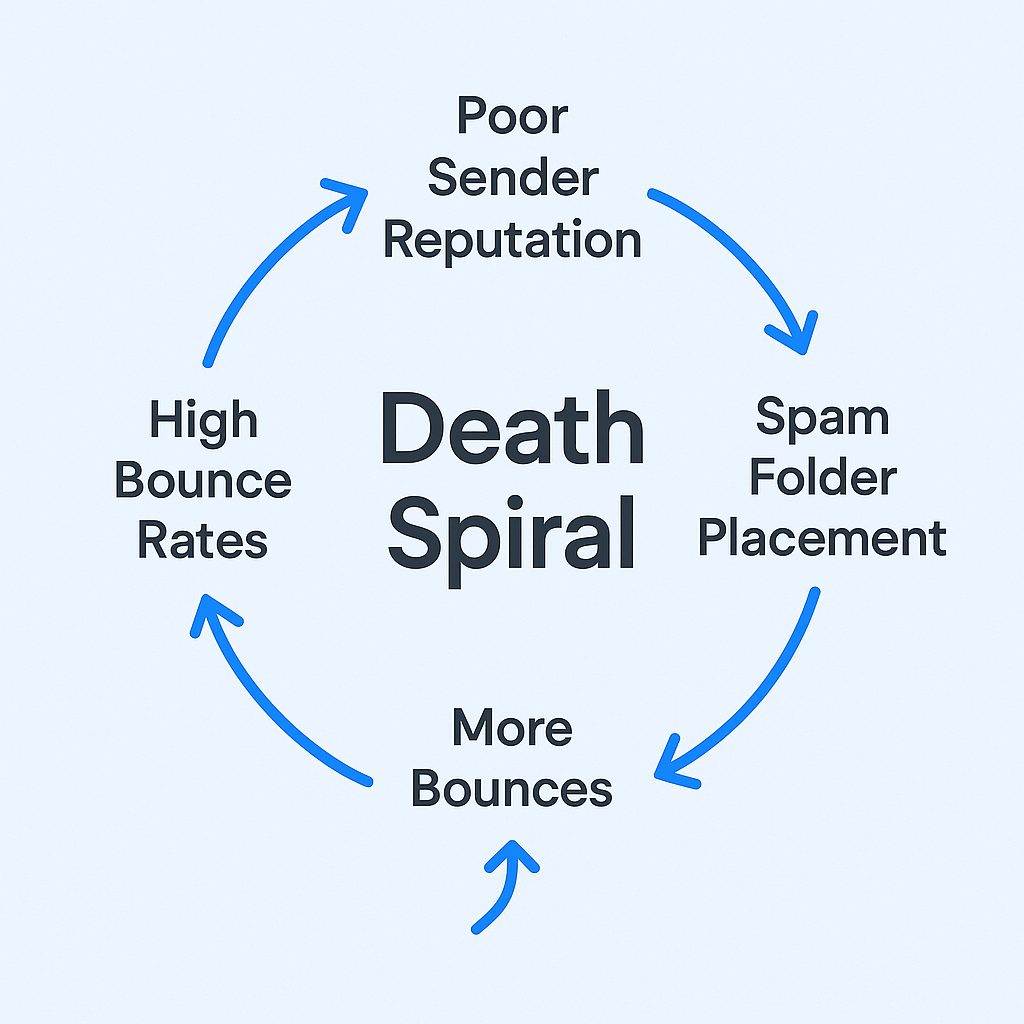
Without proper verification, many teams fall into what experts call the “deliverability death spiral”:

  1. High bounce rates damage your sender reputation
  2. Poor reputation leads to spam folder placement
  3. Low engagement prompts you to send more emails
  4. Increased volume generates more bounces
  5. The cycle accelerates until your email channel dies

Breaking this cycle requires addressing the root cause: email list quality.


When to Verify an Email List?

Before Every Campaign (Non-Negotiable)

Never upload a contact list to your email platform without verification. This should be a quality gate in your process, just like proofreading your subject lines or checking your CTAs.

Regular Maintenance Schedule

Given the 2%+ monthly decay rate, verification can’t be a one-time fix:

  • High-volume teams: Clean lists quarterly (every 3 months)
  • Relationship-based teams: Bi-annual cleaning (every 6 months)
  • New prospect lists: Always verify before first contact

Real-Time Prevention

For inbound leads from forms, webinars, or gated content, implement real-time verification to prevent bad data from entering your CRM in the first place.

How to Verify Email Addresses Before Sending Emails?

🚀 LinkedIn Outbound Done Right

We target your ICP, design campaigns, and scale outreach while you focus on closing deals.

Level 1: Quick Manual Checks (For Single Prospects)

When you need to quickly verify email address validity for one or two high-value prospects:

The Gmail Hover Trick: Paste the email into a new Gmail message and hover over it. If a profile card appears, the address is likely valid and actively used.

Syntax Spot-Check: Look for obvious formatting errors – missing @ symbols, incomplete domains, or extra characters that break the standard username@domain.com format.

LinkedIn Cross-Reference: Search for the email in quotes on Google or check if it appears on the prospect’s LinkedIn profile or company directory.

Level 2: Automated Verification Tools (For Serious Teams)

For any list larger than a handful of contacts, manual checking isn’t scalable. Professional verification tools like ZeroBounce, NeverBounce, or Hunter.io perform sophisticated multi-step validation:

What Quality Tools Check:

  • Syntax validation for proper formatting
  • Domain verification to confirm MX records exist
  • SMTP handshake to ping the mail server
  • Catch-all detection for risky domains
  • Spam trap identification to protect your reputation

Level 3: API Integration (For Scale)

Teams sending thousands of emails need automated verification built into their workflow. Real-time APIs validate emails as they’re captured, preventing bad data from ever entering your system.

What is the Best Method for Verifying Emails?

âš¡ Better Than Verified Emails

LinkedIn messages land in DMs, not spam folders. Complete targeting, campaign creation, and scaling included.

7-day Free Trial |No Credit Card Needed.

The “best” method depends on your volume and needs, but here’s the hierarchy:

For Individual Emails: Manual + Tool Combo

Start with a quick syntax check, then use a verification tool for confirmation. This gives you confidence without overkill.

For Small Lists (Under 500): Bulk Verification Tools

Upload your list to a professional service. Expect to lose 15-20% of contacts – this is success, not failure. Every invalid email removed is a bounce prevented.

For Large Lists (500+): Automated Workflow

Integrate verification into your sales process. Use real-time APIs for inbound leads and scheduled bulk cleaning for existing databases.

Key Features to Look For:

  • High accuracy rates (95%+ is the standard)
  • Catch-all detection to identify risky domains
  • API availability for real-time verification
  • CRM integrations to streamline your workflow
  • Spam trap detection to protect your reputation

Verification Method Comparison

Method

Accuracy

Scalability

Best For

Manual checks

Low

Very low

Single high-value prospects

Automated tools

High

Very high

All serious email teams

Real-time API

High

High

Preventing bad data entry

Understanding Verification Results

Valid Emails

These addresses passed all checks and are safe to email. Send away with confidence.

Invalid Emails

These addresses are definitely bad – remove them immediately to protect your sender reputation.

Catch-All/Accept-All

These domains accept emails to any address, making individual verification impossible. Treat with extreme caution – many are unmonitored inboxes that waste your outreach effort.

Risky/Unknown

These addresses couldn’t be definitively verified. Consider excluding them from your most important campaigns.

Why Choose Salesso for Email List Verification and Cold Email Outreach?

Salesso combines powerful email verification with comprehensive cold email tools, giving you everything needed for successful outreach campaigns.

What Makes Salesso Different:

  • 99% verification accuracy powered by advanced SMTP validation
  • Real-time API to prevent bad emails from entering your CRM
  • Integrated cold email platform – verify and send from one dashboard
  • Email warmup to improve deliverability beyond just verification
  • Detailed reporting to track bounce rates and list health

The Complete Solution: While other tools only verify emails, Salesso handles your entire cold email workflow – from finding prospects and verifying addresses to warming up domains and tracking results.

FAQs

What's a good bounce rate to aim for?

Always target under 2%. Rates between 1-2% are acceptable but show room for improvement. Above 2% is a red flag, and above 5% puts your domain at serious risk.

Should I email catch-all addresses?

Treat them as high-risk. While some may be valid, many go to unmonitored inboxes or bounce after acceptance. Best practice is excluding them from important campaigns.

Is it ever okay to buy email lists?

Absolutely not. Purchased lists are filled with outdated addresses, spam traps, and fake emails that will destroy your sender reputation and potentially violate anti-spam laws.

How often should I clean my email list?

Quarterly for high-volume outbound teams, bi-annually for relationship-based teams. Given the 22.5-28% annual decay rate, regular maintenance is essential.

Can I verify emails for free?

While some tools offer limited free verification, professional-grade accuracy requires paid services. The cost is minimal compared to the damage from poor deliverability.

Stop Bouncing. Start Booking Meetings.

LinkedIn outbound delivers replies without verification headaches or sender reputation risks.

Segmentation That Actually Converts

LinkedIn outbound targets precise demographics with strategic campaign design and scaling methods

How to Build a High-Converting B2B Sales Funnel from Scratch on LinkedIn ​