

- blog
- Sales Development
- Best Sales Navigator Extensions 2026 (Safe & Effective)
LinkedIn Sales Navigator Extensions: 6 Tools That Actually Work (And 2 That'll Get You Banned)
Table of Contents
Let me guess: You just spent 2 hours building the perfect list in Sales Navigator.
You filtered by job title, company size, and location. 3,000+ ideal prospects. Your pipeline dream is right there on the screen.
And then it hits you. There’s no export button.
You’re trapped in copy-paste hell. The only way to get that data into your CRM or outreach tool is to manually transfer each profile, one by one. Your perfect list is essentially useless unless you want to spend the next three days doing data entry.

Â

🎯 Done-For-You LinkedIn Outbound
We handle targeting, campaigns, and scaling—no extensions, tools, or ban risks required
Here’s what nobody tells you: Sales Navigator isn’t designed to be a complete solution. It’s a discovery tool that intentionally locks your data inside its ecosystem. For anyone trying to build a sales pipeline, this is a massive workflow problem.
This is exactly why chrome extension tools exist. They’re the keys that unlock that data prison.
But there’s a catch. You’ve probably heard the warnings. LinkedIn just banned Apollo.io and Seamless.AI’s company pages for violating their Terms of Service. And they’re not just banning companies—they’re flagging users too.
So how do you extract your data without risking your LinkedIn account? How do you pick a safe tool that won’t get you banned right before quarter-end?
I’ve got you. We’re going to break down the 6 best Sales Navigator extensions, show you which ones are safe, which ones are radioactive, and help you pick the right tool in the next 30 seconds.
By the end of this, you’ll never need to Google this topic again.
LinkedIn Basic or Sales Navigator?
Quick comparison for anyone who needs to forward this to their manager for budget approval.
LinkedIn Basic (Free): This is a networking tool. It’s great for job hunting and “personal branding.” For prospecting? Basically useless. You get a handful of basic filters and LinkedIn will hit you with a “commercial use limit” before your morning coffee gets cold.
Sales Navigator (Paid): This is a purpose-built B2B prospecting tool. If you’re serious about outbound sales, it’s non-negotiable.
The real power of linkedin sales navigator isn’t just seeing more profiles. It’s the 50+ advanced filters that let you stop “searching” and start targeting.
The filters that matter:
- Lead Filters: Job function, seniority level, years at company, LinkedIn groups
- Account Filters: Company headcount, technologies used (like “uses Salesforce”), actively hiring
The data backs this up. Sales reps who use social selling are 51% more likely to hit quota. And 40% of B2B marketers say LinkedIn is their most effective channel for driving high-quality leads.
What About the Cost?
Sales Navigator Core (the individual plan most people need):
- $99.99/month (monthly billing)
- $79.99/month (annual billing, total of $959.88)
Sales Navigator Advanced (Team plan): ~$149.99/month with added features like TeamLink.
The “So What” Moment
You get the subscription. You build your list. You click… and there’s no “Export to CSV” button.
This is critical: Sales Navigator is intentionally incomplete. It’s only valuable when you pair it with an extension to actually get the data out. This is the only reason these extensions exist.
The Big Risk: Are Sales Navigator Extensions Safe in 2026?
Let’s talk about the elephant in the room.
In late 2025, LinkedIn sent shockwaves through the sales tech world. They permanently banned Apollo.io and Seamless.AI’s company pages from the platform.
Why? Aggressive, large-scale data scraping that violated LinkedIn’s Terms of Service.
But here’s what matters to you: LinkedIn isn’t just banning companies. They’re flagging users. People using these tools have reported getting their personal LinkedIn accounts restricted or even banned.
Imagine explaining to your boss that you lost your entire LinkedIn network—and your main prospecting channel—three weeks before quarter-end.
🛡️ Eliminate Tool & Ban Risks
Our complete LinkedIn outbound strategy delivers 15-25% response rates without extension headaches
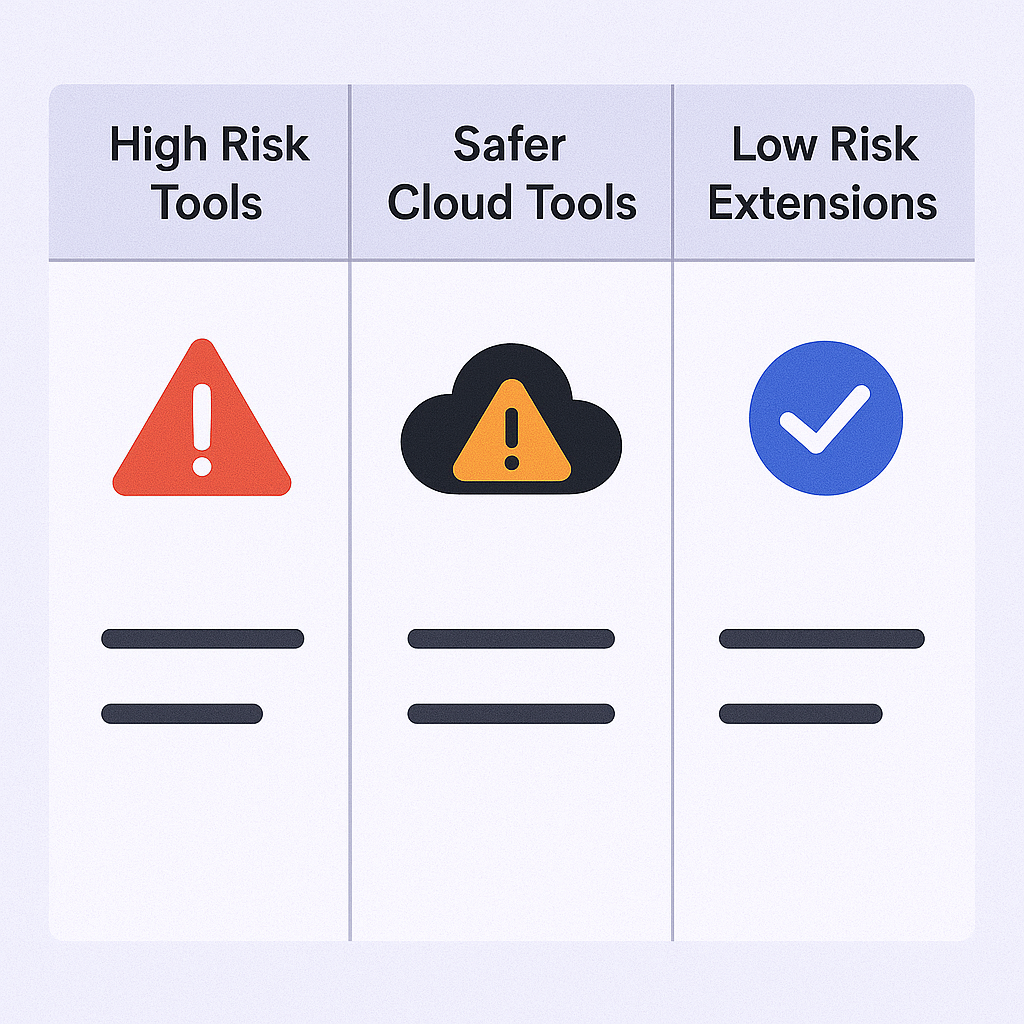
The Safety Spectrum (Not All Extensions Are Equal)
This is the nuance most articles won’t give you.
Â

Â
Â
High-Risk (Aggressive Browser Extensions): These tools LinkedIn actively hates. They run in your browser, scrape at inhuman speeds, and are easy to detect. Apollo and Seamless fell into this category.
Safer (Cloud-Based Tools): These use “headless” browsers running from dedicated IP addresses in the cloud. They mimic human behavior, add delays, and are much harder for LinkedIn to detect. Tools like lemlist often use this architecture.
Low-Risk (Smart Extensions): Still browser-based, but built specifically to respect LinkedIn’s rate limits and mimic human patterns. They scrape more slowly, but they work without putting your account at risk. Evaboot is the prime example.
The verdict: Using any extension carries some risk—but it’s a necessary risk if you want to do your job effectively. The key is avoiding tools LinkedIn is actively at war with and choosing ones that prioritize account safety.
Top Sales Navigator Chrome Extensions
Let’s break these down by workflow. I’ve organized them into three categories:
Category 1: All-in-One Outreach Platforms (find, enrich, and email in one tool)
Category 2: Data Scrapers & Cleaners (export clean lists for your own email outreach tool)
Category 3: B2B Data Finders (find email/phone for individual profiles)
Category 1: All-in-One Outreach Platforms
Best for: People who want one platform to handle the entire outreach process.
lemlist
What it is: A full-scale, multi-channel cold outreach platform (email, LinkedIn, cold calls) with a chrome extension that connects to Sales Navigator.
Best for: Anyone who wants to find a lead on Sales Navigator and immediately add them to a multi-step sequence without switching tools.
How it works: You’re viewing a profile or list in sales navigator. Click the lemlist extension. It scrapes the lead’s data (name, company, profile URL), finds their verified email, and with one more click, pushes them directly into an existing campaign.
The Good:
- Smoothest workflow on this list. The transition from prospect-to-campaign is seamless.
- Multi-channel sequences. Not just email—you can automate LinkedIn profile visits, connection requests, and follow-ups.
- Strong reputation: 4.5/5 on G2 with users consistently praising ease of use and support.
The Bad:
- It’s a full suite. If you only need to export a CSV, this is overkill and more expensive than a simple scraper.
Pricing:
- Email Pro: $55/mo (annual billing)
- Multichannel Expert: $79/mo (annual billing) — this is the plan you’d need
Safety Verdict: âś… LOW RISK
lemlist is primarily cloud-based. The extension is just a connector. This architecture is much safer and not what LinkedIn is cracking down on.
Apollo.io
What it is: A massive B2B database (like ZoomInfo) combined with a sales engagement platform.
Best for: (Formerly) The default all-in-one choice for startups and sales teams on a budget.
How it works: The extension overlays on Sales Navigator profiles. It instantly cross-references the lead with its massive database. If there’s a match, it shows you their verified email and direct-dial phone.
The Good:
- Amazing free plan (used to offer 120 email credits/month)
- Huge feature set: database, email finder, sequencer, and dialer all in one
- 4.8/5 on G2—users genuinely loved this tool
The Bad:
- Data quality issues: users report outdated info and high email bounce rates
- THE BIG ONE: See safety verdict below
Pricing:
- Free: 120 email credits/year (they reduced it)
- Basic: $49/mo (annual billing)
Safety Verdict: 🚨 HIGH RISK (AVOID)
Apollo.io was banned by LinkedIn in late 2025 for aggressive scraping that violated Terms of Service.
Users are actively reporting warnings and restrictions on their personal LinkedIn accounts just for having the extension installed.
It doesn’t matter how good the features are. If a tool gets your account banned, it’s a net negative for your career. We cannot recommend this tool in 2026.
⚡ Skip The Tool Stack EntirelyÂ
Get qualified meetings booked through our proven LinkedIn outreach—no scraping, no software required
Category 2: Data Scrapers & Cleaners
Best for: Sales professionals who already have a cold email tool and just need to get clean lists out of Sales Navigator.
Evaboot
What it is: The “smartest scraper” for Sales Navigator. It does one job—exporting lists—and does it with obsessive perfection.
Best for: High-volume prospectors whose #1 priority is clean data.
How it works: Build your list in Sales Navigator. Click “Export with Evaboot.” It scrapes the entire list (not profile by profile), finds verified emails, and delivers a perfectly clean CSV.
The “Clean Data” Superpower:
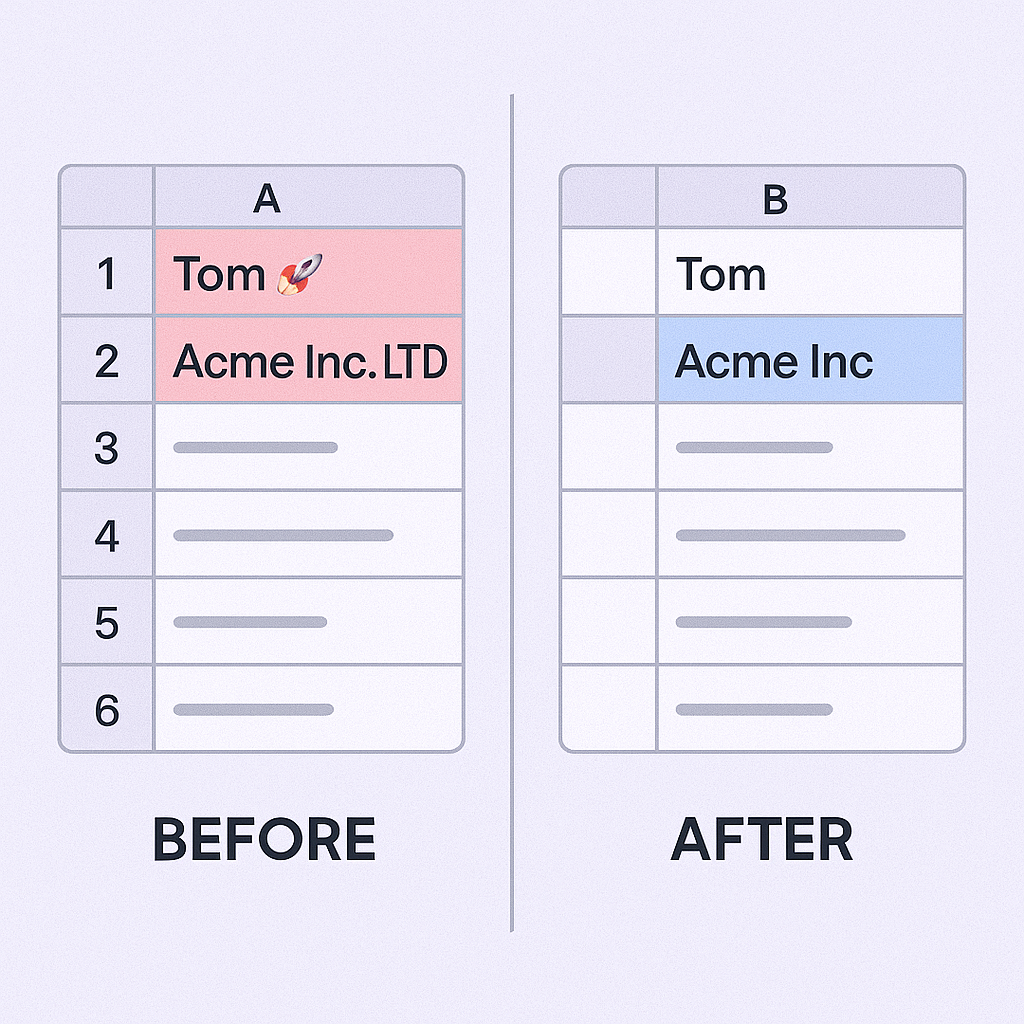
Here’s why Evaboot is special. LinkedIn’s filters are flawed. Evaboot found that on average, 31% of leads in a Sales Nav search don’t actually match your filters.
Â

🚀 Advanced LinkedIn Targeting
Strategic demographic segmentation delivers personalized campaigns with systematic scaling approaches
7-day Free Trial |No Credit Card Needed.
Evaboot’s technology double-checks every lead against your exact filter criteria and flags the bad ones. It also auto-cleans messy data: “Tom 🚀” becomes “Tom,” and “Acme Inc. LTD” becomes “Acme Inc.”
The Good:
- Saves hours of manual cleaning. This is its entire value proposition.
- You get a CSV you can trust, which means fewer bounces and better email deliverability.
- Simple, purpose-built tool with a 4.6/5 on G2
The Bad:
- It’s just a scraper and cleaner. You need a separate tool for actually sending emails (which is where we come in).
Pricing:
- Credit-based system starting at $9/mo
- 1 lead exported = 1 credit, 1 email found = 1 credit
Safety Verdict: âś… LOW RISK
Evaboot’s entire brand is built on being the “smart” and “safe” scraper. It’s designed to stay within LinkedIn’s daily limits and mimic human behavior to protect your account. Not in the same high-risk category as banned tools.
Scalelist
What it is: A direct competitor to Evaboot, but with a specific, powerful twist—automated prospect monitoring.
Best for: Account Executives and ABM professionals managing high-value territories.
The difference in workflow: This matters.
- High-volume prospectors build a new list for each campaign (use Evaboot)
- Territory managers track the same 200 accounts for years (use Scalelist)
How it works: Starts the same as Evaboot—export a list from Sales Navigator, get clean data, verified emails, and mobile numbers.
The Killer Feature: Automated Prospect Monitoring. Scalelist tracks your list 24/7 and alerts you when leads change jobs.
Why this matters: If your champion at a target account leaves, that’s a churn risk. If they move to a new company in your territory, that’s a brand new, warm lead. For account managers, this is way more valuable than a one-time scrape.
The Good:
- Job-change monitoring is a game-changer for account management
- Perfect 5.0/5 rating on G2
- Also provides direct-dial mobile numbers
The Bad:
- More expensive—priced for high-value accounts, not high-volume prospecting
Pricing:
- Starts at $49/month for Starter plan
Safety Verdict: âś… LOW RISK
Similar to Evaboot, Scalelist is a “smart” extension focused on data quality and monitoring, not aggressive scraping. Designed to be a safe, long-term tool.
Category 3: B2B Data Finders
Best for: People who live on individual profiles and just need an email right now.
Seamless.AI
What it is: A “real-time” B2B search engine that finds emails and phone numbers.
Best for: (Formerly) Reps who valued “real-time” data and wanted direct dials.
How it works: The extension sits on a LinkedIn profile. Click it, and it uses AI to find contact info for that specific person in real-time.
The Good:
- In theory, data is “real-time” and constantly refreshed (unlike static databases)
The Bad:
- Data accuracy is wildly disputed: Despite claims, users report email bounce rates of 18-23%. That’s high enough to destroy your domain reputation.
- Shady business practices: Non-transparent pricing (must schedule a demo) and difficult-to-cancel contracts
- Poor customer support consistently mentioned in reviews
Pricing:
- Not public—you must “Contact Sales” (red flag for people who just want to buy a tool)
Safety Verdict: 🚨 HIGH RISK (AVOID)
Seamless.AI was banned by LinkedIn in late 2025.
Combined with questionable data quality and difficult contracts, this is an easy “no” in 2026.
Skrapp.io
What it is: A simple, no-fluff, straightforward email finder.
Best for: Budget-conscious prospectors or freelancers who need to find emails profile by profile.
How it works: View a profile, click the Skrapp extension, it finds the email. Also has a “Sales Navigator List Saver” feature for bulk exports.
The Good:
- Easy to use and does its job well
- Great free plan: 100 email credits per month
The Bad:
- Lacks advanced features. It’s a finder, not a cleaner or monitor. You’ll still need to clean your own lists.
- Customer support is a common complaint in reviews
Pricing:
- Free: 100 credits/month
- Professional: Starts at $30-$39/month
Safety Verdict: âś… LOW RISK
Skrapp has been around for years. Not associated with aggressive automation that got other tools banned. Solid, lower-risk utility.
Conclusion: Your 30-Second Decision Guide
The “best” tool isn’t a single winner. It depends on what you’re actually trying to do.
Here’s the breakdown:
Tool | Best For | Key Feature | Safety |
Evaboot | List Building | Auto-cleans flawed Sales Nav data | âś… Low Risk |
Scalelist | Account Management | Alerts when leads change jobs | âś… Low Risk |
lemlist | All-in-One Solution | Pushes leads into sequences instantly | âś… Low Risk |
Skrapp.io | Budget Email Finding | Simple, free plan available | âś… Low Risk |
Apollo.io | ❌ (Formerly All-in-One) | Features irrelevant due to risk | 🚨 High Risk |
Seamless.AI | ❌ (Formerly Data Finder) | Features irrelevant due to risk | 🚨 High Risk |
My Recommendations:
If you’re building lists for cold email: Get Evaboot. It’s built for this exact use case, it’s safe, and clean data will save you hours while protecting your email reputation.
If you’re managing a territory long-term: Get Scalelist. Job-change monitoring is a genuine game-changer for protecting accounts and finding new opportunities.
If you want one tool to rule them all: Get lemlist. It’s powerful, safe, and a smart alternative to the now-risky Apollo.
Tools to avoid: As a friend, stay away from Apollo.io and Seamless.AI right now. The features aren’t worth risking your LinkedIn account.
FAQs
Why do I need an extension at all? Can't I just use Sales Navigator?
What's the safest type of extension in 2026?
What's the difference between Salesforce Navigator and Sales Navigator?
How much does Sales Navigator cost?
Why does everyone keep talking about "clean data"? What's the big deal?
Skip The Tools, Get Leads
Our LinkedIn outbound delivers 15-25% response rates with zero tools, zero setup hassles
Segmentation That Actually Converts
LinkedIn outbound targets precise demographics with strategic campaign design and scaling methods
