
But there’s a deeper problem than algorithm penalties. Buyers have developed “banner blindness” to sales messages. They can spot a template in the first five words. “I hope this email finds you well” or “I see we have mutual connections” are dead giveaways.
To sell on LinkedIn, you must sound like a human. Not a sequencer. Not a bot. A real person who took time to understand their specific situation.
Transform Your Profile Into a Sales Asset
Most people treat their LinkedIn profile like a digital resume. They list job titles, quota achievements, and skills in “prospecting” or “closing.”
This is a catastrophic waste of digital real estate.
Your prospect doesn’t care that you’re a “President’s Club Winner.” Seeing that might actually trigger their defense mechanisms—it tells them you’re a shark coming to feed.
Instead, transform your profile into a sales landing page designed to convert passive visitors into intrigued leads.
The Headline: Your 220-Character Elevator Pitch
Your headline follows you everywhere on the platform. When you comment on a prospect’s post, they see your headline. If it says “Account Executive at TechCorp,” you’ve given them zero reason to click.
Effective headlines in 2026 follow a benefit-focused structure:
The Formula: [Target Role] + [Specific Outcome] + [Method/Niche]
Example 1 (SaaS): “Helping HR Directors reduce employee churn by 30% through AI-driven onboarding”
Example 2 (Agency): “Scaling B2B revenue for Fintech startups | No lead left behind”
Example 3 (Cybersecurity): “Preventing data breaches for remote-first healthcare providers”
This approach instantly qualifies the viewer. If an HR Director sees the first headline, they identify themselves in the value proposition. It creates an emotional hook that addresses a primary problem immediately.
The Visuals: Banner and Photo
Your banner image is the largest visual element on your profile, yet 90% of sales professionals leave it as the default grey pattern. This is a missed opportunity.
The Banner Strategy:
- Value Proposition: State clearly what your company does in one sentence
- Social Proof: Include logos of 3-5 recognizable clients you’ve helped
- Call to Action: A directional cue pointing to your “Featured” section or specific URL
The Photo: Avoid AI-generated headshots if they look “uncanny.” Authenticity matters. A clear, well-lit photo where you look approachable and professional is sufficient. The goal is to humanize yourself so when your name appears in their inbox later, they recognize the face.
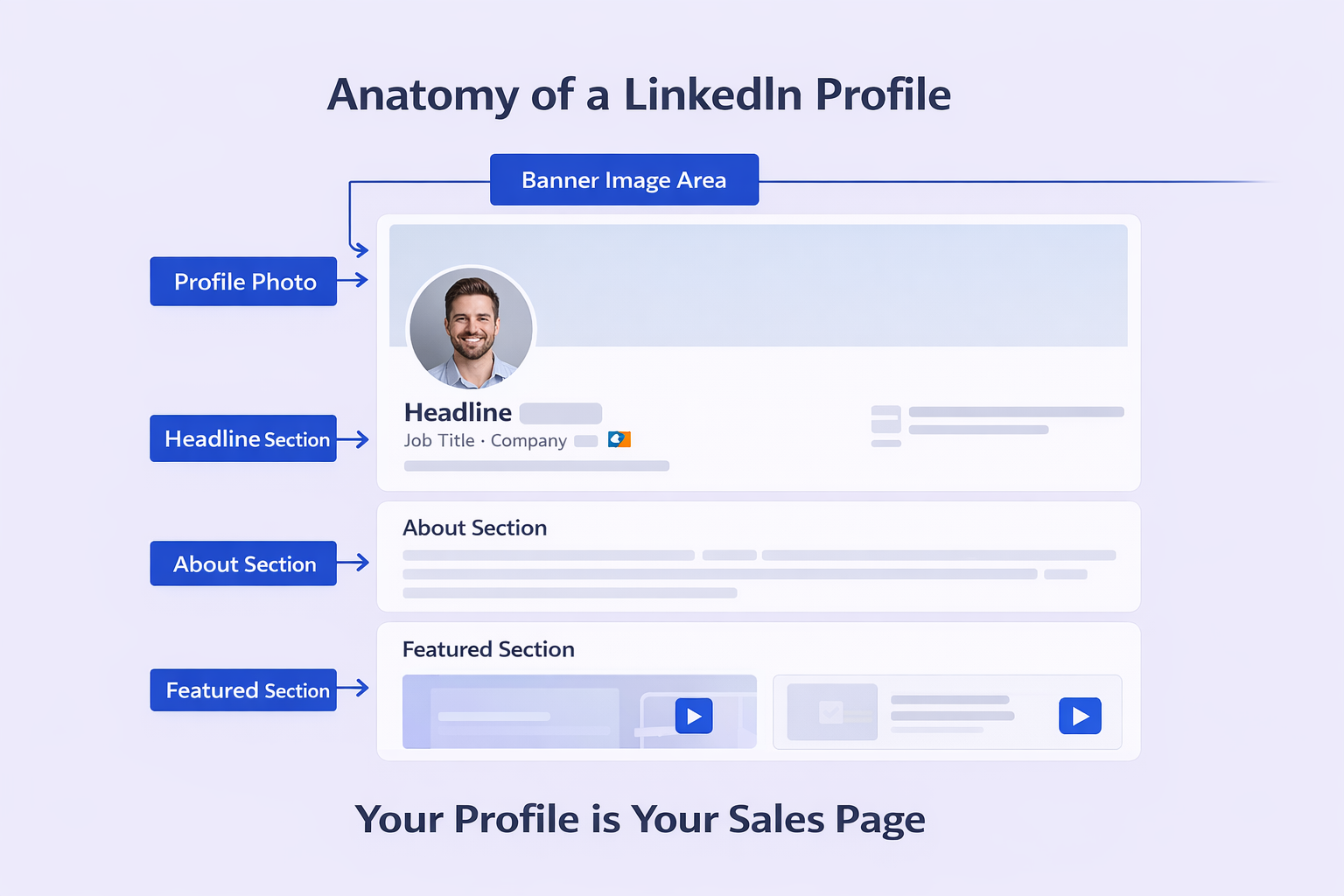
The “About” Section: A Sales Letter, Not a Biography
Stop writing about yourself in third person. Write directly to your prospect using “You” language.
Structure of a High-Converting About Section:
The Hook: Open with a question or statement about the prospect’s pain. “Managing a remote sales team is harder today than it was five years ago.”
The Agitation: Twist the knife slightly. “You’re dealing with ghosting, burnout, and tools that don’t talk to each other. Your tech stack is bloated, but your pipeline is thin.”
The Solution: Introduce your methodology or philosophy. “We believe that data without context is just noise. That’s why we built…”
The Proof: Mention specific results. “We’ve helped 500+ teams like [Company A] reclaim 10 hours a week.”
The CTA: Tell them exactly what to do next. “Check out the case studies below or send me a message to discuss your stack.”
The Featured Section: Your Portfolio
This section lets you pin content to the top of your profile. It’s your “show, don’t tell” zone.
Case Studies: Upload PDFs or link to blog posts detailing how you solved problems for clients.
Video Introduction: Record a 60-second video explaining who you help. This builds massive trust and familiarity.
High-Performing Posts: Pin your best thought leadership content so new visitors see your expertise immediately.
Creator Mode
For social selling, turn on Creator Mode. It changes the primary button on your profile from “Connect” to “Follow” (helping you build an audience without hitting connection limits) and rearranges your profile to highlight content and Featured sections above your About section.
It signals to the algorithm—and your prospects—that you’re a contributor, not just a consumer. Using LinkedIn’s Creator Mode effectively can dramatically increase your visibility.
The Content Engine: Fueling Your Sales Funnel
Many sales professionals suffer from “Poster’s Block.” They believe they need to be profound thought leaders to post on LinkedIn.
This is a myth.
Your content has one job: prove competence and relevance.
The 80/20 Rule of Value
To build an engaged audience that earns you the right to sell, your content strategy should follow the 80/20 Rule:
80% Value-First Content: Focus on educating, informing, and helping your audience. Industry analysis, practical tips, how-to guides, and empathy-driven posts about role struggles.
20% Company-Focused Content: Connect insights back to your product. Product updates, team news, and direct offers fit here.
Violate this ratio by posting 80% promotional content, and you’ll be tuned out.
Content Pillars That Actually Work
You don’t need to be a marketing genius. Just document your reality.
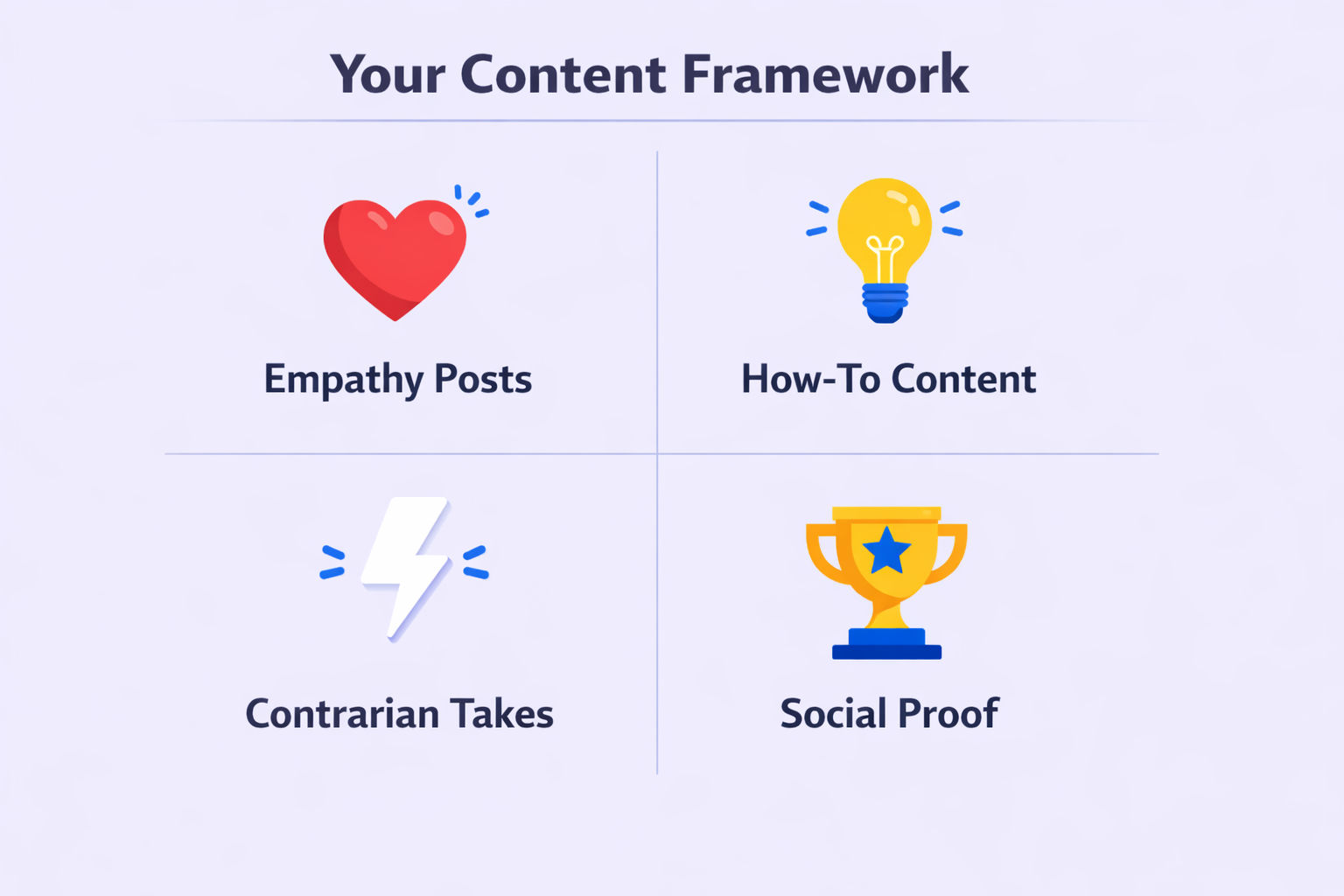
Define 3-4 content pillars:
The “I Felt Your Pain” (Empathy): Stories about specific struggles your ideal customer faces. Validates their feelings.
Example: “I spoke to 10 CISOs this week. They all said the same thing: Compliance isn’t the hard part; reporting it is.”
The “How-To” (Education): Actionable advice that solves a small piece of their problem for free.
Example: “Here’s the exact email template that got us a 40% reply rate. Steal it.”
The “Contrarian” (Differentiation): Challenge a commonly held industry belief. Sparks debate and engagement.
Example: “Unpopular opinion: Cold calling isn’t dead, you’re just doing it wrong. Here’s the data.”
Social Proof (Results): Highlight customer wins, making the customer the hero, not the product.
Example: “Just watched Sarah at [Company] reduce her admin time by 10 hours/week. She’s a rockstar.”
The Consistency Calendar
Consistency beats perfection. Use a structured calendar to maintain momentum:
Meme Mondays: Share a lighthearted, relatable industry meme or observation. Humanizes you and drives high impressions.
Industry News Wednesdays: Share a news snippet (new regulation or tech trend) and add your perspective. Positions you as an expert.
Feature Fridays: A soft demo or screenshot of your product solving a specific problem.
Algorithm Hacking: How to Get Seen
Understanding LinkedIn’s algorithm maximizes reach. Here are key factors:
Dwell Time: The algorithm tracks how long users spend looking at your post. Long-form text posts without external links often perform best because they keep users reading on LinkedIn.
No External Links in Body: LinkedIn wants to keep users on LinkedIn. Don’t put links to your blog or website in the post body. Put them in comments or your bio.
The “Golden Hour”: Engagement in the first 60 minutes after posting determines velocity. Engage with every comment immediately to signal “Creator Love” to the algorithm.
Text-Only Posts: Simple text posts often outperform image-heavy or video posts for B2B engagement because they feel more authentic and less like ads.
Video: Native video (uploaded directly, not a YouTube link) gets 3x more engagement than text but requires higher effort.
Precision Prospecting With Sales Navigator
While organic content attracts leads, Sales Navigator lets you hunt them.
In 2026, the free version of LinkedIn is severely limited for commercial use. Sales Navigator is the standard for any serious sales professional.
The “Trigger Event” Strategy
Amateur reps search for job titles. Expert reps search for timing.
You want to identify prospects who just experienced a “Trigger Event” that makes them more likely to buy.
Top Sales Navigator Filters for 2026:
Changed Jobs in Past 90 Days: New executives are eager to make an impact. They’re statistically more likely to rip out old software and install new vendors.
Posted on LinkedIn in Past 30 Days: This is the “Active” filter. Target people who never post is a waste of your social selling efforts. You want prospects who are actually on the platform to see your content and connection requests.
Company Headcount Growth: Filter for companies growing at >20%. Growth equals budget.
Technographics: Filter by companies using competitor software (for displacement campaign) or complementary software (for integration campaign).
Using advanced LinkedIn search techniques amplifies your targeting precision dramatically.
Building Persona Lists
Sales Navigator allows you to save “Personas.” If you sell to HR, you can define an “HR Director” persona. The algorithm then surfaces leads matching this persona on your homepage, along with their recent posts.
This turns your Sales Navigator homepage into a news feed of potential sales triggers. Combined with LinkedIn growth hacking strategies, you’ll never run out of qualified prospects.
The Outreach Masterclass: How to Sell on LinkedIn Messages
This is the moment of truth. How do you move from connection to conversation without being annoying?
The data from 2025 is clear: Contextual, low-friction messages win.
The Connection Request Debate: Blank vs. Note
For years, sales trainers preached “Always add a note.” In 2026, the data has nuanced this advice.
The Blank Request: Studies suggest a blank connection request often has a higher acceptance rate (up to 90%) if your profile is optimized and you’ve already engaged with their content. A blank request feels like natural networking; a note often screams “Sales Pitch.”
The Contextual Note: If you send a note, it must be devoid of a pitch.
Bad: “I’d love to connect to discuss how we can save you money.”
Good: “Saw your comment on [Influencer]’s post about AI in HR. Totally agree about the compliance risk. Would love to follow your work.”
The “No-Pitch” Sequence
The most effective sequence in 2026 avoids the pitch entirely in the first few touches. This builds trust and lowers defenses.
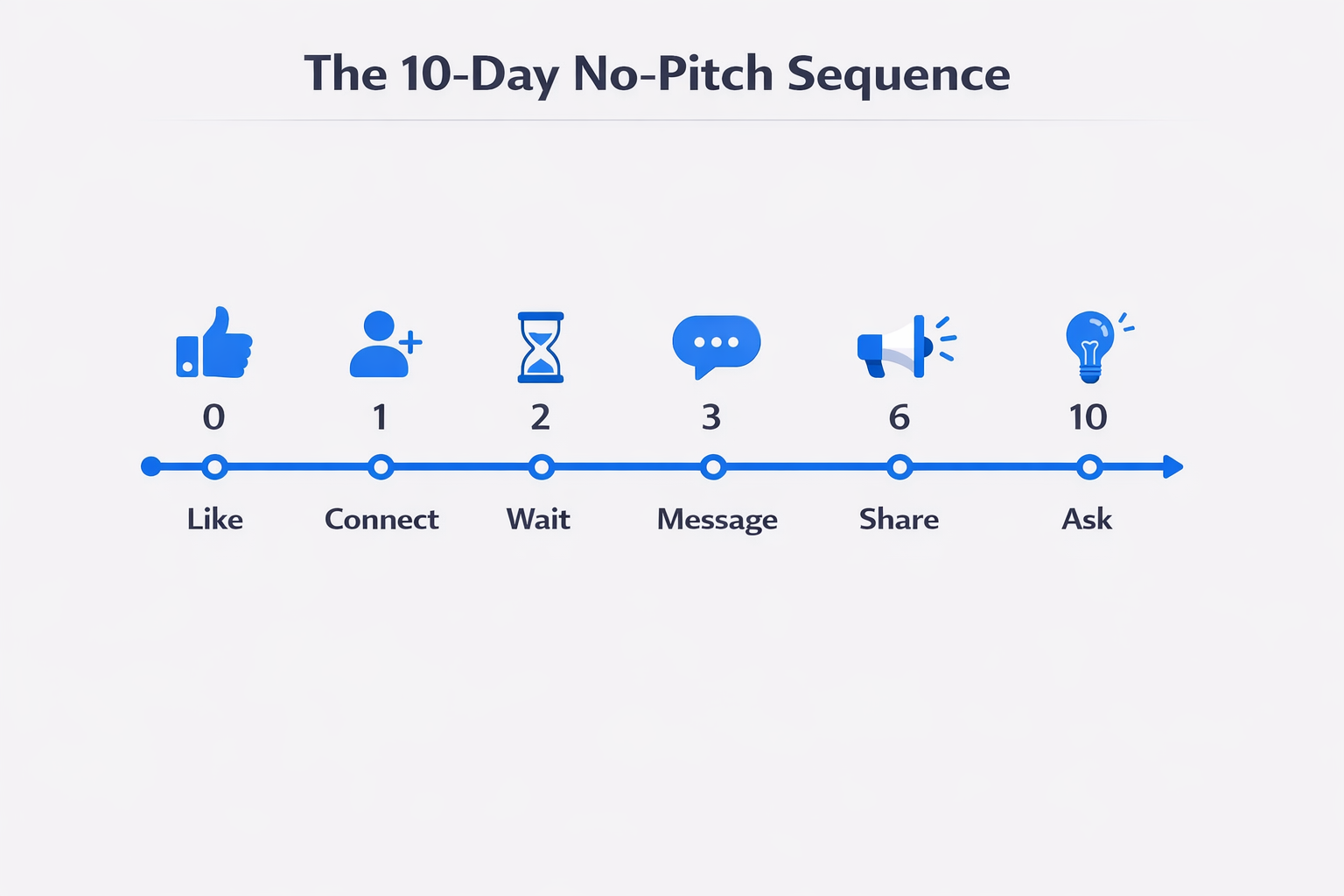
The 10-Day Social Sequence:
Day 0 – Pre-Heat (LinkedIn): Follow prospect. Like 2 posts. Comment on 1 post with a thoughtful question.
Day 1 – Connect (LinkedIn): Send blank connection request (or “Saw your post on X, loved it”).
Day 2 – Wait: Do not message immediately upon acceptance.
Day 3 – Context (LinkedIn DM): “Thanks for connecting, [Name]. I see we’re both in the [Industry] space. I’m putting together a cheat sheet on [Problem]. Curious if that’s a priority for you right now?”
Day 6 – Value Drop (LinkedIn DM): “Thought of you when I saw this report on [Topic]. It mentions [Competitor]. Thought you might find it interesting.” (Link to third-party content).
Day 10 – Soft Ask (LinkedIn DM): “I’ve been working with a few [Companies] on solving [Problem] using [Method]. Would you be open to seeing how we did it for [Similar Company]?”
The Secret Weapon: Voice Notes and Video
If you want to know how to sell on LinkedIn messages with an unfair advantage, use the mobile app.
Voice Notes: Sending a personalized voice note can boost reply rates by 30-40%. It proves you’re human and not an automation bot.
Script: “Hey [Name], sending a voice note because typing is boring. I was just on your site and noticed [Specific Observation]. Made me wonder if you’re looking at [Topic] this year? No pressure, just curious.”
Video Messages: LinkedIn video messages have a 33% higher conversion rate than text. A 30-second video of you showing their website and pointing out an opportunity is incredibly powerful.
Handling Objections in DMs
You’ll face rejection. Here’s how to handle common objections:
“Just send me the info.” Response: “Happy to. I have a few different resources depending on whether you’re focused on [Problem A] or [Problem B]. Which is a bigger priority right now?” (Qualifies them before sending).
“We’re happy with our current vendor.” Response: “Totally understand. Most people I talk to use [Competitor]. We actually play nicely with them by [Integration/Gap fill]. Worth a peek, or should I leave you be?” (The “leave you be” builds trust by showing detachment).
“Is this a sales pitch?” Response: “Yes, it is. But I did my homework and genuinely think we can help with X. If I’m wrong, tell me to get lost and I will.” (Radical honesty disarms prospects).
How to Sell on LinkedIn Reddit: The Hidden Intelligence Layer
This sophisticated strategy involves using Reddit as a “listening post” to inform your LinkedIn outreach.
Reddit is where the real talk happens. Prospects complain about vendors, ask for unfiltered advice, and reveal pains on Reddit in ways they never would on the polished corporate environment of LinkedIn.
The Strategy: Subreddit Monitoring
Identify Subreddits: Join communities where your ideal customers hang out.
- Sales professionals → r/sales
- Marketers → r/marketing, r/SEO
- Founders → r/SaaS, r/Entrepreneur, r/startups
Keyword Monitoring: Use Reddit search (or tools like Syften) to monitor keywords related to your competitors or specific pain points.
Search examples: “Alternative to [Competitor]” or “How do I fix [Problem]?”
The Cross-Platform Play (Reddit → LinkedIn)
When you find a user asking a high-intent question on Reddit (e.g., “We’re looking to switch CRM, Salesforce is too expensive”), you can often identify them.
Ethical Research: Look for clues in their username or post history (“I’m a VP of Sales at a mid-sized logistics company in Ohio”).
Search on LinkedIn: Use Sales Navigator to find profiles matching that description.
The Outreach: Message: “Hey [Name], I saw a thread on Reddit about CRM migrations and it looked like you might be exploring options. Didn’t want to spam the comments there, but had a thought about…”
Why it works: This shows extreme personalization. You’re meeting them where they expressed pain.
