
Automate LinkedIn Connections: The Smart Way to Scale Your Network in 2026
- Sophie Ricci
- Views : 28,543
Table of Contents
Let’s be honest—manually clicking “Connect” on 100+ LinkedIn profiles every week feels like watching paint dry.
You know you need to grow your network. You know LinkedIn is where the opportunities are. But spending 2-3 hours daily on repetitive connection requests? That’s not sustainable.
Here’s the reality: 56% of professionals waste their entire workday on administrative tasks instead of actual productive work. Manual LinkedIn prospecting is one of those time-draining activities that automation was literally invented to solve.
But here’s the catch—automate wrong, and you’ll wake up to a restricted account faster than you can say “LinkedIn jail.”
This guide shows you exactly how to automate LinkedIn connections safely, using the right tools, following platform limits, and avoiding the mistakes that get accounts banned. Whether you’re exploring LinkedIn prospecting for the first time or looking to scale your outreach, you’ll learn the proven framework that works in 2025.
Why Automate LinkedIn Connections?
The numbers don’t lie. Professionals who automate their lead generation process see 451% more qualified leads compared to manual outreach.
Think about it: while you’re sleeping, eating, or actually doing your job, automation tools are steadily building your network. They’re viewing profiles, sending personalized connection requests, and following up—all without you lifting a finger.
The Productivity Crisis Nobody Talks About
Most professionals spend only 30% of their time on revenue-generating activities. The rest? Lost to data entry, CRM updates, and clicking buttons on LinkedIn.
🚀 Scale Your LinkedIn Outreach
Stop wasting hours on manual connections—let our team handle your entire LinkedIn outbound strategy
The financial impact is brutal. Organizations lose approximately $18,000 per person annually to low-value tasks like manual prospecting. If you’re expected to touch 50-100 prospects per week, the opportunity cost of doing it manually is simply unsustainable.
But automation offers more than just time savings. It delivers consistency.
80% of successful outreach requires at least 5 follow-up attempts. No human can maintain that discipline across hundreds of prospects. An automation tool never forgets, never gets tired, and executes your follow-up sequence flawlessly every single time.
The Modern Buyer Has Changed
Your prospects aren’t sitting around waiting for connection requests. 96% of buyers research independently before ever talking to anyone, and 71% prefer completing their evaluation without human interaction.
This shift means your initial LinkedIn connection isn’t about getting a meeting—it’s about earning attention. Automation helps you maintain a consistent presence, so when buyers enter the market, you’re already in their network.
LinkedIn automation tools have evolved beyond simple bots. Modern platforms use AI to analyze prospect data and generate messages that feel genuinely human. The result? 62% higher engagement rates compared to generic outreach.
Understanding LinkedIn’s Limits (And Why They Matter)
Before you automate anything, understand this: LinkedIn is watching.
The platform uses sophisticated algorithms to detect and punish automation abuse. Ignore the rules, and your account gets restricted. Follow them, and you can safely scale to hundreds of new connections monthly.
The Weekly Connection Request Limit
LinkedIn enforces approximately 100 connection requests per week for most users. This applies whether you have a Free account, Premium, or Sales Navigator.
The biggest myth? That paying for Sales Navigator gives you unlimited requests. It doesn’t.
However, this limit isn’t rigid. Accounts with high Social Selling Index scores, long activity history, and strong acceptance rates can send up to 200 requests weekly. New accounts or those with low acceptance rates might be restricted to just 50 requests per week.
Daily Safe Zones You Must Follow
For automation purposes, experts recommend staying well below theoretical maximums:
- Safe daily limit: 20-30 connection requests
- Danger zone: 50+ requests in a single day
- Profile views: 80-100 per day (Free), 150-200 (Sales Navigator)
- Messages to connections: 40-60 per day (Free), 80-100 (Sales Navigator)
- Pending requests cap: Keep below 500 (Free), 700 (Sales Navigator)
BANNER PLACEMENT #2
After explaining the daily limits and safe zones (natural frustration point about complexity):
📊 LinkedIn Outbound Done Right
Get 15-25% response rates with our proven targeting, campaign design, and scaling system
Exceeding 50 requests daily acts as a major red flag for LinkedIn’s anomaly detection. The platform monitors velocity changes obsessively. A sudden spike from zero to fifty requests screams “bot behavior.”
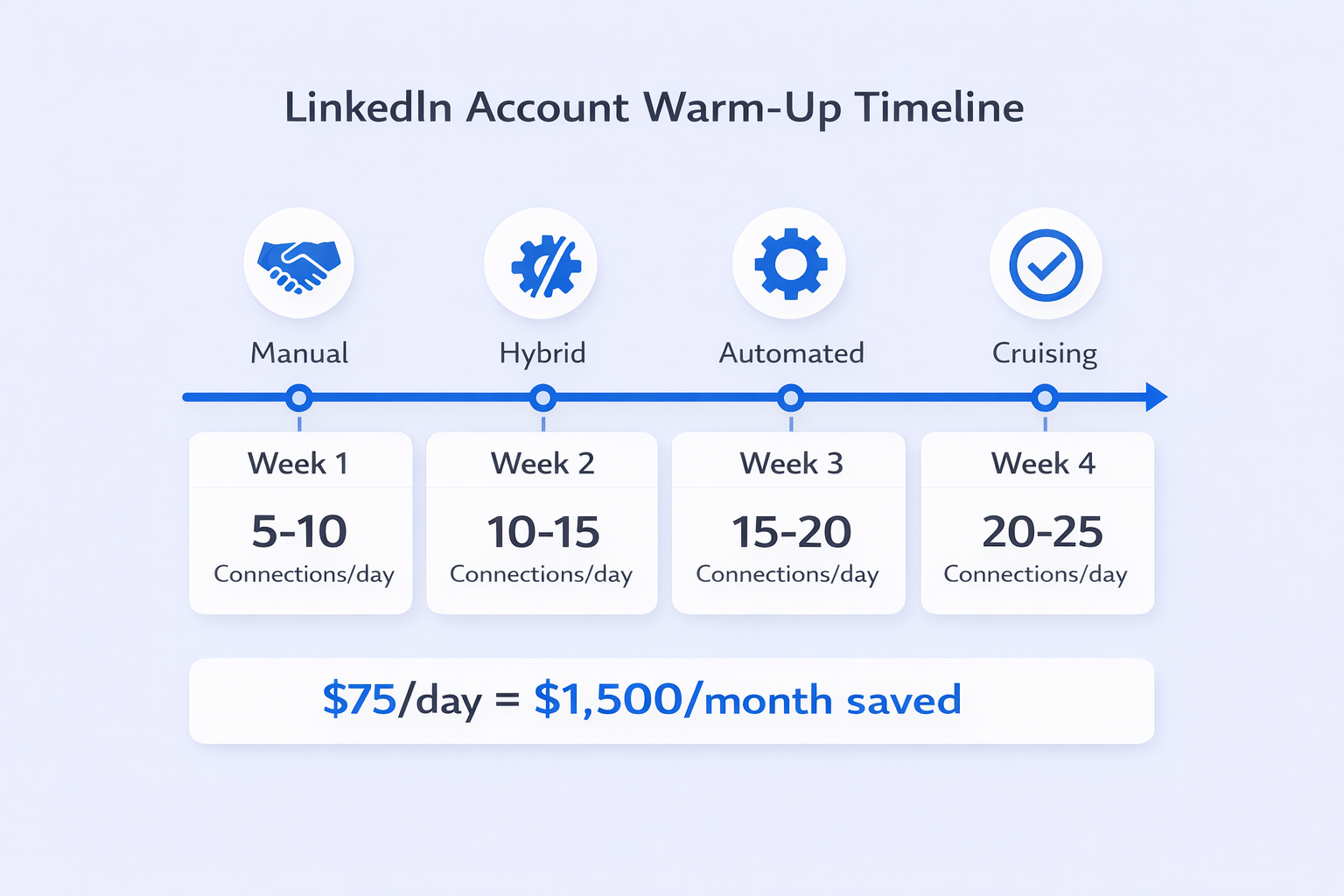
The Account Warm-Up Protocol
Launching automation on a fresh account at full volume is like sprinting without stretching—you’ll get injured immediately.
LinkedIn tracks how your activity patterns change over time. A dormant account that suddenly sends 30 connection requests daily triggers instant scrutiny.
Week 1: The Foundation (Manual Only)
- Activity: 5-10 connection requests daily
- Method: Strictly manual—no tools
- Targeting: High-affinity prospects (former colleagues, alumni, 2nd-degree connections)
- Goal: Maximize acceptance rate to build account trust
- Engagement: Spend 15-20 minutes daily liking and commenting on posts
Week 2: The Gradual Ramp (Hybrid)
- Activity: 10-15 connection requests daily
- Method: Introduce automation tools at very low settings
- Targeting: Slightly broader 2nd-degree connections
- Safety Check: Ensure pending requests don’t exceed 100
Week 3: The Acceleration (Automated)
- Activity: 15-20 connection requests daily
- Method: Full automation sequences active
- Workflow: Incorporate “View Profile” actions before connecting
- Monitoring: If acceptance rate falls below 40%, pause and refine targeting
Week 4: Cruising Altitude
- Activity: 20-25 connection requests daily (~100-120 weekly)
- Method: Consistent automation with randomized delays
- Maintenance: This level is sustainable indefinitely with healthy acceptance rates
The Tools: Python Scripts vs. SaaS Platforms
When it comes to automating LinkedIn connections, you face a fundamental choice: build your own solution or subscribe to a specialized platform.
The DIY Approach: Python & Selenium
Building a custom LinkedIn automation tool gives you complete control and eliminates subscription costs. But it shifts all responsibility for safety and maintenance onto you.
The Technical Stack:
- Selenium: Core library for browser automation
- Webdriver Manager: Handles browser driver compatibility
- Pandas: Manages prospect data from CSV files
- Undetected-Chromedriver: Critical for 2025—patches detection leaks that identify bots
The Risks: Even with undetected-chromedriver, browser fingerprinting remains a massive vulnerability. Your browser has a unique signature based on screen resolution, installed fonts, audio context, and hardware configuration.
If your script runs from a data center IP with a Linux server fingerprint but claims to be Windows Desktop, that discrepancy triggers immediate red flags.
Plus, LinkedIn updates its website structure constantly. A script that works today might fail tomorrow when LinkedIn changes a button’s class name.
The SaaS Approach: Chrome Extensions vs. Cloud Platforms
Chrome Extensions (like Dux-Soup, Octopus CRM):
- How they work: Inject JavaScript directly into LinkedIn pages
- Pros: Cost-effective ($15-45/month), run on your local IP address
- Cons: Your computer must stay on, easier for LinkedIn to detect
Cloud-Based Platforms (like Expandi, Waalaxy, Zopto):
- How they work: Run on remote servers using your session credentials
- Pros: Operate 24/7, centralized team dashboards, smart automated limits
- Cons: More expensive ($80-150/month), potential IP mismatch issues
💼 Skip the Tool Headaches
Our team manages your entire LinkedIn outbound engine—targeting, messaging, and scaling included
The Tools: Python Scripts vs. SaaS Platforms
When it comes to automating LinkedIn connections, you face a fundamental choice: build your own solution or subscribe to a specialized platform.
The DIY Approach: Python & Selenium
Building a custom LinkedIn automation tool gives you complete control and eliminates subscription costs. But it shifts all responsibility for safety and maintenance onto you.
The Technical Stack:
- Selenium: Core library for browser automation
- Webdriver Manager: Handles browser driver compatibility
- Pandas: Manages prospect data from CSV files
- Undetected-Chromedriver: Critical for 2025—patches detection leaks that identify bots
The Risks: Even with undetected-chromedriver, browser fingerprinting remains a massive vulnerability. Your browser has a unique signature based on screen resolution, installed fonts, audio context, and hardware configuration.
If your script runs from a data center IP with a Linux server fingerprint but claims to be Windows Desktop, that discrepancy triggers immediate red flags.
Plus, LinkedIn updates its website structure constantly. A script that works today might fail tomorrow when LinkedIn changes a button’s class name.
The SaaS Approach: Chrome Extensions vs. Cloud Platforms
Chrome Extensions (like Dux-Soup, Octopus CRM):
- How they work: Inject JavaScript directly into LinkedIn pages
- Pros: Cost-effective ($15-45/month), run on your local IP address
- Cons: Your computer must stay on, easier for LinkedIn to detect
Cloud-Based Platforms (like Expandi, Waalaxy, Zopto):
- How they work: Run on remote servers using your session credentials
- Pros: Operate 24/7, centralized team dashboards, smart automated limits
Cons: More expensive ($80-150/month), potential IP mismatch issues

The Top Automation Tools for 2025
The LinkedIn automation market is crowded. Here’s what actually works:
Safety-First Champions
Expandi: Widely considered the safest cloud option. Uses dedicated IP addresses for every user and “smart limits” that mimic human irregularities. Instead of sending exactly 100 requests at 9 AM daily, it randomizes timing patterns.
Offers conditional sequences where connection requests only send if prospects visit your profile first. This dramatically improves acceptance rates.
Salesflow: Focuses on agency compliance and white-labeling. Provides detailed account health reporting and uses AI to predict when accounts approach danger zones, automatically throttling activity.
Multichannel Hybrids
Waalaxy: Known for its freemium model and intuitive interface. Excels at combining LinkedIn messages with cold email sequences. The visual campaign builder makes complex workflows simple.
La Growth Machine: Visualizes workflows like flowcharts. Allows complex “if/then” logic across LinkedIn, email, and Twitter. Perfect for orchestrating complete nurture sequences across multiple channels.
Data & Enrichment Powerhouses
Apollo.io: Primarily a B2B database with integrated LinkedIn automation. Its strength lies in seamless flow from “Search” to “Sequence.” Filter 5,000 prospects by technographics (like “uses Salesforce”), add them to a sequence, and Apollo executes automatically.
ZoomInfo: The enterprise standard for sales intelligence. Doesn’t focus on “bot-like” automation but on high-intent targeting. Shows you companies that just received Series B funding or recently hired key roles.
Works best as a data source feeding into a dedicated automation tool.
Agency & Scale Solutions
HeyReach: Designed for managing dozens of LinkedIn accounts from a unified inbox. Its “Account Rotation” feature distributes campaigns across multiple sender accounts to maximize volume without hitting individual limits.
PhantomBuster: A library of automation “Phantoms” you can chain together: “Scrape Search” → “Enrich Profile” → “Send Connect.” Operates on an “execution time” pricing model. Powerful but requires manual configuration for safety.
Strategic Workflows That Actually Work
Automation without strategy is just high-volume spam. To succeed in 2025, you need workflows based on behavioral signals, not job titles.
The Content-First Automation Strategy
This delivers the highest conversion rates in current markets.
How it works:
- Trigger: Prospect likes/comments on a viral post about a pain point your solution addresses
- Extraction: Use PhantomBuster or Expandi to scrape the “Likers” list
- Action: Automate connection requests to this specific list
- The Message: “Hi [Name], saw you liked [Influencer]’s post about [topic]. It’s a huge challenge right now. I’m connecting with others in the space to see how they’re handling it.”
Results: Acceptance rates for this method often exceed 70%, compared to the 15-20% industry average for cold invites.
Why does it work? These prospects have self-identified as interested in the topic. Your connection request feels relevant, not random.
The Signal-Based Outreach Model
Move beyond basic demographic targeting. Focus on behavioral signals that indicate active need:
Hiring Signals: Companies posting jobs for specific roles indicate budget and urgency. Find companies hiring for roles that use your solution.
Funding Signals: Companies that recently raised capital are in growth mode and more receptive to new solutions.
Tech Stack Signals: Use BuiltWith or Apollo to identify companies using competitor software. They’re already in-market for your category.
The Workflow: Filter by Signal → Export CSV → Import to Automation Tool → Deploy Dynamic Message

🎯 Data-Driven Prospecting Made Simple
We identify high-intent prospects using signals, not guesswork—then execute the entire outreach sequence
7-day Free Trial |No Credit Card Needed.
Writing Messages That Actually Convert
The mechanics of automation ensure delivery. Your copy ensures conversion.
In 2025, the “pitch-slap”—immediately pitching in the connection request—guarantees you’ll be ignored.
The Anti-Pitch Connection Request
Your connection request has one goal: get accepted. That’s it. Not book a meeting, not pitch your service—just get the connection.
Template: “Hi [Name], noticed we’re both in the [Industry] space in [City]. I’m posting a lot about [Topic] lately and thought it might be relevant to your work at [Company].”
Why it works: It offers value (content) rather than asking for value (time).
The Flattery Approach
Automation tools can insert dynamic variables like {Company Name} or {Job Title}.
Template: “Hi [Name], impressive tenure at [Company]. I’ve been following [Company]’s growth in [Area] and would love to keep up with your updates.”
Why it works: Appeals to ego without being transparently manipulative.
Using Spintax for Safety and Variety
Every automated message should be slightly different to avoid spam filter detection.
Spintax Format: {Hi | Hello | Hey} [Name], {hope you’re well | hope you’re having a good week}
Outcome: One prospect receives “Hi John, hope you’re well.” The next receives “Hey Sarah, hope you’re having a good week.”
This prevents LinkedIn from detecting identical bulk messages across your entire prospect list.
Beyond LinkedIn: Multichannel Orchestration
Relying solely on LinkedIn creates a single point of failure. The most effective campaigns in 2025 integrate multiple channels into one cohesive narrative.
The Triple Threat Workflow
This ensures you reach prospects where they’re most active:
Day 1 (LinkedIn): Auto-view profile (creates notification: “John viewed your profile”)
Day 2 (LinkedIn): Send connection request with low-friction message
Day 3 (Email): If connection not accepted, send email:
- Subject: “Tried to connect on LinkedIn”
- Body: “Hi [Name], sent you a request on LinkedIn but figured you might be buried in
Tools like Saleshandy, Kendo, or Apollo can scrape verified emails from LinkedIn profiles during the viewing phase.
Day 5 (LinkedIn): If accepted, send a “Value Asset” (PDF, case study). DO NOT PITCH.
Day 7 (Phone): If engaged (opened email or accepted request), execute manual call or LinkedIn voice note.
This approach is covered extensively in our guide to LinkedIn message automation and workflow automation software.
Integrating with CRM via Zapier/Make
Automation shouldn’t exist in isolation. It must feed your CRM.
The Trigger: “New Connection” in automation tool (Waalaxy, Expandi, etc.)
The Action: Zapier/Make sends data to HubSpot/Salesforce
The Benefit: Complete visibility into LinkedIn activity directly within CRM, preventing duplicate outreach
For deeper insights on maximizing LinkedIn’s potential, check out our comprehensive LinkedIn marketing statistics guide.
Crisis Management: What to Do If You Get Restricted
Despite best efforts, restrictions happen. Your response determines whether it’s a temporary setback or account-ending disaster.
Types of LinkedIn Restrictions
The Temporary Restriction (“Slap on the Wrist”):
- Symptoms: Can’t send requests/messages, warning pop-up
- Duration: 24 hours to 7 days
- Cause: Velocity spikes, browser extension detection, “I don’t know this person” reports
- Recovery: Stop all activity immediately, wait 48 hours after restriction lifts, resume manual-only activity for one week
The Identity Verification (“Soft Block”):
- Symptoms: Account locked, must upload government ID
- Duration: Indefinite until resolved (2-5 business days review)
- Cause: Suspicious login patterns (logging in from different geographic locations simultaneously)
- Recovery: Comply with ID request, ensure future automation uses location-matched proxies
The Permanent Ban (“Nuclear Option”):
- Symptoms: Total access loss, profile removed from search
- Duration: Permanent
- Cause: Repeated violations, fake profiles, aggressive data scraping
- Recovery: Extremely difficult, appeals rarely succeed
The Appeal Strategy
If restricted, appeal immediately.
The Tone: Contrite and confused. Never admit to using automation.
The Narrative: “I’ve been actively growing my network and may have clicked too quickly. I wasn’t aware of specific velocity limits. I value LinkedIn’s community standards.”
The Method: Respond to support ticket. If auto-rejected, reply again. Persistence matters.
The Recovery Phase
Once unbanned:
- Cool Down: Do nothing for 48 hours
- Purge: Disconnect all API integrations and browser extensions
- Slow Restart: Begin with 5 manual requests daily for one week
- Infrastructure Check: Verify IP address; if using cloud tool, ensure fresh, clean proxy
Conclusion
Automating LinkedIn connections isn’t about gaming the system—it’s about reclaiming your time to focus on what actually generates revenue: building relationships and closing deals.
The framework is simple:
Respect the limits. Never exceed 100 requests weekly on a single account.
Warm up properly. Treat your account like an athlete—stretch before sprinting.
Diversify channels. Combine LinkedIn with email and phone for maximum impact.
Humanize your automation. Use Spintax and targeted content to mask the mechanical nature.
Monitor continuously. Automation requires daily supervision, not “set and forget.”
Companies that implement automation in their lead generation processes report 451% more qualified leads. But only if they do it right.
The choice is yours: spend 2-3 hours daily clicking buttons manually, or invest 30 minutes setting up automation that runs while you sleep.
FAQs
How can I automate LinkedIn connections safely?
What are LinkedIn's connection request limits?
Can I use Python to automate LinkedIn connections?
What's the best LinkedIn automation tool?
Will LinkedIn ban my account for using automation?
We deliver 100–400+ qualified appointments in a year through tailored omnichannel strategies
- blog
- Sales Development
- Automate LinkedIn Connections Safely (2025 Guide)