

The Modern Sales Reality
Your coffee’s cold. Your inbox is screaming. The market noise is deafening.
The days of dialing down yellow pages are buried alongside fax machines. Today, LinkedIn is the new battleground for anyone serious about lead generation. The pressure to generate pipeline has never been higher, and “spray and pray” email tactics aren’t just ineffective—they’re destroying your domain reputation.
Welcome to the era of precision. Lead generation demands sniper accuracy with machine gun volume. It’s a paradox that keeps sales leaders awake: How do we personalize outreach at scale while staying human?
This is where LinkedIn automation enters the conversation.
For the uninitiated, LinkedIn automation uses software to automatically visit profiles, send connection requests, and drop messages into inboxes while you sleep. When it works, it feels like magic. When it fails, it’s a nightmare of restricted accounts and angry prospects.
In this crowded marketplace, one name consistently floats to the top of the premium pile: Zopto. But is it the right tool for you? Or just an overpriced complication?
Let’s strip Zopto down to the studs and find out.
📊 Quick Stats You Need to Know
Before we dive deep, here’s what the data shows:
- 65 million decision-makers actively use LinkedIn for business
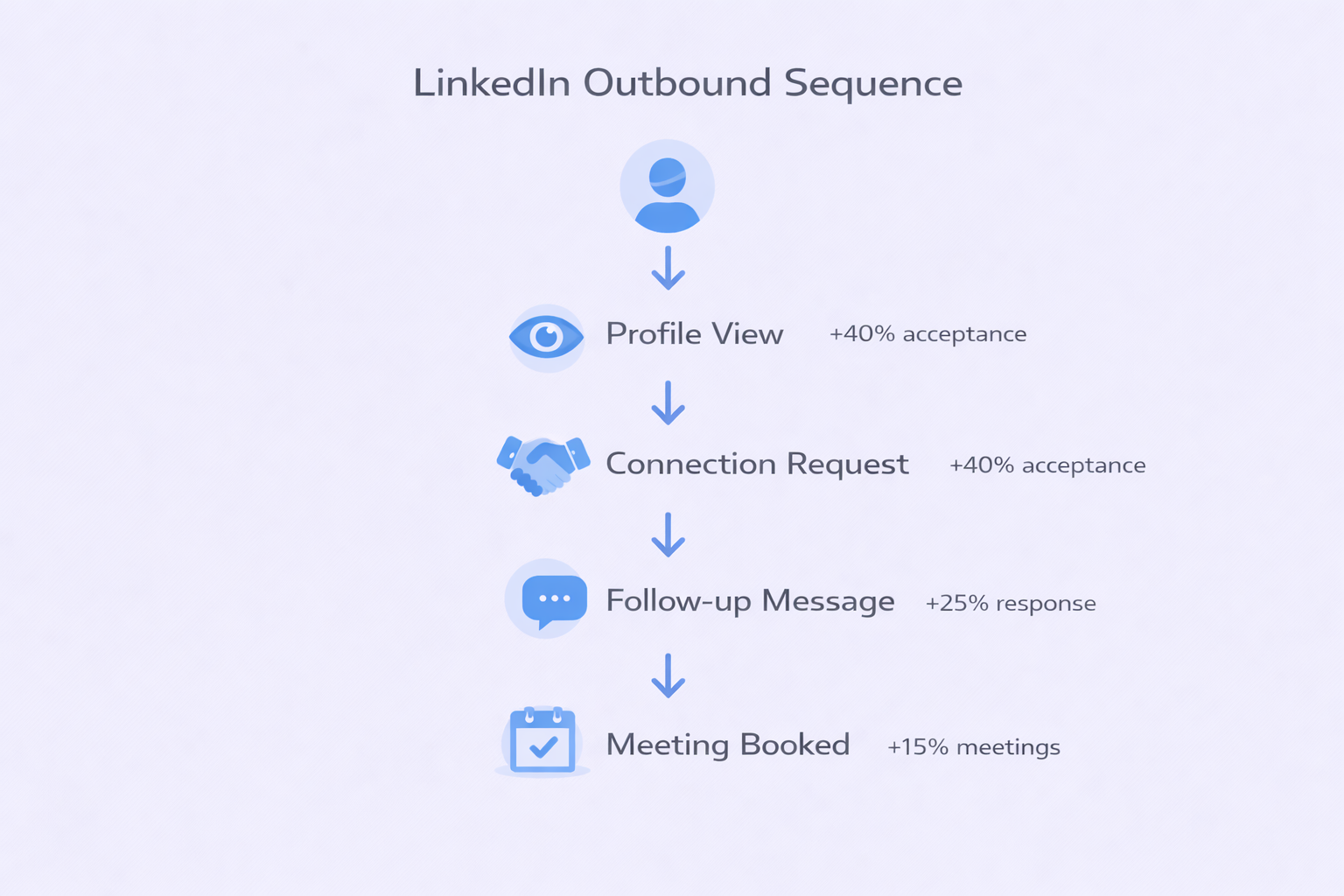
- LinkedIn automation can increase connection acceptance by 25-40% when done correctly
- The average LinkedIn user spends 17 minutes per day on the platform
- 84% of B2B marketers say LinkedIn is their most effective platform
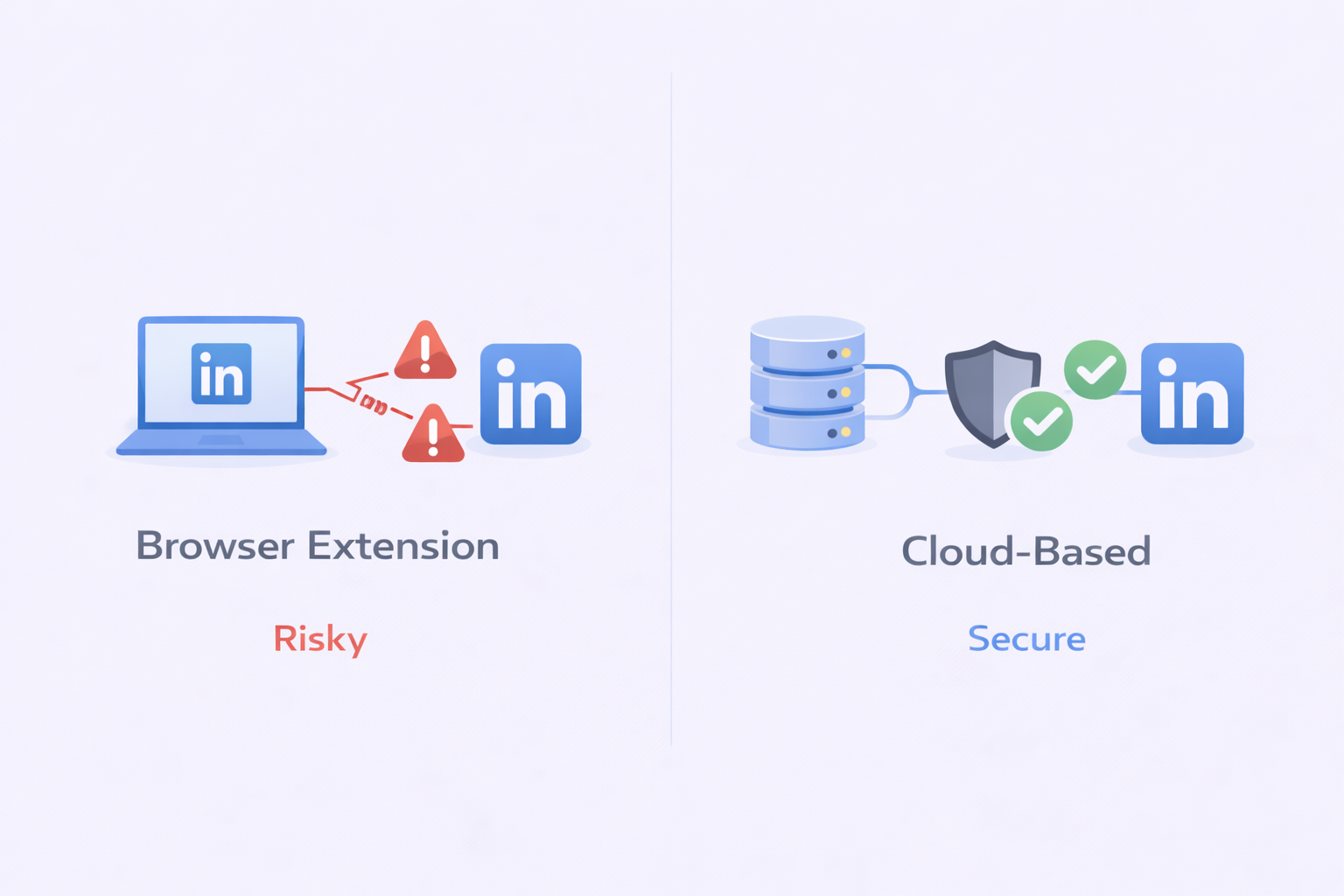
- Cloud-based automation tools have 73% lower account restriction rates than browser extensions
What Is Zopto? The Architecture Explained
Zopto positions itself as a cloud-based platform for lead generation and social selling. If you Google “Zopto review,” you’ll see glowing praise mixed with whispers about its price tag.
Think of it as the Mercedes-Benz of LinkedIn automation tools—robust, feature-rich, but expensive to drive.
Cloud vs. Browser: Why This Matters
To understand Zopto, you need to understand the mechanics of LinkedIn automation. Historically, these tools fell into two camps:
Browser extensions live in your Chrome browser. They’re lightweight, often cheaper, and easy to install. But they rely on your computer being on and your browser being open. More critically, they inject code directly into LinkedIn’s webpage. LinkedIn’s security algorithms can “see” this injected code. Using a browser extension is like wearing a t-shirt that says “I’m automating this” while trying to look natural.
Zopto operates differently. It’s fully cloud-based. When you sign up, you’re essentially renting a virtual computer on a server somewhere with dedicated IP addresses. Zopto logs into your LinkedIn account from that server.
Why does this matter?
First, safety. Zopto assigns a dedicated IP address to your account. If you log in from New York and your automation tool logs in from a shared server in Mumbai used by 5,000 other people, LinkedIn’s fraud detection screams “Anomaly!” and locks your account. By giving you a consistent, dedicated IP (often a residential IP that looks like a home connection), Zopto masks its robotic nature. It mimics human behavior—pausing between clicks, scrolling randomly, operating during “waking hours.”
Second, performance. Because it’s cloud-based, Zopto runs 24/7. You can close your laptop, go to a networking event, or take a vacation, and Zopto continues sending connection requests and follow-ups in the background.
However, this architecture contributes to Zopto’s price. Servers and dedicated IPs cost money. This is the first filter: Are you willing to pay for premium insurance, or risk your account with a $20 browser plugin?
The User Experience: Steep Learning Curve or Power Tool?
<div style=”position: sticky; top: 100px; background: #ECECFE; padding: 20px; border-radius: 8px; border: 2px solid #2A5AF8; margin: 20px 0;”> <h3 style=”color: #1F2124; margin: 0 0 10px 0;”>🚀 Skip LinkedIn’s Learning Curve</h3> <h4 style=”color: #1F2124; font-weight: normal; margin: 0 0 15px 0;”>Get 15-25% response rates with our done-for-you LinkedIn outbound engine</h4> <a href=”#” style=”display: inline-block; background: #2A5AF8; color: #FFFFFF; padding: 12px 24px; text-decoration: none; border-radius: 6px; font-weight: bold;”>Book Strategy Meeting</a> </div>
When you log into Zopto for the first time, don’t expect colorful, gamified simplicity. Zopto looks like enterprise software. It’s dense. It’s data-heavy. And according to many users, it has a “steep learning curve.”
The dashboard is a cockpit of dials and graphs. You have modules for campaign management, inbox, analytics, and profile settings.
The Onboarding Friction
Getting started isn’t just “click and go.” You have to:
- Sync your LinkedIn account
- Set up your limits (critical for safety)
- Integrate with LinkedIn Sales Navigator
Zopto doesn’t have its own internal database of people to search (unlike Apollo). It sits on top of LinkedIn. You do your searching in Sales Navigator, copy the URL of your search results, and feed it into Zopto.
This workflow—Search in Nav → Import to Zopto → Configure Sequence—can feel clunky at first. Users report the setup process takes time to master. You need to understand how to map fields, set up A/B tests, and configure time zones.
However, once you climb that learning curve, the view is impressive. The complexity exists because the control is granular. You can define exactly how many profiles to view per day. You can set specific delays between connection acceptance and the first follow-up message. You can target specific industries with laser precision because you’re leveraging the full power of Sales Navigator’s filters.
The Dashboard Latency
Some users have complained about speed. “Slow performance and loading times” have been cited in reviews. When you’re managing thousands of leads, waiting 5 seconds for a page to load can feel like an eternity. This suggests while the backend automation is robust, the frontend user interface could use optimization.
Zopto’s Feature Set: The Complete Arsenal
Zopto isn’t just a connection bot—it’s a full-stack lead generation platform. Let’s break down what justifies its existence in your tech stack.
1. Smart Campaigns and Sequences
You don’t just send a connection request; you build a journey:
Step 1: The Soft Touch. Program Zopto to view a prospect’s profile 24 hours before sending a request. This puts your face in their “Who viewed your profile” notifications, warming them up.
Step 2: The Twitter Touch. Automate a “Like” on a tweet if you have their handle (enriched via Zopto).
Step 3: The Connection. The request goes out. Not just a generic one—Zopto allows for templates.
Step 4: The InMail. If they have an open profile, Zopto can send a free InMail, saving your connection limits.
Step 5: The Drip. Once they connect, the follow-up sequence begins. “Thanks for connecting…” followed by value-add messages over weeks.
The power here is logic. If they reply, the sequence stops automatically. This prevents that embarrassing moment where your bot sends “Are you there?” to a prospect already negotiating with you.
According to HubSpot’s 2024 Sales Statistics, personalized follow-up sequences can increase response rates by 250% compared to single-touch outreach.
2. Zhoo: The AI Revolution
In 2026, if your tool doesn’t have AI, is it even a tool? Zopto introduced Zhoo, its AI assistant powered by GPT-4 technology.
For anyone who hates writing copy, Zhoo is a savior. It can analyze a prospect’s LinkedIn profile—their summary, recent posts, job history—and generate hyper-personalized icebreakers. Instead of “I see you work at Company X,” Zhoo might write, “I saw your recent post about supply chain logistics challenges in the Midwest—fascinating take.”
Does it work perfectly? No AI does. Sometimes it’s uncanny. But as a starting point to overcome writer’s block, it’s invaluable.
Furthermore, Zhoo helps with sentiment analysis. When you wake up to 50 replies, Zhoo categorizes them: “Positive” (Hot Lead), “Negative” (Not Interested), “Question” (Needs Info). This allows you to prioritize your morning. You talk to the money first.
Research from Salesforce shows that sales teams using AI-powered tools close deals 28% faster than those relying solely on manual processes.
The User Experience: Steep Learning Curve or Power Tool?
<div style=”position: sticky; top: 100px; background: #ECECFE; padding: 20px; border-radius: 8px; border: 2px solid #2A5AF8; margin: 20px 0;”> <h3 style=”color: #1F2124; margin: 0 0 10px 0;”>🚀 Skip LinkedIn’s Learning Curve</h3> <h4 style=”color: #1F2124; font-weight: normal; margin: 0 0 15px 0;”>Get 15-25% response rates with our done-for-you LinkedIn outbound engine</h4> <a href=”#” style=”display: inline-block; background: #2A5AF8; color: #FFFFFF; padding: 12px 24px; text-decoration: none; border-radius: 6px; font-weight: bold;”>Book Strategy Meeting</a> </div>
When you log into Zopto for the first time, don’t expect colorful, gamified simplicity. Zopto looks like enterprise software. It’s dense. It’s data-heavy. And according to many users, it has a “steep learning curve.”
The dashboard is a cockpit of dials and graphs. You have modules for campaign management, inbox, analytics, and profile settings.
The Onboarding Friction
Getting started isn’t just “click and go.” You have to:
- Sync your LinkedIn account
- Set up your limits (critical for safety)
- Integrate with LinkedIn Sales Navigator
Zopto doesn’t have its own internal database of people to search (unlike Apollo). It sits on top of LinkedIn. You do your searching in Sales Navigator, copy the URL of your search results, and feed it into Zopto.
This workflow—Search in Nav → Import to Zopto → Configure Sequence—can feel clunky at first. Users report the setup process takes time to master. You need to understand how to map fields, set up A/B tests, and configure time zones.
However, once you climb that learning curve, the view is impressive. The complexity exists because the control is granular. You can define exactly how many profiles to view per day. You can set specific delays between connection acceptance and the first follow-up message. You can target specific industries with laser precision because you’re leveraging the full power of Sales Navigator’s filters.
The Dashboard Latency
Some users have complained about speed. “Slow performance and loading times” have been cited in reviews. When you’re managing thousands of leads, waiting 5 seconds for a page to load can feel like an eternity. This suggests while the backend automation is robust, the frontend user interface could use optimization.
Zopto’s Feature Set: The Complete Arsenal
Zopto isn’t just a connection bot—it’s a full-stack lead generation platform. Let’s break down what justifies its existence in your tech stack.
1. Smart Campaigns and Sequences
You don’t just send a connection request; you build a journey:
Step 1: The Soft Touch. Program Zopto to view a prospect’s profile 24 hours before sending a request. This puts your face in their “Who viewed your profile” notifications, warming them up.
Step 2: The Twitter Touch. Automate a “Like” on a tweet if you have their handle (enriched via Zopto).
Step 3: The Connection. The request goes out. Not just a generic one—Zopto allows for templates.
Step 4: The InMail. If they have an open profile, Zopto can send a free InMail, saving your connection limits.
Step 5: The Drip. Once they connect, the follow-up sequence begins. “Thanks for connecting…” followed by value-add messages over weeks.
The power here is logic. If they reply, the sequence stops automatically. This prevents that embarrassing moment where your bot sends “Are you there?” to a prospect already negotiating with you.
According to HubSpot’s 2024 Sales Statistics, personalized follow-up sequences can increase response rates by 250% compared to single-touch outreach.
2. Zhoo: The AI Revolution
In 2026, if your tool doesn’t have AI, is it even a tool? Zopto introduced Zhoo, its AI assistant powered by GPT-4 technology.
For anyone who hates writing copy, Zhoo is a savior. It can analyze a prospect’s LinkedIn profile—their summary, recent posts, job history—and generate hyper-personalized icebreakers. Instead of “I see you work at Company X,” Zhoo might write, “I saw your recent post about supply chain logistics challenges in the Midwest—fascinating take.”
Does it work perfectly? No AI does. Sometimes it’s uncanny. But as a starting point to overcome writer’s block, it’s invaluable.
Furthermore, Zhoo helps with sentiment analysis. When you wake up to 50 replies, Zhoo categorizes them: “Positive” (Hot Lead), “Negative” (Not Interested), “Question” (Needs Info). This allows you to prioritize your morning. You talk to the money first.
Research from Salesforce shows that sales teams using AI-powered tools close deals 28% faster than those relying solely on manual processes.
3. Cold Email Enrichment
Zopto isn’t limited to LinkedIn. It has an enrichment engine.
When you import a list of prospects from LinkedIn, Zopto pings its databases to find their corporate email addresses. This transforms Zopto from a LinkedIn tool into an omnichannel tool.
If a prospect doesn’t accept your LinkedIn request, Zopto can automatically trigger an email to their work inbox. “Hey, I tried to connect on LinkedIn but I know how busy those inboxes get…”
This dual-pronged attack significantly increases conversion rates. You’re surrounding the prospect. You’re everywhere.
4. The Post Scheduler
Social selling isn’t just about outbound—it’s about brand. Zopto includes a LinkedIn message automation scheduler.
Most professionals know they should post content to build authority, but they forget. With Zopto, you can spend Sunday night queuing up five posts for the week. Zopto will publish them automatically. Consistent posting raises your profile, meaning when you do send a connection request, the prospect is more likely to recognize you.
According to LinkedIn’s 2025 Marketing Statistics, professionals who post 4-5 times per week see 67% more connection requests accepted than those who post sporadically.
💡 LinkedIn Outbound Made Simple
Our complete targeting, campaign design, and scaling methods deliver 15-25% response rates without the tool complexity
<a href=”#” style=”display: inline-block; background: #2A5AF8; color: #FFFFFF; padding: 12px 24px; text-decoration: none; border-radius: 6px; font-weight: bold;”>Book Now</a>
Customer Support: The Human Safety Net
In the world of SaaS, “Customer Support” is often code for a knowledge base and generic email address. Zopto differentiates itself aggressively here.
Reviews consistently highlight strong customer support as a major plus.
On higher-tier plans, you get a Dedicated Customer Success Manager (CSM). This is rare. Having a specific human named “Sarah” or “Mike” who knows your account, knows your strategy, and can hop on a Zoom call to fix a broken campaign is massive value for agencies and enterprise teams.
When LinkedIn changes its algorithm (which happens constantly), you don’t want to be reading Reddit threads. You want to call your CSM. Zopto provides that safety net. They advise on “safe limits,” help optimize copy, and troubleshoot technical snags.
For anyone managing multiple accounts or running sophisticated campaigns, this support infrastructure justifies the premium pricing.
Pricing: The Elephant in the Room
We can’t talk about Zopto without talking about money. It’s expensive.
Here are the numbers:
- Basic Plan: ~$197/month for one account
- Pro Plan: ~$297/month
- Agency Plans: Start around $156/month per user (with minimums)
There is no free trial. You can’t just “try it out” for a week. You have to commit.
For a freelance consultant or bootstrapped startup, $197/month is a heavy lift. That’s nearly $2,400 per year.
However, for a B2B company selling a product with Customer Lifetime Value (CLV) of $50,000, $197 is a rounding error. If Zopto generates one extra lead per month that closes, it pays for itself for the next decade.
Zopto clearly targets the market where lead generation is high-stakes. They price out low-end users to focus on professionals.
Safety Protocols: Avoiding LinkedIn Jail
Everyone asks the same question: “Will I get banned?”
Zopto’s answer is “Probably not, if you listen to us.”
Besides the dedicated IP, Zopto enforces limits:
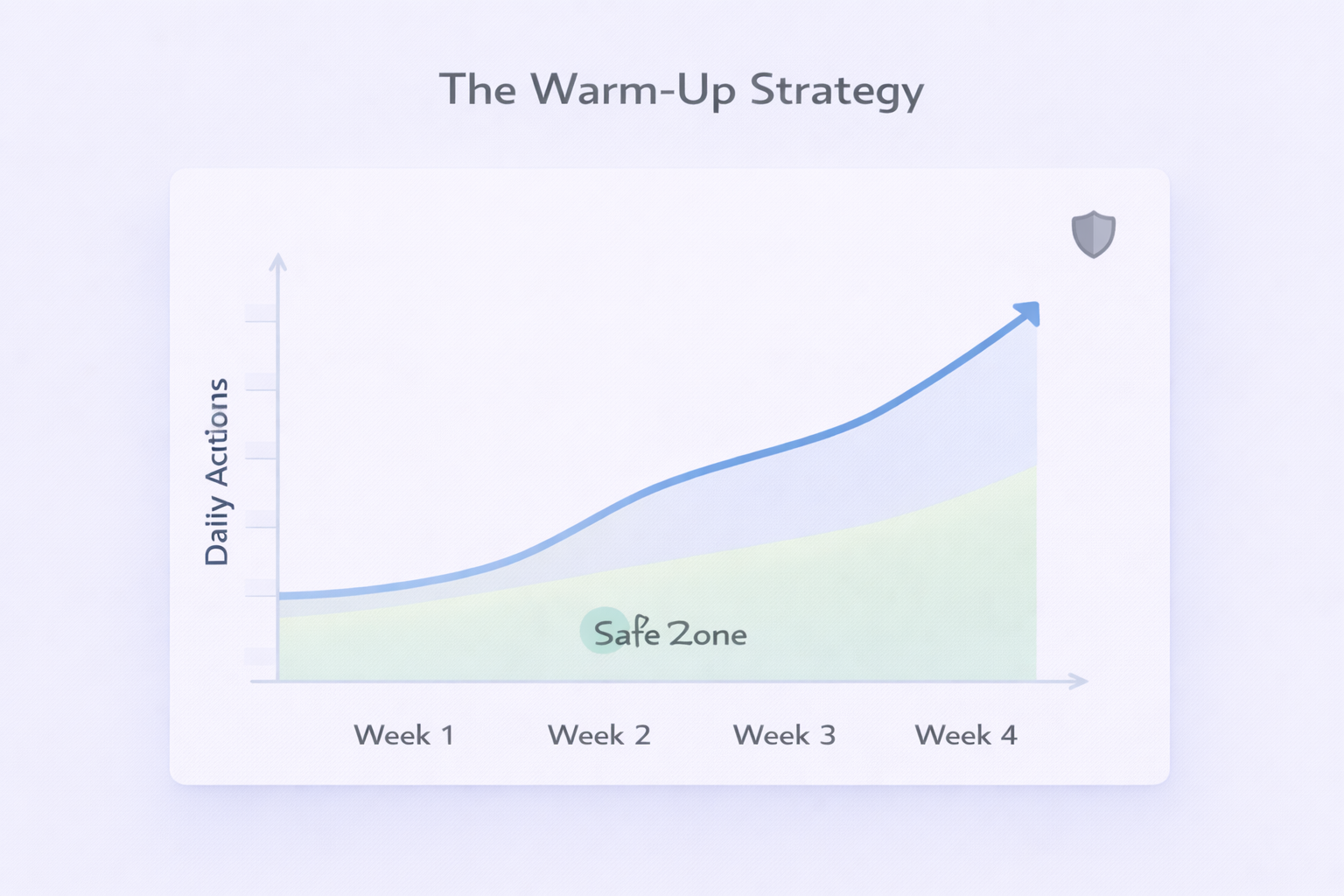
The Warm-Up
When you start, Zopto throttles your activity. You don’t send 100 requests on Day 1. You send 10. Then 15. Then 20. This mimics organic growth.
Daily Limits
You can set hard caps. “Never visit more than 50 profiles a day.”
The Email Invite Bypass
Zopto has a trick up its sleeve. LinkedIn limits standard connection requests to about 100 per week. However, if you have the person’s email address, you can send a request via email which historically bypassed this limit. Because Zopto finds emails, it enables this “high volume” mode.
Note: LinkedIn patches these loopholes frequently, so rely on your CSM for current compliance status.
According to LinkedIn’s internal data, accounts that gradually increase activity over 2-3 weeks see 91% fewer restrictions than accounts that start at maximum capacity.
The Cancellation Controversy
No review is honest without addressing complaints. A recurring theme in user feedback is difficulty of cancellation.
Users have described “confusing” processes and “restrictive” policies. Some SaaS companies make it easy to sign up and hard to leave (the “roach motel” strategy).
If you sign up for Zopto, read the fine print. Are you in a quarterly contract? How much notice do you need to give? Don’t assume you can just click “Cancel” the day before renewal and walk away. This administrative friction is a blemish on an otherwise strong service record.
Zopto vs. The Competition
The market is flooded. How does Zopto stack up against other contenders? Let’s look at the key players.
Zopto vs. Apollo: Data vs. Action
Apollo is the 800-pound gorilla with 275+ million contacts. You go to Apollo to find people. Zopto is primarily an action engine. You go to Zopto to message people you found on LinkedIn.
The Overlap: Apollo has added sequencing and automation. Zopto has added email enrichment. They’re converging.
The Verdict: If you need data (phone numbers, emails), Apollo wins. It’s cheaper (starts ~$49-$59/mo) and the database is massive. If you need sophisticated LinkedIn automation, Zopto is superior. Apollo’s LinkedIn automation is considered “lighter” and riskier than Zopto’s dedicated cloud setup.
Many top teams use both: Apollo to find the data, Zopto to execute the LinkedIn strategy.
Zopto vs. UpLead: The Accuracy War
UpLead positions itself on one promise: 95% Data Accuracy.
The Context: UpLead is a database, like Apollo. It verifies emails in real-time. It does NOT do heavy lifting of LinkedIn automation (sending connection requests, checking replies).
The Comparison: Comparing Zopto to UpLead is like comparing a tractor to a map. UpLead gives you the map (accurate coordinates of leads). Zopto is the tractor that plows the field (does the outreach).
The Choice: If your problem is “My emails keep bouncing,” buy UpLead. If your problem is “I spend 4 hours clicking ‘Connect’ on LinkedIn,” buy Zopto.
Zopto vs. GrowMeOrganic: The Unlimited Scraper
GrowMeOrganic is the scrappy challenger offering “Unlimited” credits for scraping and emailing. It’s a growth hacker’s dream. It’s often much cheaper and less restrictive.
The Trade-off: Zopto offers polished, agency-grade dashboard with white-labeling and dedicated support. GrowMeOrganic is rougher around the edges. Zopto’s cloud infrastructure feels safer for high-value LinkedIn accounts than aggressive scraping tools.
The Audience: If you’re a solo consultant scraping 10,000 emails for a blast, GrowMeOrganic is your tool. If you’re managing reputation of a Fortune 500 VP of Sales, you want safety and structure of Zopto.
Zopto vs. SalesRobot: The Direct Rival
SalesRobot is perhaps the most dangerous competitor to Zopto.
The Price: SalesRobot is significantly cheaper (~$59/mo vs $197/mo).
The Tech: SalesRobot also uses cloud-based tech and dedicated IPs. They claim to use “mobile APIs” which are even harder for LinkedIn to detect.
The Interface: SalesRobot is praised for a modern, friendly UI, contrasting with Zopto’s complex dashboard.
The Verdict: For a single user or small team, SalesRobot offers 90% of Zopto’s value for 30% of the price. Zopto wins on “Enterprise” features—agency dashboards, massive team management, white-labeling. But for average users, SalesRobot is very tempting.
