Let’s be real — choosing a cold email tool feels overwhelming. There are dozens of platforms out there, all promising the moon. So before you spend hours testing QuickMail yourself, here’s the straight-up truth: what it does well, where it falls short, and whether it’s the right fit for your outreach goals.
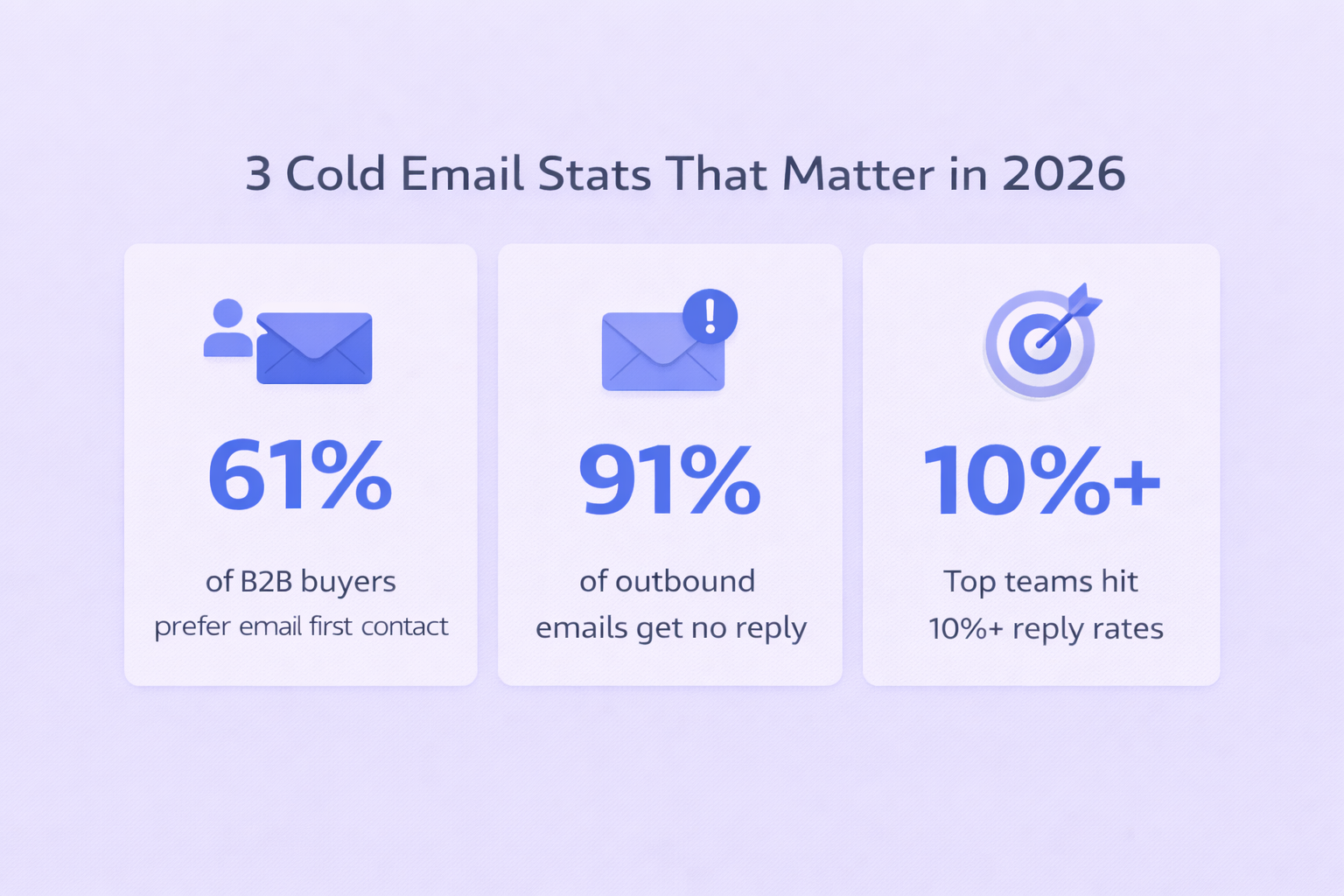
Quick context: the sales force automation market is projected to hit $19.5 billion by 2030, growing at 10.4% annually. Cold email is still the engine behind a huge chunk of that. But with 61% of B2B decision-makers saying email is their preferred first contact, inboxes are packed. The average professional receives ~15 prospecting emails per week — and nearly 20% say none are relevant to them.
That’s the problem QuickMail is trying to solve. And it does a decent job of it — for the right use case.
QuickMail Review
QuickMail is not an all-in-one platform. It doesn’t give you a contact database, it doesn’t do CRM-style deal management, and it doesn’t try to do everything. What it does do — send emails reliably at scale without wrecking your domain — it does really well.
Here’s the thing: 91% of outbound emails generate zero response. Most of that isn’t bad messaging — it’s bad deliverability and poor targeting. QuickMail is laser-focused on solving the deliverability side of that equation.
Deliverability: Where QuickMail Actually Shines
Most cold email tools use shared sending servers. That means your domain shares a reputation with thousands of other senders — including the bad ones. QuickMail avoids this entirely.
It sends through your existing Gmail or Outlook account via the official API. Your emails come from your domain, your IP, your reputation. That one decision alone separates QuickMail from a lot of competitors.
On top of that, QuickMail has built a solid stack of deliverability tools:
Feature | What It Does | Why It Matters |
Inbox Rotation | Spreads volume across multiple accounts | Prevents any single inbox from getting flagged |
Deliverability AI | Auto-pauses weak inboxes, swaps in healthy ones | Keeps campaigns running during reputation dips |
MailFlow AutoWarmer | Builds positive sending history for new domains | Free for up to 50 inboxes — saves $20–30/inbox/mo |
AI Reword | Rewrites messages to sound more human | Helps bypass spam filters and bot detection |
The AutoWarmer feature alone is worth talking about. Standalone email warming tools typically charge $20–30 per inbox per month. QuickMail includes warming free for up to 50 inboxes. For teams running multiple sending accounts, that’s a meaningful cost saving.
Bonus: investing in proper email authentication (SPF, DKIM, DMARC) can boost your reachable audience by double-digit percentages. QuickMail’s infrastructure encourages you to set this up from day one. See our guide on email deliverability best practices for the full setup checklist.
Campaign Performance: What the Numbers Look Like
Here’s what you can realistically expect from a well-run QuickMail campaign:
Metric | 2026 Industry Benchmark | QuickMail Context |
Open Rate | 25–30% | Varies by subject line & domain health |
Reply Rate | 1–5% | 55% of replies come from follow-up steps |
Bounce Rate | < 2% | Stays near 1.5% with proper list verification |
Email ROI | $38 per $1 spent | Highly dependent on ACV and lead quality |
That 55% of replies coming from follow-ups is a stat worth burning into your brain. Yet 44% of people give up after just one email. QuickMail’s sequence automation keeps you in the game without you having to manually track every follow-up.
Also worth knowing: 80% of sales require at least five touchpoints after initial contact. QuickMail’s multi-step sequences handle that automatically — keeping your outreach consistent while you focus on actual conversations.
Want to understand your cold email outreach ROI more deeply? We break down the full math in our dedicated guide.
Campaign Performance: What the Numbers Look Like
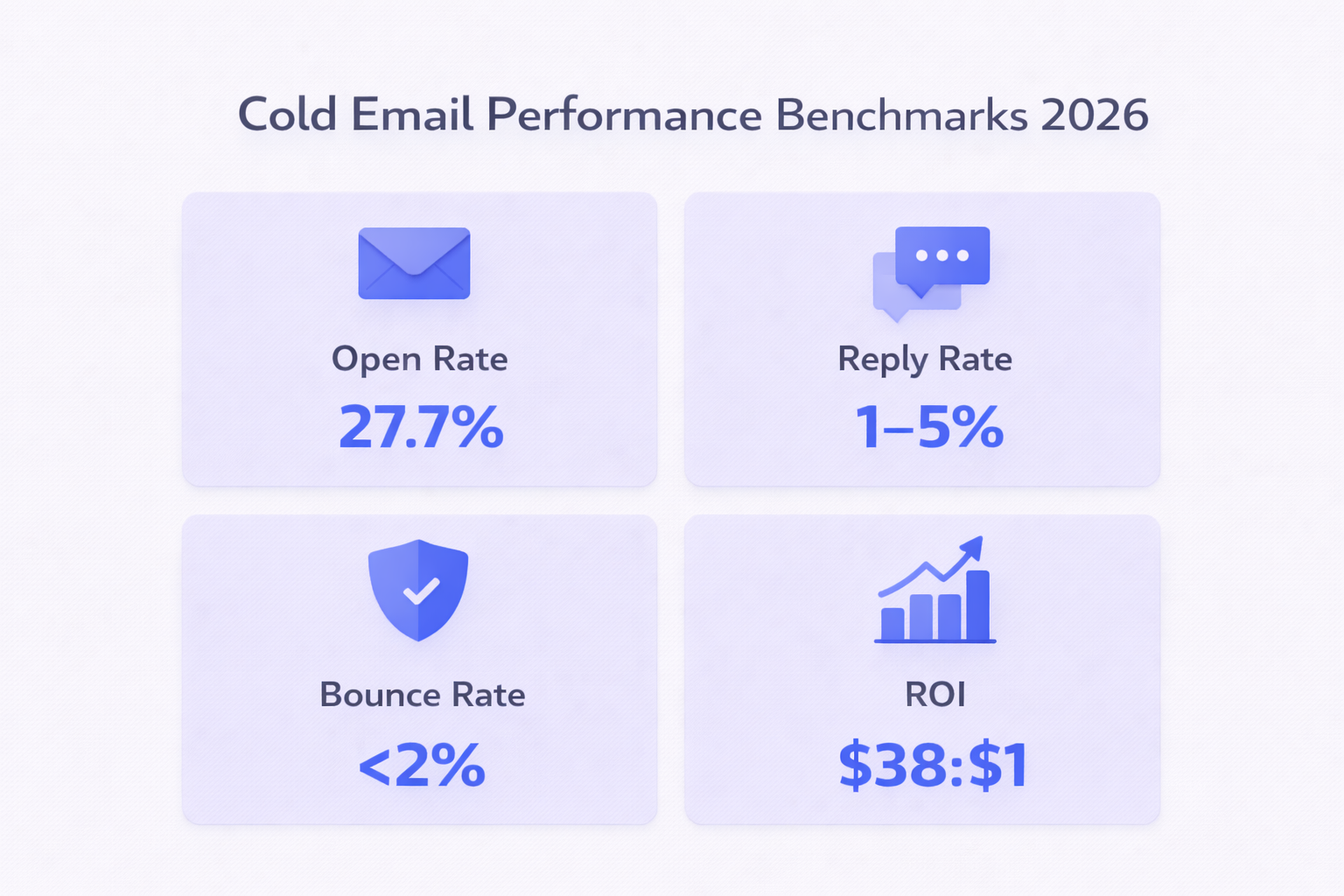
Here’s what you can realistically expect from a well-run QuickMail campaign:
Metric | 2026 Industry Benchmark | QuickMail Context |
Open Rate | 25–30% | Varies by subject line & domain health |
Reply Rate | 1–5% | 55% of replies come from follow-up steps |
Bounce Rate | < 2% | Stays near 1.5% with proper list verification |
Email ROI | $38 per $1 spent | Highly dependent on ACV and lead quality |
That 55% of replies coming from follow-ups is a stat worth burning into your brain. Yet 44% of people give up after just one email. QuickMail’s sequence automation keeps you in the game without you having to manually track every follow-up.
Also worth knowing: 80% of sales require at least five touchpoints after initial contact. QuickMail’s multi-step sequences handle that automatically — keeping your outreach consistent while you focus on actual conversations.
Want to understand your cold email outreach ROI more deeply? We break down the full math in our dedicated guide.
Pricing: Fair, But Know What You’re Buying
QuickMail’s pricing is refreshingly simple — no per-seat fees.
Plan | Price | Contacts | Monthly Messages |
Starter | $9/mo | 1,000 | 3,000 |
Growth | $99/mo | 30,000 | 100,000 |
Agency | $299/mo | Unlimited | 300,000 |
Honest take: the Starter plan is mostly useful for testing. Most real campaigns need the Growth plan at $99/mo. And here’s the thing — QuickMail doesn’t include leads. You need to bring your own contact data. Check our roundup of the best cold email software to understand how QuickMail stacks up when you factor in the full tech stack.
Not sure about email sending limits across platforms? We cover the full breakdown — Gmail limits, Outlook caps, and how rotation helps you stay within safe thresholds.
QuickMail vs. The Competition
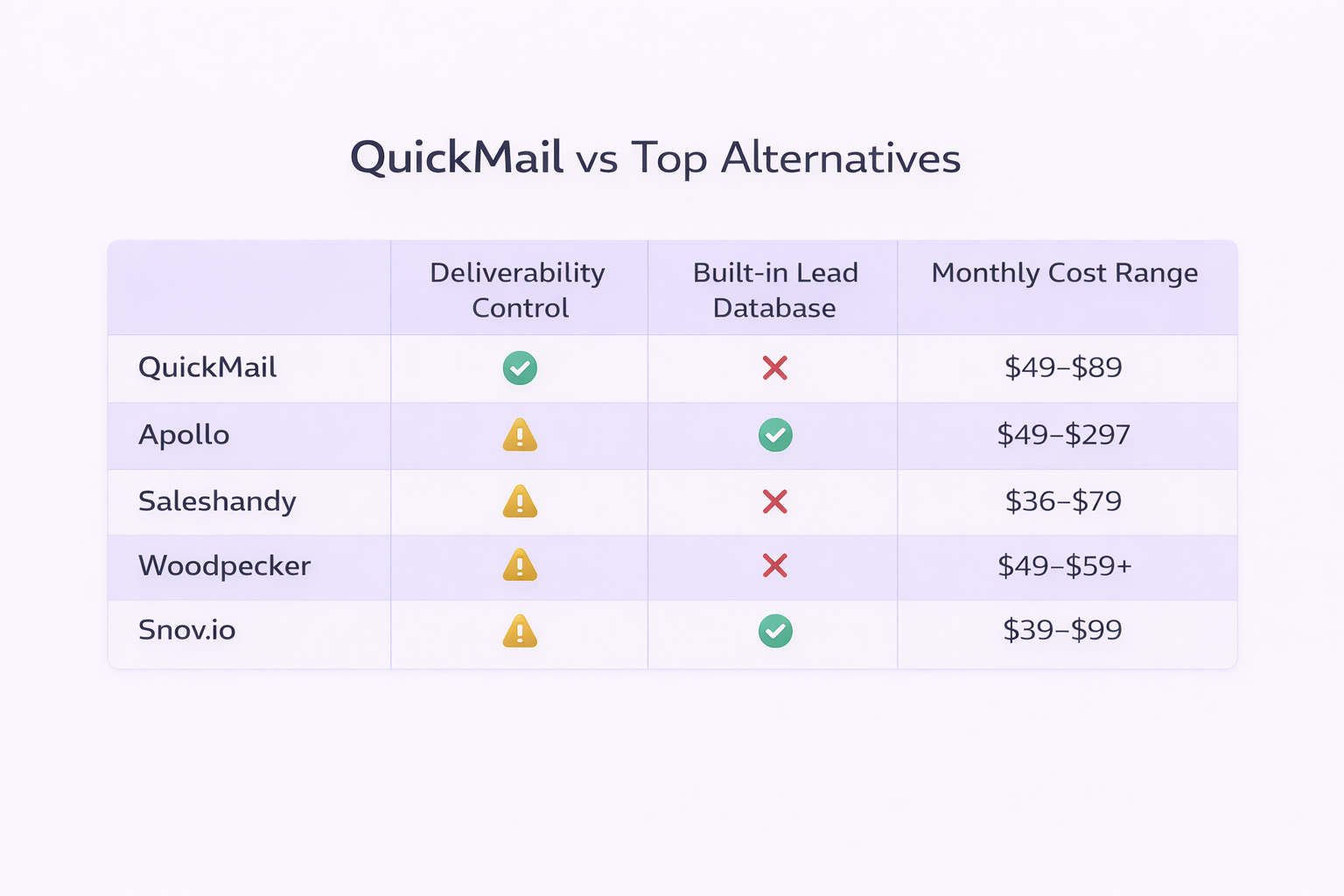
Here’s a quick snapshot of how QuickMail compares to the tools most people are choosing between:
Tool | Best For | Built-in Database? | Deliverability Focus |
QuickMail | Deliverability-first teams | No | Very High |
Apollo.io | Budget-conscious startups | Yes (210M+ contacts) | Moderate |
ZoomInfo | Enterprise data quality | Yes (premium) | Moderate |
Saleshandy | Mid-market usability + AI search | Yes | High |
Woodpecker | Human-like sending cadence | No | Very High |
Snov.io | All-in-one find + verify | Yes | Moderate |
Apollo is the go-to if you want a database bundled in (though data accuracy hovers around 65–80%). ZoomInfo is the gold standard but can cost $15,000–$25,000/year. Saleshandy sits closest to QuickMail in the mid-market and adds AI-powered lead search. Woodpecker, like QuickMail, prioritizes deliverability with human-like sending delays.
Looking beyond QuickMail? Check out our full list of the best QuickMail alternatives — we’ve ranked and reviewed each one.