You spent hours crafting the perfect cold email. Clean copy. Strong subject line. Personalized first line. You hit send — and nothing. No reply. No open. Just silence.
Here’s what probably happened: your email ran straight into the Mixmax Cold Email Shield — an automated filter used by tech-savvy recipients to quarantine unsolicited outreach before it even reaches their main inbox.
And here’s the uncomfortable truth: 75% of unsolicited messages in saturated B2B sectors get intercepted by these shields — regardless of how well-written your email is. That means the problem isn’t your copy. It’s the filter.
The good news? Bypassing it is absolutely doable. This guide breaks down exactly how the Mixmax Cold Email Shield works, and the specific technical and behavioral moves you can make to get back into the primary inbox — where deals actually get made.
What Is the Mixmax Cold Email Shield?
Mixmax is a Gmail-based sales engagement tool. But beyond sequencing and scheduling, it includes a Cold Email Shield — a filtering layer that recipients can activate to automatically categorize and deprioritize incoming outreach.
When the shield is active, your email doesn’t bounce. It doesn’t go to spam. It quietly lands in a secondary “shielded” queue that most recipients rarely check. You might even see a high open rate — but reply rates drop to near zero.
This is a classic case of deliverability vs. categorization. Your email arrives at the server just fine. But the filter correctly identifies it as outreach and treats it accordingly.
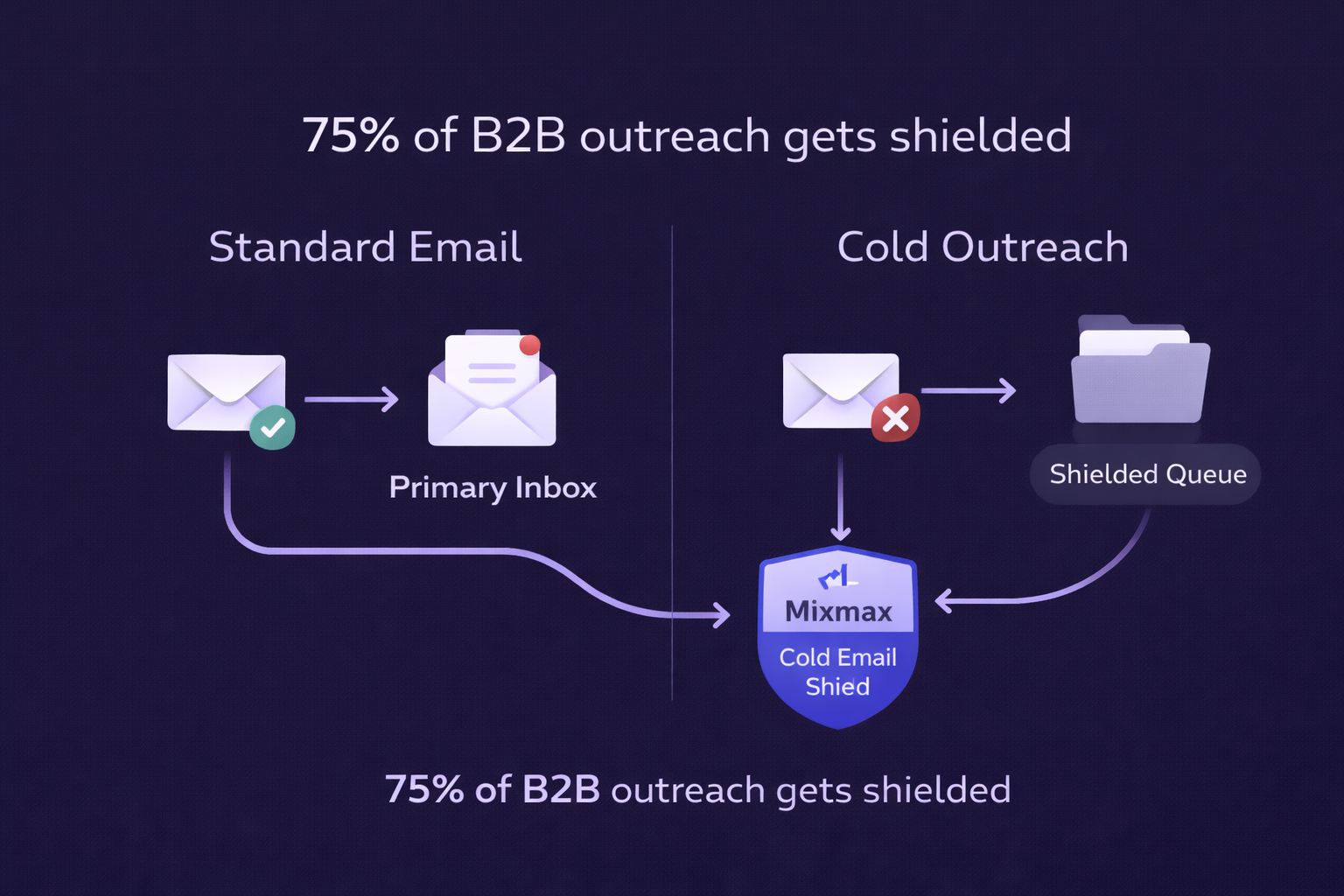
The shield activates based on three categories of signals:
- Technical markers — DNS authentication, tracking pixels, shared domains
- Behavioral markers — sequencing patterns, automated timing, multi-touch cadences
- Content markers — spam-trigger words, naked links, formatting patterns
To bypass the shield, you need to address all three.
Mixmax Cold Email Shield: How To Bypass It?
Fix Your DNS Authentication First
Before anything else, make sure your domain has the authentication trifecta locked in: SPF, DKIM, and DMARC. These act like a passport for your domain — proving to the recipient’s server that you are who you say you are.
Without these, filters immediately flag your messages as potential spoofing attempts. And once you’re flagged, almost nothing else matters.
DNS Record | What It Does | Impact if Missing |
SPF | Authorizes your sending IP address | High probability of spam categorization |
DKIM | Digital signature on email headers | Message integrity questioned; filters trigger |
DMARC | Policy: what to do if SPF/DKIM fail | Domain reputation drops; bounces increase |
Most email platforms walk you through this setup — it takes less than 30 minutes and pays dividends every single day. If you’re unsure where to start, check out our guide on email deliverability best practices for a step-by-step walkthrough.
Use a Custom Tracking Domain
Most sales tools use shared tracking domains — meaning thousands of senders use the exact same URL to track opens and clicks. One bad actor can tank the reputation of that domain for everyone.
The fix is simple: set up a branded subdomain like track.yourdomain.com and point your tool to use it instead. This isolates your sender reputation and signals to filters that you’re a legitimate, established operation — not a bulk spammer.
This is non-negotiable if you’re targeting tech-heavy niches like SaaS or IT services, where Cold Email Shields are most aggressively deployed.
Disable Tracking Pixels (Yes, Really)
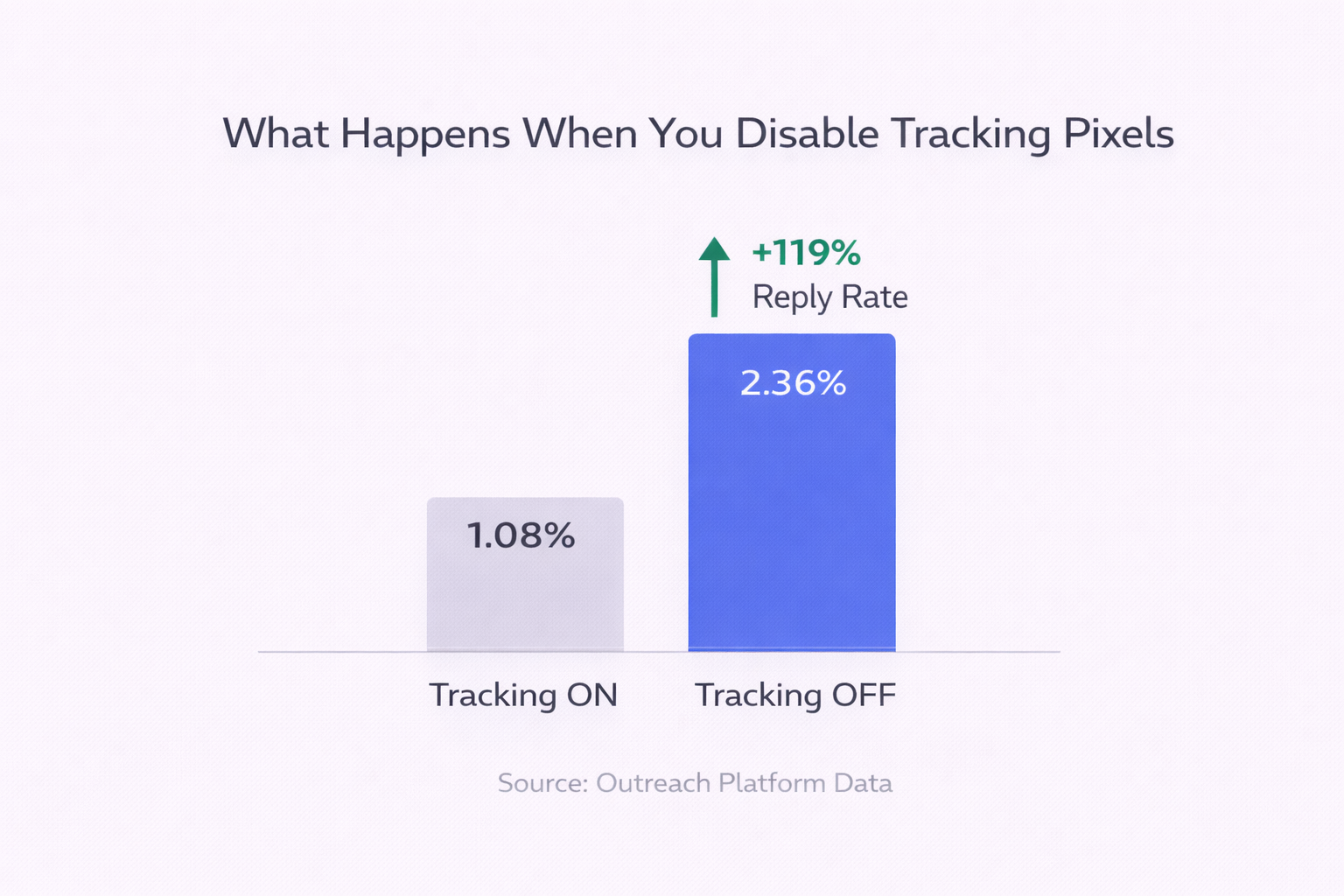
This one feels counterintuitive, but the data is undeniable: disabling open tracking can more than double your reply rate, improving it from 1.08% to 2.36% in controlled tests.
Here’s why: tracking pixels are tiny 1×1 invisible images that ping a server when your email is opened. Modern security tools and privacy filters flag these as intrusive — clear indicators of automated sequences.
When you remove the pixel, the email’s code looks less like a sales sequence and more like a regular human-written note. That matters enormously to algorithmic filters.
You’ll lose the open tracking data point — but you’ll gain actual conversations. The trade-off is almost always worth it for the first message in a sequence.
Stop Using Naked Links
A “naked link” looks like this: www.salesso.com. When you track a click on a naked link, the visible URL in your email and the actual destination URL are completely different.
Filters detect this discrepancy instantly and often flag it as a phishing attempt — one of the fastest ways to trigger a shield or land in spam.
Instead, use descriptive hyperlinked text: “Check out our case study” linked to your destination. Or better yet, disable click tracking entirely on cold outreach.
While you’re at it, run your email through one of these free email spam checkers before any major send to catch issues before they cost you.
Clean Your Email List — Then Clean It Again
Every bounce you send is a signal to email infrastructure that your list is dirty. And a bounce rate above 7.5% actively damages your domain reputation, making the Cold Email Shield’s job even easier.
📊 < 1% Healthy bounce rate for cold outreach. Exceed 7.5% and your domain health suffers significantly.
Use a reputable verification service to confirm email addresses before sending. Focus on recency — an address verified 12 months ago may already be defunct. For a comprehensive overview of how list quality connects to overall ROI, see our guide on cold email outreach ROI.
Also stay aware of email sending limits on different platforms — pushing volume too hard too fast is another trigger. Our email sending limits guide covers what thresholds to stay within.
Fix Your Browser Settings for Sales Extensions
If you use Mixmax or similar tools as browser extensions, misconfigured browser settings can actually create bot-like behavioral signals that get detected by security software on the recipient’s end.
Browser Setting | What’s Required | Risk if Wrong |
Third-Party Cookies | Allow exceptions for mixmax.com | Repeated logouts, broken tracking links |
Site Access | “On all sites” or Gmail-specific | Extension fails during compose |
Multiple Trackers | Avoid Mixmax + Yesware simultaneously | Double-pixel fires, higher spam scores |
A dedicated “sales browser” profile — used only for outreach — eliminates most of these collisions. It takes 10 minutes to set up and saves you from phantom filter triggers that are hard to diagnose.
Stack Multiple Channels Before Cold Email
Sometimes the most effective bypass is recognizing that cold email isn’t always the right first move.
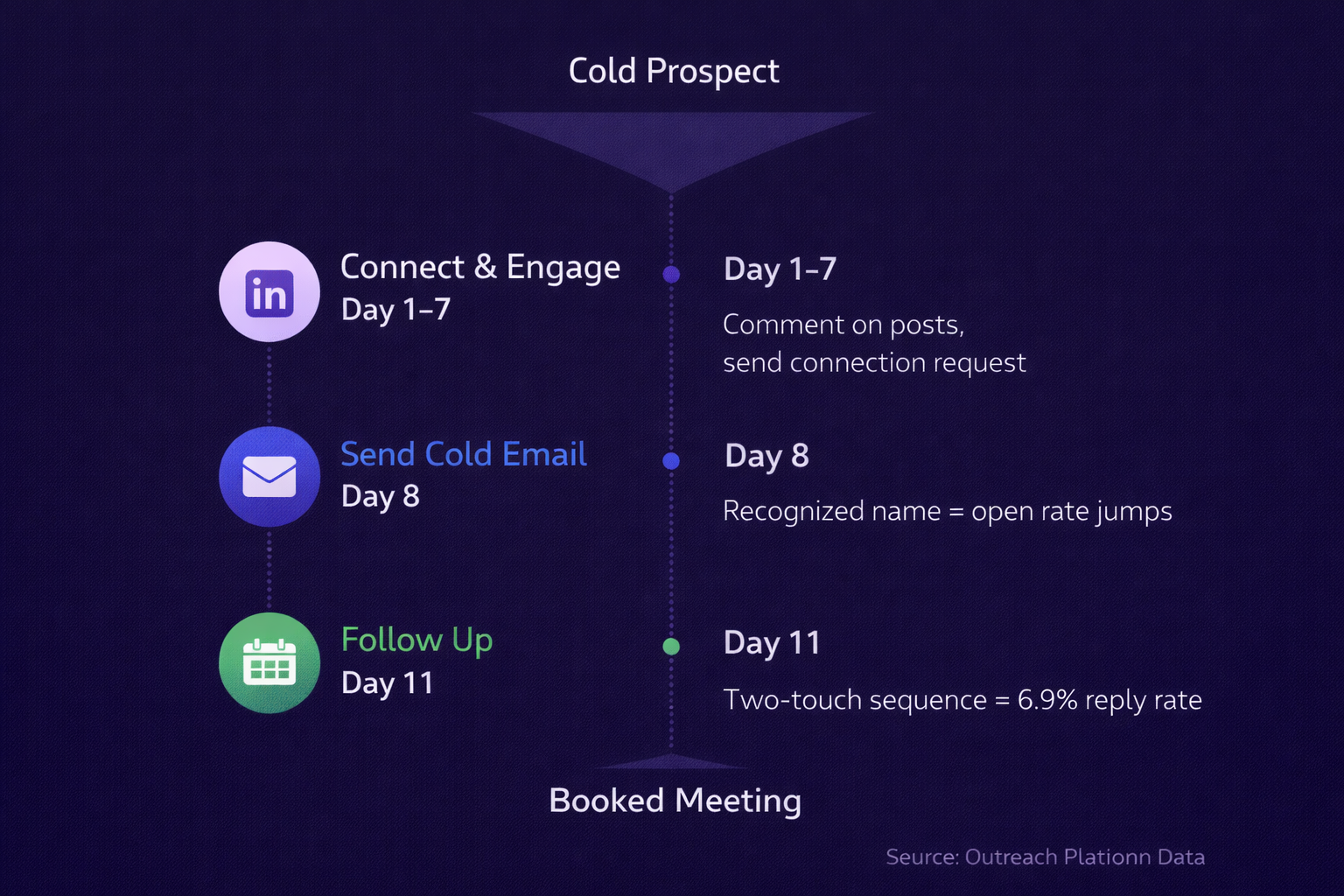
Engaging with a prospect on LinkedIn for a week before your first email changes everything. When your name shows up in their inbox, they recognize it from their notifications — and are far more likely to pull your email out of the shielded queue or whitelist you entirely.
Research shows that a two-email sequence with a single follow-up generates the most responses (6.9%), outperforming both single-touch attempts and over-sequenced cadences. But that only works if your first message actually reaches them.
For a deeper look at how to build this kind of multi-touch approach, our targeted outreach guide lays out the full framework.