Let's Build Your First Campaign Together with our LinkedIn Expert

Get 100 Accepted Connections on LinkedIn: The 2026 Strategy Guide

Table of Contents

Back in 2020, you could send 500 connection requests weekly and hope for the best. But LinkedIn changed the game in 2025. The platform now caps you at roughly 100 connection requests per week, no matter what account type you have.

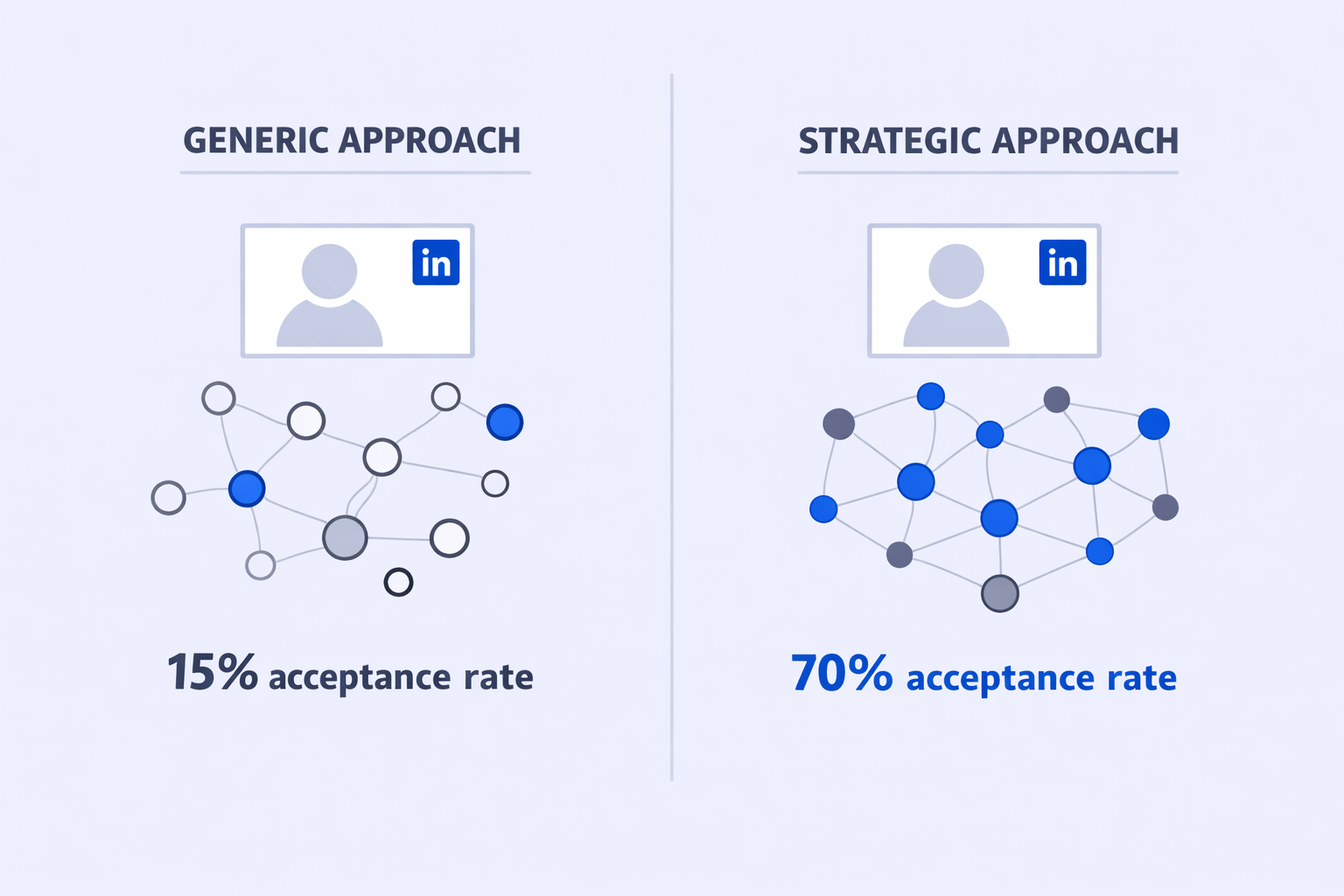
Here’s the brutal math: if you send 100 requests with a 15% acceptance rate, you get only 15 connections. That’s it. But if you push your acceptance rate to 70%, suddenly you’re looking at 70 new connections from the same effort.

The difference? Your strategy.

This guide shows you exactly how to get 100 accepted connections on LinkedIn by optimizing three critical factors: your profile trust signals, your targeting precision, and your outreach approach. Plus, we’ll cover the safety protocols you need to avoid getting your account restricted.

Let’s get started.

Why Your Acceptance Rate Is Everything

Your connection limit hasn’t changed, but your acceptance rate can.

LinkedIn’s 2025 reality:

  • Weekly connection limit: 100-120 requests
  • Daily safe zone: 20-25 requests
  • Average acceptance rate: 15-20% (generic approach)
  • Top performer acceptance rate: 45-70% (strategic approach)

Here’s what this means in real numbers:

Strategy Type

Acceptance Rate

Connections per 100 Sent

Monthly Growth

Generic (No personalization)

15-20%

15-20

~60-80

Basic personalization

25-30%

25-30

~100-120

Strategic targeting

45-50%

45-50

~180-200

Expert approach


70%+

70+

~280+


The platform rewards high acceptance rates with subtle increases to your limits. Low acceptance rates? LinkedIn tightens restrictions, shows more CAPTCHAs, and eventually restricts your account entirely.

Your acceptance rate isn’t just about getting leads—it’s about protecting your entire LinkedIn infrastructure.

🚀 Tired of Low LinkedIn Response Rates?

Stop wasting connection requests on prospects who ignore you. Our LinkedIn outbound engine delivers 15-25% response rates with complete targeting, campaign design, and scaling systems.

Build a Profile People Actually Want to Connect With

Your profile is your first impression. If it screams “I’m here to sell you something,” people won’t accept your request.

Here’s what matters most:

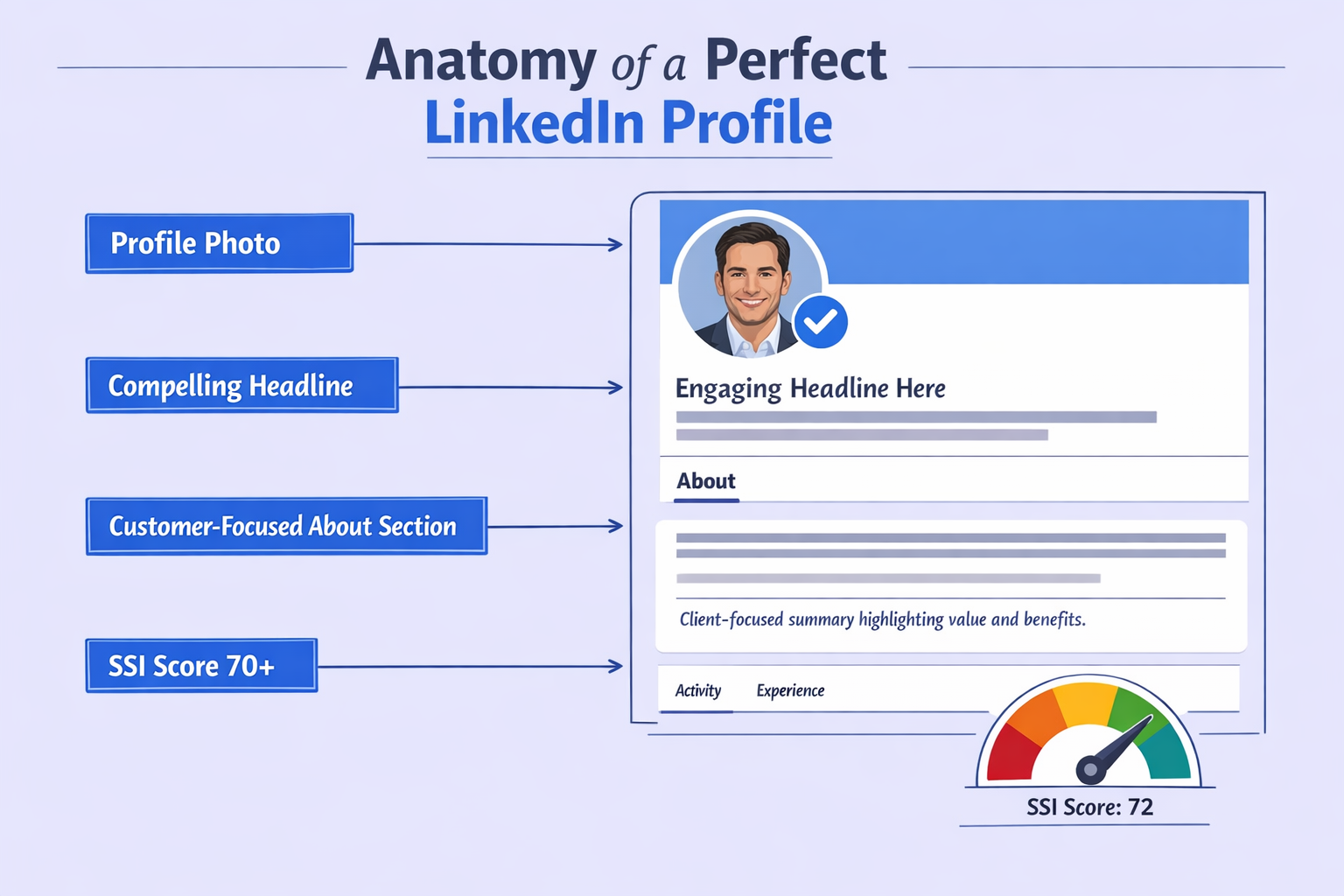
Your Headline Needs to Offer Value

Bad headline: “Sales Development Representative at XYZ Company”

Good headline: “Helping Finance Teams Automate Workflows & Reduce Audit Risk | Ex-Deloitte”

The difference? The first one signals “I’m selling.” The second one signals “I solve problems like yours.”

The value-first formula:

  • Helping [Target Audience] [Achieve Specific Outcome] | [Credibility Marker]

This works because 71% of people make connection decisions based on headlines alone. When your headline speaks directly to their pain points, you trigger instant recognition. They think, “This person gets it.”

Your Photo Matters More Than You Think

Professional photos increase profile views by 14x and message responses by 36x. That’s not a small difference.

What works:

  • High-resolution headshot with neutral background
  • Genuine smile (triggers trust response)
  • Professional attire appropriate for your industry

What doesn’t work:

  • Group photo crops
  • Casual selfies
  • Blurry or poorly lit images

71% of people reject connection requests from profiles with poor photos. Don’t be that person.

💡 LinkedIn Not Converting? Try This Instead

Generic LinkedIn outreach gets 5% acceptance. Our systematic approach to profile optimization, warm engagement, and strategic sequencing drives 70%+ acceptance rates. No guesswork—just proven methodology.

The About Section: Stop Talking About Yourself

Most people write their About section like a resume. “I’m a motivated professional with 3 years of experience…”

Nobody cares about your career history. They care about their problems.

The customer-centric framework:

  1. The Problem: Start with their pain point. “Most CFOs are drowning in manual financial workflows…”
  2. The Insight: Offer a new perspective. “But the real issue isn’t the volume—it’s the lack of automation…”
  3. Your Solution: Explain how you help. “I help finance teams implement AI-powered workflows that cut audit prep time by 60%…”
  4. Social Proof: Add credibility. “I’ve partnered with 50+ companies to streamline their financial operations…”
  5. The Call-to-Action: “Let’s connect. I share weekly insights on financial automation.”

This structure validates their challenges and positions you as a consultant, not a vendor.

Check Your Social Selling Index (SSI)

LinkedIn measures your effectiveness with an internal metric called the Social Selling Index.

The benchmark: Users with an SSI over 70 are 45% more likely to create opportunities.

Check yours at linkedin.com/sales/ssi. If it’s low, increase your engagement (comments, likes) and ensure your profile is 100% complete. A complete profile boosts InMail acceptance by 87%.
 

Target the Right People (Not Just Any People)

You have 100 bullets per week. You can’t afford to miss.

The biggest mistake: Sending requests to anyone who fits your basic criteria. Title, industry, company size—that’s not enough anymore.

The game-changer: Target people who are actually active on LinkedIn.

The “Active User” Filter

60-70% of LinkedIn users are dormant. They haven’t logged in for months. If you target them, you’re burning connection requests on people who will never see your notification.

How to find active users:

  • Look for “Posted in Past 30 Days” (Sales Navigator filter)
  • Check recent activity on their profile
  • Target users who engage with content regularly

This single filter can double your acceptance rate by eliminating dead leads.

Use Boolean Search Like a Pro

Boolean search lets you filter LinkedIn’s database with mathematical precision. It’s how you find high-probability targets.

The operators:

  • AND: Narrows results. “Manager AND Sales”
  • OR: Broadens results. “SaaS OR Software”
  • NOT: Excludes results. “Manager NOT Intern”
  • “” (Quotes): Exact phrases. “Vice President”
  • () (Parentheses): Groups logic. “(SaaS OR Cloud) AND Sales”

High-value search strings:

Decision-maker sweep:

(“VP” OR “Vice President” OR “Head” OR “Director”) AND (“Sales” OR “Marketing”) AND “SaaS” NOT (“Intern” OR “Assistant”)


New role trigger:

“started a new position” AND (“CMO” OR “Chief Marketing Officer”)


Why this works: Executives in new roles are 62% more likely to accept connections and buy new solutions. They’re actively looking to make an impact.

For more advanced targeting techniques, check out our guide on advanced LinkedIn search.

🎯 Struggling to Find the Right LinkedIn Prospects?

Stop wasting time on manual searches and dormant profiles. Our LinkedIn outbound system combines Sales Navigator filters, activity tracking, and enrichment tools to deliver only high-intent prospects ready to engage.

Sales Navigator Is Worth It

If you’re serious about LinkedIn growth hacking, Sales Navigator pays for itself.

Why?

  • “Posted in Past 30 Days” filter: Eliminates 60-70% of dormant users
  • “Changed Jobs in Past 90 Days” filter: Targets buying mode prospects
  • “Follows Your Company” filter: Increases acceptance by 270%

Without these filters, you’re targeting blind. With them, you’re surgical.

Warm Up Before You Reach Out

Cold connection requests get 15% acceptance. Warm requests get 60%.

The difference? Familiarity. When someone sees your name multiple times before you request to connect, they’re far more likely to accept.

The psychology: This is called the “Mere Exposure Effect.” People develop preferences for things simply because they’re familiar with them.

The 3-5 Day Warm-Up Playbook

Day

Action

Psychological Impact

Day 1

View their profile

Notification: “X viewed your profile.” Creates initial awareness.

Day 2

Like a recent post

Notification: “X liked your post.” Reinforces your name. Positive association.

Day 3

Comment on their post

Notification: “X commented…” Shows intelligence and relevance.

Day 4-5

Send connection request

They recognize you: “Oh, that’s the person who commented on my post.”

The result: Your acceptance rate jumps from 15% to 60% or higher just by engaging first.

How to Comment Without Looking Desperate

Bad comments:

  • “Great post!”
  • “Agree!”
  • “Thanks for sharing!”

These get ignored. They add zero value.

Good comments:

  • Add value: “Great point about X. I’ve also found that Y factors into this…”
  • Ask a question: “Interesting take on X. Do you think this applies to [specific scenario] as well?”
  • Give a genuine compliment: “This is the clearest explanation of [topic] I’ve seen in months.”

Your comment should show you actually read their post and have something meaningful to contribute.

The Connection Request Message That Actually Works

The great debate: Should you send a blank request or a personalized note?

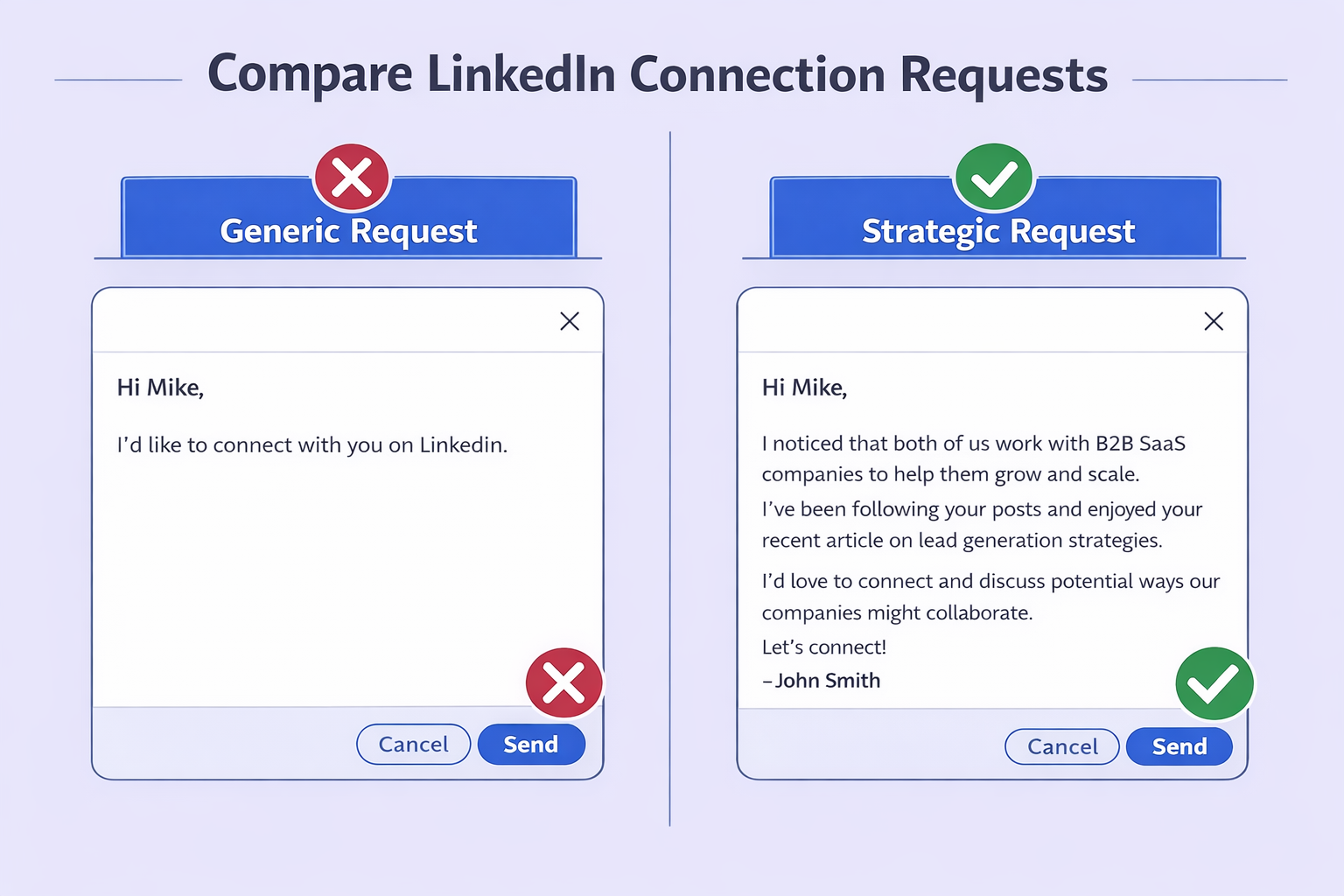
The data: Personalized requests achieve 45% acceptance vs. 15% for generic ones.

But there’s a catch: Your message must be anti-sales. Pitching in the connection request is the fastest way to get flagged as spam.

Template #1: The Content Fan (High Acceptance)

“Hi [Name], I’ve been following your posts on [topic] and really appreciate your perspective on [specific thing]. I’m building a network of [industry] leaders and would love to connect. Best, [Your Name]”

Why it works:

  • Shows you actually know who they are
  • References specific content (proves you’re not mass-sending)
  • No ask, no pitch—just genuine interest

Template #2: The Mutual Connection

“Hi [Name], I noticed we’re both connected to [Mutual Connection] and share an interest in [industry/topic]. Would be great to connect and learn from your experience at [Company].”

Why it works:

  • Mutual connections increase trust by 3x
  • Shows you did research
  • Low friction—easy to say yes

Template #3: The Relevance Hook

“Hi [Name], impressive work scaling the [department] team at [Company]. I work with similar [industry] orgs and try to keep up with the top players. Would love to follow your journey here.”

Why it works:

  • Specific compliment (not generic)
  • Shows you understand their role
  • Positions you as a peer, not a vendor

Key principles for every message:

  • Keep it under 300 characters
  • Give context for why you’re connecting
  • Never ask for 15 minutes or a demo
  • Make it easy to say yes

📈 LinkedIn Messages Getting Ignored?

The problem isn't your product—it's your outreach sequence. Our multi-touch LinkedIn strategy combines profile engagement, strategic connection requests, and value-first follow-ups to turn cold prospects into warm conversations.

7-day Free Trial |No Credit Card Needed.

After They Accept: Don’t Blow It

The connection is just the door opening. The sale happens inside.

The Post-Acceptance Sequence

Step 1: Wait 24 hours. Don’t pounce immediately. Let the connection breathe.

Step 2: Send a welcome message. “Thanks for connecting, [Name]. Great to have you in my network.”

Step 3 (The Value Drop): 3-4 days later, send something useful. “Saw this report on [topic] and thought of your post about X. Thought it might be relevant.”

Step 4 (The Soft Ask): Only after you’ve provided value, transition to a conversation about their challenges. “Curious—are you currently working on [problem they likely have]?”

The principle: Give before you ask. 70% of people who receive value first are willing to take a call. Without value, that number drops to 12%.

Avoid LinkedIn Jail: The Safety Protocols

“LinkedIn Jail” is real. It’s when LinkedIn temporarily or permanently restricts your account for suspicious activity.

In 2025, the platform’s AI detection is ruthless. One wrong move and you’re locked out.

What Triggers Restrictions

Velocity: Sending requests too fast (50 in 10 minutes). Humans pause and read. Bots just click.

Volume: Exceeding 100 per week or 20-25 per day.

Rejection Rate: If your requests get ignored or rejected, your “reputation score” drops.

“I Don’t Know This Person” Clicks: Each time someone clicks this, it’s a strike against your account. Too many strikes = restriction.

Pending Invites: Having more than 700 pending requests is a massive red flag. Keep it under 200.

The Pending Invite Cleanup

Rule: If a request isn’t accepted within 2-3 weeks, withdraw it.

How: Go to My Network > Manage > Sent > Withdraw.

Why it matters: Pending invites signal spam behavior to LinkedIn’s algorithm. Clean house regularly.

The Safe Ramp-Up Schedule

If you have a new account or haven’t been active: Don’t jump to 20 requests per day immediately. You need to “warm up” the account.

Timeline

Daily Requests

Daily Messages

Focus

Week 1

5-10

0-5

Engagement (Likes/Comments)

Week 2

10-15

5-10

Connecting with Mutual Connections

Week 3

15-20

10-20

Targeted Outreach

Week 4+

20-25

30-50

Full Capacity

Gradual ramp-up prevents algorithmic red flags. Sudden spikes in activity look like bot behavior.

If you’re exploring automation tools, read our comparison of LinkedIn automation tools to understand the risks and rewards.

When LinkedIn Isn’t Enough: The Omnichannel Pivot

Here’s the math problem: Even with perfect execution, you’re capped at 400-500 connection attempts per month.

If your goals require more volume, you need a backup plan.

The Scrape and Enrich Strategy

When you find a perfect prospect on LinkedIn but you’ve hit your connection limit, don’t abandon them.

The process:

  1. Identify: Find the prospect on LinkedIn
  2. Enrich: Use a tool to find their business email
  3. Engage: Send a cold email referencing their LinkedIn profile

Email template:

Subject: Saw your profile on LinkedIn


Hi [Name],


I was browsing LinkedIn and saw your work at [Company]. I wanted to connect there, but I know requests can get buried, so I thought I’d reach out here instead.


[Your value proposition]


Best,

[Your Name]


This acknowledges the platform constraints and often gets higher open rates because the subject line is personal.

The Enrichment Tool Landscape

If you need to scale beyond LinkedIn’s limits, you’ll need email enrichment tools.

Key players:

  • Apollo.io: Massive database, credit-based pricing
  • UpLead: Verified data, 95% accuracy, higher cost per lead
  • Hunter.io: Domain-based email finding
  • Salesso: Unlimited extraction and sending (flat rate model)

For teams doing high-volume prospecting, flat-rate unlimited models win over credit-based systems. If you’re comparing options, check out ZoomInfo alternatives for more context.

Deliverability Matters

Moving from LinkedIn to email introduces a new challenge: deliverability.

LinkedIn messages (if accepted) have 100% deliverability. Emails don’t.

Critical steps:

  • Warm up your email domain before sending volume
  • Verify emails before sending (catch-all emails damage sender reputation)
  • Avoid purchased lists (they contain spam traps)

If you’re using cold email as a backup channel, make sure your infrastructure is solid. Start with Mailgenius alternatives to test your deliverability.

Content Strategy: Make Them Come to You

The easiest connections are the ones you don’t have to request.

When you post valuable content, people send you connection requests. It flips the script entirely.

The 3-2-1 Content Framework

3 Comments per Day: Engage with prospects and influencers. This drives profile views back to you.

2 Curated Posts per Week: Share an industry article or report with your own take. You don’t need to write the article—just add value with your perspective.

1 Original Post per Week: Share a story, a lesson learned, or a success anecdote (anonymized).

The Profile View Loop

Tactic: Check “Who Viewed Your Profile” daily.

Action: If a target prospect viewed you but didn’t connect, send a request: “Hi [Name], saw you stopped by my profile. Hope you found something useful. Would love to connect…”

This approach has an incredibly high acceptance rate because they’ve already shown interest.

For more on leveraging LinkedIn’s algorithm, explore our insights on LinkedIn job statistics to understand user behavior patterns.

Conclusion

Getting 100 accepted connections on LinkedIn in 2025 isn’t about volume anymore—it’s about precision.

The winning formula:

  1. Build trust with a profile that speaks to your audience’s pain points
  2. Target strategically using activity filters and Boolean search
  3. Warm up prospects before requesting to connect
  4. Send personalized (but not salesy) connection messages
  5. Follow safety protocols to protect your account
  6. Scale beyond LinkedIn when you hit platform limits

The key insight: Your acceptance rate is everything. Push it from 15% to 70% by combining profile optimization, strategic targeting, and warm engagement.

And if you want to save time on the manual work, check out LinkedIn coupon codes to get started with tools that automate the heavy lifting without risking your account.

Now go build those connections.

FAQs

Can I really get restricted for sending too many connection requests?

Yes. LinkedIn enforces a ~100/week limit. First offenses result in temporary restrictions. Repeated violations can lead to permanent account suspension.

Is Sales Navigator worth the cost?

Absolutely. Advanced filters like "Posted in 30 days" and "Changed Jobs" ensure you target active users. Without it, you waste limited requests on dormant profiles.

How do I find someone's email if they don't accept my connection?

Use email enrichment tools like Salesso, Apollo, or Hunter. Many offer Chrome extensions that overlay on LinkedIn profiles to find verified email addresses.

What's the best time to send connection requests?

Mid-week (Tuesday-Thursday) during business hours yields highest engagement. Avoid Friday afternoons and weekends—requests get buried by Monday.

My acceptance rate is stuck at 20%. What should I fix first?

Fix your headline and photo first. These are your gateway. If they look salesy or unprofessional, no amount of personalization will help.

What to Build a High-Converting B2B Sales Funnel from Scratch on LinkedIn

Build a Full LinkedIn Pipeline in Just 30 Days—Guaranteed