

🎉Find Prospects and Send Cold Emails & LinkedIn Outbound | All in One Place

Email Deliverability Guide: Your Path to the Inbox

Table of Contents

Even the best-written emails fail if they land in spam.

You could craft the perfect subject line, write compelling copy, and design an irresistible call-to-action, but if your email doesn’t reach the inbox, it’s all worthless. This guide explains how deliverability works, factors that affect it, laws to follow, tools to test it, and advanced techniques to maximize inbox placement.

What Is Email Deliverability?

Email deliverability is the ability of an email to successfully arrive in the recipient’s primary inbox, rather than being filtered into the spam, promotions, or junk folder. It’s the critical final step in the email’s journey that determines whether your message will be seen by its intended audience.

Think of it as a form of trust. Email providers like Google, Outlook, and Yahoo act as gatekeepers to protect their users. They analyze every incoming message to determine its trustworthiness. When a sender demonstrates high trustworthiness, their messages reach the main inbox. When the sender’s trust score is low, their emails get routed to spam or blocked entirely.

A high email deliverability rate indicates a healthy email program and successful relationship with email providers.

Difference Between Email Delivery and Email Deliverability

It’s common to confuse these terms, but understanding the distinction is fundamental to running successful campaigns.

Email Delivery refers to the successful transmission of an email from the sender’s server to the recipient’s mail server. If an email doesn’t “bounce back” with a permanent error message, it’s considered delivered. This confirms the email physically reached the intended server, but doesn’t guarantee inbox placement.
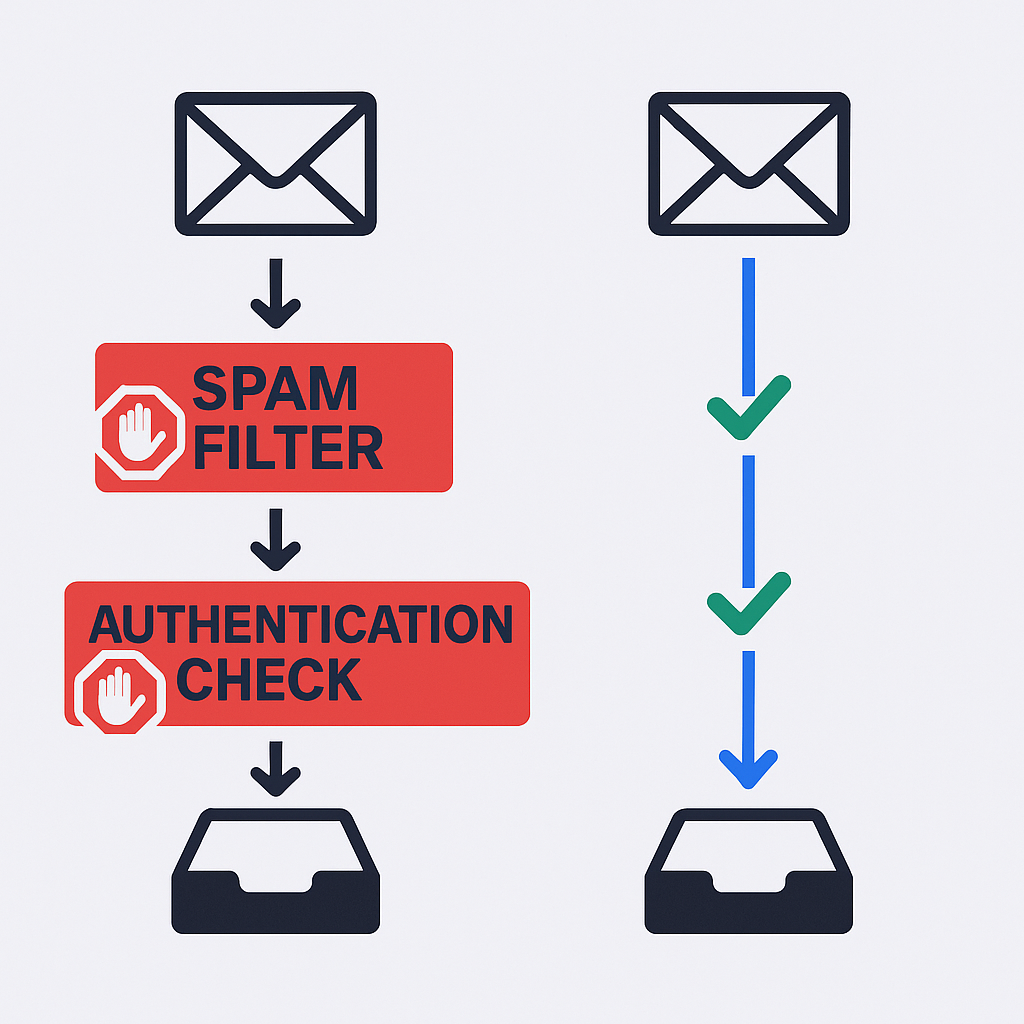


Email Deliverability is the ability of an email to successfully land in the recipient’s primary inbox. A delivered email can still be filtered into spam or promotions folders, making its deliverability poor.

Email Delivery

Email Deliverability

Email reaches the mail server

Email appears in the primary inbox

Like dropping a letter in the mail

Like the letter arriving on someone’s desk, not the trash

Success metric: Delivery Rate

Success metric: Inbox Placement Rate

This distinction is critical for sales professionals. A campaign report might show a 99% delivery rate, which can be misleading. If open and reply rates are near zero, you’re experiencing deliverability issues—emails reach the server but fail to reach the primary inbox.

Why Email Deliverability Matters for Your Business

Without good email deliverability, even the most compelling email won’t drive results. If an email doesn’t reach the inbox, it won’t be opened, read, or replied to.

The numbers tell the story:

  • Email marketing delivers an average ROI of $36 for every dollar spent
  • 40% of marketers consider email the most effective sales channel in B2B
  • Global daily email volume projected to reach 376.4 billion by 2025

This immense volume makes inboxes crowded, competitive spaces. Inbox providers work harder than ever to filter unwanted messages, which means senders must prove their emails are relevant and valuable.


How Does Email Deliverability Work?

Email deliverability revolves around trust and reputation. When you send an email, the recipient’s mail server analyzes it before it reaches any inbox. The ISP acts as a gatekeeper, inspecting factors to determine if the email is legitimate or potential spam.

The most important factor is your sender reputation—a composite score reflecting your trustworthiness based on your entire sending history. A good sender reputation is the single most important factor for high inbox placement.

This creates a cycle: positive reputation → emails reach inbox → higher engagement → signals trustworthiness → improves reputation. Conversely, poor reputation → emails land in spam → low engagement → further damages reputation.

Why Do You Need a Strong Email Deliverability Infrastructure?

🎯 Eliminate Deliverability Issues Completely

LinkedIn outbound reaches decision-makers directly with 15-25% response rates and zero authentication headaches or spam filters

For any professional, strong deliverability infrastructure is business-critical. Your email address and domain are valuable assets, and poor sender reputation causes severe, lasting damage.

A single person sending to unverified email lists can trigger spam filters and get the company’s domain flagged. When a domain is blacklisted, the entire organization can’t send emails—sales, marketing, support, and leadership will find their messages rejected or sent to spam.

The stakes are higher in 2025. Major platforms like Google, Yahoo, and Microsoft have tightened requirements for bulk senders (those sending more than 5,000 emails daily). As of May 2025, Microsoft began rejecting or junking emails from non-compliant domains. These aren’t suggestions—they’re mandatory requirements.

What Affects Your Email Deliverability

Your sender reputation is the primary factor, influenced by key elements:

Sender Reputation: The Foundation

Based on three main areas of sending behavior:

  • Spam Complaints: Recipients marking emails as spam directly measures unwantedness. A complaint rate above 0.1% is a major red flag. Rates of 0.3% or higher can lead to blacklisting.

  • Bounce Rates: High bounce rates indicate low-quality email lists, severely damaging sender reputation.

  • Engagement Signals: ISPs monitor recipient interactions. Positive signals (opens, clicks, replies, forwards) indicate wanted emails. Negative signals (unsubscribes, deletions without opening) harm reputation.

Technical Setup: The Backbone

Proper technical authentication proves email legitimacy:

  • SPF (Sender Policy Framework): Verifies emails are sent from authorized servers, preventing domain impersonation.

  • DKIM (DomainKeys Identified Mail): Adds digital signatures proving emails haven’t been altered in transit.

  • DMARC (Domain-based Message Authentication, Reporting, and Conformance): Works with SPF and DKIM, telling servers what to do if emails fail authentication checks.


List Quality: Garbage In, Garbage Out

Email list health is foundational to good deliverability. Sending to invalid or unengaged contacts increases bounce rates and risks hitting spam traps—email addresses used by ISPs to catch senders with poor list management.

Email Content & Formatting

Filters scan content for red flags:

  • Spam Trigger Words: Words like “free,” “limited time offer,” “urgent,” excessive punctuation, or all capitals trigger spam filters.

  • Format: Emails heavy on images, light on text, or containing too many links may be flagged. Plain-text emails often feel more personal and trustworthy.

  • Personalization: Emails using recipient names or company information appear less like mass campaigns and more likely to be deemed important.

How To Improve Your Email Deliverability

Improving deliverability requires a strategic, multi-faceted approach:

💡 Skip the Technical Complexity

Our LinkedIn outbound engine handles complete targeting, campaign design, and scaling without SPF, DKIM, or warm-up requirements

1. Maintain Clean Email Lists

Purchased or unverified email lists cause deliverability issues because they often contain high percentages of invalid addresses and spam traps. Use a bulk email verification service to remove problematic addresses before sending. This protects sender reputation and reduces bounce rates.

2. Authenticate Your Domain

Set up SPF, DKIM, and DMARC authentication protocols. These are now mandatory for bulk senders and crucial for proving identity and preventing spoofing. A low deliverability score should be addressed immediately.

3. Warm Up Your Email Address

Sending large volumes from new domains or IP addresses without warm-up is a major red flag for ISPs. New domains should gradually increase sending volume over several weeks. This process helps establish positive sender reputation and signals legitimacy.

4. Craft Inbox-Friendly Content

Generic, sales-heavy emails are often flagged as spam. Write emails in conversational, plain-text style that feel like one-on-one messages from colleagues. Personalize each message and avoid spam trigger words, excessive punctuation, and all caps.

5. Make It Easy to Unsubscribe

Forcing recipients through hoops to opt-out leads them to mark emails as spam, which damages sender reputation more than unsubscribes. Include clear, one-click unsubscribe links in every email—this is now mandatory for bulk senders.

Advanced Email Deliverability Techniques

For high-volume senders, advanced techniques protect reputation and maximize inbox placement:

 📈 Get Higher Response Rates

LinkedIn outbound delivers 15-25% response rates versus cold email’s 5-8% while eliminating bounce rates, spam traps, and blacklisting risks

  • Sender Rotation: Split volume across multiple sender accounts instead of using single addresses. This mimics natural sending patterns and prevents any single account from being flagged for high volume.

  • Spintax and Variables: Avoid sending identical emails hundreds of times by using tools that generate unique variations of subject lines and body copy. This adds uniqueness to each message.

  • Re-engagement Campaigns: Regularly check in with less active recipients, giving them options to re-engage or opt out. Removing inactive contacts keeps lists clean and healthy.

  • Request Positive Signals: Subtly ask recipients to add you to address books or reply to emails. These positive interactions strongly signal to providers that emails are wanted.

Key Metrics For Email Deliverability

These metrics are diagnostic tools indicating pipeline health:

Metric

Industry Benchmark

What It Tells You

Delivery Rate

Above 95%

Low rates indicate messages being rejected due to poor sender reputation or high bounce rates

Bounce Rate

Below 2%

High rates indicate poor list quality—use email verification service to remove hard bounces

Spam Complaint Rate

Below 0.1%

Direct signal of email unwantedness—rising rates lead to blacklisting

Open Rate

B2B cold email: 36%

Reflects subject line effectiveness and inbox placement—low opens despite high delivery may signal deliverability issues

Click-Through Rate

Varies by industry

Shows audience engagement and content effectiveness

What are Some Email Deliverability Test Tools?

A complete deliverability toolkit is essential:

âš¡ Stop Testing, Start Connecting

LinkedIn outbound bypasses verification services, warm-up tools, and authentication protocols with direct decision-maker access and proven campaign frameworks

7-day Free Trial |No Credit Card Needed.

Email Verification Tools

These services clean and validate email lists before campaigns, effectively preventing bounce rates and protecting sender reputation:

  • Top Players: ZeroBounce, Bouncer, Sparkle.io, MyEmailVerifier, EmailListVerify, QuickEmailVerification, and MailBoxValidator. These platforms offer real-time validation, high accuracy rates, and bulk email verification.

Deliverability Checkers & Warm-up Services

These tools analyze sending health and automate warm-up processes, providing insight into sender reputation and inbox placement:

  • Top Players: Mail-Tester, GlockApps, MailReach, and Warmy. They help identify content issues and monitor where emails are landing.

Tool Name

Core Function

Why It Matters

ZeroBounce

Email verification service

Accurately removes invalid, disposable, and harmful emails to reduce bounce rates

Bouncer

Email verification service

Known for high accuracy rates and real-time validation to protect sender reputation

MailReach

Email warm-up & spam test

Automates reputation building for new domains and checks for spam flags

Mail-Tester

Free email deliverability tester

Analyzes single emails and provides scores with improvement suggestions

Laws and Policies: What You Must Follow to Stay Compliant

Sales professionals must understand key regulations governing email marketing. Laws in the United States, Europe, and Canada differ significantly, particularly regarding consent.

Law

CAN-SPAM (United States)

GDPR (Europe)

CASL (Canada)

Opt-in/Opt-out Rule

Opt-out: Can send commercial emails without prior permission until recipient requests to stop

Opt-in: Must have prior, explicit consent from recipient. Applies to both B2C and B2B

Opt-in: Must have prior, express consent to send commercial electronic messages

Sender Requirements

Must include valid physical address, clear sender identity, and conspicuous opt-out mechanism

Must be transparent about identity, purpose, and how email address was obtained

Must include clear sender identification and simple, free unsubscribe mechanism

Opt-out Processing

Must be honored within 10 business days

Must be honored without delay and request record kept

Must be honored within 10 business days

Platform Policies to Watch in 2025

The email landscape is undergoing significant transformation, driven by stricter policies from Google, Yahoo, and Microsoft targeting bulk senders.

These changes make “batch and blast” approaches completely obsolete. Sending to unverified email lists or using generic, templated messages will be immediately flagged and rejected.

Core requirements include:

  • Mandatory Authentication: Senders must have proper SPF, DKIM, and DMARC authentication protocols. Failure results in emails being sent to spam or rejected.

  • Low Spam Rate: New policies require senders to keep spam complaint rates under 0.10%. Exceeding 0.3% leads to severe consequences.

  • One-Click Unsubscribe: One-click unsubscribe links are now mandatory for promotional emails. Unsubscribe requests must be processed within two days.

Email Deliverability Key Takeaways: Dos and Don’ts

Do

Don’t

Use email verification tool to clean email lists

Buy email lists or send to unverified contacts

Use email warm-up service for new domains and IPs

Send large volumes from new domains immediately

Set up SPF, DKIM, and DMARC authentication protocols

Ignore technical setups and assume everything is fine

Craft personalized, plain-text emails with clear sender names

Use generic, salesy subject lines, all caps, or excessive images

Include clear, one-click unsubscribe links in every email

Make it difficult for recipients to opt out

Monitor bounce and spam complaint rates regularly

Ignore poor metrics and assume deliverability issues will fix themselves

Build lists organically and focus on earning trust

Send to unengaged contacts and risk hitting spam traps

verify email addresses before adding them to campaigns

Use outdated or inaccurate data in email marketing efforts

FAQs

What is the average open rate for cold emails?

According to recent data, the average open rate for B2B cold emails is approximately 36%.

How do I find a good email verification service?

A reputable email verification service should be known for high accuracy in identifying invalid and risky addresses. It should offer straightforward user interface and integrate easily with popular sales and email marketing tools

What is a hard bounce vs. a soft bounce?

A hard bounce is permanent delivery failure, usually because the email address doesn't exist or is invalid. A soft bounce is temporary failure, such as recipient's inbox being full or server being temporarily down. All hard bounces should be removed from email lists immediately, as they severely damage sender reputation.

How often should I clean my email lists?

List hygiene should be an ongoing process, not a one-time event. Regularly use bulk email verification service or email verification tool to check for new bounces, inactive contacts, and spam traps to maintain low bounce rates and keep lists healthy.

Ready to master email deliverability and reach more inboxes?

Start with clean, verified email lists and proper domain authentication. Your sender reputation—and your results—depend on it.

Skip Email Deliverability Headaches Forever

LinkedIn outbound gets 15-25% response rates with zero spam filters, authentication issues, or inbox placement problems

Segmentation That Actually Converts

LinkedIn outbound targets precise demographics with strategic campaign design and scaling methods

How to Build a High-Converting B2B Sales Funnel from Scratch on LinkedIn ​