
The Ultimate Guide to Facebook Lead Generation Software in 2026
- Richard Lee
- Views : 28,543
Table of Contents
You’ve poured money into Facebook ads. The clicks are coming in. But here’s the brutal truth: by the time you manually copy that lead’s email into your spreadsheet, they’ve already forgotten about you.
The average person who fills out a Facebook form expects a response within 5 minutes. Yet most sales teams take hours—or even days. Research shows that the odds of qualifying a prospect drop by 100 times if you don’t contact them within the first five minutes of form submission. That’s not a typo. One hundred times worse.
This is where facebook lead generation software becomes your secret weapon. These tools act as the bridge between someone clicking “Submit” on your ad and you actually starting a conversation with them. No more copying and pasting. No more missed opportunities rotting in your downloads folder.
In this guide, we’re cutting through the marketing fluff. You’ll learn which tools actually work, how much they really cost, and how to set them up without losing your mind. Whether you’re running ads for the first time or scaling to thousands of leads per month, you’ll walk away knowing exactly which solution fits your needs.
Let’s dive in.
Facebook Lead Generation Software: What It Actually Does
Here’s what most people misunderstand: Facebook lead generation software isn’t just about storing names and emails. It’s about speed. The entire game is won or lost in those first few minutes after someone submits their information.
When someone fills out your Facebook Lead Ad (also called an Instant Form), Facebook collects their data. But here’s the catch: that data sits inside Facebook’s ecosystem. You can’t see it in your inbox. You can’t call them immediately. It’s trapped.
Software solves this by creating a direct pipeline. The moment someone hits submit, the software grabs that data and pushes it wherever you need it: your phone, your CRM, your email system, or even your LinkedIn prospecting workflow. Some tools send you a push notification. Others automatically trigger a text message or email sequence.
The result? You’re in their inbox while they’re still scrolling Facebook. That’s the difference between a 30% response rate and complete silence.
🎯 LinkedIn Outbound: The Smarter Alternative
Bypass the Facebook ad grind—LinkedIn outbound gets you 15-25% response rates without the high cost per lead
The Types of Tools You Need to Know
Facebook lead generation software falls into three categories. Understanding which one you need saves you from paying for features you’ll never use.
Mobile-First Speed Managers
These are built for people who are always on the move. The moment a lead comes in, your phone buzzes. You tap the notification and boom—their contact info is right there. You can text, call, or message them instantly.
Privyr is the king here. It’s free forever for basic use. You connect your Facebook page, and it sends every new lead straight to your phone. The catch? On the free plan, you can only see the most recent lead. If ten people fill out your form overnight, you can only access the last one unless you upgrade. This limitation actually forces you to respond fast—which is exactly what drives conversions.
ConvergeHub takes a different approach. It’s a Chrome extension that captures profile data from Facebook, LinkedIn, and other sites as you browse. It’s less about automation and more about organizing your manual prospecting efforts.
Middleware Connectors (The Digital Glue)
If you need leads flowing to multiple places—your CRM, your cold email software, your team’s Slack channel—you need middleware. These tools connect apps that don’t normally talk to each other.
Zapier is the household name. It connects over 6,000 apps. But here’s the painful surprise: Facebook Lead Ads is a “Premium App” on Zapier. You cannot use it on the free plan. You must upgrade to at least the Starter plan at roughly $20/month. If you budgeted for free, you’re already behind.
Zapier charges per “task.” If your workflow has four steps (Facebook → Email → CRM → SMS), that’s three tasks per lead. At 1,000 leads per month, costs add up fast. But it’s rock-solid reliable. If you cannot afford to lose a single lead, Zapier is worth every penny.
Make (formerly Integromat) is the technical marketer’s favorite. It’s cheaper than Zapier for high-volume simple tasks. The interface is visual—you literally draw your workflow on a canvas. The downside? The free plan has a 15-minute delay between checks. When speed matters, 15 minutes feels like an eternity. You can use webhooks to make it instant, but that requires some technical know-how.
LeadsBridge specializes in advertising ecosystems. Beyond pulling data out of Facebook, it excels at pushing data back in. It can sync “Disqualified” prospects from your CRM to Facebook Custom Audiences, ensuring you don’t waste ad spend showing ads to people who already said no. This “negative targeting” directly improves ROI.
💡 Stop Losing Leads to Slow Follow-Up
With LinkedIn outbound, you’re not waiting for forms—you’re reaching decision-makers directly where they already do business
Enterprise Ecosystems (Native Integrations)
If your company already uses a major CRM, you might not need third-party tools at all.
HubSpot offers one of the smoothest Facebook integrations. Once connected, lead forms automatically appear in your dashboard. But there’s a common mistake: people assume all pages sync automatically. You must manually navigate to Marketing > Ads > Lead Syncing and check the box for your specific Facebook Page. Miss this step, and no data flows.
HubSpot’s real power is attribution. It can track a user from the exact ad click all the way to the final “Closed-Won” revenue. Marketing teams can see which creative actually drives sales, not just inquiries. This visibility changes how you spend your ad budget.
Zoho CRM takes a “Social-First” approach. It pushes data into the Leads module and lets you monitor comments and messages on the ad itself in real-time. This turns the ad into a two-way communication channel rather than just a data collection point.
How Much This Actually Costs (The Real Numbers)
Let’s talk money. The software costs are one thing. But the real expense is your Facebook ads themselves.
Average Facebook ad costs in 2025:
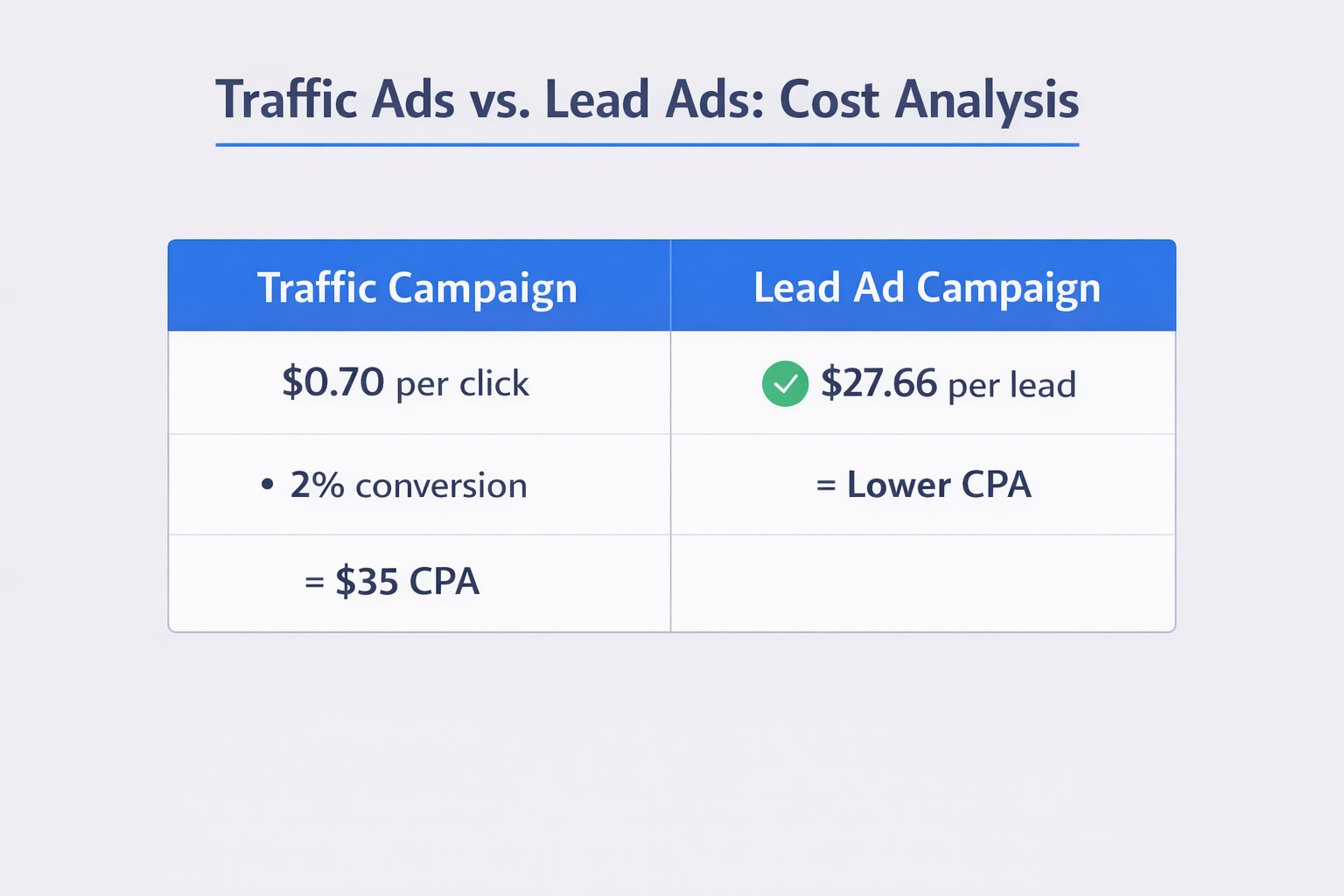
- Cost Per Lead (CPL): $27.66 (up 21% year-over-year)
- Cost Per Click (CPC): $0.70 (down from previous years)
- Conversion Rates: Vary wildly—restaurants see 18%, while professional services hover around 4-5%
Here’s the math that matters. If you’re paying $27 per lead and your lead generation software costs $20/month, that software just needs to save you one lead per month to pay for itself. If it speeds up your follow-up and converts even one extra lead, it’s pure profit.
Compare this to driving traffic to a landing page. At $0.70 per click and a 2% conversion rate, you’re paying $35 per lead. The Instant Form at $27.66 is actually cheaper—if you have the software to follow up fast enough.
📊 Better ROI Than Facebook Ads
LinkedIn outbound delivers 15-25% response rates at a fraction of Facebook’s $27.66 cost per lead

Setting Up Your Software (The Technical Side)
Most people get stuck at the Terms of Service. Facebook requires you to accept specific data handling policies before you can run Lead Ads. Here’s how to fix it:
Accepting Facebook Lead Generation Terms of Service:
- Log into your Facebook Business Page with Admin access
- Navigate to Meta Business Suite or Publishing Tools
- Find “All Tools” and select “Instant Forms”
- Creating a new form usually triggers the Terms of Service pop-up
- If it doesn’t appear, go to Ads Manager > Settings > Pages, find your page, and click “View Terms” next to “Lead Ads”
If the button is greyed out, you likely lack Admin privileges. Contact your Business Manager owner.
You also need a Privacy Policy. Facebook requires a link to a policy on your website that explicitly states you’re collecting data for marketing purposes. No policy = ad account suspension. It’s not optional.
The “Cold Email” Bridge (Advanced Strategy)
Here’s where things get interesting. A Facebook lead is technically “warm”—they opted in. But treating them with the rigor of cold outreach often yields better results.
Standard marketing automation tools like Mailchimp are great for newsletters. But they’re built for HTML-heavy blasts. Cold email software platforms are engineered differently. They use warm-up pools, inbox rotation, and plain-text formatting to land in the Primary Inbox—not the Promotions tab.
The pattern interrupt: A prospect expects a glossy “Thanks for subscribing!” email with logos and buttons. When they get a plain-text note that looks like it came from a real person (“Hey, saw you just asked about pricing…”), it feels genuine. Response rates skyrocket.
Most cold email tools don’t have one-click Facebook integrations. You build the bridge using webhooks. A webhook is a digital listener. You give Facebook a unique URL, and whenever a form is submitted, Facebook “posts” the data to that URL.
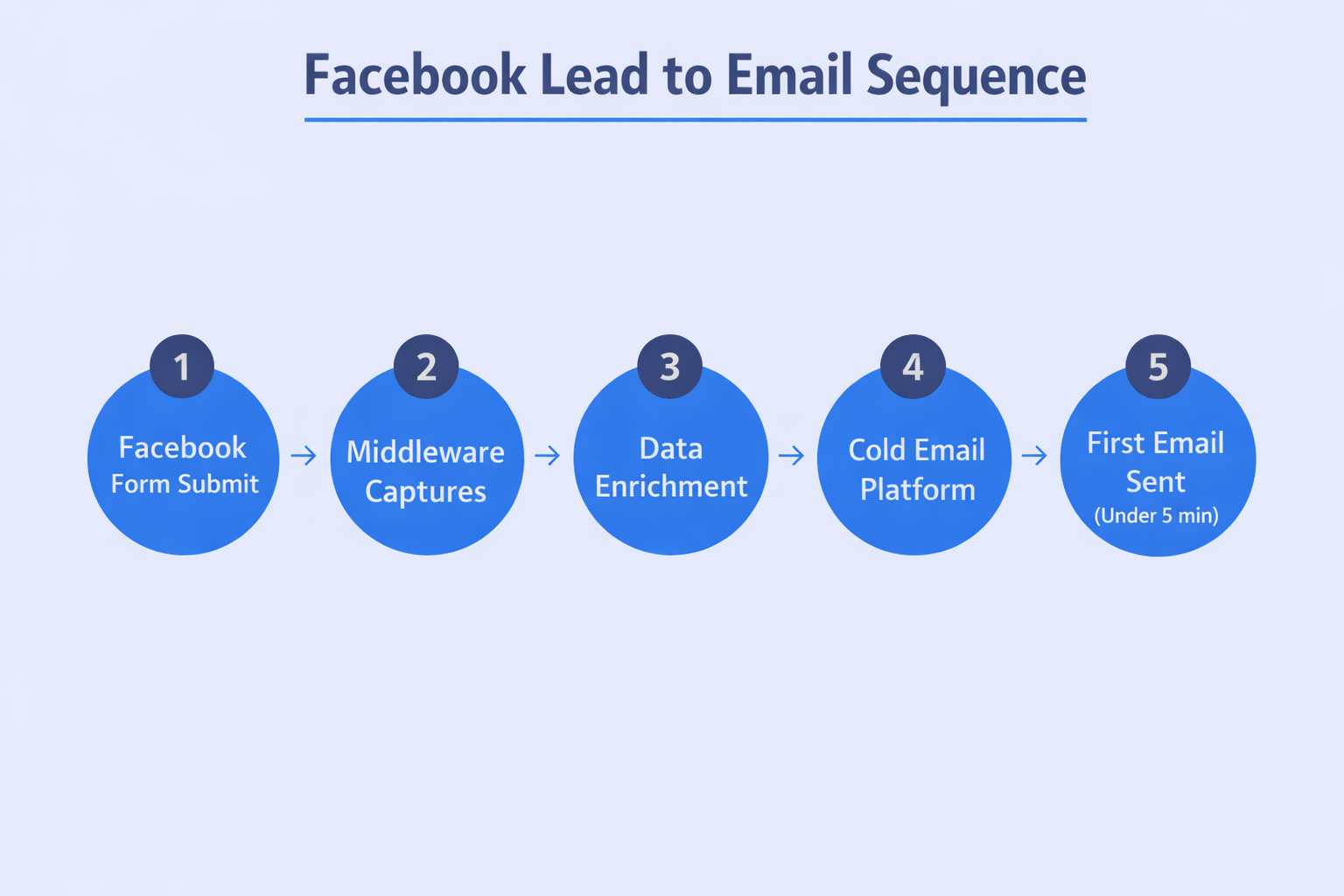
The workflow:
- User submits the Instant Form
- Middleware (Make or Zapier) captures the data
- Middleware formats it (splits “Full Name” into “First Name” and “Last Name”)
- Middleware sends the data to your cold email platform via webhook
- The prospect is added to your campaign and the first email triggers instantly
Since Facebook users often sign up with personal emails (Gmail, Yahoo), cold emailing agencies add an enrichment layer. The middleware pings a database like Snov.io or Hunter, finds the corporate email, and runs dual sequences: a soft nurture to the personal email and a business pitch to the work email.
🚀 Why LinkedIn Outbound Beats Facebook Ads
Get 15-25% response rates without spending $27.66 per lead or worrying about deliverability
7-day Free Trial |No Credit Card Needed.
We provide complete outbound methodology: advanced LinkedIn search targeting, multi-touch campaign design, and proven scaling systems. Direct access to decision-makers, no ad spend required.
Avoiding the “Junk Lead” Problem
A common criticism of Facebook Lead Ads is quality. Because forms pre-fill, users sometimes submit outdated information (like a phone number they changed years ago).
Mitigation strategies:
Add custom questions beyond just Name/Email. Ask “What’s your budget?” or “When are you looking to start?” This forces users to pause and type, filtering out accidental clicks. People who take the time to answer are genuinely interested.
Use email validation tools within your middleware. Services like Clearout or NeverBounce ping email addresses in real-time. If an email bounces, don’t add it to your CRM. This keeps your domain reputation high and your follow-up efforts focused on real prospects.
The more friction you add, the lower your volume but the higher your quality. It’s a trade-off. A form with five questions might get 40% fewer submissions, but those submissions convert at 3x the rate. Test both approaches with a small budget before scaling.
he Future: Conversions API
The most advanced teams are now implementing Conversions API (CAPI). Traditional software is “Read-Only”—it takes data from Facebook. CAPI makes it “Read-Write.”
Here’s how it works: When a lead converts into a paying customer in your CRM, the software sends a signal back to Facebook. Facebook’s algorithm learns. It stops optimizing for “people who fill forms” and starts optimizing for “people who actually buy.”
This requires robust integrations like HubSpot or specialized CAPI bridges. But the payoff is massive. Early adopters report 20-30% lower cost per acquisition because Facebook’s AI gets smarter with every signal you send. According to LinkedIn lead generation statistics, similar closed-loop systems improve targeting precision dramatically.
Conclusion
Choosing facebook lead generation software isn’t about finding the fanciest dashboard. It’s about one thing: speed. Can you get from “Submit” to “Hello” in under five minutes?
For solo operators, Privyr’s mobile-first approach enforces the discipline you need. For scaling teams, middleware like Make or Zapier provides the architectural flexibility to weave inbound leads into sophisticated outreach sequences. And for enterprises, native HubSpot or Zoho integrations ensure every dollar of ad spend is tracked to revenue.
Your job is to close deals, not copy-paste data. The tools exist. The benchmarks are clear. The Terms of Service are just a checkbox. The only question left is how fast you’re willing to move.
Stop researching. Start responding.

FAQs
What is the best free facebook lead generation software?
How do I accept Facebook Lead Generation Terms of Service?
Can I connect Facebook Lead Ads to Zapier for free?
What is Facebook for Creators?
- blog
- Sales Development
- Facebook Lead Generation Software Guide (2026)