
LinkedIn Hashtags That Actually Work in 2026 (And How to Use Them)
- Sophie Ricci
- Views : 28,543
Table of Contents
You’ve spent 20 minutes crafting the perfect LinkedIn post. You hit publish, add a few hashtags you’ve seen others use, and… crickets. Sound familiar?
Here’s the thing: LinkedIn’s algorithm changed dramatically in 2025, and the hashtag game isn’t what it used to be. With over 1.15 billion users on the platform, getting noticed requires more than just slapping #marketing or #business at the end of your posts.
The good news? When you nail your hashtag strategy, the results are massive. We’re talking 8.01% average engagement rates in 2025 (up from previous years) and the ability to reach decision-makers who actually care about what you’re sharing.
This guide breaks down exactly which hashtags work, how many to use, and where to place them so your content cuts through the noise and lands in front of the right people.
🎯 Skip Hashtag Guessing Games
Get qualified leads directly from LinkedIn with our proven outbound system—no posting required
Why LinkedIn Hashtags Matter More Than Ever
Think of hashtags as your content’s GPS coordinates. They tell LinkedIn’s algorithm exactly where to send your post.
Here’s what most people miss: LinkedIn doesn’t just show your content to your connections anymore. The 2025 algorithm uses hashtags as classification signals to match your post with users who’ve engaged with similar topics—even if they’ve never heard of you.
The stats prove it works. Only 1% of LinkedIn users post weekly, but they generate 9 billion impressions. That massive content gap means properly tagged posts from consistent creators get disproportionate visibility.
But there’s a catch. Use too many hashtags or pick the wrong ones, and the algorithm flags your content as spam. Use too few, and you’re invisible. The sweet spot? 3-5 highly targeted hashtags per post.
🚀 Stop Hoping Posts Go Viral
Our LinkedIn outbound campaigns deliver 15-25% response rates with zero content creation needed
The 3-5 Hashtag Rule (And Why It Exists)
LinkedIn’s algorithm runs a four-stage check on every post within the first 60 minutes. One of those stages? A quality filter that looks for spam signals.
Posts with more than 5 hashtags get flagged and suppressed. The platform learned that excessive tagging usually means low-quality content or engagement bait.
The magic number is 3-5 hashtags. Here’s why this range works:
3 tags give the algorithm enough data to categorize your content without looking desperate. 5 tags maximize your reach across different audience segments while staying under the spam threshold.
Most professionals stick to 3-4 tags. Save that fifth slot for when you’re targeting multiple audiences or testing a new category.
How to Choose Your 3-5 Hashtags
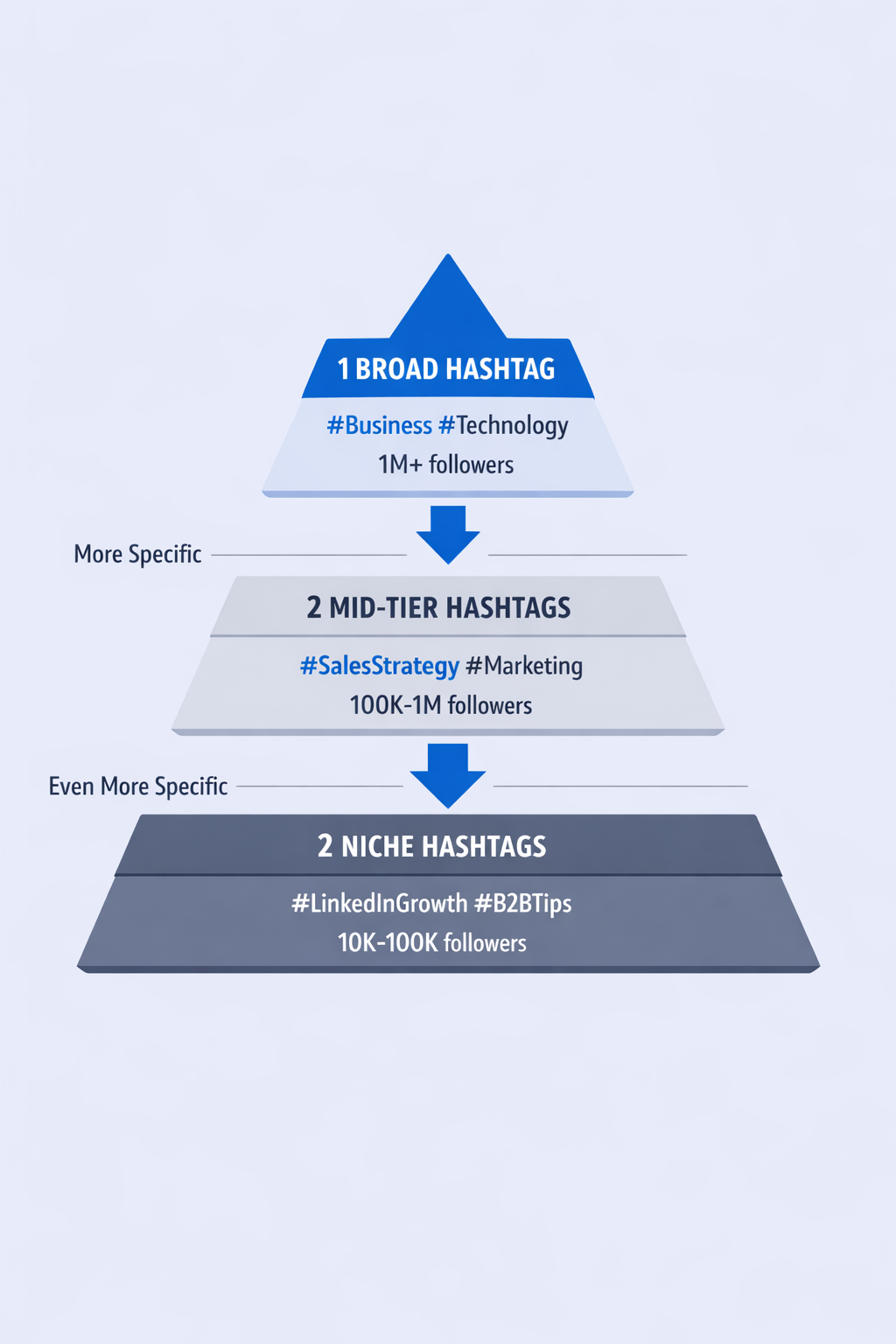
Your hashtag stack should follow the “pyramid strategy”—one broad tag, two mid-tier industry tags, and 1-2 niche topic tags.
Broad hashtags like #Business (41M+ followers) or #Technology (38.8M followers) give you baseline visibility but high competition. Mid-tier hashtags like #SalesStrategy (500K followers) target your industry. Niche hashtags like #LinkedInTips (50K followers) connect you with highly engaged micro-communities.
Real example: If you’re sharing a post about improving your LinkedIn outreach, use:
- #Business (broad)
- #Sales, #MarketingStrategy (mid-tier)
- #LinkedInGrowth (niche)
Pro tip: Check follower counts before using a hashtag. Click any tag on LinkedIn to see its follower number. Aim for a mix—at least one tag with 1M+ followers and at least one with under 100K.
💡 Done Choosing Hashtags Manually?
We handle targeting, campaigns, and follow-ups so you book 10-15 meetings monthly on autopilot
Where to Place Your Hashtags (It Actually Matters)
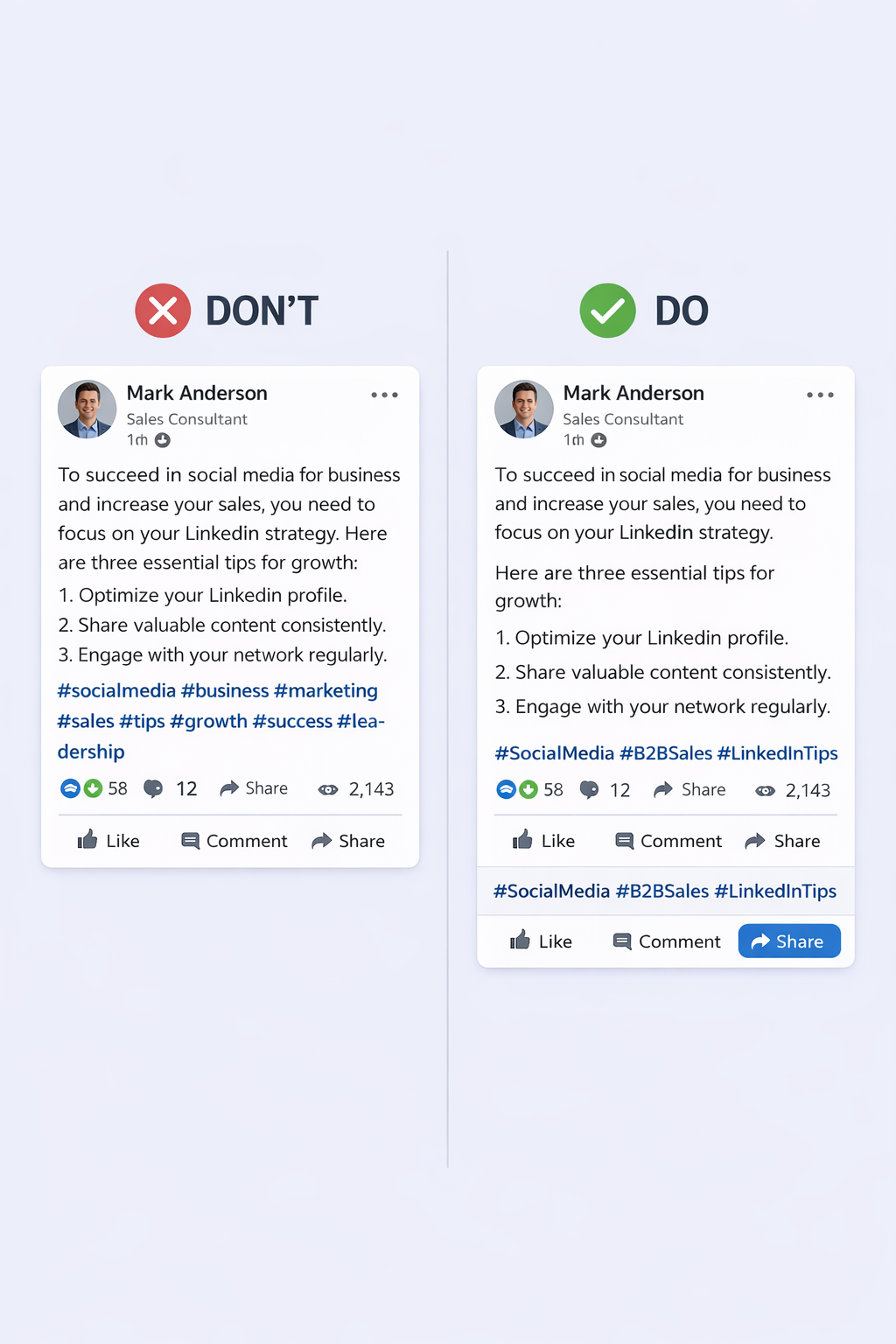
The 2025 consensus is clear: put hashtags at the end of your post. This keeps your main message clean and professional.
You can occasionally weave one hashtag naturally into your text—like “The future of sales automation is changing fast”—but save most tags for the bottom.
Here’s the format that works:
[Your post content]
[One line break]
#Hashtag1 #Hashtag2 #Hashtag3
Never bury hashtags in the middle of long paragraphs. The algorithm can read them anywhere, but humans can’t—and dwell time (how long people stay on your post) is a major ranking factor.
The Pascal Case Standard
Always capitalize the first letter of each word in multi-word hashtags: #SocialMediaMarketing, not #socialmediamarketing.
This isn’t just for looks. Pascal Case makes hashtags 73% easier to read and helps screen readers interpret them correctly for accessibility. It’s the professional standard everyone follows in 2025.
Avoid punctuation like hyphens (#Social-Media) or underscores (#Social_Media). They break the tag’s indexing and look sloppy.
Top-Performing LinkedIn Hashtags by Industry
Generic hashtags like #Leadership or #Innovation get you some reach, but industry-specific tags put you in front of people who actually need your expertise.
Here are the highest-engagement hashtag combinations for major industries in 2025:
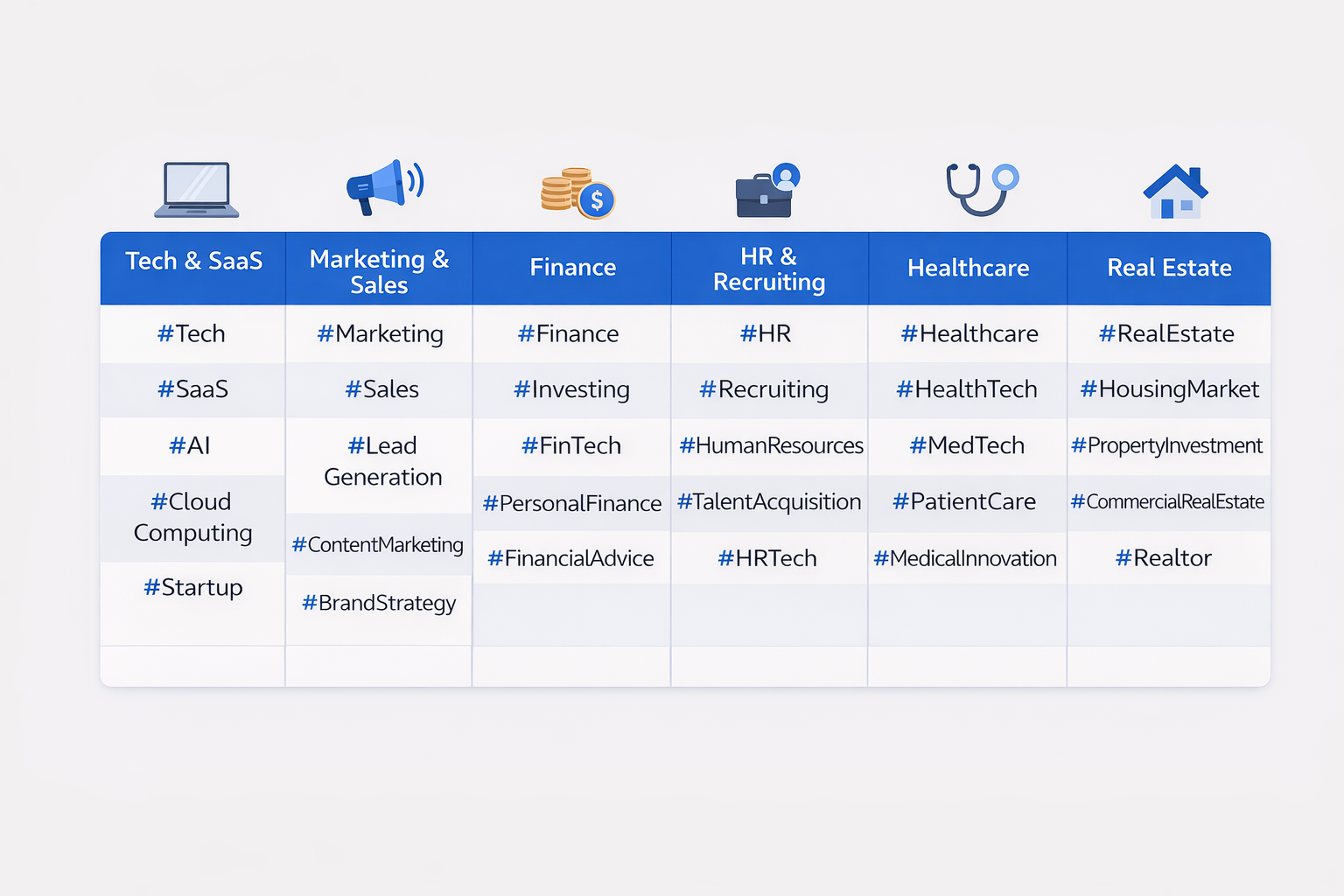
Tech & SaaS: #Technology, #SaaS, #AI, #CloudComputing, #ProductDevelopment
Marketing & Sales: #Marketing, #DigitalMarketing, #ContentMarketing, #B2BMarketing, #GrowthHacking
Finance & Investment: #Finance, #FinTech, #Investing, #WealthManagement, #CryptoNews
HR & Recruiting: #HumanResources, #Hiring, #TalentAcquisition, #EmployeeEngagement, #WorkplaceCulture
Healthcare: #Healthcare, #HealthTech, #MedicalDevices, #DigitalHealth, #PatientCare
Real Estate: #RealEstate, #CommercialRealEstate, #PropertyInvestment, #Construction, #PropTech
The pattern? Mix a general industry tag with specific functional areas. If you’re in tech recruiting, combine #Technology + #Hiring + #TechJobs for precision targeting.
Bonus for job seekers: When posting about your career transition, add #OpenToWork, #JobSearch, and your specific role like #MarketingJobs to appear in recruiter searches.

📊 Tired of Posting Without Results?
Our LinkedIn outbound engine books qualified meetings while you focus on closing deals
7-day Free Trial |No Credit Card Needed.
Special Strategy: Hashtags for LinkedIn Job Posts
Hiring? Your hashtags directly affect who sees your job opening. 71% of recruiters say LinkedIn is their top platform for finding candidates, but most job posts use terrible hashtag strategies.
For job posts, you need four hashtag types:
- Career Tags: #Hiring, #JobOpening, #WeAreHiring 2. Role-Specific: #SalesJobs, #EngineeringCareers, #DesignRoles 3. Location/Model: #RemoteJobs, #NYCJobs, #HybridWork 4. Culture/Values: #StartupLife, #DiversityAndInclusion, #GrowthOpportunity
Example job post stack for a remote marketing role: #Hiring #MarketingJobs #RemoteWork #DigitalMarketing #B2BMarketing
This targets active job seekers (#Hiring), role-specific professionals (#MarketingJobs), and passive candidates following industry content (#B2BMarketing).
Critical insight: Passive candidates (people not actively job searching) make up 70% of the workforce. Industry hashtags let you reach them where they’re already engaging—in their feed, not on job boards.
Common Hashtag Mistakes That Kill Your Reach
Even experienced LinkedIn users make these reach-killing errors:
Mistake #1: Using irrelevant trending tags Don’t add #AI to your post about office culture just because it’s popular. LinkedIn’s algorithm checks if your hashtags match your content. Mismatches = lower reach.
Mistake #2: Copying competitor hashtags blindly What works for a 50K-follower account won’t work the same for yours. Test your own combinations based on your audience’s engagement patterns.
Mistake #3: Never updating your hashtag strategy Hashtag popularity shifts quarterly. #ContentMarketing might be saturated now while #ContentStrategy is gaining traction. Review your tags every 90 days.
Mistake #4: Forgetting branded hashtags Create a company hashtag like #[YourCompany]Insights to aggregate your team’s content. It builds brand recognition and makes your posts searchable.
Mistake #5: Using only broad hashtags A post with #Business #Success #Leadership competes with millions of posts. Add niche tags like #SalesEnablement or #RevOps to reach specific audiences who convert better.
For advanced LinkedIn search techniques that complement your hashtag strategy, combining both methods amplifies your visibility significantly.
The Real Power of LinkedIn Hashtags: Social Selling ROI
Here’s what nobody talks about: hashtags aren’t just for content reach. They’re your first touch in a multi-channel outreach strategy.
Social selling statistics from 2025:
- LinkedIn outreach gets 42% response rates vs 26% for email and 23% for phone
- LinkedIn DMs have 10.3-16.9% response rates compared to 5.1% for cold emails
- Professionals with strong LinkedIn presence are 51% more likely to hit quota
- Social sellers close deals that are 42% larger on average
When someone sees your well-tagged post in their feed on Monday, they’re significantly warmer to your DM or email on Wednesday. This “surround sound” effect is why savvy professionals post consistently with strategic hashtags before reaching out.
You’re not just building reach—you’re building familiarity. And familiarity converts.
According to LinkedIn usage data, buying power on LinkedIn is 2x higher than average social media users. Every hashtag-optimized post is a chance to appear in front of high-value decision-makers.
Quick Implementation Checklist
Ready to implement this? Here’s your action plan:
✅ Audit your last 10 posts—are you using 3-5 hashtags consistently? ✅ Research 15-20 relevant hashtags for your industry (mix of broad, mid-tier, and niche) ✅ Check follower counts—aim for variety from 10K to 10M+ ✅ Create 3-4 standard hashtag stacks for different post types ✅ Switch all hashtags to Pascal Case (#LikeThis) ✅ Move hashtags to the end of posts for clean formatting ✅ Track which combinations get the most engagement over 30 days ✅ Refine your strategy based on data, not guesses
The difference between mediocre and exceptional LinkedIn results often comes down to these small, systematic optimizations.
Conclusion
LinkedIn hashtags in 2025 aren’t about gaming the system—they’re about helping the algorithm connect your expertise with people actively seeking it.
Stick to 3-5 targeted hashtags, use Pascal Case, place them at the end, and mix broad reach with niche precision. Test different combinations for 30 days and double down on what works for your specific audience.
Most importantly: hashtags amplify good content but can’t save bad content. Focus on providing real value first, then use strategic tagging to ensure that value reaches the right people.
Want to see which hashtags perform best for your posts? Look at your top 3 performing posts from the last month and identify the common tags. That’s your baseline winning combination.
FAQs
How many hashtags should I use on LinkedIn in 2025?
Can I use the same hashtags for every post?
What's the difference between following a hashtag and using one?
Should hashtags go at the beginning or end of my post?
Do hashtags work in LinkedIn comments?
- blog
- Sales Development
- LinkedIn Hashtags Guide 2026: Boost Your Reach Fast