

Your emails aren’t reaching the inbox. And you probably don’t even know it.Here’s the brutal truth: one in six emails never reaches the primary inbox, even when they show “delivered” in your dashboard. That 99% delivery rate you’re celebrating? It might be hiding a catastrophic 50% spam folder placement that’s killing your revenue.
If you’re tracking opens and replies instead of inbox placement rate, you’re flying blind. This guide reveals the 9 best inbox placement tools that’ll show you exactly where your emails land – before you waste another campaign.
What Are Inbox Placement Tools?
Think of inbox placement tools as X-ray machines for your email campaigns. While your email platform tells you an email was “delivered,” these tools reveal the real story: did it land in the primary inbox, promotions tab, or spam folder?
Here’s how they work:
- Seed List Testing: The tool maintains hundreds of real email accounts across major providers (Gmail, Outlook, Yahoo)
- Real-Time Monitoring: You send your campaign to these seed addresses
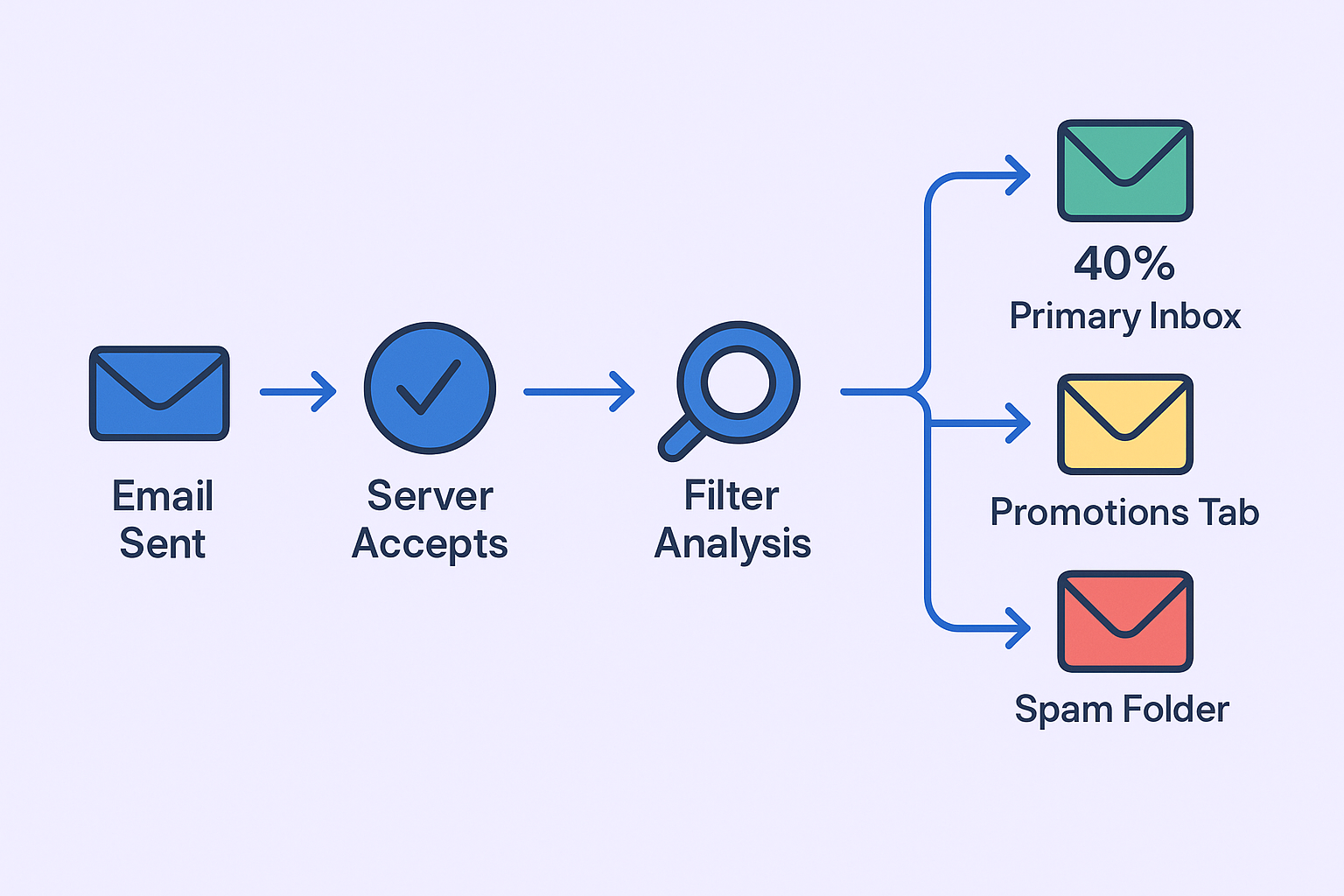
- Placement Tracking: The tool checks where each email landed across different providers
- Detailed Reporting: You get a breakdown showing exact placement rates by provider
The Critical Difference: Deliverability vs. Inbox Placement
Most marketers obsess over the wrong metric:
- Email Deliverability: Whether the email server accepted your message (usually 98%+)
- Inbox Placement: Where that email actually landed after acceptance
A 99% delivery rate with 50% spam placement means half your emails are invisible. That’s why inbox placement rate (IPR) is the only metric that matters for revenue.
Non-negotiable Features for Inbox Placement Tools
Not all inbox placement tools are created equal. Here’s your checklist for separating the winners from the wannabes:
1. Comprehensive Seed List Coverage
Your tool needs real, active inboxes across major providers:
- Gmail, Outlook, Yahoo (the big three)
- Corporate filters (Barracuda, Mimecast, Office 365)
- Regional providers for global campaigns
- Mobile vs. desktop placement tracking
Red flag: Tools using fake or simulated inboxes produce useless data.
2. Provider-Specific Breakdown
You need granular data showing performance by provider. Gmail might love your emails while Outlook sends them to spam. Without provider-specific insights, you’re shooting in the dark.
3. Technical Authentication Monitoring
The tool must validate your sending infrastructure:
- SPF records: Prevents domain spoofing
- DKIM signatures: Verifies message authenticity
- DMARC policies: Protects against phishing
- Blacklist monitoring: Real-time reputation alerts

4. Content Analysis & Spam Scoring
Pre-flight content checks catch problems before they tank your sender reputation:
- Spam trigger word detection
- Link reputation analysis
- HTML/formatting issues
- Subject line optimization
5. Automated Testing & Alerts
Manual testing is for amateurs. Your tool should offer:
- Scheduled recurring tests
- Real-time alerts when placement drops
- Campaign pause triggers for reputation protection
- Historical performance tracking
TL;DR – Quick Overview of Top 9 Inbox Placement Tools
Tool | Best For | Starting Price | Key Strength | G2 Rating |
Salesso | All-in-One Cold Email | $29/month | Integrated deliverability + outreach | 4.8/5 |
GlockApps | Deliverability Specialists | $59/month | Deep technical analysis | 3.7/5 |
Folderly | Hands-Off Management | $96-120/mailbox | AI-powered fixes | 4.8/5 |
Mailgun Optimize | Developers | $49/month | API-first approach | 4.2/5 |
MxToolbox | IT Administrators | $129/month | Technical infrastructure focus | 4.1/5 |
Instantly | High-Volume Agencies | $37/month | Unlimited scaling | 4.8/5 |
Smartlead | Cold Outreach Teams | $39/month | Multi-mailbox management | 4.6/5 |
SendForensics | Enterprise Teams | $299/month | Advanced forensics | 4.3/5 |
Litmus | Email Marketers | $79/month | Design + deliverability | 4.4/5 |
In-Depth Review of 9 Best Inbox Placement Tools
1. Salesso – The All-in-One Cold Email Powerhouse
Best for: Teams wanting deliverability monitoring built into their outreach platform
Salesso combines cold email prospecting, sending, and deliverability testing in one platform. Unlike standalone tools that require integration headaches, everything works together seamlessly.
Key Features:
- Built-in inbox placement testing across 20+ providers
- Automatic campaign pausing when IPR drops below threshold
- Real-time sender reputation monitoring
- Email warm-up and authentication setup
- Integrated lead finding and verification
Pricing: Starting at $29/month with deliverability suite included
Why It Wins: You’re not juggling multiple tools. Test placement, fix issues, and send campaigns from one dashboard. Perfect for sales teams who want simplicity without sacrificing power.
2. GlockApps – The Technical Deep Dive
Best for: Deliverability experts who need granular data across maximum ISPs
GlockApps offers the most comprehensive seed list testing, covering obscure regional providers and enterprise spam filters that other tools miss.
Key Features:
- 90+ ISP coverage including international providers
- Enterprise spam filter testing (SpamAssassin, Barracuda)
- DMARC aggregate reporting
- Google Postmaster Tools integration
- Detailed forensic analysis
Pricing: $59/month for Essential plan (credit-based system)
The Reality Check: Recent price hikes and inconsistent support have frustrated users. Great for technical depth, questionable for customer experience.
3. Folderly – The AI-Powered Fixer
Best for: Non-technical teams with budget who want hands-off management
Folderly promises to not just diagnose problems but fix them automatically using AI algorithms.
Key Features:
- AI-based spam fix algorithms
- Automated technical record fixes
- White-glove setup and management
- Continuous domain health monitoring
- Modern, visual interface
Pricing: $96-120 per mailbox per month (requires sales consultation)
The Warning: Some users report the automated warm-up sent thousands of uncontrolled emails, damaging their reputation. High price, limited control.
4. Mailgun Optimize – The Developer’s Choice
Best for: Technical teams building email functionality into applications
Mailgun’s deliverability suite integrates seamlessly with their email API, perfect for developers who need programmatic access.
Key Features:
- Powerful API for custom integrations
- Real-time email validation
- Sender reputation monitoring
- Header analysis for complex troubleshooting
- Enterprise-grade infrastructure
Pricing: $49/month for Pilot plan
Bottom Line: Excellent for technical teams, overkill for simple marketing use cases. The interface feels dated but the reliability is unmatched.
5. MxToolbox Delivery Center – The Infrastructure Guardian
Best for: IT administrators focused on email infrastructure health
MxToolbox excels at the technical foundation – DNS records, blacklist monitoring, and compliance management.
Key Features:
- 100+ blacklist monitoring
- SPF record flattening (solves 10-lookup limit)
- DMARC deployment assistance
- End-to-end mail flow monitoring
- Threat investigation tools
Pricing: $129/month for standard, $399/month for Plus
Reality: Powerful for infrastructure but limited campaign-specific insights. Better for IT teams than marketers.
6. Instantly – The High-Volume Scaling Machine
Best for: Agencies and teams sending massive cold email volumes
Instantly’s “unlimited mailboxes” model makes it perfect for scaling cold outreach without per-mailbox costs.
Key Features:
- Unlimited email warm-up
- Auto-rotating sender accounts
- Built-in placement testing
- Unified inbox for reply management
- A/Z testing capabilities
Pricing: $37/month for Growth plan
User Feedback Mixed: High G2 ratings but recent reports of bugs and poor support. Growing pains from rapid scaling.
7. Smartlead – The Multi-Mailbox Master
Best for: Teams managing multiple sender accounts for cold outreach
Smartlead specializes in multi-mailbox management with built-in deliverability features.
Key Features:
- Unlimited mailbox connections
- SmartDelivery placement testing
- Advanced AI personalization
- Campaign rotation across accounts
- Integrated warm-up system
Pricing: $39/month for Basic plan
The Verdict: Strong feature set and competitive pricing, but support quality varies by user experience.
8. SendForensics – The Enterprise Solution
Best for: Large enterprises needing advanced forensic analysis
SendForensics provides military-grade email intelligence for complex deliverability challenges.
Key Features:
- Advanced threat intelligence
- Forensic email analysis
- Enterprise security integration
- Custom reporting and analytics
- Dedicated success management
Pricing: $299/month and up (enterprise focus)
Who Needs This: Large organizations with complex sending requirements and dedicated email teams.
9. Litmus – The Email Marketing Favorite
Best for: Email marketers who need design testing plus deliverability
Litmus combines inbox placement testing with email design and rendering tools.
Key Features:
- 90+ email client previews
- Inbox placement testing
- Spam filter testing
- Email analytics and tracking
- Collaboration tools for teams
Pricing: $79/month for Plus plan
Best Fit: Marketing teams sending designed newsletters and promotional emails, not cold outreach.
Precaution is Better Than Cure – Test Before You Send!!
Here’s your step-by-step blueprint for achieving 90%+ inbox placement:
Step 1: Fix Your Technical Foundation
Before testing anything, ensure your authentication is bulletproof:
- Verify SPF records authorize your sending servers
- Set up DKIM signatures for all sending domains
- Implement DMARC with at least p=quarantine policy
- Monitor blacklists for immediate reputation alerts
Pro tip: Use your chosen tool’s technical audit features first. Fix these basics before worrying about content optimization.
Step 2: Warm Up New Domains and Accounts
Never send cold campaigns from brand new accounts. ISPs flag sudden high-volume sending as spam behavior.
The warm-up process:
- Start with 5-10 emails daily
- Gradually increase by 10-15 emails per day
- Mix sending patterns (don’t send at exact times)
- Generate positive engagement through warm-up networks
- Continue for 2-4 weeks minimum
Most modern platforms (Salesso, Instantly, Smartlead) automate this process.

