
LinkedIn Headshot Statistics: The Data Behind Professional Profile Photos
- Sophie Ricci
- Views : 28,543
Table of Contents
LinkedIn Headshot Statistics
- Profiles with professional photos get 14x more views than those without – algorithm treats profiles without photos as inactive, bots, or not serious, burying them in search results
- Profiles with headshots receive 36x more messages – professional photo answers critical trust questions: Is this person real? Professional? Will they respond?
- People with professional photos receive 9x more connection requests – network grows faster when people can see who they’re connecting with, basic human nature
- 86% of recruiters and hiring managers screen profiles in 30 seconds or less – they scan photo, headline, and current position, not reading entire work history
- 100 milliseconds to form trustworthiness judgments – Princeton research shows this happens faster than conscious thought, instant assessment of competence and trust
- Upload at least 400 x 400 pixels minimum, 2,000 x 2,000 recommended – starting with high resolution ensures crisp appearance on 4K monitors and retina displays
- Face should occupy roughly 60% of frame – LinkedIn displays photos as circles, too much space makes face unrecognizable in thumbnail view
- Keep file size under 8MB using JPEG format – save at high quality to avoid compression artifacts making you look pixelated
- 57% of LinkedIn traffic comes from mobile phones – photo needs to pass squint test, must be recognizable from tiny circular thumbnail
- 76.5% of recruiters preferred AI-generated headshots when they didn’t know they were AI – lighting and composition were technically superior to real photos
- Two-thirds (66%+) said it would put them off completely when discovering photos were fake – once deception suspected, credibility is destroyed permanently
- All-Star profiles 40x more likely to receive opportunities – exponential advantage, not marginal improvement in opportunity generation
- All-Star profiles 18x more likely to appear in search results – professional photo is foundation requirement for All-Star status
- $300 typical investment in professional photography – pays for itself with one client, job offer, or partnership gained from increased visibility
- Smiling with teeth visible significantly increases perceived likability – closed-mouth smile not nearly as effective for building trust with strangers online
Ever wonder if that professional headshot is actually worth the investment? You’re about to find out.
Your LinkedIn profile photo isn’t just a nice-to-have anymore. It’s the digital handshake that happens before you ever meet someone. And the numbers prove it.
Whether you’re job hunting, building your network, or generating business, your profile picture is working for you 24/7. Let’s look at exactly what the data tells us about professional headshots.
The Numbers Don’t Lie: Core LinkedIn Headshot Statistics
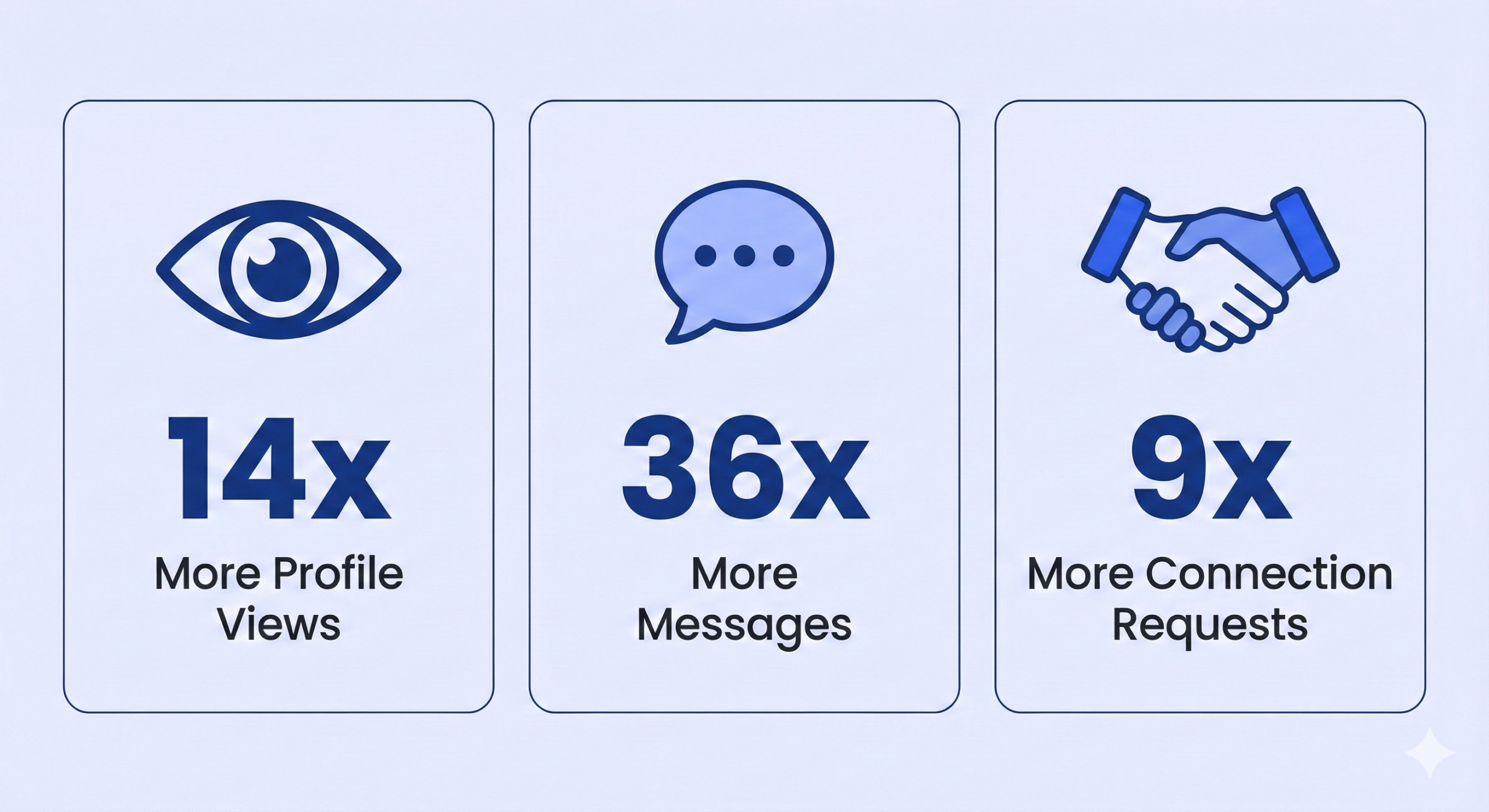
Profiles with professional photos get 14 times more views than those without. That’s not a typo. If you’re showing up as a grey silhouette, you’re essentially invisible.
Here’s why this matters: LinkedIn’s algorithm treats incomplete profiles differently. Without a photo, the platform assumes you’re inactive, a bot, or not serious about networking. You get buried in search results while your competitors with photos get discovered.
But visibility is just the beginning. Profiles with headshots receive 36 times more messages. Think about that from a practical standpoint. When someone considers reaching out to you, they’re asking themselves: “Is this person real? Are they professional? Will they respond?”
A missing photo raises red flags. A professional one answers “yes” to all three questions.
Â

Â
The connection stat is equally powerful: people with professional photos receive 9 times more connection requests. Your network grows faster when people can see who they’re connecting with. It’s human nature.
The 30-Second Window: First Impressions Happen Fast
Here’s something that should change how you think about your profile: 86% of recruiters and hiring managers screen profiles in 30 seconds or less.
In that half-minute, they’re not reading your entire work history. They’re scanning three things: your photo, your headline, and your current position. If any of those fail the credibility test, they move on.
Your photo gets processed first. Research from Princeton shows humans form trustworthiness judgments within 100 milliseconds of seeing a face. That’s faster than you can consciously think.
This “thin-slicing” happens whether you like it or not. Your brain is wired to instantly assess: competent or not? Trustworthy or suspicious? Approachable or standoffish?
The scary part? Once that snap judgment forms, it’s hard to reverse. Someone who sees a low-quality selfie or a cropped group photo has already made up their mind before reading a single word you’ve written.
📧 Cold Emails Getting Ignored?
LinkedIn messages get 10-25% response rates while cold emails struggle at 1-5%. We handle everything.
What Makes a Headshot Actually Work?
Not all professional photos are created equal. The data shows specific elements that boost how people perceive you.
Smiling with teeth visible significantly increases perceived likability. A closed-mouth smile isn’t nearly as effective. When you’re trying to build trust with strangers online, that warmth matters.
The “squinch” (slightly narrowed eyes) increases perceived competence. Wide eyes can signal uncertainty or fear. A slight squint projects confidence and focus without looking aggressive.
Formal business attire increases authority perception. A jacket signals you respect the platform and take your professional presence seriously. This doesn’t mean you need a full suit, but looking polished helps.
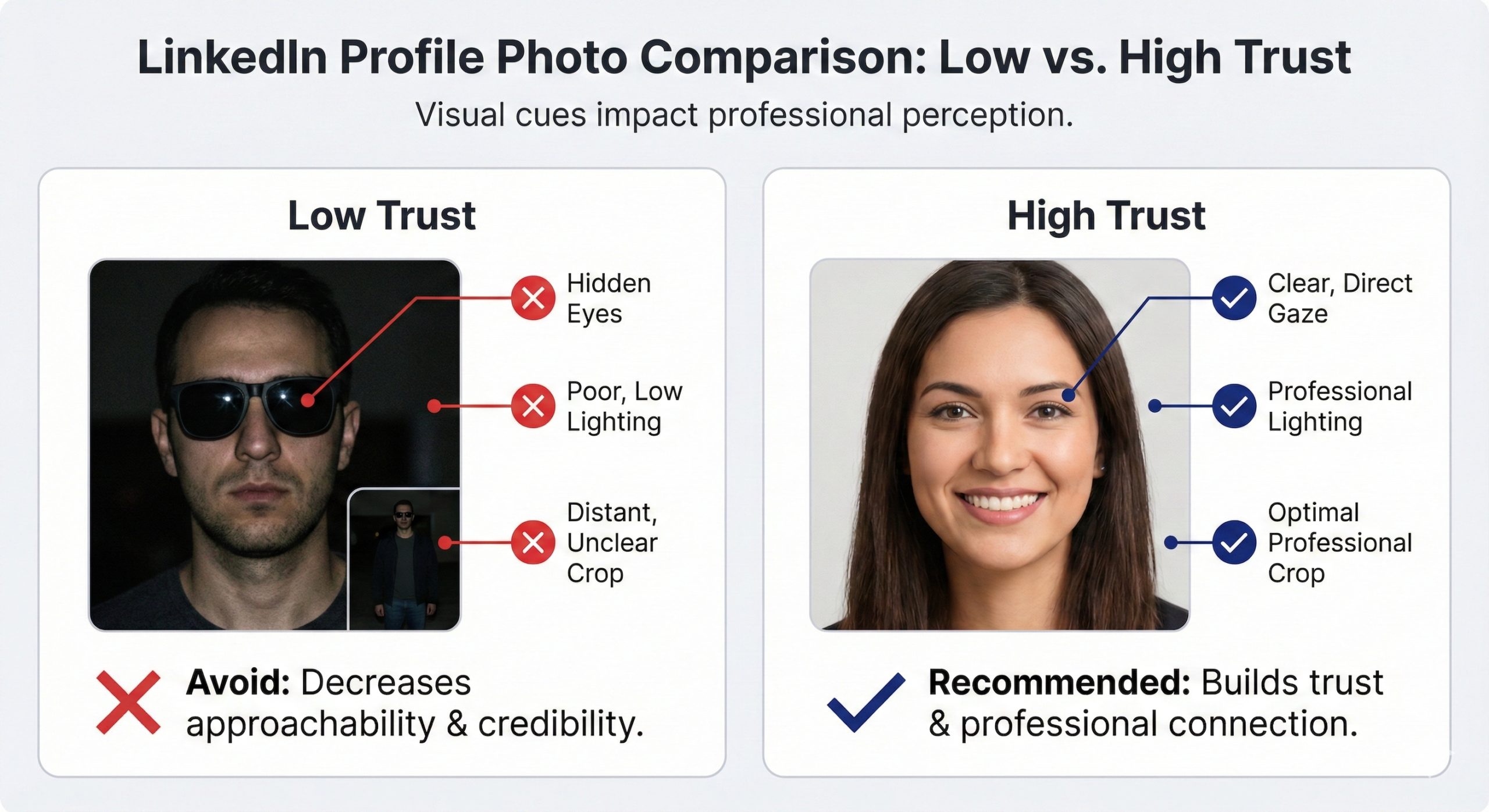
Your eyes must be clearly visible. Sunglasses, shadows, or hair obscuring your eyes kills trust instantly. The eyes are how humans read sincerity. Block them and you block connection.
Â

Â
Technical Specs That Actually Matter
You can have the perfect photo ruined by wrong upload settings. Here’s what works in 2025:
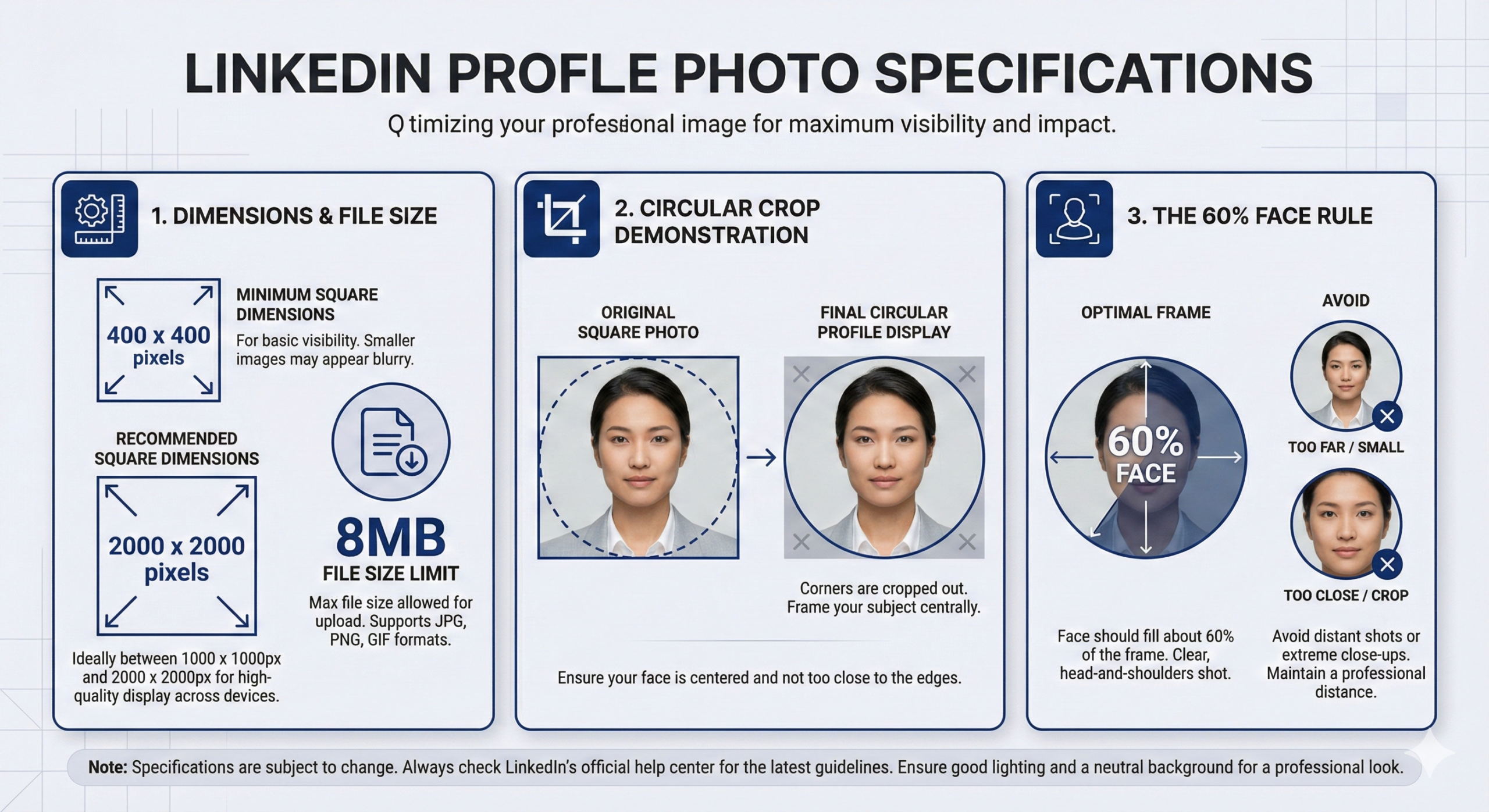
Upload at least 400 x 400 pixels (square format). That’s the minimum for acceptable sharpness. But honestly? Go bigger. Upload at 2000 x 2000 pixels. LinkedIn will compress it, but starting with high resolution ensures it looks crisp on 4K monitors and retina displays.
The platform shows your photo as a circle, but you upload a square. This means your face should occupy roughly 60% of the frame. Too much space around you and your face becomes unrecognizable in thumbnail view.
Keep file size under 8MB. Use JPEG format for photographs (better compression). Save at high quality to avoid compression artifacts that make you look pixelated.
Most importantly: test how it looks on mobile. With 57% of LinkedIn traffic coming from phones, your photo needs to pass the squint test. Can someone recognize you from a tiny circular thumbnail? If not, crop tighter.
🚀 Tired of Low Response Rates?
Our LinkedIn outbound engine delivers qualified meetings through proven targeting, campaign design, and scaling methods.
The Dark Side: Common Mistakes That Kill Trust
Using a group photo (even cropped) looks unprofessional. That floating hand or shoulder of someone else in frame screams “I couldn’t be bothered to take a proper photo.”
Selfies distort your face. The wide-angle lens on phone cameras makes your nose look bigger and your face rounder. It’s subtle but people can tell. Have someone else take your photo from 4-5 feet away.
Photos older than 2 years create the “catfish effect.” When you finally hop on a video call and look completely different, trust evaporates. Update your photo when you change glasses, hairstyle, or gain/lose significant weight.
The “Open to Work” green frame has a specific purpose for job seekers. If you’re not actively looking, remove it. For sales professionals, business owners, or freelancers, it signals instability.
Should You Use AI for Your Headshot?
This is controversial, but here’s what the data shows: 76.5% of recruiters preferred AI-generated headshots when they didn’t know they were AI. The lighting and composition were technically superior.
But when they discovered the photos were fake? Two-thirds said it would put them off completely.
The risk is real. If your AI headshot looks “too perfect” or has weird artifacts (plastic skin, unnatural hair), people will notice. And once they suspect deception, your credibility is shot.
If you use AI, make sure it’s indistinguishable from a real photo and actually looks like you. Otherwise, spend the $150-300 on a real photographer. Trust is too valuable to gamble with.
Â

Â
💼 Outbound Feels Too Hard?
Skip the technical setup. We build complete LinkedIn outbound systems that actually deliver results.
The ROI of Getting This Right
Let’s make this practical. If you’re sending connection requests, messages, or simply showing up in search results, your photo affects conversion rates across all of those touchpoints.
All-Star profiles (which require a photo) are 40 times more likely to receive opportunities and 18 times more likely to appear in search results. That’s not marginal improvement. That’s exponential advantage.
For business development, the math is simple: more visibility + more trust = more conversations. Those conversations turn into relationships. Relationships turn into revenue.
A $300 investment in professional photography that increases your profile views by 14x pays for itself the moment you land one client, one job offer, or one partnership you wouldn’t have gotten otherwise.
Quick Action Checklist
Before you finish reading, here’s what you should do this week:
Look at your current profile photo honestly. Does it pass the squint test on mobile? Would you trust this person?
If not, schedule a professional photographer or use an AI tool that produces hyper-realistic results. Search “linkedin headshots near me” to find local options.
Make sure you’re smiling with teeth, eyes are clear and visible, wearing professional attire, and the background isn’t distracting.
Upload at high resolution (2000 x 2000 pixels), test on mobile, and get feedback from three people you trust.
Your LinkedIn profile is working 24/7. Make sure it’s working in your favor.
🎯 Ready for Better Results?
LinkedIn outbound gets you direct access to decision-makers without deliverability headaches or spam filters.
7-day Free Trial |No Credit Card Needed.
The ROI of Getting This Right
Let’s make this practical. If you’re sending connection requests, messages, or simply showing up in search results, your photo affects conversion rates across all of those touchpoints.
All-Star profiles (which require a photo) are 40 times more likely to receive opportunities and 18 times more likely to appear in search results. That’s not marginal improvement. That’s exponential advantage.
For business development, the math is simple: more visibility + more trust = more conversations. Those conversations turn into relationships. Relationships turn into revenue.
A $300 investment in professional photography that increases your profile views by 14x pays for itself the moment you land one client, one job offer, or one partnership you wouldn’t have gotten otherwise.
Quick Action Checklist
Before you finish reading, here’s what you should do this week:
Look at your current profile photo honestly. Does it pass the squint test on mobile? Would you trust this person?
If not, schedule a professional photographer or use an AI tool that produces hyper-realistic results. Search “linkedin headshots near me” to find local options.
Make sure you’re smiling with teeth, eyes are clear and visible, wearing professional attire, and the background isn’t distracting.
Upload at high resolution (2000 x 2000 pixels), test on mobile, and get feedback from three people you trust.
Your LinkedIn profile is working 24/7. Make sure it’s working in your favor.
FAQs
Does having a professional headshot actually improve my chances of getting hired or making sales?
What are the ideal dimensions for a LinkedIn profile photo in 2025?
Should I smile in my LinkedIn headshot?
How often should I update my LinkedIn profile picture?
Is it okay to use an AI-generated headshot?
- blog
- Statistics
- LinkedIn Headshot Statistics: Profile Photo Impact Data 2026
