
LinkedIn InMail Statistics: The Numbers That Actually Matter in 2025
- Sophie Ricci
- Views : 28,543
Table of Contents
LinkedIn InMail Statistics
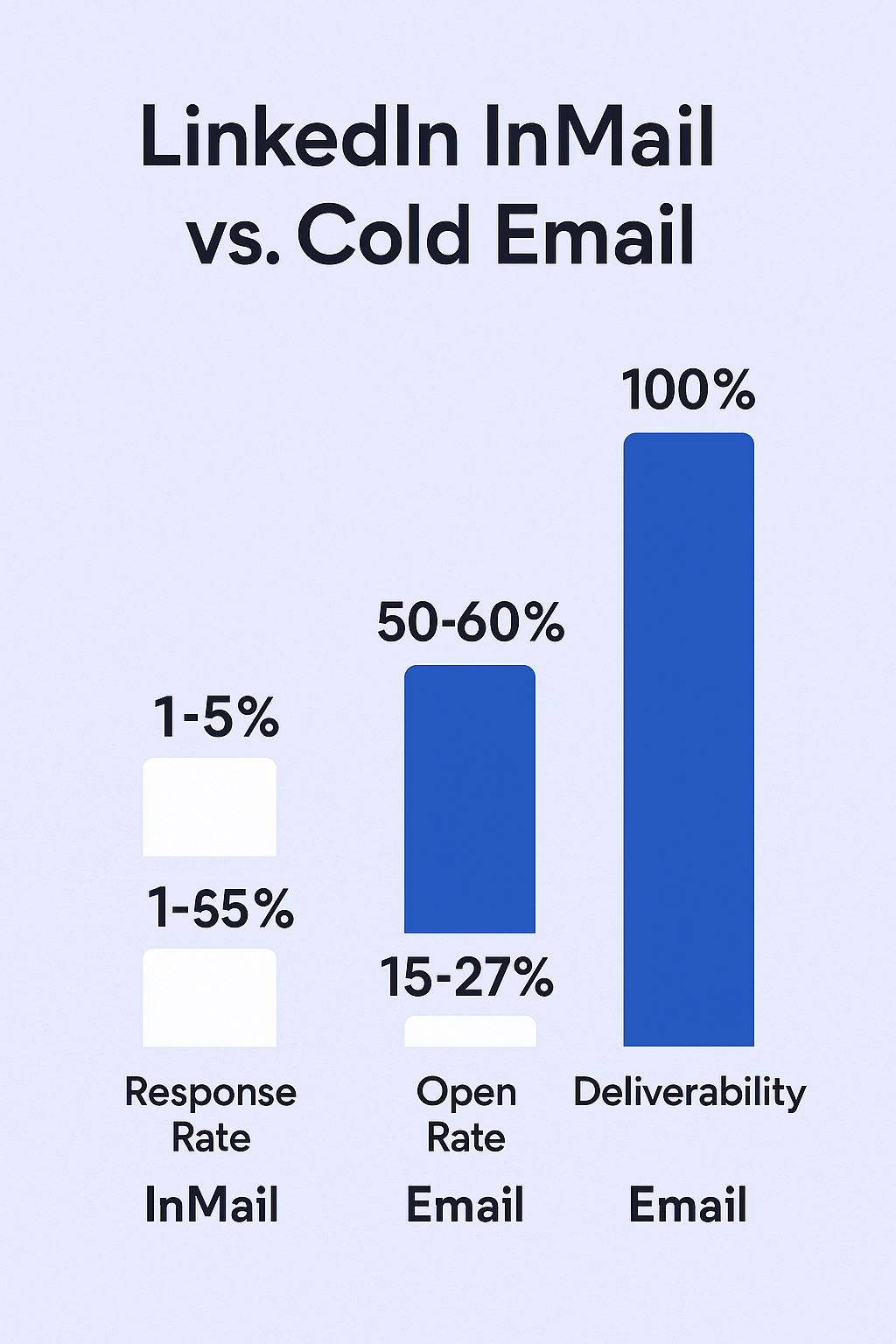
Average InMail response rate is 10-25% – compared to cold email’s 1-5%, representing a 400-500% improvement in engagement
Top performers achieve 30-40% response rates – while top-performing cold emails barely crack 12%, showing InMail’s superior effectiveness
InMail deliverability is nearly perfect at 100% – compared to only 83% of cold emails reaching the inbox, with 17% bouncing or landing in spam
InMail open rates reach 50-60% – while cold emails average just 15-27%, meaning InMails are twice as likely to be seen
57-70% of LinkedIn traffic happens on mobile devices – requiring mobile-optimized messaging for maximum impact
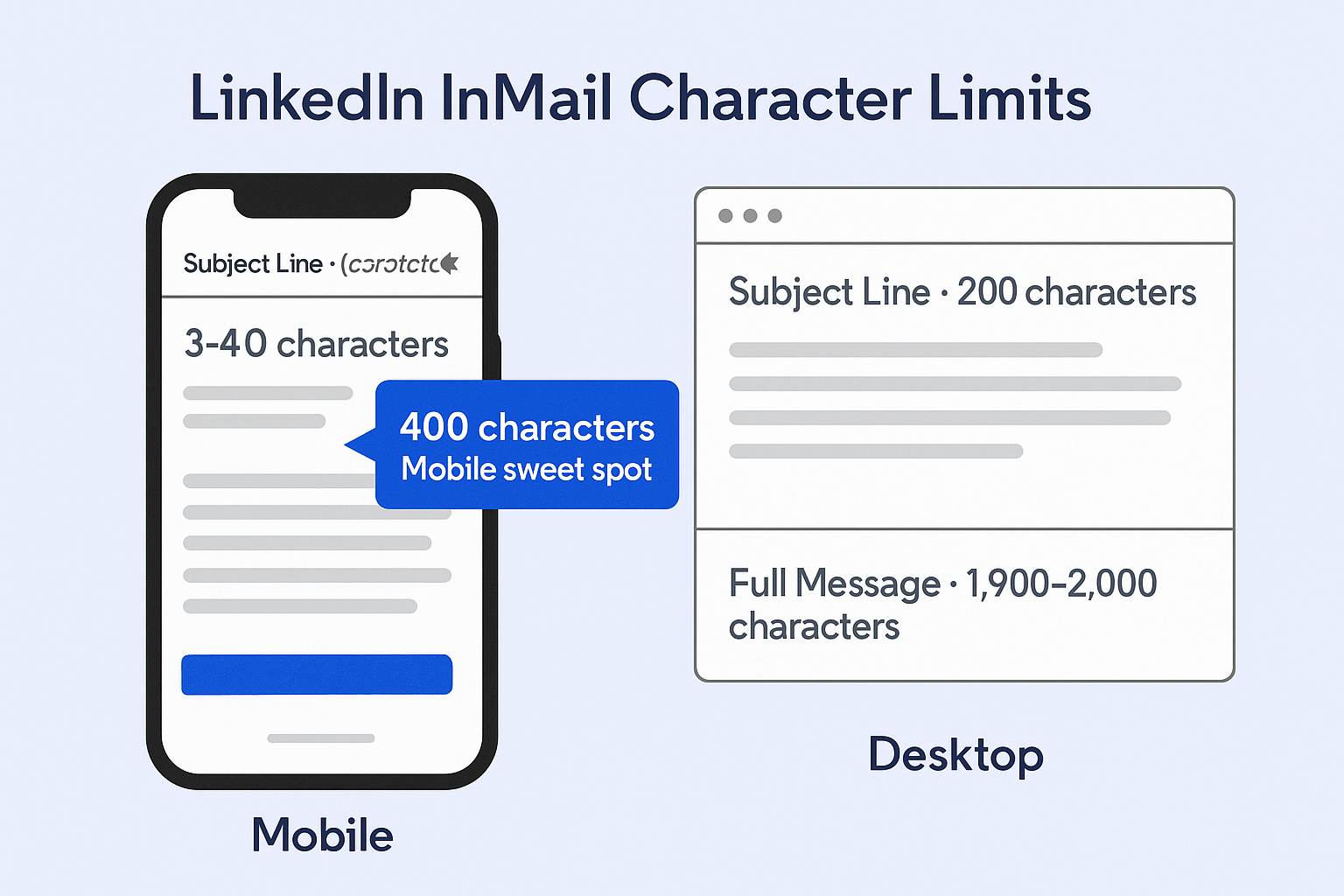
Subject lines get cut off at 30-40 characters on mobile – despite desktop showing 200 characters, requiring hooks in the first 30 characters
Messages under 400 characters get 22% higher response rates – than longer ones, with roughly 50-70 words being optimal
InMail character limit is 1,900-2,000 characters – for the message body, though shorter performs better
LinkedIn refunds InMail credits if recipient replies within 90 days – incentivizing quality messaging over spam
Recruiting sees 18-25% average response rate – the highest-performing industry for InMail engagement
SaaS & Software only achieves 4.77% response rate – the hardest vertical due to overwhelming volume of automated outreach
Sales Navigator Core includes 50 InMail credits per month – with credits rolling over up to 150 maximum (three months’ worth)
Subject line sweet spot is 16-27 characters – showing highest open rates of 11.6-15.2%, equating to 3-5 words
LinkedIn limits connection requests to approximately 100 per week – regardless of subscription level, with violations triggering restrictions
Combining InMails with other channels increases engagement by 287% – making multichannel sequences far more effective than InMail alone
Here’s something that might surprise you: while your cold emails are sitting in spam folders, LinkedIn InMails are getting opened and read.
The numbers don’t lie. LinkedIn InMail response rates hover between 10-25%, while traditional cold emails struggle to break 5%. That’s not a small difference—it’s a complete game-changer for anyone trying to reach decision-makers.
But here’s the catch: most people mess up LinkedIn InMails because they don’t understand the technical limits and psychology behind what works. They treat it like email, hit send, and wonder why nobody responds.
This article breaks down the real linkedin inmail statistics you need to know—from character limits that can kill your message before it’s read, to the response rates that separate winning outreach from wasted credits. No fluff, just the numbers that matter and what they mean for your outreach strategy.
LinkedIn InMail Statistics
The Response Rate Reality Check
Let’s start with the number everyone cares about: how many people actually respond to LinkedIn InMails?
The average response rate for linkedin inmail messages is 10-25%. Compare that to cold email’s 1-5% response rate, and you’re looking at a 400% to 500% improvement in engagement.
Â

Â
But that’s just the average. The best performers? They’re seeing 30-40% response rates on their InMail campaigns. Meanwhile, top-performing cold emails barely crack 12%.
Here’s what drives that massive difference:
Deliverability is nearly perfect. LinkedIn InMails land directly in your prospect’s message feed—no spam filters, no promotional tabs, no delivery issues. Your message gets delivered 100% of the time. Cold emails? Only 83% actually reach the inbox, with 17% bouncing or landing in spam.
Open rates tell the same story. LinkedIn inmails see 50-60% open rates, while cold emails average just 15-27%. That means your message is twice as likely to even be seen.
The Mobile Factor Nobody Talks About
Here’s where most outreach dies: 57-70% of LinkedIn traffic happens on mobile devices.
Think about what that means. Your prospect is scrolling LinkedIn on their phone during lunch, or checking messages between meetings. They see your InMail preview on a tiny screen.
This is where the linkedin inmail character limit becomes critical:
Â

Â
- Subject lines get cut off at 30-40 characters on mobile. Desktop shows 200 characters, but mobile is ruthless. If your hook isn’t in the first 30 characters, it’s invisible.
- Message previews show only the first 8-10 words. That’s your entire first sentence on mobile. Start with “I hope this message finds you well…” and you’ve already lost.
- Full messages max out at 1,900-2,000 characters. But here’s the kicker: messages under 400 characters (roughly 50-70 words) get 22% higher response rates than longer ones.
Why? Because a long paragraph on mobile looks like a wall of text. It screams “this will take effort to read.” Short messages feel quick and easy—so people actually read them.
Industry-Specific LinkedIn InMail Performance
Not all industries respond the same way to linkedin inmail. Here’s what the data shows:
Â

Â
Recruiting crushes it: 18-25% average response rate. Makes sense—candidates are looking for opportunities.
Legal and Professional Services: 10.42% response rate. These professionals network for a living and actually respond to relevant outreach.
Healthcare: 9.25% response rate. Good engagement, but only if your message is highly relevant.
Retail & Consumer Goods: 9.17% response rate. Solid mid-range performance.
Marketing & Advertising: 7-9% response rate. These folks are bombarded with pitches, so they’re pickier.
SaaS & Software: 4.77% response rate. The hardest vertical. Tech buyers are drowning in automated outreach and have developed “banner blindness” to generic messages.
The takeaway? If you’re reaching out to tech companies, you need hyper-personalization. Generic templates are basically wasted credits.

💡 Better Than Managing InMail Credits
We Handle Targeting, Messaging & Scaling—15-25% Response Rates Guaranteed
Credit Economics and the Refund Mechanism
Here’s a crucial detail most people don’t know: if someone replies to your InMail within 90 days, LinkedIn refunds your credit.
Think about what that means. Send 50 InMails. Get 20 responses (40% response rate). You just got 20 credits back. That’s 40% of your monthly allocation, recycled for more outreach.
This creates a powerful incentive for quality over quantity. Spam messages get zero replies and burn through credits. High-quality, personalized messages get replies, get credits back, and keep your outreach engine running.
The credit allocation varies by subscription:
- Premium Career: 5 InMail credits/month
- Premium Business: 15 InMail credits/month
- Sales Navigator Core: 50 InMail credits/month
- Recruiter Professional: 100-150 InMail credits/month
Credits roll over month-to-month, but there’s a cap at three months’ worth. For Sales Navigator users, that’s 150 credits maximum. Hit the cap, and new credits are forfeited.
🚀 No Credit Limits. No Caps.
Our LinkedIn Outbound Reaches Decision-Makers Without Platform Restrictions
The Technical Specs That Kill Messages
Beyond character limits, here are the linkedin inmail specs that can make or break your outreach:
Connection request notes: 300 characters maximum. That’s it. No room for a pitch. Just enough to spark interest.
Direct messages (after connecting): ~8,000 characters. Much more room to work with, but only available after you’re connected.
Subject line sweet spot: 16-27 characters. This length shows the highest open rates (11.6-15.2%). Three to five words, maximum.
Commercial use limits exist. LinkedIn tracks your activity. View too many profiles too fast? You hit “commercial use” restrictions. Send too many connection requests? You get temporarily blocked. Roughly 100 connection requests per week is the safe limit, regardless of subscription level.
âš¡ Avoid Account Restrictions Completely
We Scale Your Outreach Without Risking Your Personal LinkedIn Account
What Makes InMails Win (Besides Better Deliverability)
The psychology of LinkedIn InMail response rates comes down to three factors:
Trust through context. When someone receives your InMail, one click shows your face, job history, mutual connections, and endorsements. That’s instant credibility. With cold email, they have to Google you—and most people won’t bother.
The scarcity signal. Recipients know InMails cost credits. That means you spent a finite resource to reach them specifically. It signals importance and thoughtfulness in a way free emails never can.
Professional context. LinkedIn is work mode. People expect professional outreach there. Email inboxes are a mess of newsletters, receipts, and spam. Your message gets lumped in with all that noise.
Timing and Strategy
Mid-week wins. Tuesday, Wednesday, and Thursday see the best engagement. Monday is chaos. Friday is checked-out mode.
Morning matters. Messages sent between 9-10 AM (recipient’s local time) align with the “morning LinkedIn scroll” many professionals do with coffee.
Sunday evening surprise. While total volume is low, Sunday evening can be highly effective for reaching executives who are planning their week. Zero inbox competition.
The Multichannel Multiplier Effect
Here’s the real power move: combining LinkedIn InMails with other channels increases engagement by 287%.
A typical high-performing sequence:
- View their LinkedIn profile (creates awareness)
- Send a personalized connection request
- Follow up with cold email (different angle)
- Make a phone call attempt
- Send the LinkedIn InMail as a “nudge” reference
By the time your InMail arrives, they’ve seen your name multiple times. That repetition builds familiarity, making the InMail feel less like cold outreach and more like a persistent professional trying to connect.
This is why social selling strategies that integrate multiple touchpoints consistently outperform single-channel approaches.
Open Profiles: The Hidden Hack
Premium LinkedIn users can set their profile to “Open,” allowing anyone to message them for free—no InMail credit needed.
Smart move: before sending a paid InMail, check if the profile is Open. If it is, send a standard message and save your credit for “closed” profiles (usually higher-level executives).
In Sales Navigator, Open Profiles are marked with a specific icon. Filter your target list to prioritize these free-to-contact prospects first.
When InMail Doesn’t Work
LinkedIn InMail isn’t magic. It fails when:
Messages are generic. “I help companies grow” doesn’t cut it. Reference their specific situation.
Subject lines are vague. “Quick question” is the kiss of death. Be specific: “Your post on Q4 sales challenges”
You’re selling too hard. Nobody likes being pitched immediately. Start with value or insight.
You ignore mobile optimization. Remember: most people see your message on a tiny screen. Short sentences. Clear value. Immediate hook.
🎯 Done-For-You LinkedIn Outbound
Complete Targeting, Campaign Design & Scaling—Without The Manual Work
7-day Free Trial |No Credit Card Needed.
The Better Alternative?
Here’s something worth considering: while linkedin inmail works better than cold email, it still requires credits, character limits, and platform restrictions.
That’s why some companies are shifting to LinkedIn outbound strategy services that handle the entire process—targeting, messaging, and scaling—without burning through your personal InMail credits or risking account restrictions.
If you’re spending hours crafting perfect InMails and still hitting rate limits, it might be time to explore a done-for-you approach. Lead generation for B2B SaaS has evolved beyond individual outreach—it’s about systematic, scalable strategies that don’t depend on your personal LinkedIn account.
Conclusion
The linkedin inmail statistics are clear: 10-25% response rates beat cold email by a massive margin. But success isn’t just about sending InMails—it’s about understanding the technical limits, mobile realities, and psychological triggers that make people respond.
The 400-character sweet spot isn’t arbitrary—it’s about respecting your prospect’s time and attention. The subject line character limits aren’t suggestions—they’re hard stops that kill your message if you ignore them.
Most importantly, the refund mechanism rewards quality. Send thoughtful, relevant inmail messages and you get credits back. Send spam and you burn through your allocation with nothing to show for it.
The choice is yours: master the technical specs and psychology, or keep wondering why nobody responds.
FAQs
What is the average response rate for LinkedIn InMails?
What is the LinkedIn InMail character limit?
Do LinkedIn InMails work better than cold emails?
What happens to unused LinkedIn InMail credits?
Can I get my LinkedIn InMail credit back?
What's the best length for a LinkedIn InMail subject line?
- blog
- Statistics
- LinkedIn InMail Statistics 2026: Response Rates & Key Data