
🎉Find Prospects and Send Cold Emails & LinkedIn Outbound | All in One Place

LinkedIn Photo Statistics: The Data Behind Professional Profile Photos

Table of Contents

LinkedIn Photo Statistics

  • Profiles with professional photos receive 21x more views than those without – not marginal improvement but massive visibility multiplier opening doors to more opportunities and connections
  • Profiles without photos get rejected 9x more often – gut reaction people have to missing photos applies universally across all connection decisions
  • 100 milliseconds to decide if they trust you – brain processes faces faster than text, snap judgments about credibility happen before reading anything
  • Profiles with quality photos receive 9x more connection requests – face visibility dramatically increases both incoming requests and acceptance rates of outgoing requests
  • Profiles with photos receive 36x more messages – if building relationships, starting conversations, or generating opportunities, professional photo is biggest leverage point
  • 71% of recruiters have rejected candidates based on LinkedIn photo alone – even when qualifications were perfect, photo quality determined outcome
  • 96% of business leaders believe professional photo inspires confidence – photo serves as proxy for professionalism, attention to detail, and personal brand
  • Genuine smile (teeth visible) increases perceived likability by 135% – people respond to warmth especially in business context where everyone’s guard is naturally up
  • 57-74% of LinkedIn traffic comes from mobile devices – photo appears as tiny circle requiring facial clarity at 60% of frame for thumbnail visibility
  • Upload images at 1,200 x 1,200 pixels minimum – LinkedIn displays at 400×400 but higher resolution ensures sharpness across all devices and screens
  • Face should fill roughly 60% of total image – too close reduces likability, too far reduces competence scores, head-and-shoulders is sweet spot
  • Formal attire (blazer/suit jacket) boosts perceived competence by 94% – don’t need full suit but professional top signals taking career seriously
  • 49% of recruiters consider vacation photos a red flag – disembodied hands, cocktails, or vacation settings send wrong professional message
  • 38% of recruiters flag obviously artificial AI images as problem – photos looking “too perfect” or entering uncanny valley can backfire on trust

Brain processes visual information 60,000x faster than text – viewers see photo before reading single word, initial visual impression shapes interpretation of everything else

Your LinkedIn profile photo isn’t just a picture—it’s your digital handshake. And the numbers prove it matters more than you think.

Most people upload a random photo and move on. But here’s what they’re missing: profiles with professional photos receive 21 times more views than those without. That’s not a typo. Twenty-one times.

If you’re serious about growing your network, landing opportunities, or building credibility, your profile photo is where it starts. Let’s break down exactly what the data tells us about LinkedIn photos and how you can use these insights to your advantage.

💼 Get More LinkedIn Meetings
Skip the guesswork. Our complete targeting, campaign design, and scaling methods book 15-25% response rates—10x better than typical outreach.

Why LinkedIn Profile Photos Actually Matter

Think about the last time you received a connection request from someone without a photo. Did you accept it? Probably not.

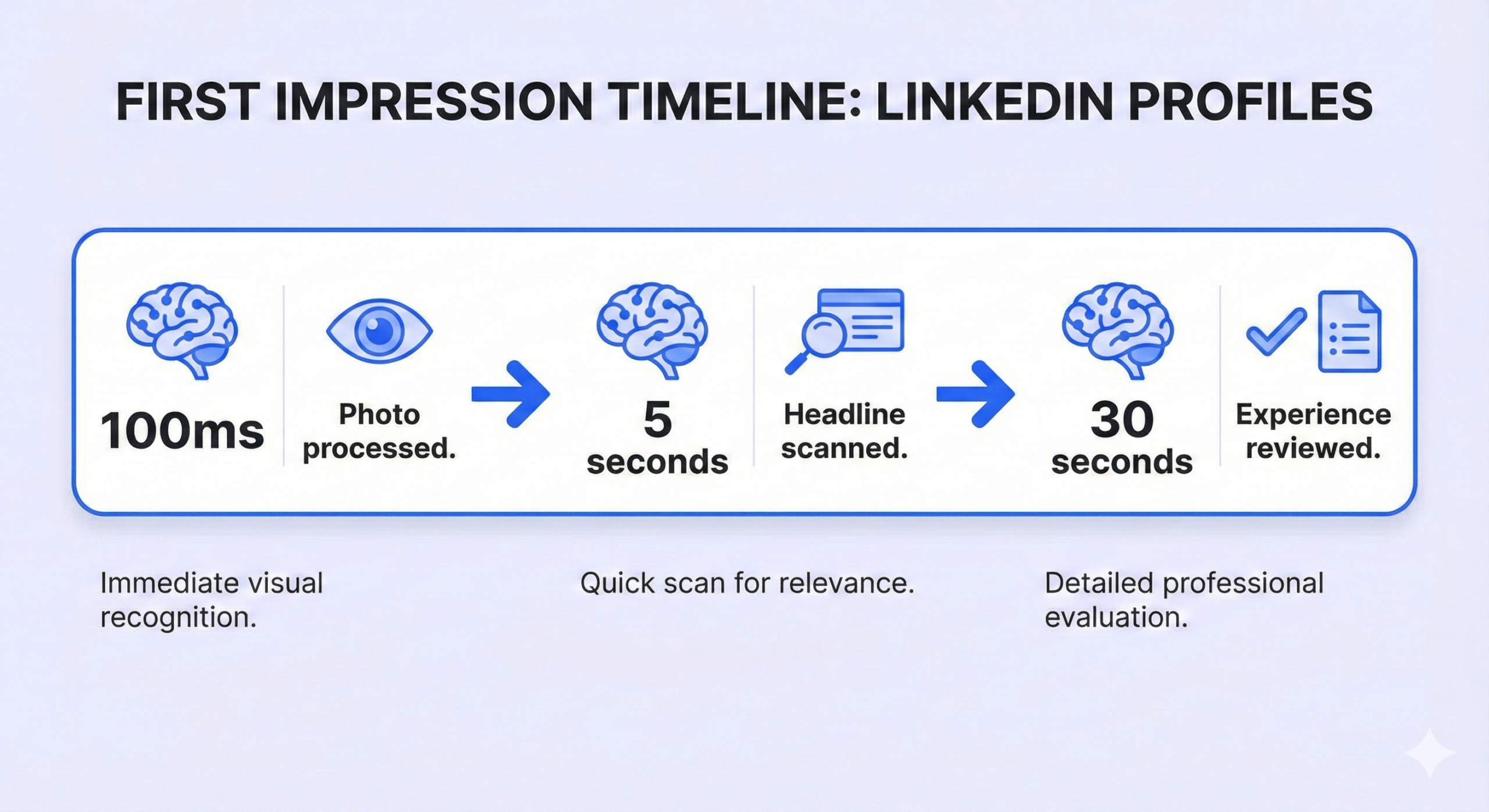
That gut reaction you had? Everyone else has it too. Profiles without photos get rejected 9 times more often than profiles with professional headshots. Your brain processes faces faster than text, and within 100 milliseconds, people decide if they trust you.

Here’s what that means in practical terms: every time someone lands on your profile, they’re making snap judgments about your credibility, competence, and whether they should connect with you. Your photo either opens doors or closes them.

The Numbers That Change Everything

Let’s look at the hard data on LinkedIn photo statistics:

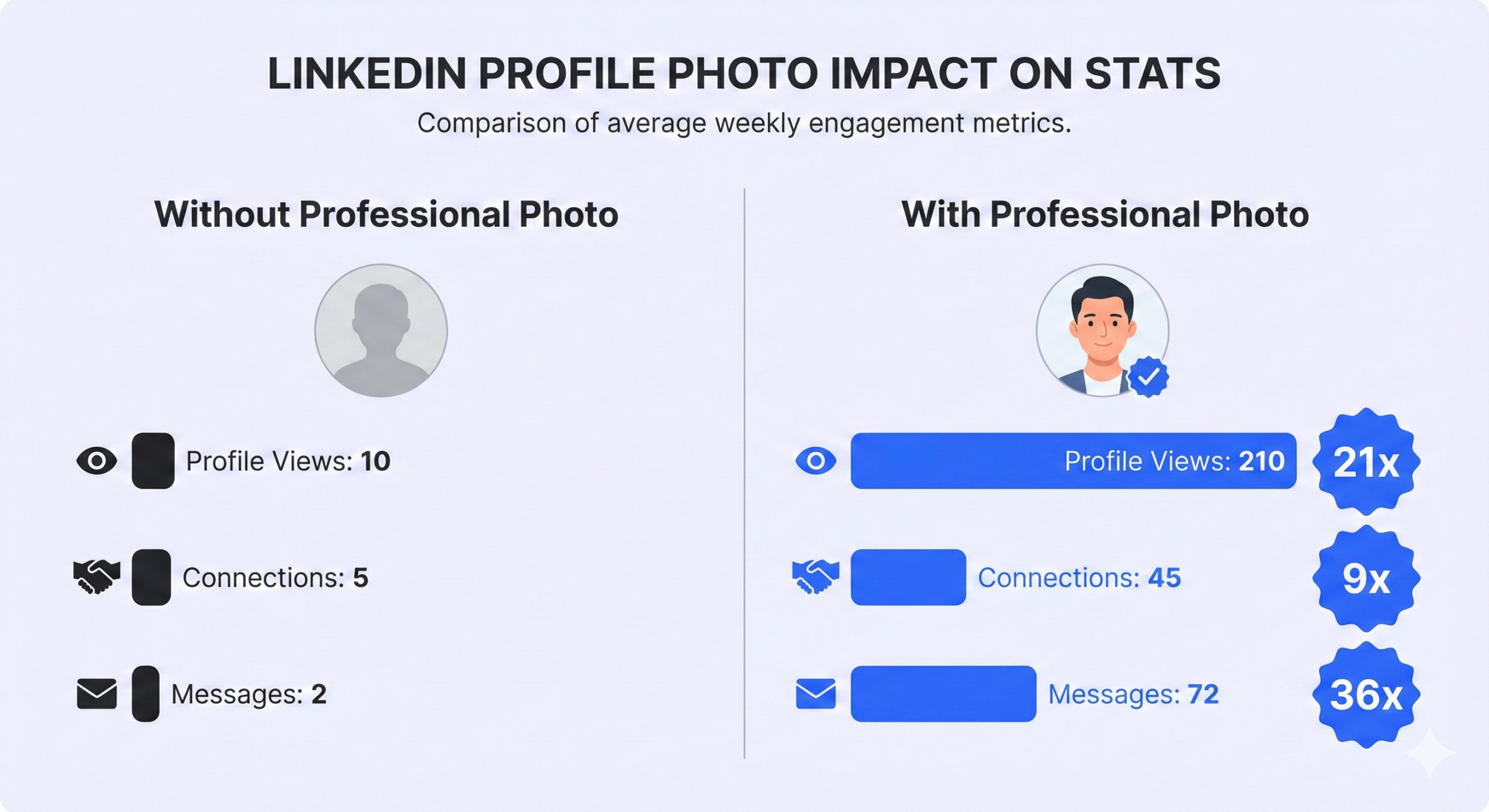
Profile Views: Users with professional photos attract 21x more profile views than those without. More views mean more visibility, more opportunities, and more chances to make meaningful connections.

Connection Requests: When you have a quality photo, you receive 9x more connection requests. But here’s the flip side—you’re also more likely to have your own requests accepted. People trust faces they can see.

Message Engagement: This is where it gets really interesting. Profiles with photos receive 36x more messages. Think about that. If you’re trying to build relationships, start conversations, or generate opportunities, a professional photo is your biggest leverage point.

Professional Credibility: A study of over 200 recruiters found that 71% have rejected candidates based on their LinkedIn photo alone—even when qualifications were perfect. If recruiters (whose job is finding talent) reject profiles based on photos, imagine how quickly potential connections or clients make similar judgments.

Trust Factor: Research shows that 96% of business leaders believe a professional photo inspires confidence. Your photo is a proxy for your professionalism, your attention to detail, and ultimately, your brand.

After the introduction of these statistics, prospects often realize their current photo might be holding them back. But here’s the good news: fixing this is completely in your control.

🎯 Stop Losing Opportunities to Bad Photos
Your LinkedIn profile should work for you 24/7. We help B2B companies turn connections into qualified meetings through systematic outreach.

What Makes a LinkedIn Photo Work

Now that you know the “why,” let’s talk about the “how.” Not all professional photos perform equally. The data reveals specific elements that drive better results:

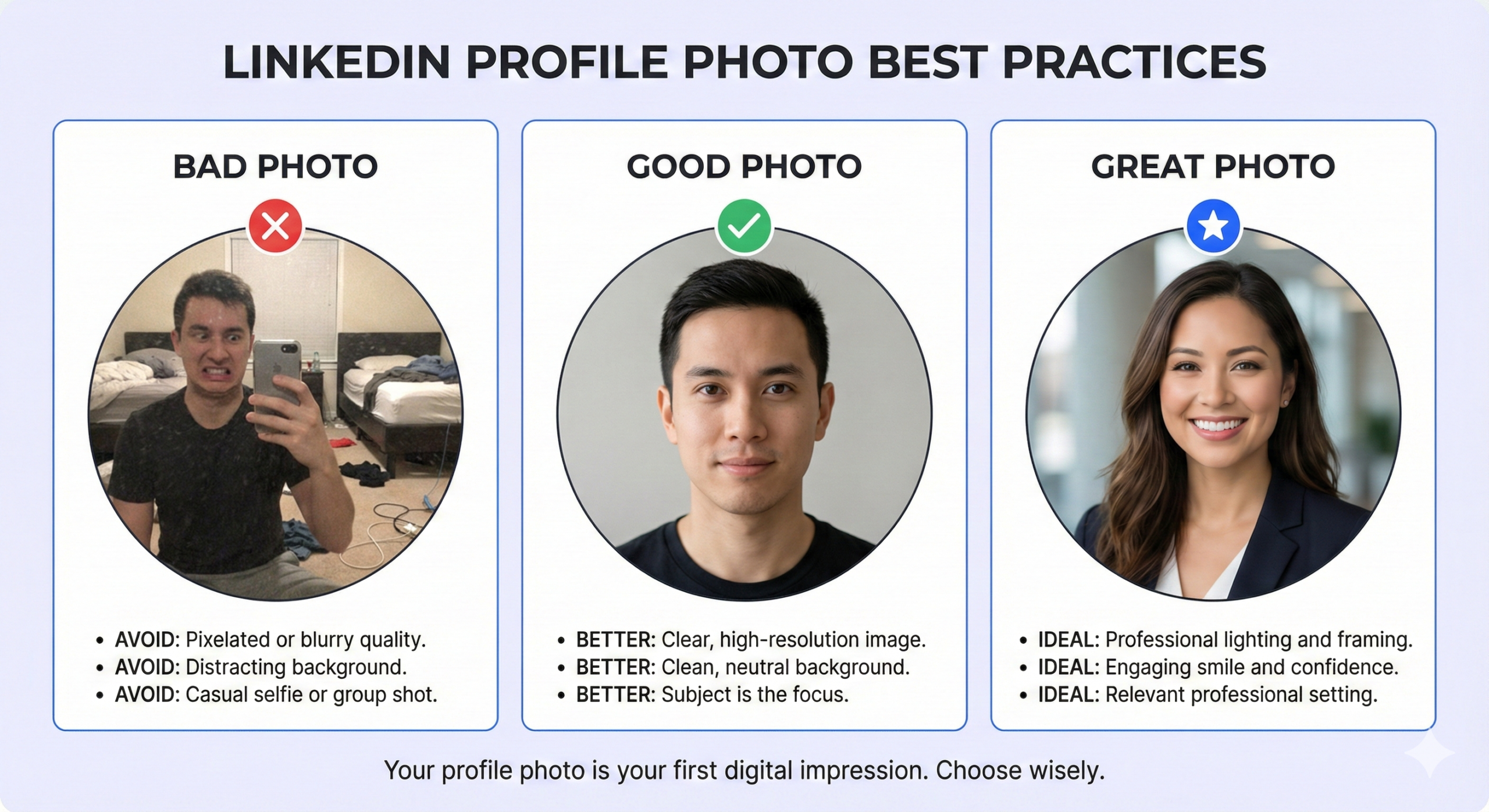
The Smile Effect: Photos with a genuine smile (teeth visible) increase perceived likability by 135%. People respond to warmth, especially in a business context where everyone’s guard is naturally up.

Eye Contact Matters: Direct eye contact with the camera increases connection rates. It simulates making eye contact with the viewer, creating an instant sense of trust and presence. Sunglasses, shadows over your eyes, or looking away? Those significantly decrease trust scores.

Facial Clarity: Your face should take up about 60% of the frame. This is especially critical because 57-74% of LinkedIn traffic comes from mobile devices, where your photo appears as a tiny circle. If viewers can’t see your face clearly in that small thumbnail, you’ve already lost them.

Background Choices: Neutral or slightly blurred backgrounds work best. Busy backgrounds pull attention away from your face. The goal is simple: nothing should compete with you for attention.

Clothing Decisions: Formal attire (like a blazer or suit jacket) boosts perceived competence by 94%. You don’t need to wear a full suit, but a professional top signals that you take your career seriously.

Image Quality: Upload images at 1200 x 1200 pixels minimum. LinkedIn’s profile photo slot is 400 x 400 pixels, but uploading higher resolution ensures your photo stays sharp on all devices. Remember, most people will see your photo on mobile first.

Common Photo Mistakes That Kill Results

Knowing what works is half the battle. Avoiding these mistakes is the other half:

Selfies: Even if they’re good quality, selfies signal a lack of professional resources. They also tend to have lens distortion that makes your face look unnatural. The data is clear: selfies perform poorly in professional contexts.

Cropped Vacation Photos: If someone can see a disembodied hand on your shoulder or a cocktail in the corner, you’re sending the wrong message. 49% of recruiters consider vacation photos a red flag. Keep personal and professional separate.

Outdated Photos: If your photo is 5+ years old and you look completely different now, it creates a “trust gap” the moment someone meets you in person or on a video call. Update your photo at least every 2-3 years.

Group Photos: Even if you crop yourself out, group photos look unprofessional. They also make it harder for people to identify you in networking situations.

No Photo At All: This is the biggest mistake. An empty profile photo slot makes you look like a bot, a fake account, or someone who doesn’t take LinkedIn seriously. You’re essentially invisible.

The best part? Fixing your LinkedIn photo is a one-time investment that pays dividends on every single interaction moving forward.

📈 LinkedIn Outbound Beats Email Every Time
While others struggle with 1-5% email response rates, we consistently hit 15-25% on LinkedIn. No spam filters. No technical headaches. Just direct access to 65M+ decision-makers.

Technical Specs You Should Know

Let’s get specific about the technical requirements for LinkedIn profile photos in 2025:

File Size: Maximum 8MB. Most professional headshots fall well under this limit, but if you’re uploading high-resolution images, keep an eye on file size.

File Format: JPG or PNG work best. LinkedIn accepts both, but JPG is standard for photos.

Aspect Ratio: 1:1 (square). LinkedIn automatically crops your image into a circle, so make sure the important parts of your photo are centered.

Resolution: Upload at least 1200 x 1200 pixels. This ensures your photo looks sharp across all devices and screen resolutions.

The 60% Rule: Your face should fill roughly 60% of the total image. Too close (just your face) reduces likability. Too far (full body) reduces competence scores. Head-and-shoulders is the sweet spot.

One quick note on AI headshots: while AI tools can enhance lighting or remove backgrounds, be careful with completely AI-generated photos. 38% of recruiters flag inauthentic images as a problem. If your photo looks too perfect or enters “uncanny valley” territory, it can backfire.

🚀 Ready to Scale Your Outreach?

Your profile photo is just the start. We design complete LinkedIn prospecting campaigns that fill your calendar with qualified meetings—using proven systems that work.

7-day Free Trial |No Credit Card Needed.

The Mobile Reality

Here’s something most people miss: LinkedIn photos need to pass the “mobile squint test.” Since the majority of your profile views happen on smartphones, your photo needs to work at thumbnail size.

When someone scrolls through search results or views your mini-profile in messages, your photo appears as a tiny circle—sometimes just 50 pixels wide. At that size, details disappear. All that matters is: Can they see your face? Can they see your expression? Do you look approachable?

This is why close-up head-and-shoulders shots dominate. They’re optimized for the way people actually use LinkedIn—on their phones, making quick decisions about who to connect with.


Psychology Behind the Stats

The LinkedIn photo statistics we’ve covered aren’t random—they’re rooted in human psychology.

Your brain processes visual information 60,000 times faster than text. When someone lands on your profile, they see your photo before they read a single word of your headline. That initial visual impression shapes how they interpret everything else.

This is called the “halo effect.” If your photo signals professionalism, competence, and warmth, viewers unconsciously assume your experience, recommendations, and content are also high quality. If your photo signals the opposite—through poor quality, inappropriate setting, or no photo at all—they’ll judge your entire profile more harshly.


What This Means For You

If you’re still using an old photo, a cropped vacation shot, or worse—no photo at all—you’re leaving opportunities on the table every single day. The good news? Fixing this takes less than an hour.

Book a professional headshot session. Wear business attire. Choose a neutral background. Smile genuinely. Upload at the right resolution. Done.

That one action will multiply your profile views by 21x, your connection requests by 9x, and your messages by 36x. Those aren’t small improvements—they’re game-changers.

And here’s the kicker: while everyone else is optimizing their headlines and summaries, you’ll be winning at the thing most people ignore—the first thing everyone sees.


Conclusion

The data is clear: your LinkedIn profile photo isn’t a small detail—it’s the foundation of your entire professional presence on the platform. With profiles that have professional photos receiving 21x more views, 9x more connection requests, and 36x more messages, this isn’t about vanity. It’s about visibility and opportunity.

The difference between a professional photo and no photo (or a bad one) is the difference between being seen as credible versus being ignored. In a digital world where first impressions happen in milliseconds, your photo does the heavy lifting before anyone reads a single word.

Take the hour. Get the headshot. Update your profile. The ROI is too massive to ignore.

FAQs

Does a professional LinkedIn photo really make a difference?

Yes—profiles with professional photos get 21x more profile views and 36x more messages than those without.

What's the best size for a LinkedIn profile photo?

Upload at 1200 x 1200 pixels minimum. LinkedIn displays photos at 400 x 400 but higher resolution ensures quality across all devices.

Should I smile in my LinkedIn photo?

Absolutely. Smiling with visible teeth increases likability by 135% and signals approachability—critical for professional networking on the platform.

Can I use an AI-generated headshot for LinkedIn?

Be cautious. While AI can enhance photos, 38% of recruiters flag obviously artificial images. Keep it authentic for maximum trust.

How does a better LinkedIn photo help with outreach and lead generation?

Beyond profile views, a strong photo directly impacts your outreach success. When you combine a professional photo with systematic LinkedIn prospecting—including precise targeting, personalized messaging sequences, and strategic follow-ups—your response rates jump dramatically. Most cold outreach gets 1-5% responses, but our complete LinkedIn outbound system consistently hits 15-25% because we combine visual credibility with proven campaign strategies. Book a strategy meeting to learn how we help B2B companies scale qualified meetings through LinkedIn.

How to Build a High-Converting B2B Sales Funnel from Scratch on LinkedIn

How to Build a High-Converting B2B Sales Funnel from Scratch on LinkedIn ​
