
Your LinkedIn profile picture isn’t just a photo—it’s your most powerful first impression tool. In a world where business relationships start with a click, that single image can make or break your professional opportunities.

Tips to Get the Max From Your LinkedIn Profile Picture
The Psychology Behind a Winning Shot
Your face should tell a story before your headline even gets read. Research shows it takes just one-tenth of a second to form an opinion about someone from their photo. That’s faster than you can blink, and it’s happening to your profile right now.
The golden rule? Authenticity wins. Your photo should look like the “everyday professional you” that people will meet in real life. Outdated shots or heavy filters create trust gaps that kill conversations before they start.
The Smile That Sells
Here’s what most professionals get wrong: they think “professional” means serious. Wrong. A genuine smile with teeth visible has the most significant impact on perceived competence, likeability, and influence according to Photofeeler research.
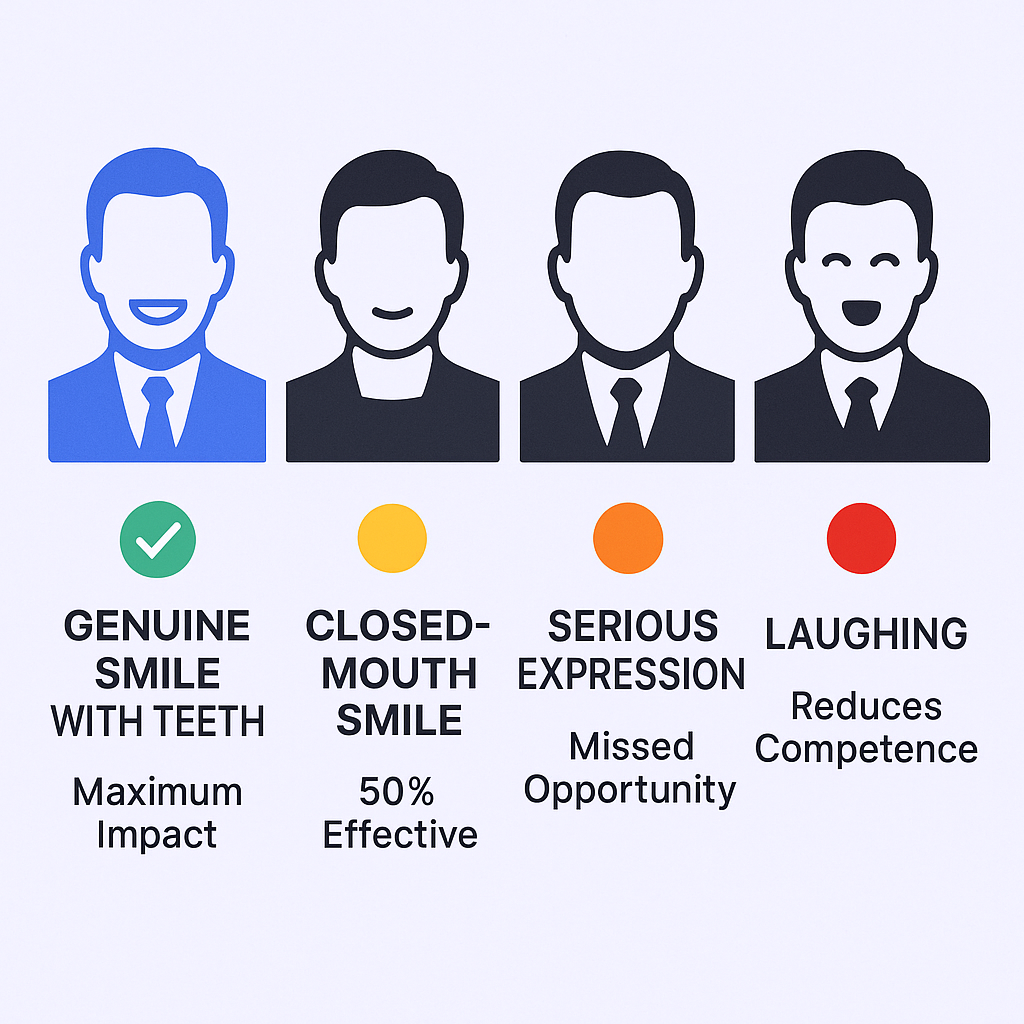
The hierarchy of expressions:
- Genuine smile with teeth: Maximum impact
- Closed-mouth smile: Half as effective
- Serious expression: Missed opportunity
- Laughing: Can reduce perceived competence
Pro tip: Try “the squinch”—a slight squint of the eyes that naturally occurs with genuine smiles. This subtle expression improves all perceived trait ratings and makes you appear more engaging.
Technical Fundamentals That Matter
Face-to-frame ratio: Your face should occupy at least 60% of the frame. This ensures you’re clearly visible even as a small thumbnail on mobile devices.
Dimensions: Keep it simple with 400×400 pixels for optimal display across all LinkedIn surfaces.
Camera quality: Skip the selfie camera. Use your phone’s rear-facing camera with a self-timer and stable surface. The resolution difference is dramatic, and the angle is naturally more flattering.

Lighting: Your Secret Weapon
Position yourself near a large window during mid-morning or late afternoon. This “golden hour” lighting creates a warm, professional glow while avoiding the harsh shadows that overhead lights create.
Key lighting rules:
- Face the light source, never have it behind you
- Natural light beats artificial every time
- Avoid direct sunlight—it creates unflattering shadows
Dress for the Client You Want
Your attire communicates before you speak. Wear what you’d typically wear to an important meeting in your industry. Conservative sectors like finance call for formal attire, while creative and tech industries often embrace smart casual.
Color strategy: Solid, neutral colors like navy, gray, or white work best. They contrast beautifully with most backgrounds and keep focus on your face rather than your outfit.
Background Strategy That Works
Keep it simple. A plain, neutral wall in white, soft gray, or light blue is your safest bet. Standing several feet from the background creates a natural blur that adds professional depth without distraction.
Banner synergy: While your profile picture should focus solely on you, use your background banner image to reinforce your brand. Showcase your office, product, or company logo to create a cohesive visual story.
The Best LinkedIn Profile Image Examples
The Classic Professional
This timeless approach features a crisp, high-quality headshot with a blurred neutral background. Perfect for conservative industries like finance, law, or enterprise sales. The image communicates reliability and trustworthiness—exactly what decision-makers want to see.
When to use: Traditional industries, C-suite positions, or when targeting conservative clients.
The Approachable Expert
Slightly more casual but still polished. Features a warm, genuine smile with a hint of natural environment or softly blurred office background. This style shows personality while maintaining professionalism.
When to use: Tech startups, creative industries, or when your audience values approachability alongside expertise.
The Industry Insider
This sophisticated approach combines a confident headshot with subtle industry cues—perhaps a hint of your workspace or tools of your trade in the blurred background. It positions you as someone who truly understands their field.
When to use: Specialized industries, consulting roles, or when demonstrating deep domain expertise matters.
The Visual Storyteller (Advanced)
The most strategic professionals create cohesive visual narratives. A confident headshot paired with a background banner that showcases their solution, team, or results. This transforms a profile from a resume into a dynamic business card.
When to use: Entrepreneurs, sales professionals, or anyone building a personal brand around their expertise.

