

🎉Find Prospects and Send Cold Emails & LinkedIn Outbound | All in One Place

LinkedIn Proxy: The Complete Guide to Scaling Your Outreach Safely

Table of Contents

Look, if you’re trying to scale your LinkedIn outreach, you’ve probably hit that frustrating wall. You send a few connection requests, view some profiles, and boom—LinkedIn flags your account. Sound familiar?

Here’s the thing most people don’t realize: LinkedIn actively restricts how much you can do from a single IP address. But there’s a way around this that professionals use every single day. Enter: LinkedIn proxies.

In this guide, I’m going to walk you through everything you need to know about using proxies for LinkedIn—without the technical jargon or confusing setup processes.

What is LinkedIn Proxy For?

Think of a linkedin proxy as your digital bodyguard.

When you connect to LinkedIn through a proxy server, it routes your internet traffic through an alternative location. Instead of LinkedIn seeing your real IP address, they see the proxy’s IP address. This simple switch unlocks some pretty powerful capabilities.
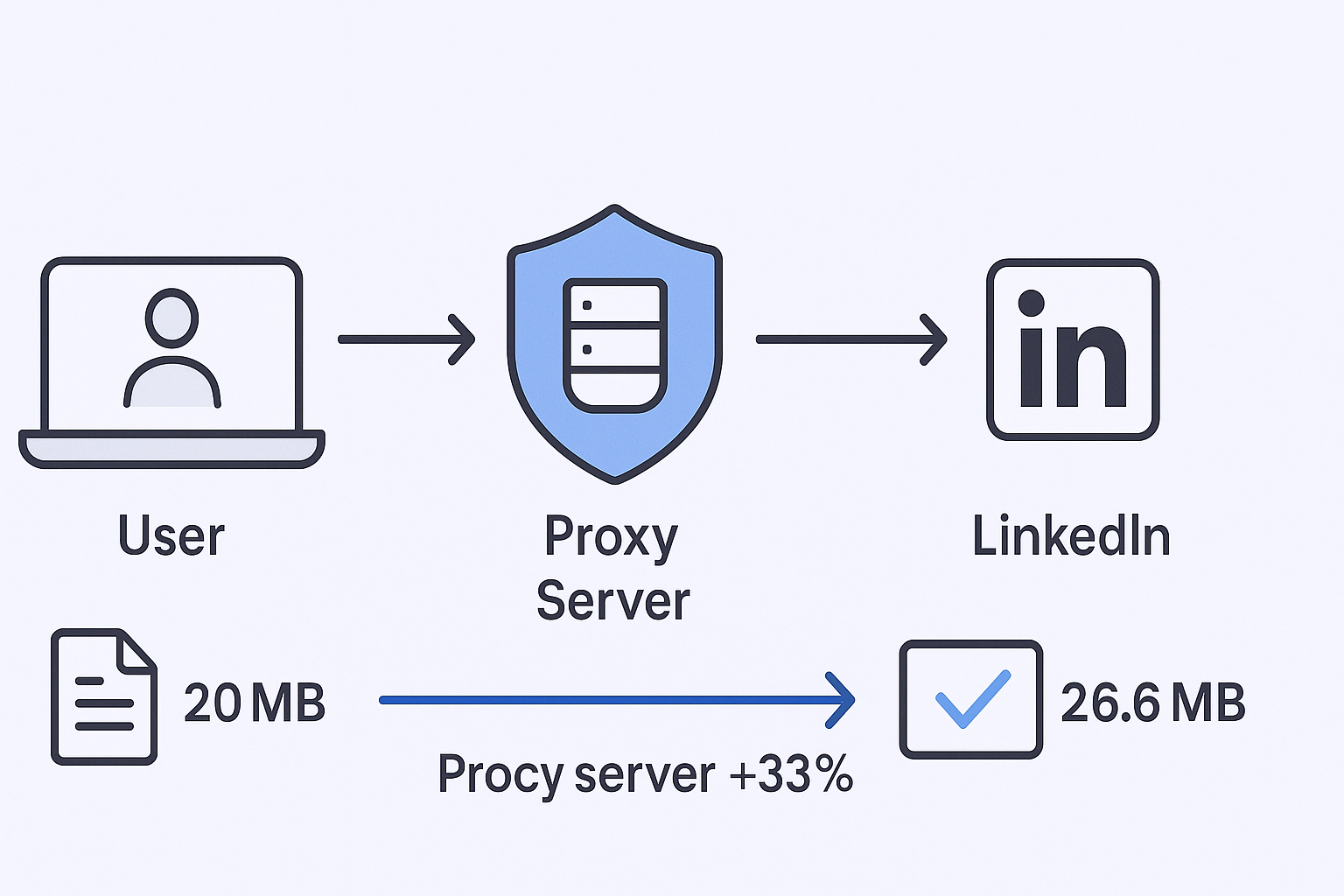
Here’s what you can actually do with proxies:

Manage Multiple LinkedIn Accounts Without Red Flags
If you’re running outreach campaigns or managing client accounts, logging into several profiles from the same IP is a surefire way to get suspended. Proxies give each account its own unique digital identity, making high-volume activity look like normal traffic from different locations.

Scrape Data at Scale
Need to gather prospect information, competitor insights, or contact details? Data scraping requires tons of requests. A linkedin proxy server distributes these requests across multiple IP addresses, keeping you under the radar. In fact, rotating proxies can help you collect data 10x faster without detection.

Access Geo-Restricted Content
Running campaigns in different countries? Proxies let you appear as if you’re browsing from any location worldwide, giving you access to region-specific content and allowing you to target local markets authentically.

The bottom line: Proxies transform bottlenecked operations into scalable systems. According to industry data, LinkedIn’s average reply rate is 85%—3x higher than email marketing. But you can only capitalize on this if you can reach enough people without getting banned.

🎯 Skip The Proxy Setup Entirely

Our LinkedIn Outbound Engine Delivers 15-25% Response Rates With Zero Technical Complexity

What Proxy Do I Need?

Here’s where most people mess up. They think all proxies are created equal. They’re not.

There are three main types of proxies, and choosing the wrong one is basically throwing money away (or worse, getting your accounts suspended).
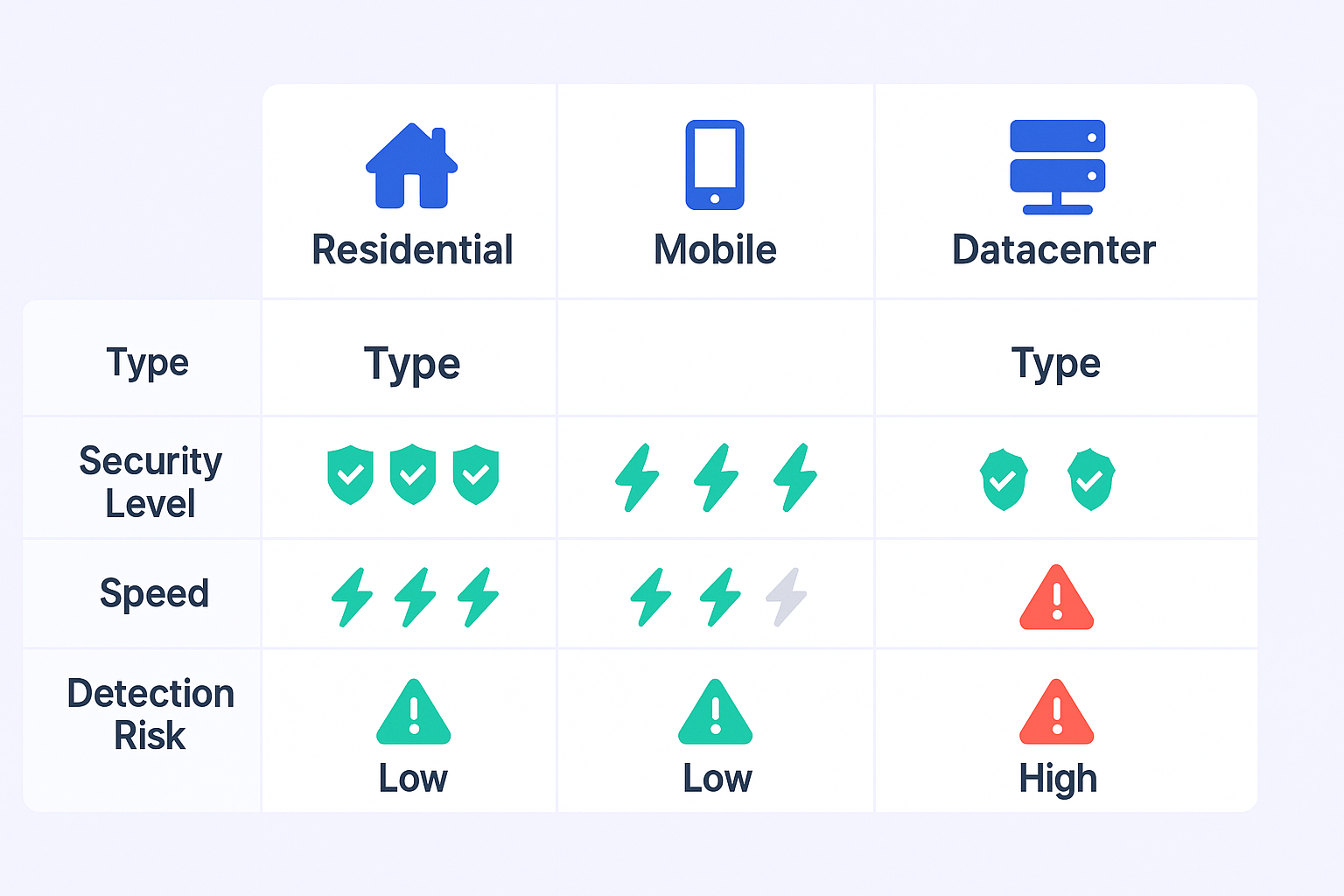
Residential Proxies: The Gold Standard

Residential proxies use real IP addresses from actual internet service providers. This means when you connect through one, LinkedIn sees what looks like a genuine user browsing from home.

Why does this matter? Because LinkedIn’s security systems are built to spot fake traffic. Residential IPs have a 95%+ success rate on protected sites compared to other proxy types. They’re the standard for serious automation and multi-account management.

Mobile Proxies: Maximum Security

Want the highest level of anonymity? Mobile proxies use IP addresses from mobile carriers (3G, 4G, 5G networks).

Since mobile IPs are naturally shared and rotated by carriers, they’re virtually impossible to flag as suspicious. They’re more expensive and sometimes slower, but if you’re managing high-value accounts or running aggressive campaigns, the extra security is worth every penny.

Datacenter Proxies: Fast but Risky

These are generated in server farms—fast and cheap, but easily detected. LinkedIn can spot datacenter IPs instantly because they don’t come from real ISPs or residential networks.

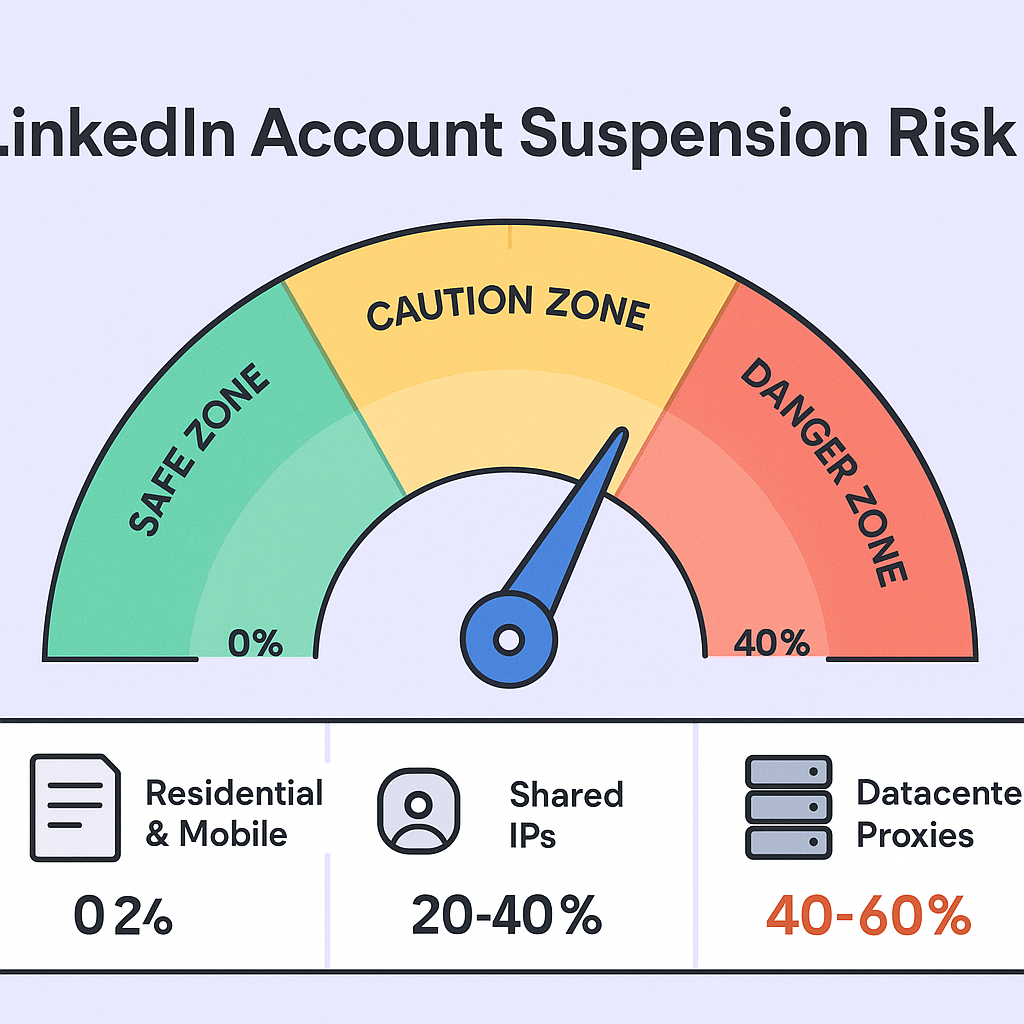
The blocking rate for datacenter proxies on platforms like LinkedIn is 30-50%. Unless you enjoy account suspensions, avoid these entirely for LinkedIn work.


Sticky vs. Rotating: Matching Your Needs

One more thing: you need to choose between sticky sessions (same IP for 10-60 minutes) and rotating IPs (changes with every request).

  • Use sticky sessions when logging into accounts or doing multi-step tasks—this mimics how real users browse
  • Use rotating proxies for high-volume data collection where you want to blast through thousands of profiles quickly

Pro tip: If you’re serious about scaling LinkedIn outreach, pair your proxy strategy with a reliable email verification tool to ensure the contacts you’re reaching are actually valid. Nothing kills campaigns faster than bad data.

Importance of LinkedIn Proxy

Let’s talk about why this actually matters for your business.

The Legal Reality

LinkedIn’s User Agreement privacy policy explicitly prohibits using software or scripts to scrape data or automate interactions. When you accept the linkedin join agreement, you’re agreeing to these terms in the privacy policy cookie framework.

Translation: LinkedIn automation exists in a grey area. The platform aggressively enforces rules to protect user experience, and accounts using poor automation practices face 20-30% suspension rates.

Here’s the interesting part: The issue isn’t proxies themselves—it’s how you use them. Proxies don’t violate terms, but reckless automation does.

The ROI Calculation

Despite the risks, people keep pushing LinkedIn hard because the numbers don’t lie. Remember that 85% reply rate? That’s not a fluke.

LinkedIn is consistently cited as the #1 social media channel for B2B lead generation. And if you target your campaigns correctly, some regions deliver even better results—Southern Europe leads globally with an 11.81% reply rate.

Compare that to cold email’s typical 5-8% response rate, and you see why everyone wants to scale LinkedIn outreach. The question isn’t whether to use LinkedIn for prospecting—it’s how to do it without burning through accounts.

💼 Done-For-You LinkedIn Outreach That Actually Works

Complete Targeting, Campaign Design & Scaling—Without Risking Your Accounts Or Learning Proxies

Understanding LinkedIn’s cookie policy is crucial here. The platform tracks session cookies to identify suspicious behavior. When automation tools overuse session tokens—showing activity at 3 AM or maintaining a robotic pace—flags go up immediately.

Want to improve your overall outreach strategy? Check out these proven cold email templates that complement your LinkedIn efforts perfectly.

Benefits of Using LinkedIn Proxy

Beyond the obvious “not getting banned” advantage, proxies unlock some serious competitive benefits:

Guaranteed Account Integrity
A dedicated linkedin proxy server assigns one unique IP per account. This is non-negotiable for safety. Shared IPs are disasters waiting to happen—one bad user in the pool can blacklist the entire IP range, taking your accounts down too.

Bypass Rate Limits and Spam Filters
By distributing requests across multiple IPs, proxies let you reach way more people without triggering LinkedIn’s spam detection. You can run campaigns across different client accounts and territories simultaneously—something impossible with a single IP.

Long-Term Account Viability
Using high-quality residential or mobile proxies mimics natural user patterns, which means your accounts stay healthy month after month. This protects the time and money you’ve invested in building those profiles and relationships.

Global Reach Without Barriers
Run simultaneous campaigns in the US, Europe, and Asia without location restrictions. Proxies let you appear as a local user in each market, making your outreach more relevant and effective.

Think about it: If you could safely 3x your outreach volume while maintaining 85% reply rates, what would that do for your pipeline?

 🚀 3X Your Pipeline Without The Setup

Our LinkedIn Outbound Service Handles Everything: Targeting, Campaigns, And Safe Scaling Methods

Text #4

🚀 Advanced LinkedIn Targeting

Strategic demographic segmentation delivers personalized campaigns with systematic scaling approaches

7-day Free Trial |No Credit Card Needed.

Best Practices for Using LinkedIn Proxy

Okay, you’ve got your proxies set up. Now here’s how to not get caught.

Rule #1: One Account, One Dedicated IP

This is the golden rule. Never share an IP address between LinkedIn accounts. If one account on a shared IP gets flagged, every account using that IP is at risk. Dedicated residential or mobile IPs keep problems isolated.

Rule #2: Act Human

LinkedIn’s algorithms are looking for robot behavior. Avoid it by:

  • Randomizing actions: Don’t send messages every 2 minutes like clockwork. Vary your timing.
  • Respect daily limits: Keep it conservative—around 100 connection requests per week, 100 messages per day maximum.
  • Match working hours: Don’t be active at 3 AM unless that’s genuinely your timezone.

Industry experts suggest these limits based on years of testing. Aggressive automation that ignores these guidelines leads to the 20-30% suspension rates we talked about earlier.

Rule #3: Match Geography

Your proxy’s location should align with your account’s listed location. Using a US proxy for an account claiming to be in Germany raises instant red flags.

Rule #4: Clean Session Management

If you suspect an automation tool has hijacked your session cookie, clear your browser’s LinkedIn cookies immediately:

  1. Right-click > Inspect
  2. Go to Application tab
  3. Click Cookies
  4. Delete all LinkedIn domain data

This terminates unauthorized access and gives you back control of your session token under the agreement privacy policy framework.

Looking to maximize your outreach effectiveness? Learn how to properly verify email addresses to ensure your messages actually reach decision-makers.

Selecting the Right LinkedIn Proxy Provider

Not all linkedin proxy site providers are created equal. Here’s what to evaluate:

Key Comparison Metrics

IP Pool Size: Bigger is better. Providers with 100M+ IPs give you more variety and lower chances of getting a previously-flagged address.

Success Rate: Top residential providers maintain 99%+ success rates. Anything below 95% is suspect.

Cost per GB: Expect to pay $2-3.60 per GB for smaller plans. Enterprise users with high volume might get rates as low as $0.32 per GB.

Top Provider Examples

SOAX leads with 191 million+ ethically-sourced IPs and a 99.73% success rate. Their mobile proxy pool alone includes 33M+ IPs—perfect for high-stakes campaigns.

Bright Data and Oxylabs cater to enterprise needs with massive pools (79M+ and 100M+ respectively) and robust management tools.

NetNut focuses on speed through direct ISP connections, offering 52M+ IPs optimized for stability.

Pro tip: Some advanced services function as a linkedin proxycurl alternative, handling IP rotation, headers, and CAPTCHA solving automatically. This lets you focus purely on strategy rather than technical management.

Setting Up LinkedIn Proxy

Let’s get tactical. Here’s how to actually configure your proxies.

Windows Desktop Setup

  1. Click the Start button
  2. Go to Settings > Network & Internet > Proxy
  3. Under Manual proxy setup, click Set up
  4. Enter your proxy IP address and port number
  5. Save the configuration

Mobile Device Setup

Mobile configuration requires network-level changes:

  1. Open Settings > Network & Internet > Internet
  2. Select your mobile network settings
  3. Choose Access Point Names (APNs)
  4. Select current APN and modify proxy settings
  5. Enter IP, Port, Username, and Password
  6. Always use HTTPS protocol
  7. Save and restart network connection

Troubleshooting Quick Fixes

Connection not working?

  • Verify IP and port are entered correctly
  • Temporarily disable firewall to test if it’s blocking
  • Use ping to test connectivity to the proxy server
  • Clear all cookies and browser cache—expired session data often causes connection errors

Most proxy issues come down to incorrect settings or old session data. Take 5 minutes to double-check everything before assuming the proxy is broken.

Conclusion

Here’s the bottom line: Scaling LinkedIn outreach safely requires high-quality proxies paired with smart operational practices.

Free or cheap datacenter proxies will get you suspended. Period. The 20-30% suspension rate isn’t worth the $5 you save.

Instead, invest in residential or mobile proxies, stick to one dedicated IP per account, maintain human-like pacing, and match your proxy location to your account’s claimed geography.

Do this right, and you can tap into LinkedIn’s incredible 85% reply rate while running multiple campaigns across different accounts and regions—all without the constant fear of waking up to suspended accounts.

The strategic question isn’t whether to use a linkedin proxy—it’s which high-quality solution you’ll invest in for sustainable growth. Your pipeline depends on it.

FAQs

Are LinkedIn proxies illegal?

Proxies as technology are completely legal. However, using them for mass scraping or automated activities violates LinkedIn's User Agreement, which bans scripts and robots for data collection. The risk comes from what you do through the proxy, not the proxy itself.

Can I use a free LinkedIn proxy?

Absolutely not for professional use. Free proxies are unstable, slow, and typically use already-blacklisted IPs. The cost of losing a critical outreach account far outweighs the minimal investment in a reliable paid residential proxy. Free proxies are a false economy.

What's the difference between a proxy and a VPN for LinkedIn?

A VPN encrypts all your device traffic and typically uses shared IP pools—less precise and often riskier for automation. A dedicated proxy assigns unique, stable IPs to different accounts, giving you surgical control. For manual browsing, VPNs work fine. For automation and multi-account management, you need dedicated proxies.

How often should I rotate my proxy IP?

It depends on your task. For account management and logins, use sticky session proxies that maintain the same IP for 10-60 minutes—this looks like normal user behavior. For mass data scraping, use rotating proxies that change IP with every request to avoid pattern detection.

Is the "Who's Viewed Your Profile" feature truly useful?

If you suspect unauthorized session token usage, immediately clear your policy cookie data: Open browser developer tools (right-click > Inspect) Navigate to Application > Cookies Find LinkedIn domain cookies Delete all stored data This terminates the active session and prevents continued unauthorized access. This is critical self-remediation under the agreement privacy framework that governs LinkedIn usage.

What is the "agreement privacy policy" related to LinkedIn Premium?

The agreement privacy policy refers to LinkedIn's privacy policy governing data collection, use, and sharing. Premium features like anonymous browsing interact with privacy settings, though LinkedIn still tracks anonymous visits. Users should review LinkedIn's official privacy policy for comprehensive details.

How to Build a High-Converting B2B Sales Funnel from Scratch on LinkedIn

How to Build a High-Converting B2B Sales Funnel from Scratch on LinkedIn ​