

🎉Find Prospects and Send Cold Emails & LinkedIn Outbound | All in One Place

How to Export Leads from Sales Navigator: Safe Methods That Actually Work

Table of Contents

You’ve spent hours building the perfect prospect list in Sales Navigator. Your search filters are dialed in, and you’re looking at hundreds of qualified leads that match your ideal customer profile perfectly.

There’s just one problem: LinkedIn doesn’t let you bulk export this data.

And if you try to scrape it the wrong way, you risk losing your account, your connections, and your primary source of new business.

Let’s cut through the confusion and show you exactly how to safely extract your leads from Sales Navigator—without violating LinkedIn’s Terms of Service.
Sales Navigator’s Export Capabilities

Here’s the cold reality: there is no native bulk export button in Sales Navigator. You can’t simply click a button and download all your leads as a CSV file.

LinkedIn built it this way intentionally to protect user privacy and prevent data harvesting. They’ve set up hard limits that every sales professional needs to understand:

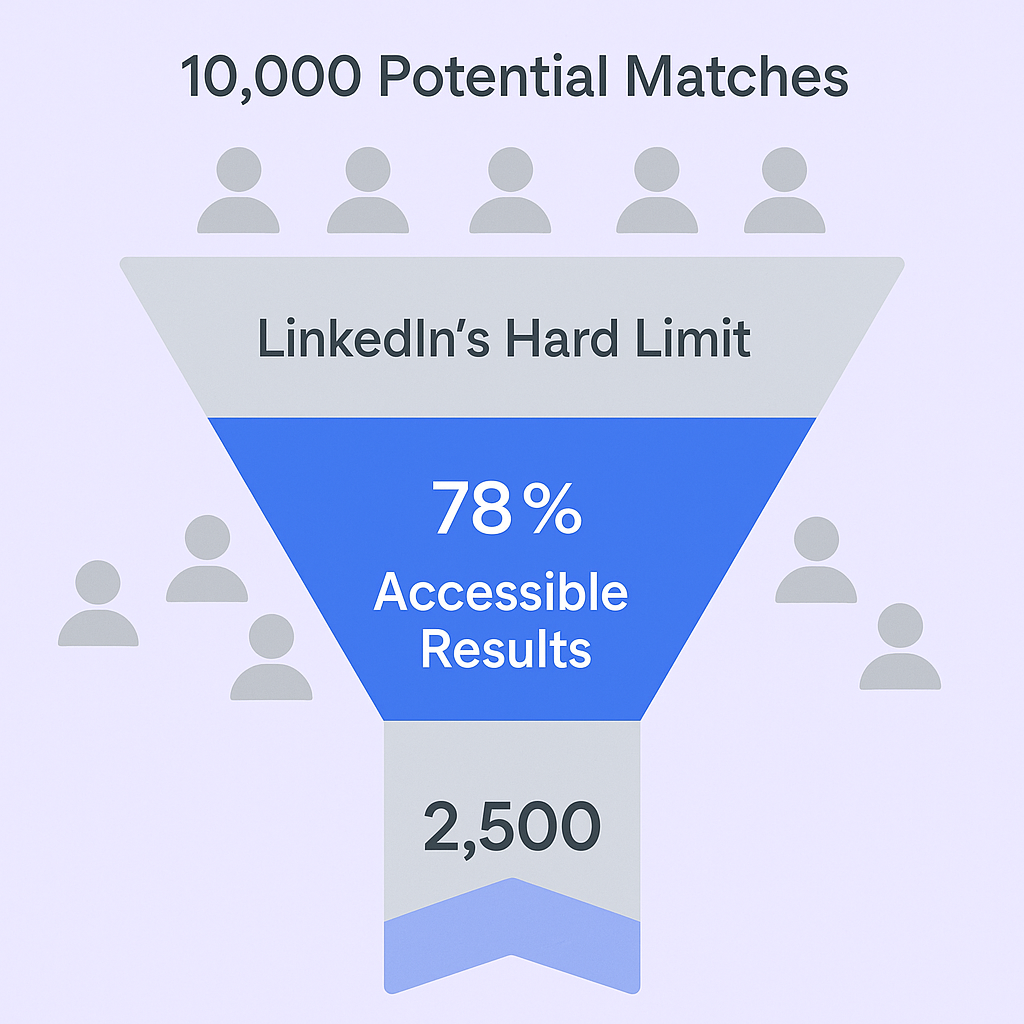
  • 2,500 prospects maximum per search — even if your ideal search yields 10,000 matches, you can only access the top 2,500 results
 

  • 5,000 total saved leads — this is your lifetime cap across all saved lists

What You Can Do (The Official But Slow Methods)

LinkedIn offers two official workarounds, but both have major limitations:

CRM Sync (Enterprise Only)

If you’re using Sales Navigator Team or Enterprise, you can sync leads directly to major CRMs like Salesforce or Microsoft Dynamics. The catch? This typically transfers profile data and engagement notes—not the verified email addresses you actually need for outreach.

LinkedIn Data Export Tool

You can request a complete archive of your data from your regular LinkedIn account settings. But this method is painfully slow—it can take hours to prepare—and dumps everything into one messy CSV file that requires extensive cleanup before you can use it.

For anyone working on tight deadlines, this simply doesn’t cut it.

🎯 Eliminate Export Tools Completely

Our LinkedIn outbound engine targets, engages, and converts prospects—no extraction, verification, or tool stacks required

Tools for Exporting Leads

Because native methods fall short, you’ll need a compliant third-party tool to extract verified contact data safely.

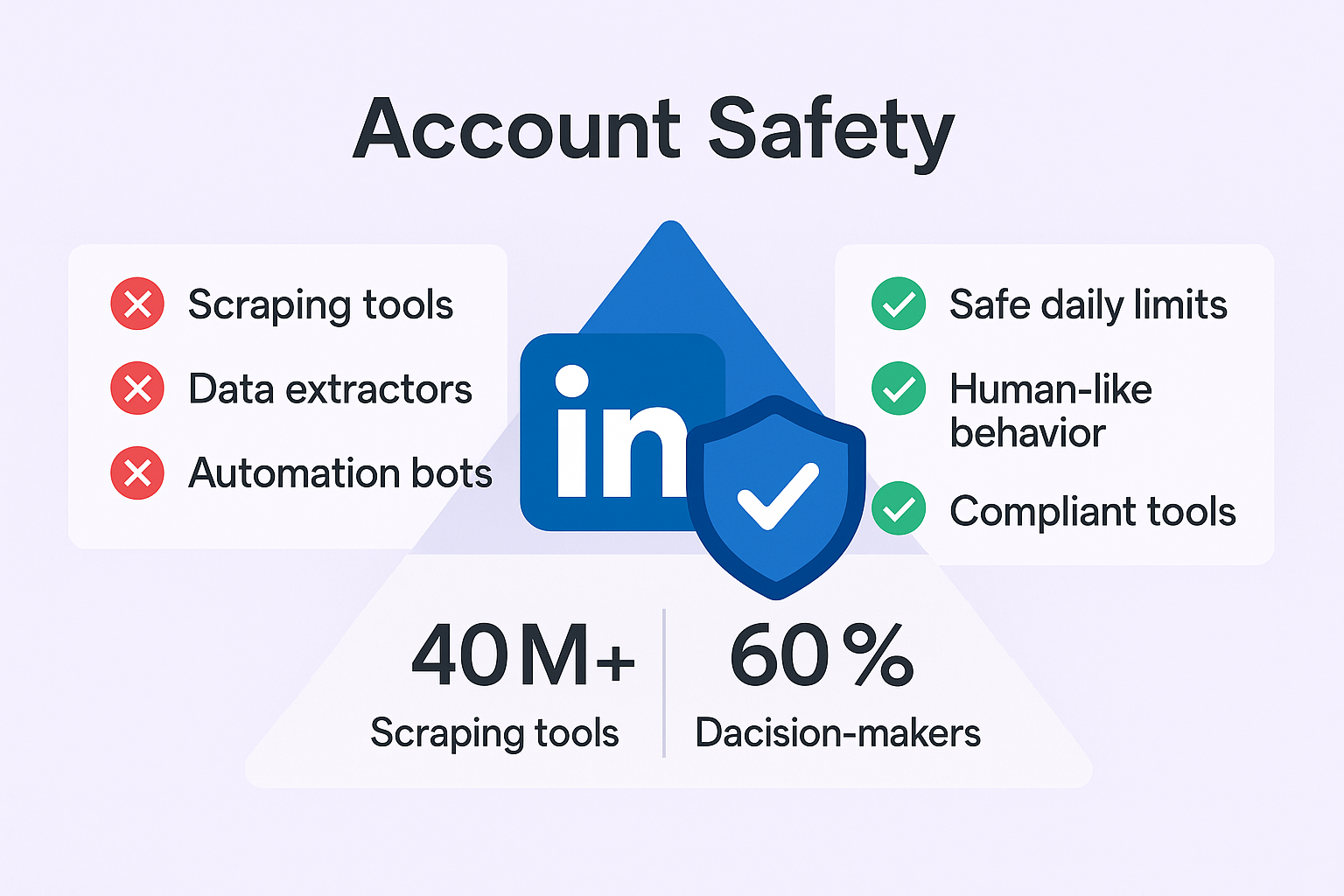
The key word here is “compliant.” The right tools operate at conservative speeds that mimic human behavior, stick to safe daily limits, and use methods that won’t trigger LinkedIn’s security algorithms.

Top Tools for Sales Navigator Export

Here are the main players that can help you bridge the gap:

Wiza

Wiza lets you bulk export from Sales Nav searches and includes email finding and verification. Starting at $30/month on a credit-based model, it can export all results from a search without manual selection and automatically skips duplicates.

Evaboot

Starting at just $9/month, Evaboot focuses heavily on data cleaning and structuring. It charges 2 credits per lead with a verified email (1 for export, 1 for verification), which reflects the true value of verified contacts.

Salesso

For complete cold email outreach, Salesso provides verified email addresses and a full outbound platform—similar to Saleshandy but built specifically for modern sales teams. Instead of juggling multiple tools, you get everything in one place: email verification, deliverability optimization, and campaign management that keeps your domain reputation intact.

Apollo/ZoomInfo

These are full sales intelligence platforms with massive B2B databases. While more expensive, they reduce reliance on real-time LinkedIn interaction, offering a safer alternative for strategic lead sourcing.

⚡ Stop Juggling Multiple Tools

Get 15-25% response rates through our complete targeting, campaign design, and scaling system—all done for you

Sales Nav Lead List Export Process

Let’s walk through the exact process for safely extracting your data:

Phase One: Preparation

Refine your search first. Given the 2,500-result limit, use highly specific filters to ensure you’re only seeing qualified prospects. Building a quality sales prospecting list starts with precise targeting—geography, company size, seniority level—stack your filters to maximize quality.

Install your chosen tool’s Chrome extension. This creates the bridge between LinkedIn’s interface and the extraction engine.

Create or select your list. Either run a live search or save specific profiles to a dedicated lead list.

Phase Two: Extraction and Verification

Launch the scan. Click the extension’s “Export leads” or “Start scan” button. With tools like Wiza, you don’t need to manually select profiles—it exports automatically.

Select your data fields. Choose which information to extract: company website, job title, profile URL, and most importantly, email addresses.

Prioritize work emails only. This is critical—personal emails (Gmail, Yahoo) should be avoided for B2B cold outreach. Configure your tool to extract only professional work emails.

Enable duplicate skipping. Prevent re-exporting contacts you’ve already saved.

Download and review. Once complete, download your CSV file. Quality tools include data cleaning analysis and proper structuring, making the file ready for immediate upload to your CRM or outreach platform.

Best Practices for Safe Extraction

Getting the data is only half the battle. Here’s how to protect your account and stay compliant:

The Daily Limit Rule

Export 200-500 profiles per day maximum. This is the safest range according to data safety experts.

Why so conservative? LinkedIn tracks activity volume over time. Consistent, moderate daily volume is drastically safer than large, sporadic bursts. While the technical limit might reach 2,500 profiles daily, regular usage at 50-70% of that limit is considered best practice for long-term account health.

Violating LinkedIn’s Terms of Service can result in permanent account suspension—losing your connections, conversation history, and primary lead source.

🛡️ Zero Account Risk Guaranteed

Our managed LinkedIn outbound delivers qualified meetings without exports, scrapers, or compliance concerns

The Data Quality Problem

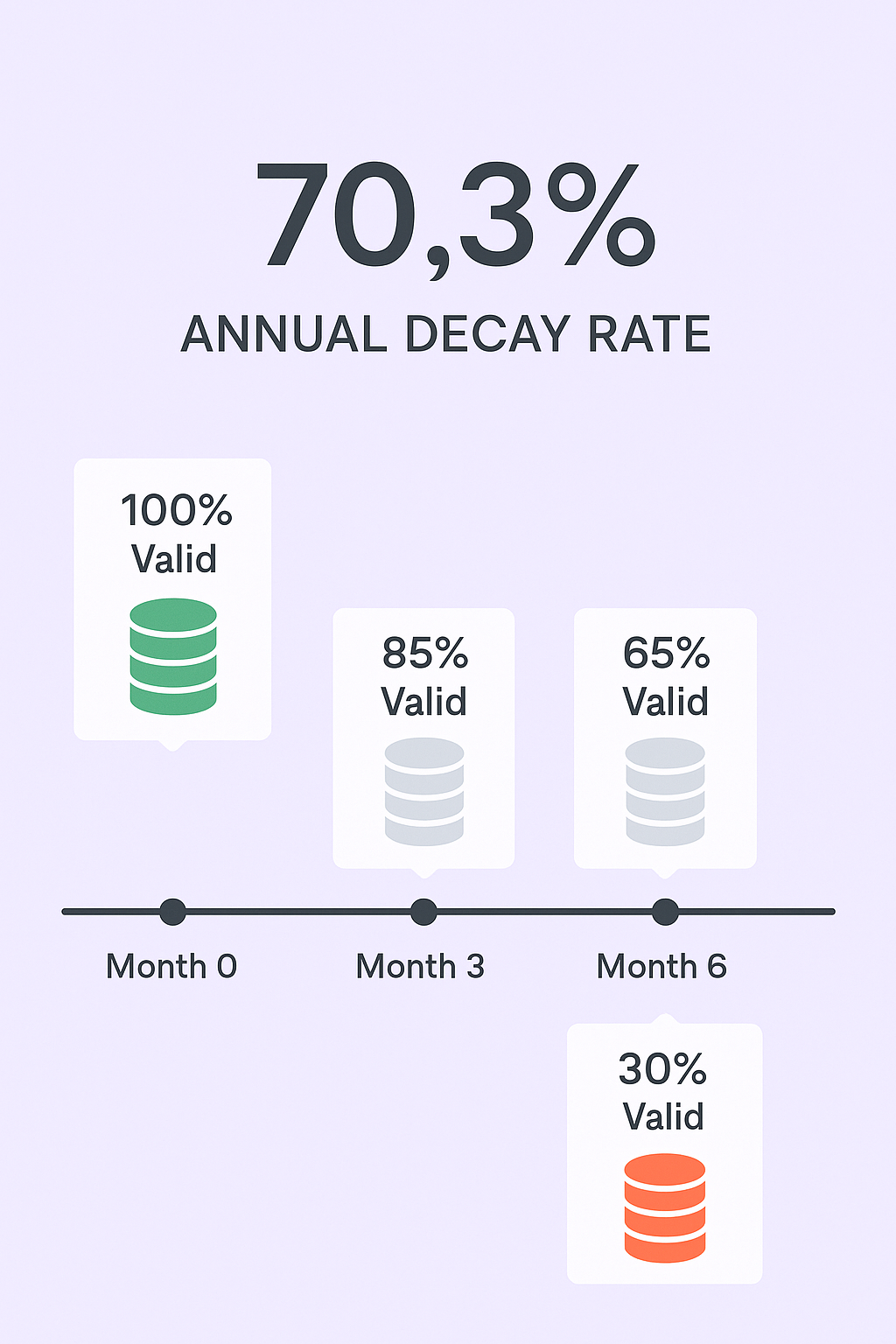
Here’s a sobering reality: B2B contact data decays at 70.3% annually. Email lists alone decay at 28% per year.

This means within 12 months, nearly three-quarters of your prospect database becomes obsolete.

The financial impact? Poor data quality costs U.S. businesses $3.1 trillion annually through wasted marketing spend and lost opportunities.


For your outreach campaigns, this translates directly to high bounce rates—which damages your sender reputation and causes 17% of emails to fail reaching the inbox.

The formula for cold email success breaks down like this: 30% content quality, 30% list quality, 50% follow-up. If you export leads without immediate verification, you’re intentionally compromising 30% of your campaign’s potential.

Always verify immediately. An email finder guesses addresses based on patterns. An email verifier confirms those addresses are deliverable and active. Never skip verification.

📊 Bypass Data Decay Issues

Real-time LinkedIn engagement eliminates verification needs while generating 15-25% response rates through proven campaign design

7-day Free Trial |No Credit Card Needed.

GDPR Compliance for Outreach

If you’re reaching out to prospects in Europe, you need to follow GDPR’s “legitimate interest” basis:

  • Ensure relevance — Your email must be professionally relevant to the recipient’s role
  • Be transparent — Tell them you found their info on LinkedIn in your first email
  • Process minimum data — Only export what’s essential: name, title, email, company
  • Include opt-out — Every email needs a clear, one-click unsubscribe option

Generic mass emails are riskier than highly personalized outreach that genuinely offers business value.

Why Quality Beats Quantity Every Time

Let’s be clear: a small, verified list always outperforms a massive list of dead contacts.

Think about it this way—would you rather send 100 emails that reach the inbox and get opened, or 500 emails where 150 bounce and damage your domain reputation?

The math is simple. When you factor in the 70% annual data decay rate, lists sitting unused for even a few months should be re-verified before any new campaign.

Don’t fall into the volume trap. Focus your energy on:

  1. Extracting the right prospects (not just any prospects)
  2. Verifying immediately before your first send
  3. Personalizing your outreach to match their role and pain points

That’s how you turn Sales Navigator data into actual revenue.

Conclusion

Exporting leads from Sales Navigator requires balancing speed with compliance and quality with volume.

The three non-negotiables are:

Use compliant tools that operate at conservative, human-like speeds—protecting your account while extracting the data you need.

Respect daily limits of 200-500 profiles to prevent Terms of Service violations and maintain long-term account health.

Verify immediately to combat the aggressive 70% data decay rate and maximize your campaign ROI.

Remember: LinkedIn is protecting the privacy of its users, which is why they restrict bulk exports. By using proper tools and following safe practices, you can build a reliable lead generation system without risking your account or your business.

FAQs

Is it legal to export leads from Sales Navigator?

Exporting public profile data is generally permissible depending on your jurisdiction. However, using unauthorized automated tools or scrapers violates LinkedIn's Terms of Service—which is a breach of contract. Use compliant, rate-limited tools to protect your account.

What happens if LinkedIn bans my account for scraping?

A permanent ban means losing your professional connections, conversation history, saved lead lists, and your primary source of new leads. The time and effort invested in building your network is lost instantly.

How often should I verify my exported lists?

Verify immediately before launching any campaign. Given that email lists decay at 28% annually, any list sitting unused for more than a few months should be re-verified before subsequent campaigns.

What's the difference between an email finder and an email verifier?

An email finder uses patterns to guess a prospect's email address (like f.lastname@company.com). An email verifier is the crucial second step—it actively checks if that address is deliverable and safe to use. Relying on finding alone results in high bounce rates that severely damage your sender reputation.

Can I export more than 2,500 leads from a single search?

No. Sales Navigator caps search results at 2,500 prospects. If your ideal search yields more matches, you'll need to segment your audience into multiple smaller, more targeted searches using filters like geography, company size, or seniority level. This forced segmentation actually improves personalization and response rates.

Scale Your LinkedIn Outbound Like the Top 1%

Share your current approach. We’ll show you exactly how to 10X your qualified conversion

Segmentation That Actually Converts

LinkedIn outbound targets precise demographics with strategic campaign design and scaling methods

How to Build a High-Converting B2B Sales Funnel from Scratch on LinkedIn ​