

🎉Find Prospects and Send Cold Emails & LinkedIn Outbound | All in One Place

LinkedIn Sales Navigator vs ZoomInfo: Which Tool Wins in 2025?

Table of Contents

Here’s the truth nobody talks about: you’re probably wasting money on the wrong prospecting tool right now.

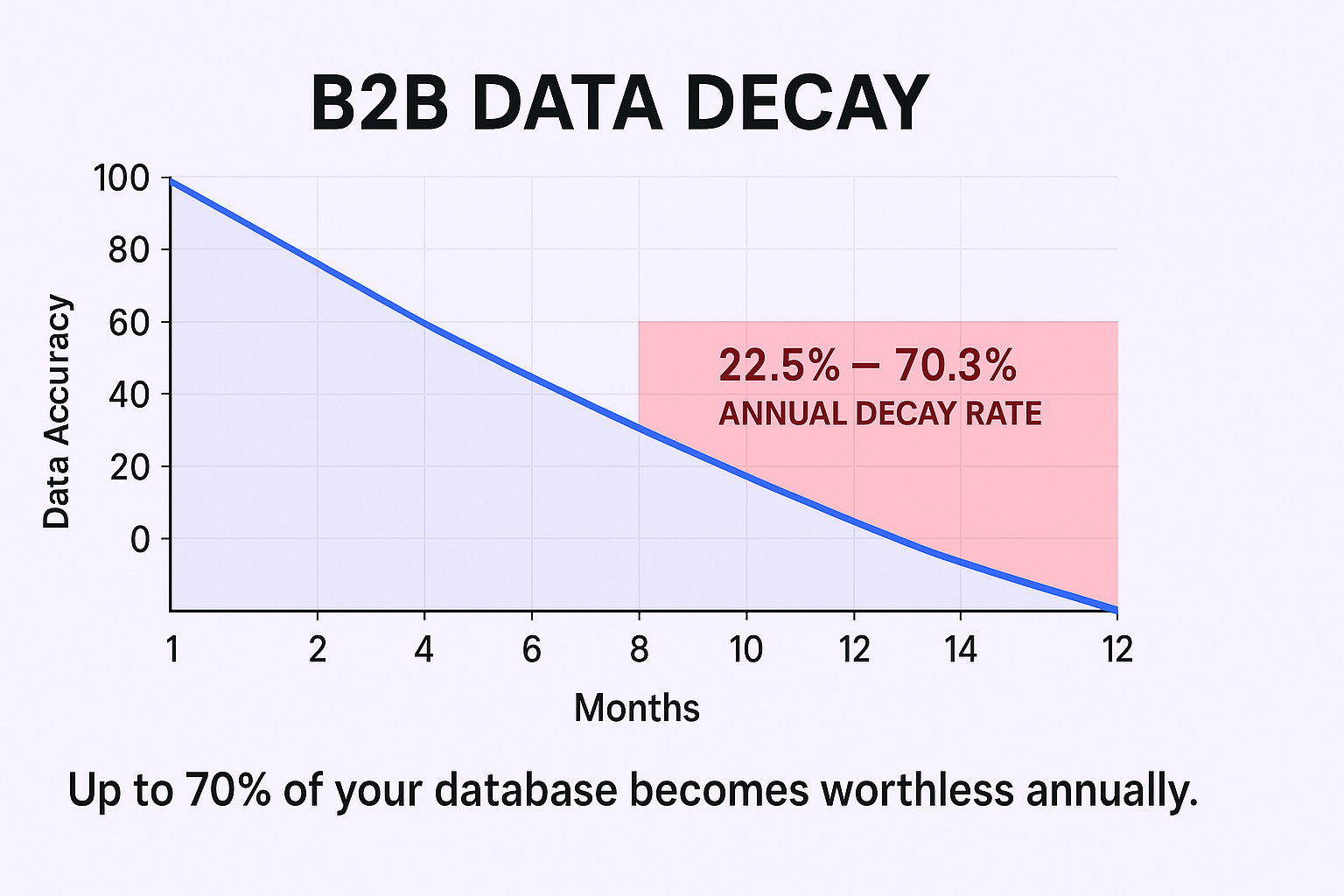
The average business loses $15 million per year due to bad data. And B2B contact data decays at a staggering 22.5% to 70.3% annually. That’s not a typo. Every year, up to 70% of your contact database becomes worthless.
 

💰 Stop Losing Money on Data

Our LinkedIn outbound engine delivers qualified meetings without data decay headaches or tool complexity

So when you’re choosing between LinkedIn Sales Navigator and ZoomInfo, you’re not just comparing two tools. You’re making a multi-million dollar decision about how you’ll fight this data decay problem.

Let’s cut through the noise and figure out which one actually deserves your budget.

ZoomInfo VS LinkedIn Sales Navigator Overview

Think of it this way: LinkedIn Sales Navigator is your “who” tool. ZoomInfo is your “how to reach them” tool.

Sales Navigator gives you access to LinkedIn’s 1 billion+ user-updated profiles. It’s built for social selling, relationship building, and account mapping. You find the right people, understand what they care about, and know exactly when to reach out.

ZoomInfo is a B2B data intelligence platform with 100M+ verified contacts. It scrapes the entire web (including LinkedIn) and verifies everything through a massive human team. You get direct-dial phone numbers, verified emails, and org charts that LinkedIn strategically hides.

Here’s the kicker: most mature sales teams don’t choose one or the other. They use both. Sales Navigator finds the person, ZoomInfo gives you their contact info, and you combine them for a complete prospecting machine.

The real question isn’t “which is better?” It’s “which workflow makes sense for your budget and sales motion?”

Data Quality and Sources

This is where things get interesting.

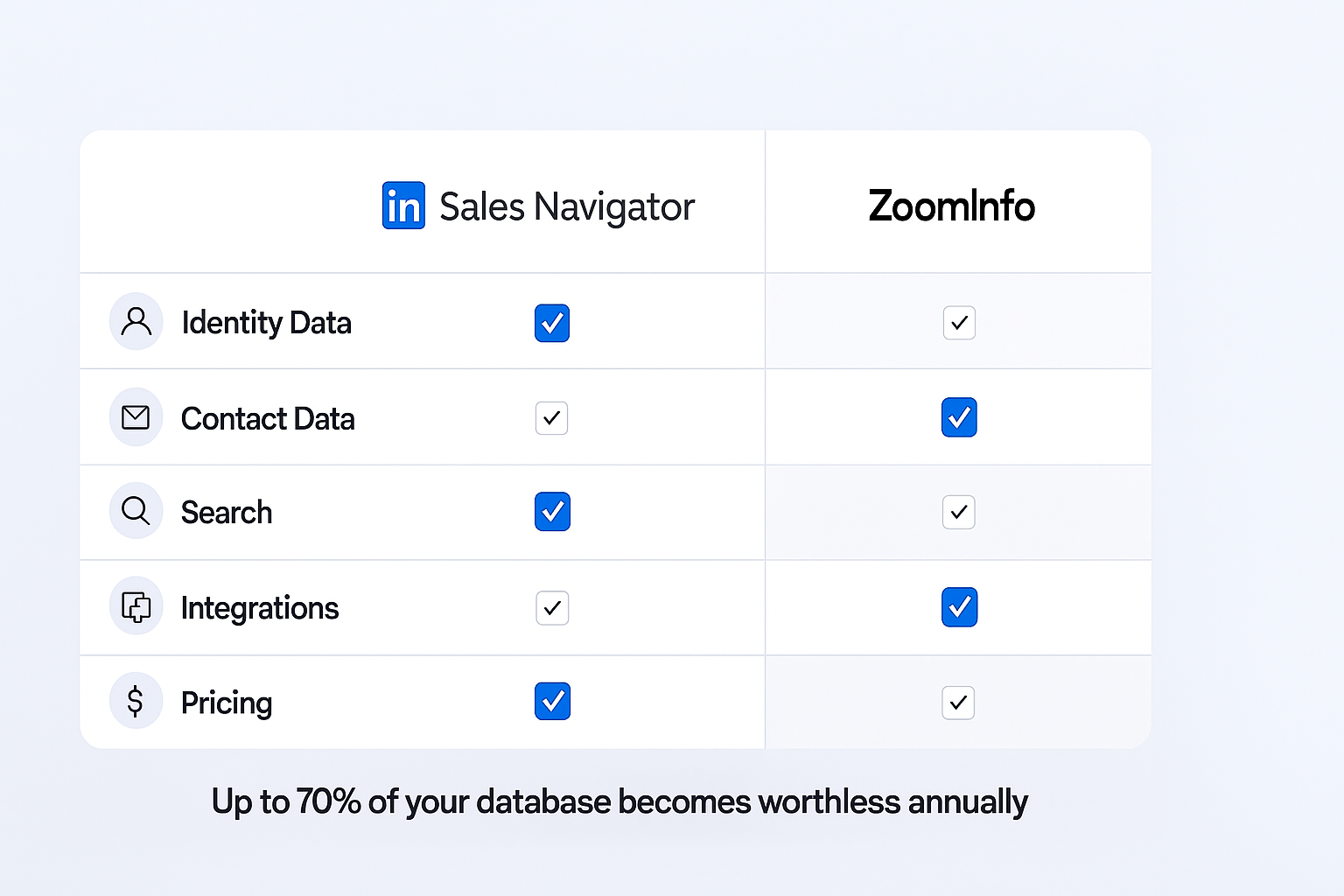
Sales Navigator wins on identity data. Job titles, company tenure, recent activity—all updated in real-time by users themselves. When someone changes jobs, they update their LinkedIn profile immediately. No other database can match that freshness.

ZoomInfo wins on contact data. Direct-dial phone numbers boast 90%+ accuracy. Verified business emails. Complete org charts. This is their entire business model, and they invest millions in human verification teams to keep it clean.

But here’s the catch: ZoomInfo’s identity data can lag behind reality. Why? Because they’re scraping and verifying external data. By the time they confirm someone’s job change, that person has already updated their LinkedIn profile.

The sales intelligence market is projected to hit $9.02 billion by 2034, up from $3.31 billion in 2024. All that growth is driven by one problem: nobody has solved the complete data equation alone.

G2 user scores tell the story:

  • Lead Builder: Sales Navigator (8.5) beats ZoomInfo (8.4)
  • Contact Data: ZoomInfo (8.4) beats Sales Navigator (8.3)
  • Alerts/Signals: Sales Navigator (8.6) crushes ZoomInfo (8.0)

They’re specialists, not generalists. And that’s exactly why smart teams use both.


Plans And Pricing

The price difference is wild. We’re talking more than 20x difference between these tools.

LinkedIn Sales Navigator:

  • Transparent pricing: ~$99/user/month (Core Plan, annual billing)
  • Anyone can buy it with a credit card
  • Advanced and Advanced Plus tiers available for teams needing CRM sync

ZoomInfo:

  • Opaque pricing: Custom quotes only
  • Professional plans start around $15,000/year
  • Advanced features like direct-dials and intent data? That’s $24,000-$40,000+/year
  • Enterprise-level C-suite purchase, not a credit card decision

🎯 Get Results, Not Tools

H2: We handle targeting, campaigns, and scaling so you focus on closing 15-25% response rate meetings

This pricing gap tells you everything. Sales Navigator is a personal productivity tool. ZoomInfo is an enterprise GTM platform that you’re betting your entire sales motion on.

Contact Information

Let’s be blunt: Sales Navigator doesn’t give you phone numbers or email addresses. That’s by design. LinkedIn wants to keep that data locked in their platform to maintain their moat.

You get InMail credits (50/month with Core). You can see what people post and when they’re active. But actionable contact info? Nope.

ZoomInfo exists to solve this exact problem. Direct-dial phone numbers are their crown jewel. Verified business emails. Mobile numbers when available. This is why high-volume calling teams can’t live without it.

The best workflow? Use Sales Navigator to find the perfect prospect, then use ZoomInfo’s Chrome extension to overlay their contact data right on top of the LinkedIn profile. One click, and you’ve got everything you need to reach out.

This is how the pros do it. And it’s clunky, yes. But it works.

Search Engine

Sales Navigator crushes search for people. Over 50 advanced filters let you build hyper-specific lists using Boolean search. “VP” AND “Sales” NOT “Assistant”—you can get that granular.

Want to find all Vice Presidents of Sales at Series B SaaS companies in the Northeast who recently posted about hiring? Sales Navigator does that in 30 seconds.

ZoomInfo crushes search for companies. Their technographic data is unmatched. “Show me all 500-1,000 employee SaaS companies using Salesforce and HubSpot” is trivial.

Sales Navigator’s company filters? Pre-set brackets like “1,001-5,000 employees.” Frustratingly vague. ZoomInfo lets you type exact employee counts.

The verdict: Use Sales Navigator for people-first searches. Use ZoomInfo for company-first, technology-based searches.

Intent Data

This is where people get confused. Both platforms have “signals,” but they’re tracking completely different things.

Sales Navigator’s “Sales Signals”:

  • Person-centric, platform-native alerts
  • “John just changed jobs” or “Sarah posted about X”
  • Rear-view mirror signals (what just happened)
  • G2 score: 8.6 for alerts

ZoomInfo’s “Streaming Intent”:

  • Account-centric, web-wide tracking
  • “Acme Corp is researching cybersecurity solutions right now”
  • Forward-looking signals (who’s in-market)
  • Tracks research activity across thousands of B2B sites

Neither is better. They’re solving different problems. Smart teams use ZoomInfo intent to find hot accounts, then Sales Navigator signals to time their outreach perfectly to specific people at those accounts.

Integrations

This is the biggest workflow difference between the two platforms.

ZoomInfo: Seamless, native integrations with Salesforce, HubSpot, and every major CRM. Data syncs automatically. New contacts enrich without manual work. Sales engagement platforms connect natively. G2 users rate their Quality of Support at 8.7.

Sales Navigator: Limited by iframe embedding. Often just a small window inside your CRM. Requires manual data entry to get contacts and activity into your system. G2 score for integration? Decent, but users constantly complain about this friction.

This isn’t an accident. LinkedIn (owned by Microsoft) protects its data moat. Letting everything easily export to competing CRMs would destroy their competitive advantage.

For RevOps leaders building scalable processes, Sales Navigator’s weak integration is a dealbreaker. Manual data entry kills productivity and creates data hygiene nightmares.

âš¡ Skip the Integration Nightmare

Our done-for-you LinkedIn outbound eliminates manual work and delivers qualified pipeline from day one

Data Upload

Neither platform is really designed for uploading external data.

ZoomInfo lets you enrich existing lists. Upload a CSV of company names or domains, and ZoomInfo fills in the contact data, technographics, and intent signals. This is powerful for account-based marketing plays.

Sales Navigator doesn’t have a data upload feature in the traditional sense. You’re searching and building lists from LinkedIn’s database, not enriching your own data.

If data enrichment is your primary use case, ZoomInfo (or an alternative like our email verification solution) is the clear winner.

Who Should Buy What?

Here’s the no-BS recommendation based on your situation:

If you’re an individual seller or small team: Get Sales Navigator + a cost-effective enrichment tool. At ~$100/month, Sales Navigator is non-negotiable. It’s the source of truth for who your prospects are. Pair it with more affordable alternatives for contact data.

If you’re a high-volume sales team: Buy both. Your team will live in Sales Navigator to build accurate lists, use ZoomInfo’s Chrome extension to get contact data, and push everything to your sales engagement platform. There’s no substitute for ZoomInfo’s direct-dial database if you’re making hundreds of calls per day.

If you’re a VP of Sales or Revenue Leader: ZoomInfo Advanced ($25,000+/year) becomes your GTM platform. It’s your insurance policy against the $15 million data decay problem. Sales Navigator gives your team the source of truth for targeting.

If you’re in RevOps: Choose ZoomInfo. Sales Navigator’s manual data entry and iframe integration are workflow killers. You need seamless CRM sync, automated enrichment, and clean data flowing everywhere.

If you’re a bootstrapped founder: Get Sales Navigator + Apollo.io or another all-in-one alternative. You get 90% of the functionality for 10% of the cost. Check out social selling strategies to maximize your limited budget.

📈 Done-For-You Outbound Engine

Complete targeting, campaign design, and scaling methods that deliver predictable qualified meetings every week

7-day Free Trial |No Credit Card Needed.

FAQs

Is LinkedIn Sales Navigator worth it?

Yes, for anyone in B2B sales. At ~$99/month, it's the single best investment for prospecting. It gives you real-time access to the most accurate professional identity database in the world. Even if you're using ZoomInfo, you need Sales Navigator to verify that your contacts still work at their companies.

What's the difference between LinkedIn Premium and Sales Navigator?

LinkedIn Premium is for job seekers. Sales Navigator is for sales professionals. Premium gives you 15 InMails and basic profile viewing. Sales Navigator gives you 50 InMails, 50+ advanced search filters, unlimited browsing, and list management features. If you're prospecting, Premium isn't a viable option.

Can I get phone numbers from LinkedIn Sales Navigator?

No. Sales Navigator strategically withholds direct phone numbers and email addresses. This is by design—LinkedIn wants to protect its data moat. You'll need a separate tool like ZoomInfo, Apollo, or business databases to get contact information.

How much does ZoomInfo cost?

ZoomInfo pricing starts around $15,000/year for Professional plans, but key features like direct-dials and advanced intent are locked in Advanced ($24,000+) or Elite ($40,000+) tiers. Pricing is custom and opaque—you'll need to talk to sales for a quote.

Do I need both Sales Navigator and ZoomInfo?

It depends on your team size and budget. Individual sellers can get by with Sales Navigator + a cheaper enrichment tool. High-volume teams doing hundreds of calls per day need both—Sales Navigator for accurate targeting and ZoomInfo for contact data and seamless CRM integration.

Skip the Tools, Get Meetings

Our LinkedIn outbound engine delivers 15-25% response rates with complete targeting and campaign management

Segmentation That Actually Converts

LinkedIn outbound targets precise demographics with strategic campaign design and scaling methods

How to Build a High-Converting B2B Sales Funnel from Scratch on LinkedIn ​