

Stop Guessing, Start Landing: The Best Mail-Tester Alternative for Accurate Inbox Placement in 2025
- Sophie Ricci
- Views : 28,543
Table of Contents
You just spent an hour crafting the perfect email. The personalization is spot-on, the value prop is crystal clear, and the CTA is compelling. You run it through a basic checker, get a 10/10 score, and hit send… only to hear crickets. Why? Because that perfect email landed squarely in the spam folder.
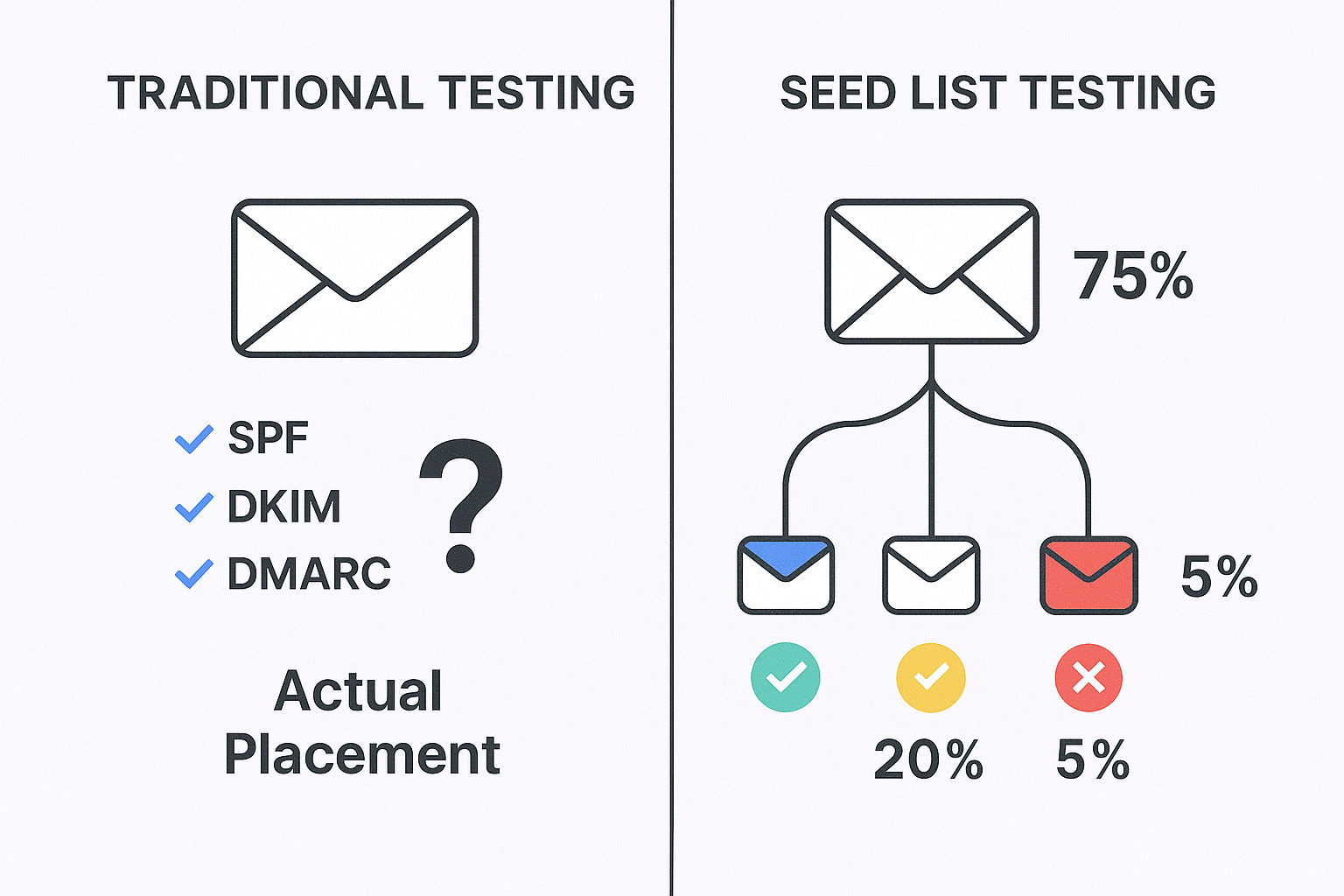
If this sounds familiar, you’ve hit the wall with traditional spam checkers. The core problem with many email deliverability tools is that they excel at checking the technical setup of your email—things like SPF, DKIM, and DMARC authentication—but they fail to answer the most critical question: “Where will my email actually land?”
This creates a dangerous false sense of security. A high score from a basic tool doesn’t guarantee you’ll avoid the promotions tab or, worse, the spam folder, because it’s not based on real-world inbox placement.
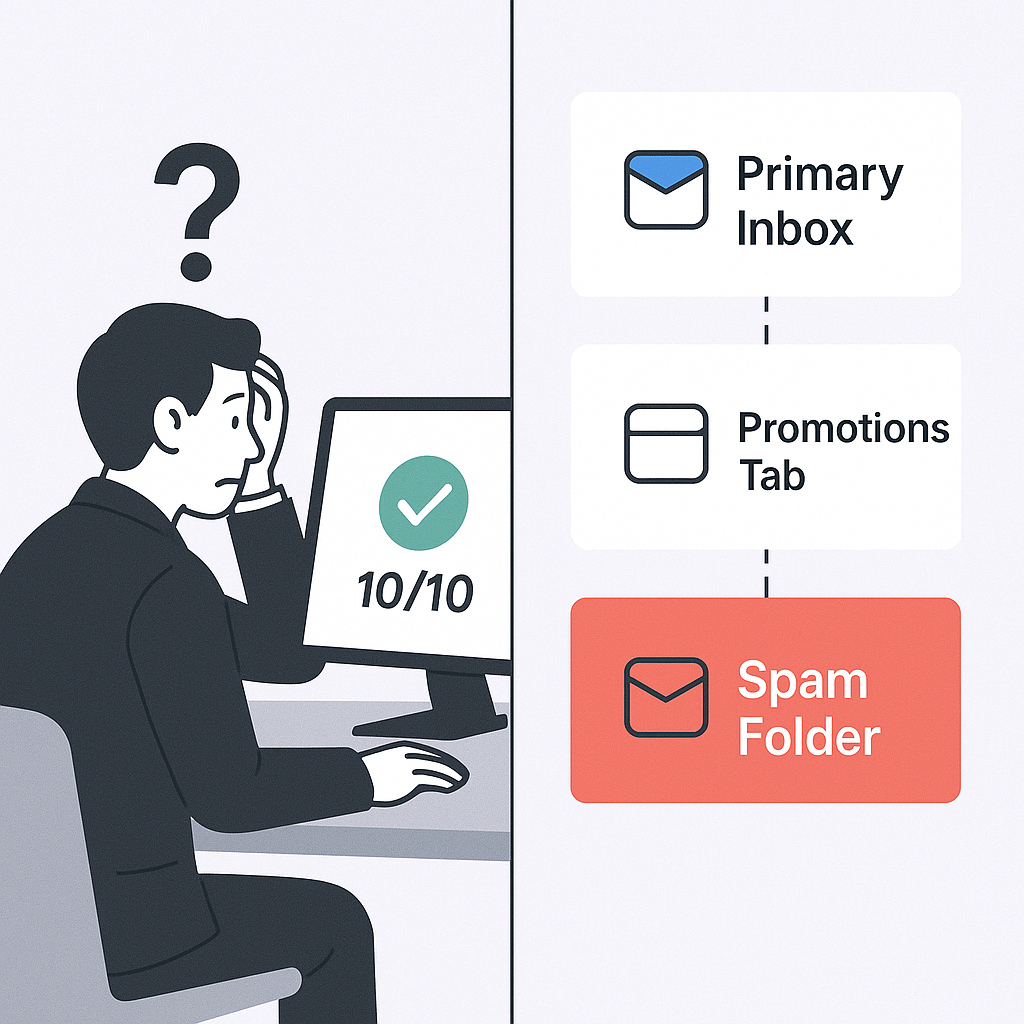
The gold standard for email deliverability has evolved. Modern platforms use a superior method called seed list testing. They send your email to a large network of real inboxes across major providers like Gmail and Outlook to see exactly where it lands: Primary Inbox, Promotions, or Spam. This isn’t a simulation; it’s a real-world stress test against the sophisticated, engagement-based algorithms that determine your fate.
Poor inbox placement isn’t just a technical problem; it’s a revenue problem that directly impacts your bottom line. 64.6% of businesses report that deliverability issues have directly impacted their revenue. Every undelivered email is a lost opportunity, and if 15% of your emails never reach an inbox, that’s 15% of your lead-gen budget wasted.
🎯 Skip the Spam Filters Entirely
LinkedIn Outbound Gets You 15-25% Response Rates—No Deliverability Headaches
This guide will introduce you to the best mail tester alternative tools that replace guesswork with data, helping you land more emails in the inbox and drive better results from your email marketing campaigns.
TLDR: Best Mail-Tester Alternatives in 2025
For the time-crunched professional who needs an answer now, here are the top three tools that will give you real inbox placement insights.
Best Overall for Cold Outreach: MailReach
- Why: It offers the most powerful combination for email marketing: best-in-class email warm-up to build your sender reputation from scratch, combined with hyper-accurate inbox placement testing built specifically for the challenges of cold outreach.
Best for Optimizing Active Campaigns: Inbox Radar by Saleshandy
- Why: Its standout feature is the ability to auto-pause your email sequences if your deliverability score drops, a game-changing feature for protecting your domain reputation mid-campaign.
Best All-in-One Deliverability Suite: MailerCheck
- Why: It goes beyond just inbox testing, offering robust email list verification, DMARC monitoring, and blacklist monitoring in a single, user-friendly platform.
💰 Stop Paying for Maybe
H2: Guaranteed Inbox Access with LinkedIn—15-25% Response Rates From Day One
Top Mail-Tester Alternatives and Competitors Explained in Detail
We’ve analyzed the features, pricing, and thousands of real user reviews to give you the ground truth on the top 5 email deliverability tools that will actually tell you where your emails are landing.
Tool | Best For | Inbox Placement (Seed List) | Email Warm-up | Automated Monitoring | Blacklist Checks | Starting Price |
MailReach | Building sender reputation for cold outreach | Yes (30k+ inboxes) | Yes (Human-like) | Yes (with Slack alerts) | Yes | $25/mailbox/month |
Inbox Radar | Protecting domain reputation during active campaigns | Yes | No | Yes (with auto-pause) | Yes | $23/month |
GlockApps | In-depth technical diagnostics & reporting | Yes (Extensive global list) | No | Yes | Yes (50+ lists) | $59/month (annual) |
MailerCheck | All-in-one list hygiene & deliverability | Yes (8 major providers) | No | Yes | Yes | Free plan, then Pay-As-You-Go |
Unspam.Email | Budget-conscious pre-send testing & optimization | Yes | No | No | Yes | $9/month (Free plan available) |
MailReach
Overview & Best For: Professionals who are serious about cold outreach. MailReach is the specialist’s choice for building and maintaining a pristine sender reputation. It’s less of an all-in-one tool and more of a high-performance engine for your most important asset: your sending domain.
How It Gives You Accurate Insights: MailReach provides a real deliverability score by sending your test emails to a high-quality network of over 30,000 real inboxes, primarily composed of Google and Microsoft accounts. The reports are incredibly clear, breaking down your placement by provider (Gmail vs. Outlook) and by inbox type (Primary, Promotions, Spam), so you know precisely where to focus your optimization efforts.
Key Features:
- Human-like Email Warm-up: This is its killer feature. MailReach doesn’t just send emails; it creates natural, multi-step conversations. The system automatically marks your emails as important and even rescues them from spam filters, perfectly mimicking human behavior to build trust with Gmail and Microsoft’s algorithms.
- Automated Spam Tests & Alerts: You can set up continuous monitoring and receive alerts in Slack if your deliverability score drops. This allows you to act before your campaign performance suffers and your domain reputation is damaged.
- 360° Deliverability Solution: It bundles all the essentials—DNS checks (SPF, DKIM, DMARC), blacklist monitoring, and content analysis—with its core warm-up and testing features.
Pricing: Simple, transparent pricing starting at $25 per mailbox per month. This plan includes 20 free spam test credits, with the option to purchase more on a pay-as-you-go basis.
Real User Reviews:
- The Good: User feedback is overwhelmingly positive, with a 4.6/5 rating on G2 and a perfect 5/5 on Capterra. Users consistently praise its effectiveness, with many claiming it doubled their open rates.
- The Bad: The primary critique is that the $25/inbox price can feel steep for solo users or those only warming one or two accounts.
Inbox Radar by Saleshandy
Overview & Best For: Teams running active, high-volume email marketing campaigns. Inbox Radar’s main strength lies in its deep integration with the Saleshandy outreach platform, offering unique safeguards to protect your domain while you scale your sending.
How It Gives You Accurate Insights: Similar to MailReach, Inbox Radar uses a seed list of real inboxes across major ESPs like Gmail, Outlook, Zoho, and Yahoo to show you exactly where your emails are landing. It provides clean, graphical reports that visualize the percentage of emails landing in the inbox, spam filters, or other tabs, and includes a SpamAssassin score to help diagnose content-related issues.
Key Features:
- Advanced Deliverability Triggers (Auto-Pause): This is its unique selling point. You can configure a rule to automatically pause an email account or an entire sequence if your inbox placement score drops below a limit you define. This is a lifesaver for preventing a temporary issue from getting your entire domain blacklisted.
- Recurring & External Tests: You can schedule automated tests to run daily or weekly, keeping a constant pulse on your deliverability. It also offers an “External Test” feature, which provides a unique Test ID to check deliverability from any other sending tool you might be using.
- Domain & IP Insights: The reports include comprehensive checks for your SPF, DKIM, DMARC, and blacklist status, giving you a complete technical overview in one place.
Pricing: Inbox Starter plan is $23/month for 15 placement tests. To access the critical auto-pause feature, you’ll need the Inbox Pro plan at $79/month, which includes unlimited tests.
Real User Reviews:
- The Good: Users praise the clean UI and the actionable nature of the reports. The ability to test specific steps and variants within a sequence is highly valued by users running complex campaigns.
- The Bad: Saleshandy as a platform relies on external tools for email warm-up. This means Inbox Radar is purely for testing and monitoring, not for building your reputation from scratch.
GlockApps
Overview & Best For: Data-driven marketers and technical users who want the most detailed diagnostic reports available. GlockApps provides an incredibly granular look at how over 50 different spam filters and mailbox providers view your email, making it a powerful email deliverability tool for troubleshooting complex issues.
How It Gives You Accurate Insights: GlockApps uses an extensive seed list that covers a wide range of global ISPs, providing some of the most detailed placement reports on the market. It excels at showing you not just if you landed in spam, but why, with detailed content analysis and reports from specific filters like SpamAssassin and Barracuda.
Key Features:
- Comprehensive Spam Filter Testing: This feature allows you to see how your email scores against dozens of different filters. This is particularly useful if you’re targeting large enterprises that might use less common, corporate-level security filters.
- DMARC Analyzer: Provides easy-to-read reports on your DMARC records, helping you spot potential spoofing or authentication issues that could be hurting your reputation.
- Uptime & Blacklist Monitoring: The platform automatically monitors your domain and IP against more than 50 blacklists and alerts you to any issues that could affect your sending.
Pricing: Complex, credit-based pricing structure. There is a free plan with 3 free email spam tests. The paid “Essential” plan starts at $59/month (when billed annually) and includes 360 test credits. A key drawback is that unused credits expire at the end of each month.
Real User Reviews:
- The Good: Users love the highly detailed and comprehensive reports, along with the ability to test against a huge variety of email providers. The free plan is generous enough for occasional, one-off testing.
- The Bad: Users report aggressive upselling for their $300/hour consulting service and sudden, massive price hikes (400-500%) with a confusing pricing structure. Some users have also reported occasional inaccuracies in test results.
MailerCheck
Overview & Best For: Teams who need an all-in-one toolkit for list hygiene and email deliverability. MailerCheck smartly combines email list verification, inbox placement testing, and technical monitoring into one user-friendly platform, making it a great starting point for improving deliverability.
How It Gives You Accurate Insights: Its Inbox Placement feature tests your campaigns against 8 major providers, including Gmail, Yahoo, and AOL. Crucially, it also specifically tells you if you’re landing in Gmail’s Promotions tab, an insight many other tools miss. The Email Insights feature analyzes your content for spammy phrases, broken links, and HTML issues before you hit send.
Key Features:
- Comprehensive Email Verification: Before you even test deliverability, MailerCheck can clean your prospect list. It detects invalid, disposable, and risky catch-all emails, which is a critical first step to reducing bounce rates and protecting your sender reputation.
- DMARC & Blocklist Monitoring: Similar to GlockApps, it provides tools to monitor your domain’s DMARC reports and get real-time alerts if your IP or domain hits a blocklist, helping you resolve issues quickly.
- Strong Integrations: MailerCheck integrates with popular tools like Mailchimp, Zapier, and ActiveCampaign, making it easy to fit into your existing workflow.
Pricing: Offers a free plan that gives you 200 credits to start. After that, it operates primarily on a flexible pay-as-you-go system. An Inbox Placement test costs 200 credits, and you can purchase 1,000 credits for just $10. Monthly subscriptions for continuous monitoring start at $125/month.
Real User Reviews:
- The Good: Users consistently praise the exceptional and responsive customer service, as well as the effectiveness of the list cleaning service. The credit-based system is seen as flexible and fair.
- The Bad: Some users have noted that the user interface can be initially confusing to navigate. Others have suggested that the price for monthly subscriptions could be lower to be more accessible for smaller businesses.
Unspam.Email
Overview & Best For: Budget-conscious professionals, freelancers, or marketers who need a user-friendly email deliverability tool for pre-send checks without the complexity or cost of enterprise solutions. It offers a great mix of spam testing and unique visual tools at a very accessible price point.
How It Gives You Accurate Insights: Unspam.Email provides a clear email spam score and inbox placement tests to show you where your emails land on major platforms like Gmail, Outlook, and Yahoo. It also covers all the essential technical checks: SPF, DKIM, DMARC, broken links, and domain age, giving you a solid overview of your deliverability health.
Key Features:
- AI Eye-Tracking Heatmap: This is a unique and valuable feature that predicts where your recipients will look first in your email. It helps you optimize your layout and CTA placement for maximum impact and engagement.
- Email Previews: This feature allows you to see how your email will render across different devices and email clients before you send, ensuring your message looks professional everywhere.
- Actionable Insights: Users report that the tool provides clear, actionable steps to fix identified issues and improve their spam scores, empowering them to make changes with confidence.
Pricing: One of the most affordable tools on the market. It offers a generous free email spam test plan that includes 10 spam tests and 3 inbox tests per month. The paid Basic plan starts at just $9/month and gives you 50 spam tests and 10 inbox tests.
Real User Reviews:
- The Good: The tool is praised for its actionable insights and ease of use, helping users confidently fix spam issues. The combination of technical checks and visual tools like heatmaps at such a low price point offers excellent value for money.
- The Bad: Unspam.Email is a focused testing tool. It lacks email warm-up or domain reputation-building features, and it doesn’t integrate directly with outreach automation platforms.
Optimize Your Outreach Based on Accurate Inbox Placement
A great tool is only half the battle. Now that you have accurate data on where your emails are landing, here’s the four-step playbook to turn those insights into better email marketing results.
Step 1: Read the Report, Find the Pattern
Don’t just look at the overall score. Dig into the details of your inbox placement report to find patterns.
Are you failing on one specific provider? If you have 90% inboxing on Gmail but only 40% on Outlook, you have a Microsoft-specific problem. This could be related to certain links, phrasing, or sender reputation signals that Microsoft’s spam filters are more sensitive to.
Are you landing in the Promotions tab? This isn’t as bad as the spam folder, but it’s not ideal for a personal email that needs a timely response. Landing in Promotions is often caused by using overly promotional language, including too many images or links, or using a “marketing-style” HTML template.
Step 2: Fix Your Technical Foundation (The Non-Nerd’s Guide)
Your reports will flag issues with three key acronyms: SPF, DKIM, and DMARC. Here’s what they mean in simple terms:
- SPF: A public list of servers that are approved to send email from your domain.
- DKIM: A digital signature that proves your email wasn’t tampered with in transit.
- DMARC: The security guard that tells receiving servers what to do if an email fails the SPF or DKIM checks.
🚫 Ditch the Technical Nightmare
We Handle Targeting, Campaigns, and Scaling—You Just Take Meetings
Most email deliverability tools on our list will show a clear red flag if these are broken. If you see an error, forward a screenshot to your IT team and say, “My deliverability tool says our email authentication needs to be fixed.”
Step 3: Build Your Reputation with Email Warm-up
For cold outreach, your sender reputation is everything. A brand new domain has no sending history, which makes it instantly suspicious to spam filters. An email warm-up service, like the one built into MailReach, automates the process of building a good reputation. It does this by sending and receiving emails from a network of high-reputation accounts, generating positive engagement signals (like opens, replies, and being marked as important) that mailbox providers love. This process is non-negotiable for anyone starting a new domain for outreach.
⚡ No Warm-Up, No Wait
Start Booking Meetings Day 1 with LinkedIn Outbound—Complete Setup Included
7-day Free Trial |No Credit Card Needed.
Step 4: Write for the Inbox, Not the Spam Folder
Even with a perfect technical setup and a warmed-up domain, bad content can still kill your email deliverability.
Personalize, Personalize, Personalize: This is crucial for both deliverability and getting replies. Personalized subject lines can boost open rates by as much as 50%. Mentioning a mutual connection, a recent company announcement, or a relevant blog post shows you’ve done your homework and aren’t just blasting a generic template.
Keep HTML Simple: For cold outreach, plain-text or simple HTML emails almost always outperform flashy marketing templates. Avoid broken links and URL shorteners, as these are major red flags for spam filters.
Focus on Value, Not Hype: Avoid using classic spam trigger words like “free,” “guarantee,” or “act now.” Instead, focus on providing value and starting a conversation.
The bottom line is that hitting the inbox has a massive ROI. Email marketing generates an average return of $36 for every $1 spent, but that ROI is $0 if the email is never seen. A healthy email program should have a delivery rate of around 98%
Other Useful Resources
To overcome the 64.6% revenue impact from deliverability issues and 15% inbox failure while achieving the 15-25% LinkedIn response rates without authentication complexity, explore these complementary resources:
Email Platform Comparisons (If Using Deliverability Testing):
- Compare Smartlead vs Saleshandy to evaluate the $23-59/month inbox placement tools beyond Mail-Tester alternatives
- Explore Saleshandy for agencies managing multiple clients without the $25/mailbox warm-up costs
LinkedIn Outbound Strategy (Superior to Email Testing):
- Master LinkedIn Sales Navigator integration with Salesforce for direct messaging eliminating the 2-4 week warm-up requirement
- Learn to cancel LinkedIn Sales Navigator if switching from email seed list testing to social outbound
- Discover how to export leads from LinkedIn Sales Navigator for targeting without SPF/DKIM/DMARC authentication
- Master LinkedIn change email address for profile management beyond deliverability monitoring
- Leverage LinkedIn company statistics for targeting achieving the $36/$1 ROI without 85% inbox placement anxiety
These resources help you achieve superior results without warm-up services, seed list testing, or spam filter battles.
Mail-Tester Alternative: Frequently Asked Questions
What's the difference between email deliverability and delivery rate?
How long does it take to warm up a new email account?
Can I use a free tool to accurately test my inbox placement?
What is a good deliverability rate for emails in 2025?
How often should I test my email deliverability?
We deliver 100–400+ qualified appointments in a year through tailored omnichannel strategies

- blog
- Email Deliverability
- Best Mail-Tester Alternative: Top Tools for Accurate Inbox Placement
