

What Is Meet Alfred?
Meet Alfred is a cloud-based LinkedIn automation tool designed to handle repetitive outreach tasks automatically.
Think of it as a virtual assistant that sends connection requests, follows up with messages, and even reaches across to email and Twitter—all without you clicking a single button.
The core promise is simple: automate the boring parts of networking so you can focus on conversations that actually matter.
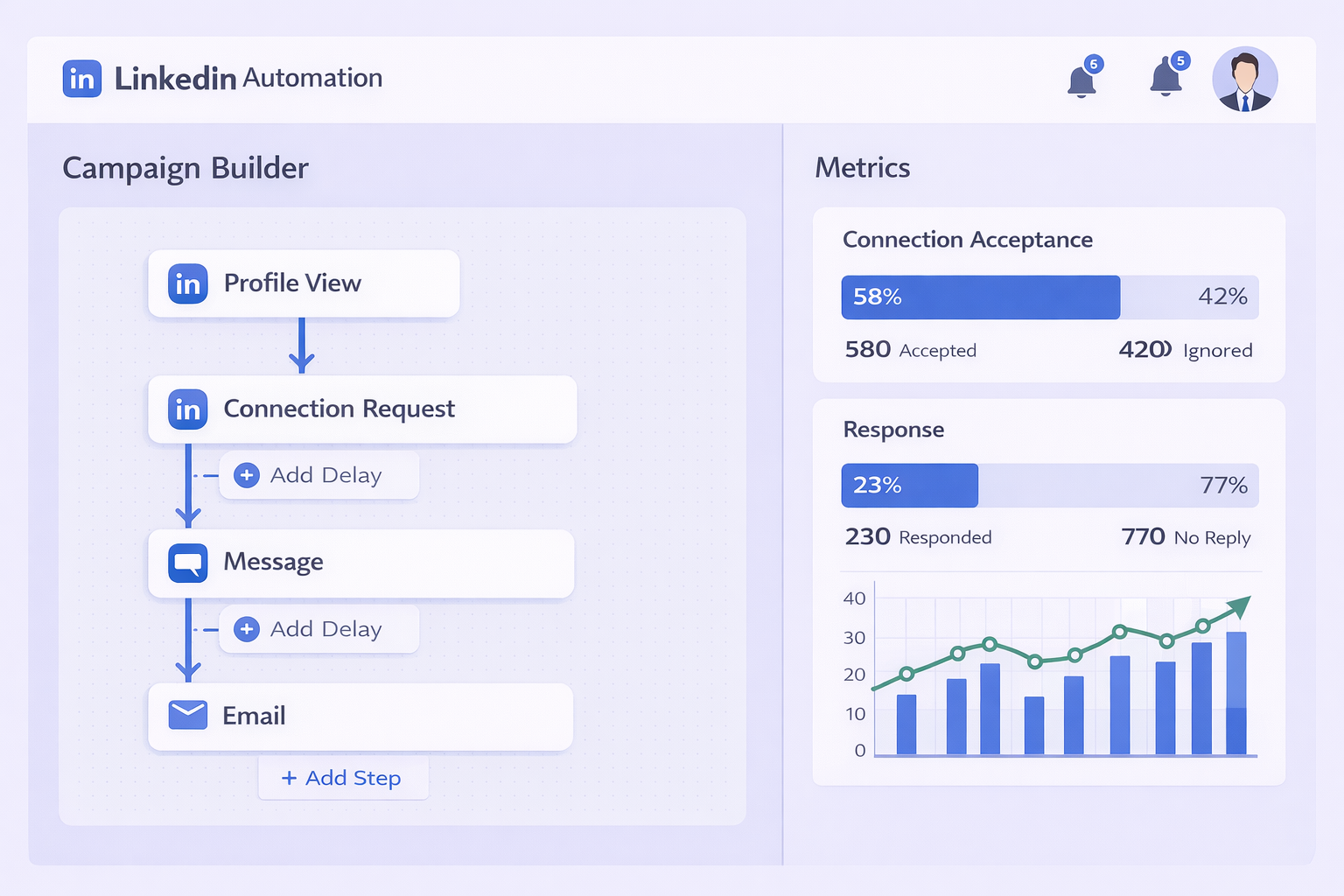
Unlike browser extensions that require your computer to stay on, Meet Alfred runs in the cloud. This means campaigns continue 24/7, even when you’re sleeping. The platform positions itself as a “LinkedIn-first” solution, meaning everything is built around maximizing your LinkedIn presence rather than treating it as an afterthought.
Key Features at a Glance
Multi-channel sequences that combine LinkedIn, email, and Twitter touches in one automated workflow. If someone doesn’t accept your LinkedIn request within 7 days, the system automatically sends them an email.
Smart inbox that consolidates all LinkedIn and email replies into one unified view. No more tab-switching between platforms.
Built-in CRM that captures prospect data, conversation history, and campaign performance metrics. It’s basic but functional for small teams.
Campaign templates for common scenarios like event invitations, content promotion, or sales outreach.
The tool tries to be your all-in-one outreach hub. Whether that’s a strength or weakness depends entirely on what you need.
How Meet Alfred Actually Works
Meet Alfred’s architecture is what separates it from simpler tools.
Cloud-based operation means the software runs on remote servers, not your local computer. When you schedule a campaign, those instructions go to the cloud. The server then logs into LinkedIn (through their infrastructure) and executes the actions you’ve programmed.
This is fundamentally different from browser extensions that hijack your Chrome tab. Those extensions manipulate your visible browser session—clicking buttons and typing text as if you’re doing it manually. LinkedIn’s security systems spot this instantly.
The cloud approach offers three major advantages:
Your computer can be off. Campaigns run independently of your personal devices.
You’re not burning local resources. No RAM drain, no battery consumption.
Device flexibility. Manage everything from your phone while the heavy lifting happens on servers.
But here’s the trade-off: to LinkedIn, a login from an AWS server looks suspicious. Home users don’t typically connect from data centers. This is why Meet Alfred must route traffic through proxy networks to mask the server origin—making it appear like you’re logging in from a residential internet connection.
The Campaign Builder
The visual campaign editor is Meet Alfred’s signature feature.
You start by creating a sequence—a series of automated actions that trigger based on prospect behavior. A typical sequence looks like this:
Day 1: View their LinkedIn profile (creates a notification on their phone)
Day 2: Like their recent post (reinforces your presence)
Day 4: Send connection request with personalized template
Day 7: If accepted, wait 2 days then send intro message
Day 10: If no reply, send follow-up message
Day 14: If still no reply and email found, trigger automated email
The branching logic handles different paths automatically. If they reply at any point, the automation stops and alerts you to take over the conversation manually.
This “set it and forget it” workflow is where the time savings come in. What would take you 30 minutes of manual clicking per day now runs in the background while you focus on actual conversations.
Features Deep Dive: What You Actually Get
Let’s break down what Meet Alfred includes and where it delivers value.
Multi-Channel Orchestration
The standout capability is seamless channel switching.
You build one master campaign that touches prospects across LinkedIn, email, and Twitter. If someone is active on Twitter but ignores LinkedIn, your sequence adapts. This matters because campaigns using 3+ touchpoints see 3-5x higher conversion rates than single-channel efforts.
The platform monitors engagement across channels. Did they open your email but not reply? The next LinkedIn message references that. Did they like your tweet? The system factors that into timing the next outreach.
This orchestration is valuable for reaching executives who are active everywhere versus junior employees who live solely on email.
The Unified Inbox
Managing conversations across platforms is chaos without centralization.
Meet Alfred’s “Smart Inbox” aggregates LinkedIn messages and emails into one view. You can reply from either channel without leaving the interface. All conversation history stays attached to the contact record.
For someone juggling 30 active conversations, this saves significant mental overhead. You’re not constantly asking yourself, “Did I already follow up with this person on LinkedIn or email?”
However, the inbox has limitations. It doesn’t pull in Twitter DMs (despite Twitter being part of sequences). And it’s buggy—messages sometimes appear out of order or duplicate.
Built-In CRM Functionality
Meet Alfred includes basic CRM features.
Every prospect you engage gets a record. The system captures scraped data from LinkedIn—job title, company, location, profile URL. It logs every automated action taken and timestamps all replies.
You can add notes, assign tags for segmentation, and track pipeline stages manually. Integration with Zapier allows pushing qualified leads into your main CRM (Salesforce, HubSpot, Pipedrive).
But let’s be clear: this is not a replacement for a real CRM. There’s no deal forecasting, no opportunity weighting, no revenue tracking. Think of it as a “pre-CRM”—a holding zone for prospects before they’re qualified enough to enter your primary system.
LinkedIn Sales Navigator Integration
This is where power users extract maximum value.
Sales Navigator is LinkedIn’s premium search tool with filters like “Posted content in last 30 days” or “Changed jobs in last 90 days.” It’s how you find ultra-targeted prospects.
Meet Alfred integrates directly. You build a hyper-specific search in Sales Nav (example: “Marketing Directors at SaaS companies, 50-200 employees, San Francisco Bay Area, posted recently”). Then you feed that search URL into Meet Alfred, which automatically iterates through results to populate your campaign.
Critical note: This integration is essential for Meet Alfred to be effective. The free LinkedIn search is too limited. You’re realistically looking at Sales Navigator ($99/month) as a mandatory add-on, not an optional enhancement.
Social Media Scheduling
An auxiliary feature that’s surprisingly useful.
You can schedule LinkedIn and Twitter posts from Meet Alfred. Why does this matter for outreach?
Modern LinkedIn growth hacking emphasizes thought leadership. Prospects check your profile before accepting connection requests. If your last post was 6 months ago, you look inactive and untrustworthy.
Consistent posting (3-5x per week) signals authority. But manually remembering to post is hard. Automating your content calendar ensures your profile looks active when prospects investigate you.
It’s not advanced scheduling (no analytics, no best-time recommendations), but it solves the consistency problem.
Pricing Breakdown: The Real Cost
Meet Alfred’s pricing appears straightforward—until you account for everything needed to run it effectively.
Official Pricing Tiers
Basic Plan: ~$29/month (annual) or ~$59/month (monthly)
- LinkedIn automation only
- Limited to 3 active campaigns
- No email or Twitter features
- Basic CRM and support
Pro Plan: ~$49/month (annual) or ~$99/month (monthly)
- Full multi-channel (LinkedIn + Email + Twitter)
- Unlimited campaigns
- Priority support
- Team collaboration features
Teams Plan: ~$39/user (annual) or ~$79/user (monthly)
- Everything in Pro
- Team dashboard and role assignments
- Minimum 3 seats required
Most serious users quickly realize the Basic plan is insufficient. You need Pro for email integration and unlimited campaigns.
The Hidden Costs Nobody Mentions
Here’s where the real expense sneaks in.
LinkedIn Sales Navigator: $99/month. Technically optional, but functionally mandatory for advanced LinkedIn search capabilities. Without it, you’re searching blind.
Email infrastructure: To safely use the email features, you need a secondary domain (to protect your main domain reputation) plus email warming services like Warmup Inbox (~$15/month) to avoid spam filters.
Residential proxy: For maximum account safety, users often purchase dedicated residential proxies (~$15-20/month) to ensure the IP address connecting to LinkedIn matches their actual location.
Data verification tools: Meet Alfred scrapes email addresses, but doesn’t verify them. High bounce rates hurt sender reputation, so you need tools like ZeroBounce (~$10-20/month depending on volume).
Total Cost of Ownership
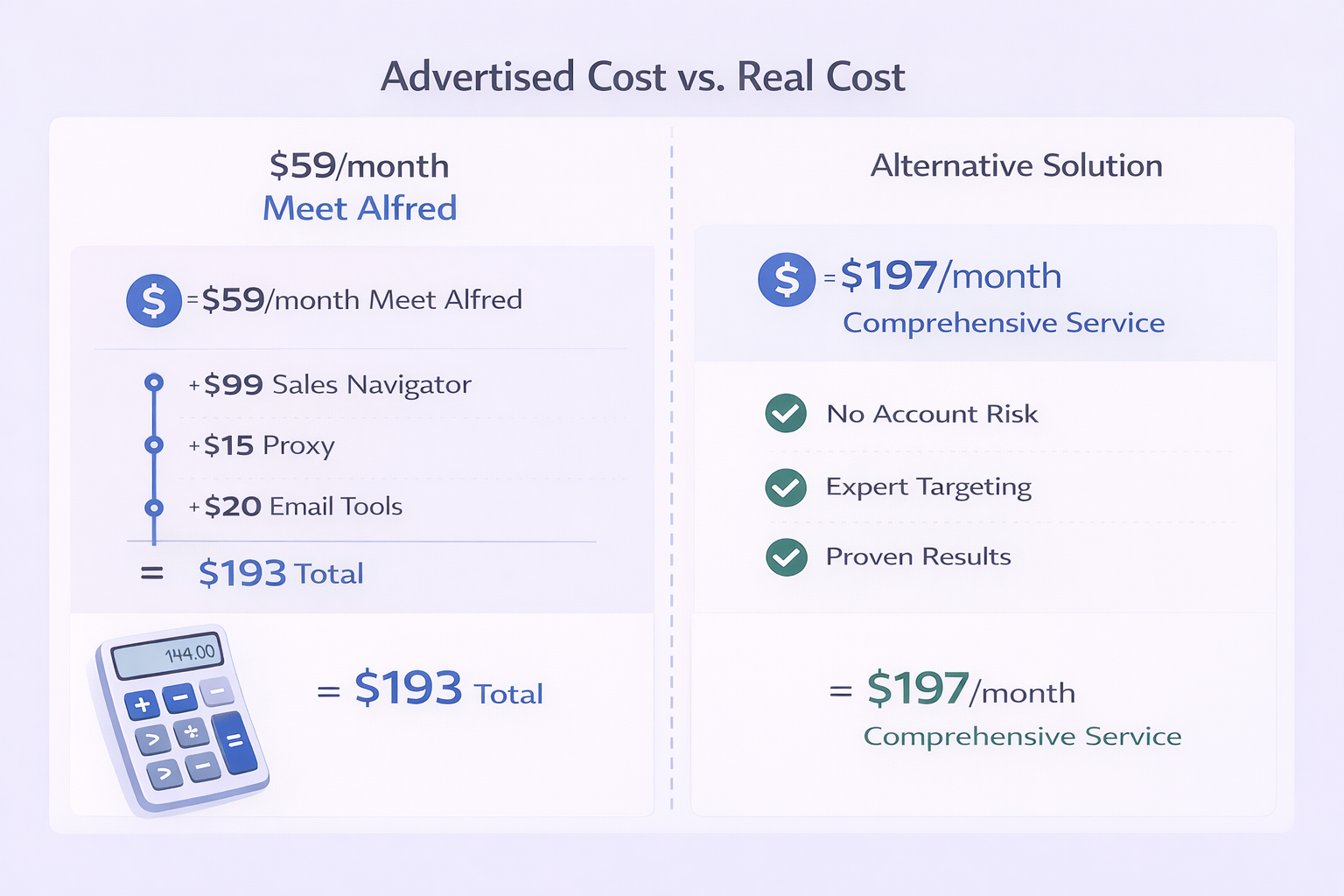
Let’s calculate the real monthly investment per user:
- Meet Alfred Pro: $59
- Sales Navigator: $99
- Proxy service: $15
- Email warming/domain: $20
Realistic monthly cost: ~$193 per user
That’s 3.3x the advertised price. For a 5-person team, you’re looking at nearly $1,000/month in actual expenses.
Is it worth it? Only if the tool generates pipeline. If it books even one meeting per month that closes into a $10,000 deal, the ROI is undeniable. But if your account gets restricted in week 2 and you’re rebuilding your LinkedIn presence, the “cost” extends beyond dollars.
The Safety Question: Will LinkedIn Ban Your Account?
This is the concern that keeps people from clicking “buy.”
LinkedIn’s Terms of Service explicitly prohibit third-party automation. Using Meet Alfred is, by definition, a violation of those terms. The question isn’t whether it’s allowed—it’s whether you’ll get caught.
How LinkedIn Detects Automation
The platform employs multiple detection layers:
Behavioral pattern analysis that flags robotic activity. Humans don’t view 100 profiles in perfect 30-second intervals. Humans don’t send connection requests without visiting profiles first.
Browser fingerprinting that scans for headless browser indicators, screen resolution mismatches, and other bot signatures.
Impossible travel detection that notices if you log in from New York on mobile, then simultaneously from Frankfurt on a server. Geographic inconsistency triggers security flags.
Meet Alfred’s Defense Mechanisms
The tool employs countermeasures to evade detection:
Randomized delays between actions. Instead of mechanical 30-second gaps, it varies (4 minutes, then 7 minutes, then 2 minutes) to mimic human unpredictability.
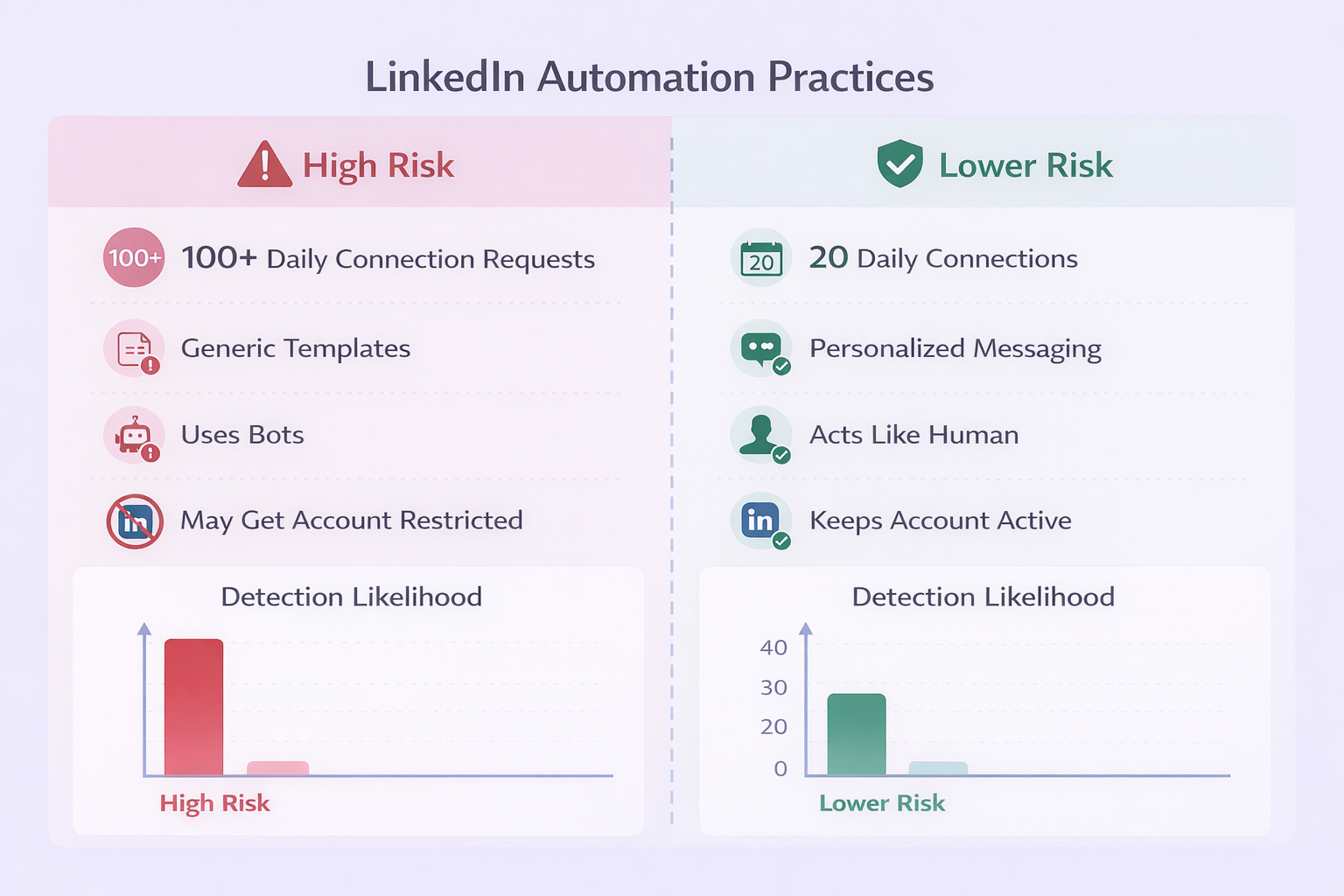
Conservative default limits that stay well below theoretical maximums. The tool suggests 20-25 connection requests per day (not the 100/week limit) and 80 profile views daily.
Proxy routing through residential networks to mask the fact that connections originate from AWS servers rather than home internet.
These defenses improve safety but don’t guarantee it.
Real User Experiences
User feedback is sharply divided.
Some report running Meet Alfred for years without issues—likely because they use conservative settings and high-quality, personalized messaging. Aggressive users who blast 100 connection requests daily with generic templates get flagged within days.
Common restriction scenarios include:
Temporary restrictions (24-48 hours) requiring ID verification. This is LinkedIn’s “warning shot.”
“Hacked account” lockouts where LinkedIn assumes your account was compromised due to unusual login patterns. You must reset your password and verify identity.
Permanent bans are rarer but catastrophic. For professionals with 5,000+ connections, losing your LinkedIn account destroys your professional network and career history.
The 2025 “Safe Limits” Consensus
Based on current data and user reports:
- Connection requests: Maximum 100-150 per week (~20/day)
- Profile views: Maximum 80-100 per day
- Messages to connections: Maximum 30-50 per day
Critical warning: Tools promising to “bypass” these limits are dangerous. LinkedIn’s limits are server-side hard caps. Trying to circumvent them is the fastest path to restriction.
Risk Mitigation Strategies
If you choose to use Meet Alfred, minimize risk by:
Starting conservatively with 10-15 daily actions for the first month while LinkedIn “learns” your new behavior pattern.
Using highly personalized templates rather than generic spray-and-pray messages.
Manually engaging on LinkedIn daily (liking posts, commenting) to create legitimate human activity mixed with automation.
Never automating from a brand-new LinkedIn account. Accounts under 3 months old with sparse networks get flagged faster.
The safest approach? Don’t automate at all. But that’s not always realistic for busy professionals who need to scale outreach.
Meet Alfred vs. Competitors
How does Meet Alfred stack up against other tools in 2025?
Meet Alfred vs. Apollo.io
Apollo has become the category leader by combining data with engagement.
Data advantage: Apollo owns a database of 275M+ contacts with verified emails and phone numbers. Meet Alfred has no proprietary data—you must find contacts elsewhere.
Workflow difference: Apollo is “data-first” (search their database, then email). Meet Alfred is “network-first” (find people on LinkedIn, then connect).
Scoring: Apollo rates higher for all-in-one database needs (8.9/10 vs 6.5/10 for Meet Alfred). But Meet Alfred wins for pure LinkedIn networking and social signaling.
Choose Apollo if you need massive contact volume with direct dial numbers. Choose Meet Alfred if your strategy centers on LinkedIn relationship-building over mass email.
Meet Alfred vs. Woodpecker
Woodpecker is a specialized cold email platform renowned for deliverability.
Deliverability focus: Woodpecker’s “Warm-up” and “Bounce Shield” features are industry-leading. They monitor domain health proactively and automatically adjust sending volumes to protect reputation.
Email as primary channel: If 80% of your outreach is email-focused, Woodpecker is technically superior. Meet Alfred’s email features are functional but lack Woodpecker’s sophisticated deliverability engineering.
Choose Woodpecker if email is your primary channel. Choose Meet Alfred if LinkedIn is primary and email is a secondary “nudge” channel.
Pro tip: Some advanced users run both—Meet Alfred for LinkedIn orchestration and Woodpecker for dedicated email campaigns. This avoids putting all eggs in one basket.
Meet Alfred vs. Linked Helper
Linked Helper represents the “old school” of LinkedIn automation.
Architecture: It’s a desktop application that takes over your mouse and browser session locally rather than running in the cloud.
Cost: Significantly cheaper (~$15/month).
Power: Offers incredibly granular control (e.g., automatically endorsing skills, inviting people who liked specific posts).
Drawback: Requires your computer to stay on with the browser open. LinkedIn detection is higher because it manipulates your visible browser session.
Choose Linked Helper if you’re budget-conscious and don’t mind keeping your computer running. Choose Meet Alfred for “set and forget” cloud convenience.
Meet Alfred vs. Enterprise Tools (Outreach, Salesloft)
Enterprise sales engagement platforms like Outreach and Salesloft dominate the Fortune 500.
Price difference: Enterprise tools run $150+/user with enterprise contracts. Meet Alfred is accessible to SMBs at $50-100/user.
LinkedIn limitation: Interestingly, enterprise tools often have weaker LinkedIn automation because they strictly comply with LinkedIn’s Terms of Service. They offer “tasks” (reminding you to manually connect) but rarely automate the connection itself.
The reality: Many enterprise sales teams use Outreach for official tracking and compliance, while individual reps covertly use Meet Alfred to handle the “grey hat” automation corporate tools won’t touch.
This creates an unofficial hybrid stack in many organizations.

