
🎉Find Prospects and Send Cold Emails & LinkedIn Outbound | All in One Place

How to Politely Remind Someone to Reply to Email: 20+ Templates That Actually Work

Table of Contents

You hit send on that important email last week. You’re checking your inbox every few minutes, but there’s still no response. Sound familiar?

The average professional receives 120+ emails per day, which means your message might be buried under an avalanche of digital communication. Before you assume they’re ignoring you, remember that a lack of response usually isn’t personal – it’s just the reality of our overwhelmed inboxes.

Learning how to politely remind someone to reply to your email is a crucial skill that can save projects, close deals, and maintain professional relationships. This guide provides you with 20+ proven templates and strategies to get responses without sounding pushy or desperate.

Why Email Reminders Matter (The Data)

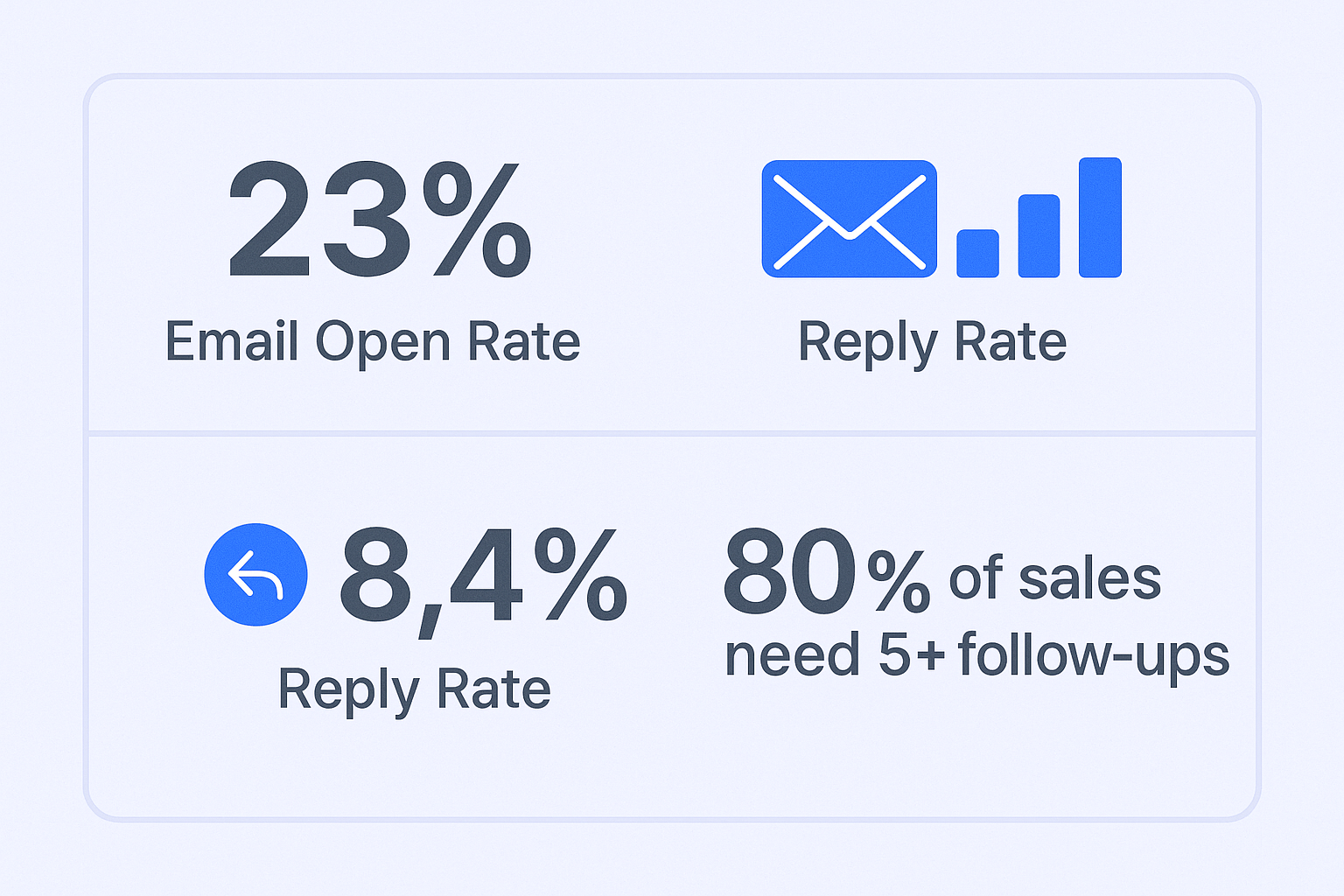
Research shows that only 23% of emails get opened, and of those, even fewer receive immediate responses. Here’s what the numbers tell us:

  • 80% of sales require at least 5 follow-ups to close
  • First email reply rates typically hover around 8.4% for cold outreach
  • Following up increases response rates by 31% when done correctly
  • Emails under 100 words receive replies 30% faster than longer messages

The key is knowing when and how to send these reminders without damaging relationships or coming across as impatient.
 

 📧 Tired of Email Silence?

LinkedIn outbound gets 41% more responses than email reminder sequences

20+ Polite Reminder Email Templates To Get You Started

The Gentle Nudge (For Colleagues)

When to use: Low-stakes follow-ups with team members or regular contacts.

Subject: Following up on [specific topic]

Hi [Name],

Hope you’re having a productive week.

Just wanted to gently follow up on my previous email regarding [mention the specific topic]. No rush at all, but I’d appreciate your input when you have a moment.

Let me know if you need any more information from my end.

Thanks, [Your name]

The Boss-Friendly Reminder

When to use: Following up with supervisors or senior colleagues.

Subject: Quick follow-up: [topic]

Hi [Name],

I just wanted to follow up on the email I sent last [day] regarding [topic]. I know things can get busy, but I would greatly appreciate your input on this when you have a moment, as it’s needed for [reason].

Thank you for your time.

Best regards, [Your name]

The Time-Sensitive Request

When to use: When deadlines are approaching and you need urgent input.

Subject: Input Needed: [Project] by [Date]

Hi [Name],

I’m writing to follow up on my previous email about [topic]. Your input is needed to meet our deadline of [date].

Could you please provide your feedback by [specific time]? This is the final piece needed to [explain consequence].

Please let me know if you have any immediate questions.

Thanks, [Your name]

Payment & Invoice Reminders

Friendly Pre-Due Reminder:

Subject: Friendly Reminder: Invoice #[Number] due [Date]

Hi [Client Name],

This is just a friendly reminder that payment for invoice #[Invoice Number] for $[Amount] is due on [date]. You can view and pay the invoice here: [Link].

If you’ve already made the payment, please disregard this email. Thank you for your business!

Kind regards, [Your name]

Past Due Reminder:

Subject: Follow-Up: Invoice #[Number] is now past due

Hi [Client Name],

Hope you’re well. I’m following up on invoice #[Invoice Number], which was due on [date]. Our records show that it is still outstanding.

Could you please let me know when we can expect to receive payment? If you have any questions, please don’t hesitate to reach out.

Thank you, [Your name]

Meeting Confirmation Reminders

Subject: Reminder: Our meeting tomorrow at [Time]

Hi [Name],

This is a quick reminder about our scheduled meeting tomorrow, [date], at [time], to discuss [topic].

The meeting will be held [location/platform]. Please let me know if you have any questions beforehand.

Looking forward to our conversation!

Best, [Your name]

Sales Follow-Up Templates

Post-Demo Follow-Up:

Subject: Next steps after our demo?

Hi [Name],

Thank you for your time on [date] for the demo. I hope it provided a clear view of how we can help solve [specific pain point].

Based on our conversation, you seemed particularly interested in [feature/benefit]. What makes sense as a next step for you and your team?

Best, [Your name]

Re-engagement Email:

Subject: Thought this might be helpful for [Company]

Hi [Name],

I’m circling back on the email I sent last week about how we help companies achieve [specific benefit].

I wanted to share a brief case study on how we helped [similar company] achieve [specific result]. You can find it here: [Link]

Would you be open to a brief 15-minute call to explore if we could drive similar results for you?

Best regards, [Your name]

Information Request Follow-Up

Subject: Following up on information for [Project]

Hi [Name],

Just a quick follow-up on my request from [date] for the [specific information needed].

I need this information to complete [task] by our deadline of [date]. Could you please send it over when you have a chance?

Please let me know if you need anything from me to help.

Thanks so much, [Your name]

The “Busy Schedule” Acknowledgment

Subject: Circling back on [topic]

Hi [Name],

I know your schedule is likely packed, so I’ll keep this brief. I’m just circling back on my previous email about [topic].

Whenever you get a moment, I’d appreciate your feedback. Happy to provide a quick summary or hop on a call if that would be easier.

Thanks for your time, [Your name]

The Light-Hearted Approach

Subject: Just Checking In – [Topic]

Hey [Name],

Hope all is well!

Just wanted to give my last email a little nudge to the top of your inbox. Let me know your thoughts on [topic] when you get a free moment.

Cheers, [Your name]

The “Final Notice” Template

Subject: Can I close your file?

Hi [Name],

I haven’t heard back from you in a while, so I’m assuming your priorities have changed. I’m clearing out my pipeline and plan to close your file.

If you’re still interested, just let me know. Otherwise, I wish you all the best.

Thanks, [Your name]

Bonus: Gentle Reminders That You Can Send on LinkedIn, WhatsApp & SMS

LinkedIn Follow-Up Messages

Sometimes email isn’t the best channel. LinkedIn messages have an 11.87% reply rate compared to email’s 8.4%. Here are professional LinkedIn templates:

Connection Request: “Hi [Name], I sent you an email last week regarding [topic] and thought I’d connect here as well. Looking forward to potentially working together!”

Direct Message Follow-Up: “Hi [Name], following up on the email I sent about [topic]. Saw your recent post about [relevant topic] – would love to chat about how we can help with [specific benefit].”

WhatsApp Business Templates

For appointment reminders and customer service follow-ups:

Appointment Reminder: “Hi [Name], just a friendly reminder about your appointment with us tomorrow at [time]. Please reply YES to confirm or call us at [number] if you need to reschedule.”

Order Update: “Hi [Name], there’s been an update regarding your order #[number]. Please check your email for details or visit [link] for the latest status.”

SMS Reminders

Keep these under 160 characters and always include an opt-out option:

Payment Reminder: “Hi [Name], your invoice #[number] for $[amount] is due tomorrow. Pay online at [link]. Reply STOP to opt out.”

Meeting Reminder: “Meeting reminder: Tomorrow at [time] at [location]. Please confirm by replying YES. Reply STOP to opt out.”

🎯 LinkedIn Beats Email Reminders

Our targeting and campaign design gets you responses without the chase

A Checklist to Follow While Writing the Polite Email Reminder

Before You Send

Timing is Everything:

  • Wait 3-5 business days for most professional emails
  • 24-48 hours for urgent matters
  • 1 week for non-urgent requests

Check Your Original Email:

  • Was your request clear?
  • Did you include all necessary information?
  • Was your call-to-action specific?

Writing Your Reminder

Subject Line Essentials:

  • Keep it under 60 characters
  • Reference the original topic
  • Avoid “Urgent” unless truly time-sensitive
  • Use action words like “Following up on…” or “Quick reminder about…”

Opening Lines:

  • Always reply in the same email thread to maintain context
  • Use their name for personalization
  • Acknowledge they’re busy: “I know you’re swamped, but…”

Body Content:

  • Keep it under 100 words for faster responses
  • Be specific about what you need
  • Explain why it matters
  • Set a soft deadline when appropriate

Call-to-Action:

  • Make it crystal clear what you want them to do
  • Offer alternatives: “Happy to hop on a quick call if that’s easier”
  • Avoid weak phrases like “let me know what you think”

Professional Closing:

  • Thank them for their time
  • Match the formality to your relationship
  • Include your contact information

The Follow-Up Sequence

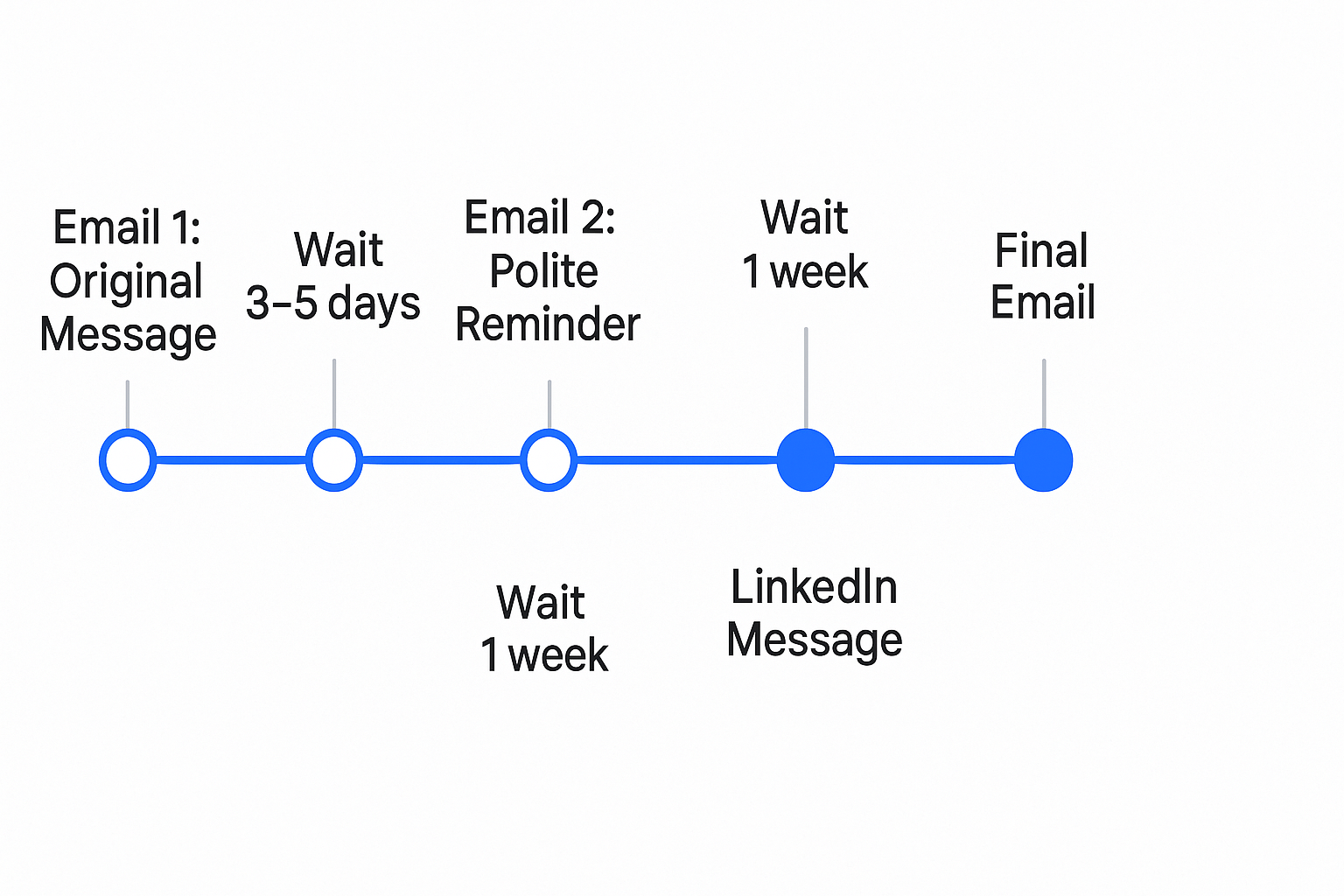
Modern follow-up strategy based on 2025 data:

  1. Email 1: Your original message
  2. Wait 3-5 days
  3. Email 2: Polite reminder (one of the templates above)
  4. Wait 1 week
  5. LinkedIn message: Different channel, same topic
  6. Wait 1 week
  7. Final “breakup” email: Graceful closure

Important: Enterprise clients (1000+ employees) are “allergic to persistence” – limit to 1-2 follow-ups max. Smaller businesses tolerate 2-3 follow-ups better.


Strategies That Actually Work (Data-Backed Tips)

Psychology of Email Responses

The Empathy Factor: Starting with phrases like “I know you’re busy” increases response rates by 26% because it acknowledges their workload instead of creating pressure.

The Scarcity Principle: Mentioning deadlines or limited availability can boost responses by 15%, but use sparingly to maintain credibility.

Social Proof: References to mutual connections or similar companies can increase open rates by 22%.

Timing Your Reminders

Best Days to Send:

  • Tuesday-Thursday have the highest open rates
  • Tuesday at 10 AM is statistically the best time
  • Avoid Mondays (inbox overload) and Fridays (weekend mindset)

Seasonal Considerations:

  • December: Expect 40% lower response rates
  • Summer months: Allow extra time for vacation schedules
  • Q4: Business urgency increases response rates

Channel Strategy

When to Switch Channels:

  1. Email → LinkedIn: After 2 unanswered emails
  2. Digital → Phone: For urgent matters or high-value clients
  3. Formal → Casual: Based on relationship and company culture

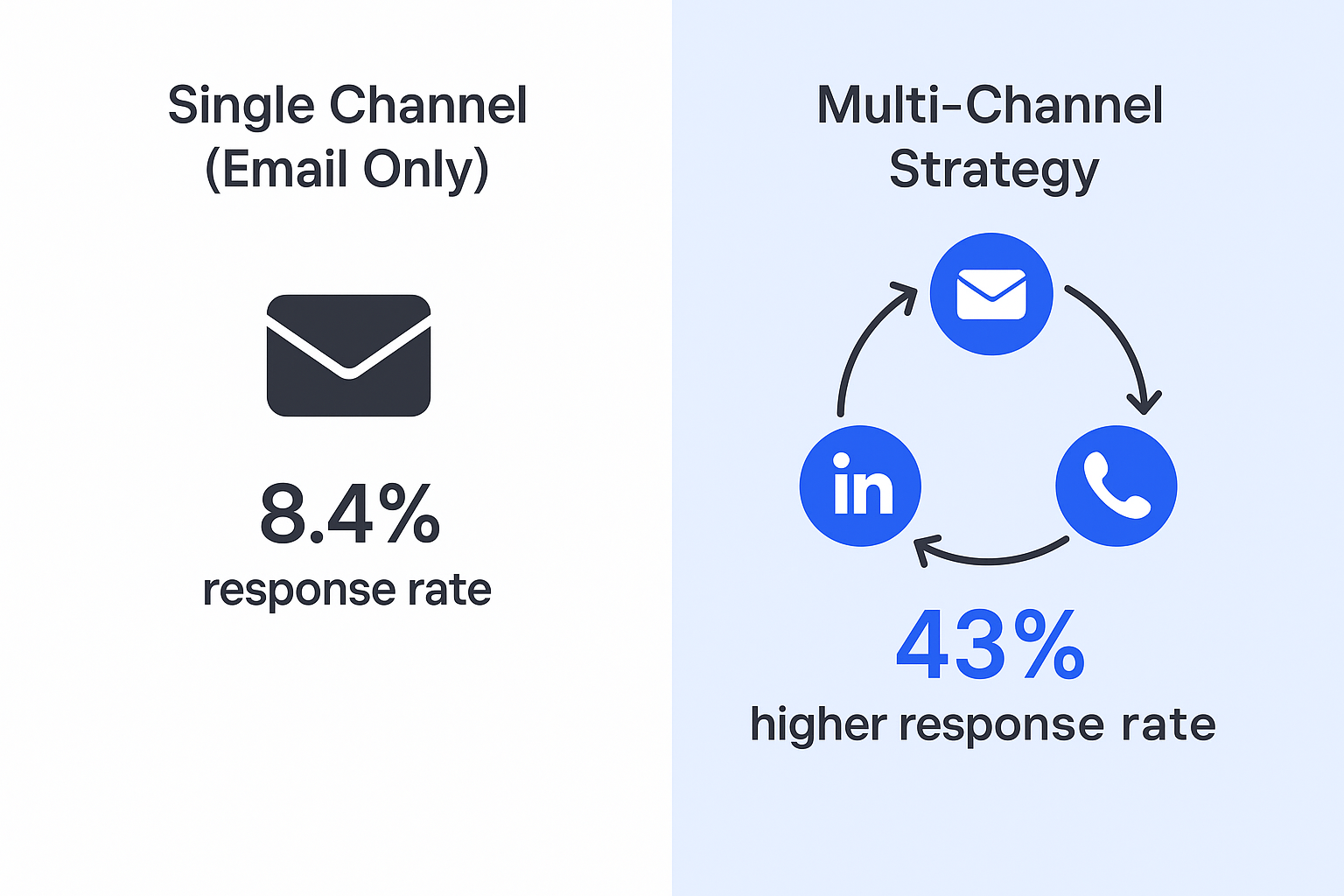
Multi-channel sequences show 43% higher response rates than email-only approaches.


Advanced Personalization

Beyond “Hi [Name]”:

  • Reference their recent LinkedIn posts
  • Mention mutual connections
  • Acknowledge their company’s recent news or achievements
  • Reference previous conversations or meetings

Personalized subject lines are 26% more likely to be opened than generic ones.

🚀 Skip The Reminder Game

Complete LinkedIn outbound strategy: targeting, campaigns, and scaling that works

Send the Polite Email Reminder

Final Pre-Send Checklist

Before hitting send on your reminder email, run through this quick checklist:

Technical Checks:

  • [ ] Replying in the same thread for context
  • [ ] Recipient’s name spelled correctly
  • [ ] No typos or grammatical errors
  • [ ] Links working properly (if included)
  • [ ] Mobile-friendly formatting

Content Checks:

  • [ ] Clear, specific subject line
  • [ ] Empathetic opening
  • [ ] Concise message (under 100 words)
  • [ ] Specific call-to-action
  • [ ] Professional closing
  • [ ] Soft deadline included (when appropriate)

Strategic Checks:

  • [ ] Appropriate wait time since last email
  • [ ] Right tone for the relationship
  • [ ] Channel makes sense (email vs. LinkedIn vs. other)
  • [ ] Not the 5th reminder to the same person

What NOT to Do

Avoid These Common Mistakes:

  • Don’t be passive-aggressive: “As I mentioned in my previous email…” sounds accusatory
  • Don’t apologize excessively: One “sorry for the follow-up” is enough
  • Don’t use guilt trips: “I’m disappointed I haven’t heard back” damages relationships
  • Don’t send daily reminders: Respect their time and inbox
  • Don’t forget to proofread: Typos in reminder emails look unprofessional

When to Stop Following Up

Know when to walk away:

  • After 3-4 attempts with no response
  • If they’ve explicitly asked you to stop
  • When you’ve switched to different channels without success
  • If the opportunity has likely passed

The “Breakup Email” Template:

“Hi [Name], I haven’t heard back from you, so I’m assuming your priorities have shifted. I’ll close your file for now. If anything changes, feel free to reach out. Best wishes!”

This approach often generates final responses from prospects who appreciate the professional courtesy.

💼 Done Chasing Cold Emails?

LinkedIn outbound targets decision-makers who actually respond to your message

7-day Free Trial |No Credit Card Needed.

FAQ on Polite Reminder Emails

How long should I wait before sending a reminder email?

Wait 3-5 business days for most professional communications. For urgent matters, 24-48 hours is acceptable. For casual requests, up to a week is appropriate.

How many reminder emails should I send?

Modern best practice: 2-3 maximum. Enterprise clients (large companies) prefer fewer follow-ups, while small-to-medium businesses tolerate more. After 3 attempts, switch channels or stop.

What's the best time to send reminder emails?

Tuesday through Thursday between 10 AM and 2 PM show the highest open and response rates. Avoid Monday mornings and Friday afternoons.

Should I apologize for following up?

A brief acknowledgment like "sorry to follow up" is fine, but don't over-apologize. It can make you sound insecure and diminish your message's importance.

How do I make my reminder email sound less pushy?

Use empathetic language ("I know you're busy"), offer alternatives ("happy to hop on a quick call"), and focus on the benefit to them rather than your need for a response.

📧 Tired of Email Silence?

LinkedIn outbound gets 41% more responses than email reminder sequences

Segmentation That Actually Converts

LinkedIn outbound targets precise demographics with strategic campaign design and scaling methods

How to Build a High-Converting B2B Sales Funnel from Scratch on LinkedIn ​