

3. AI-Powered Personalization
Generic “Hi [First Name]” messages don’t work anymore. Prospects can spot template messages instantly.
SaleRobot uses AI to analyze profiles and generate personalized opening lines that feel authentic. It can even create:
- Personalized images and GIFs
- AI-cloned voice notes
- Short video messages
According to users, these creative touches can boost response rates by up to 300% compared to text-only messages.
Want to really stand out? Some teams use these personalization features for unique outreach—like sending prospects to a specialized address store for a thank-you gift, or even facilitating an anonymous donation to their favorite charity. These creative touches help build genuine relationships.
4. Smart Bypassing of LinkedIn Limits
LinkedIn limits you to roughly 100 connection requests per week. SaleRobot works around this by:
- Open Profile Messaging: Sending InMails to Premium users who allow messages from anyone
- Group Targeting: Messaging members of the same LinkedIn groups without a connection
- Post Engagement Targeting: Reaching people who commented on specific posts
These strategies let you scale outreach without hitting LinkedIn’s hard limits, especially when you’re trying to reach B2B decision-makers effectively.
5. Smart Reply Detection
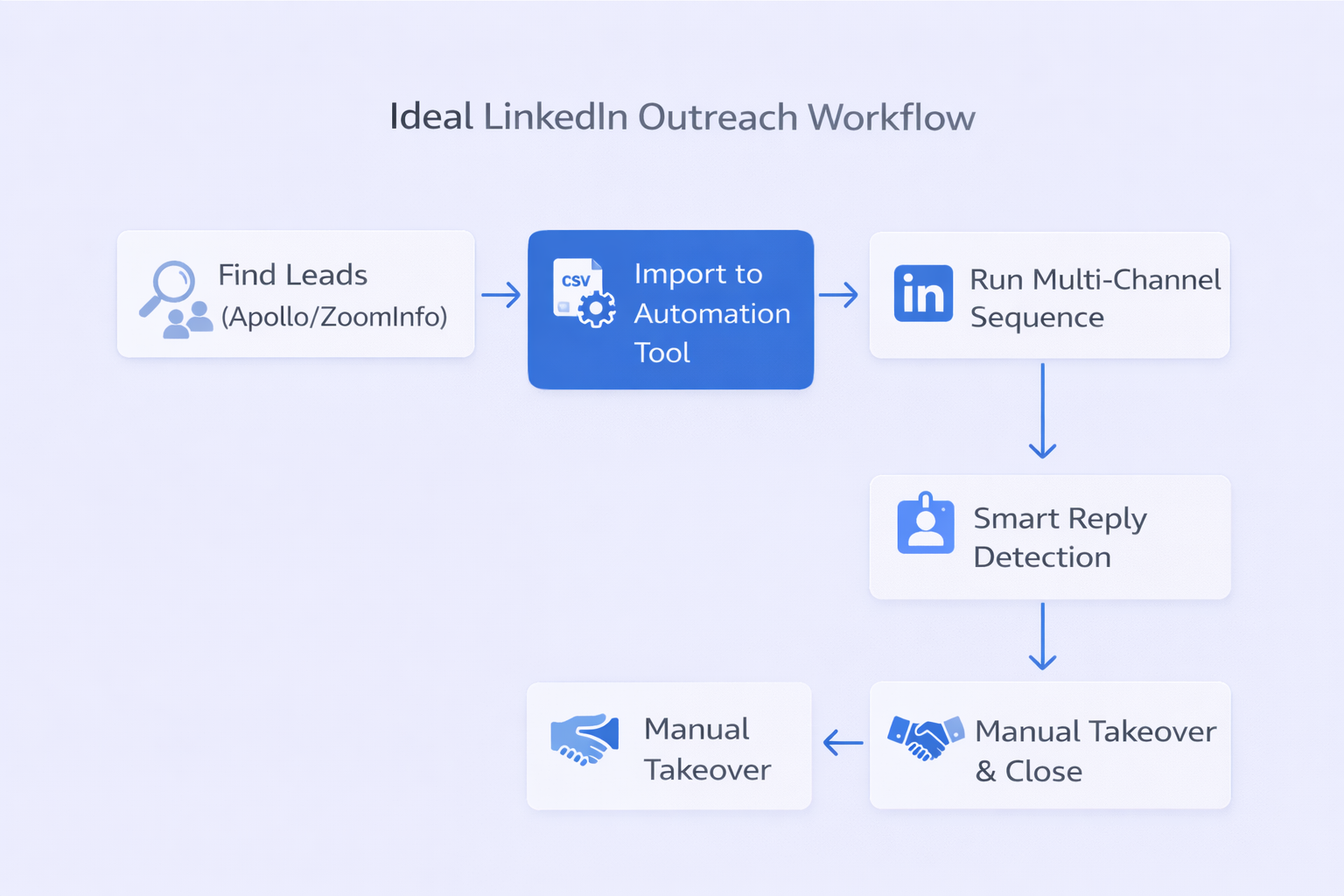
This feature is crucial. As soon as a prospect replies, SaleRobot automatically stops all automated messages in that sequence. This lets you take over manually without the risk of sending a generic follow-up message.
Why does this matter? Because 50% of conversion chances are lost if you don’t respond within 5 minutes. The handoff needs to be seamless.
But if you’re just starting out or have a limited budget, the price might be a barrier. Similar to how you might use free pipeline tools to manage leads initially, you might want to start with simpler solutions before investing in premium automation.
Pros and Cons: The Reality Check
What SaleRobot Does Well
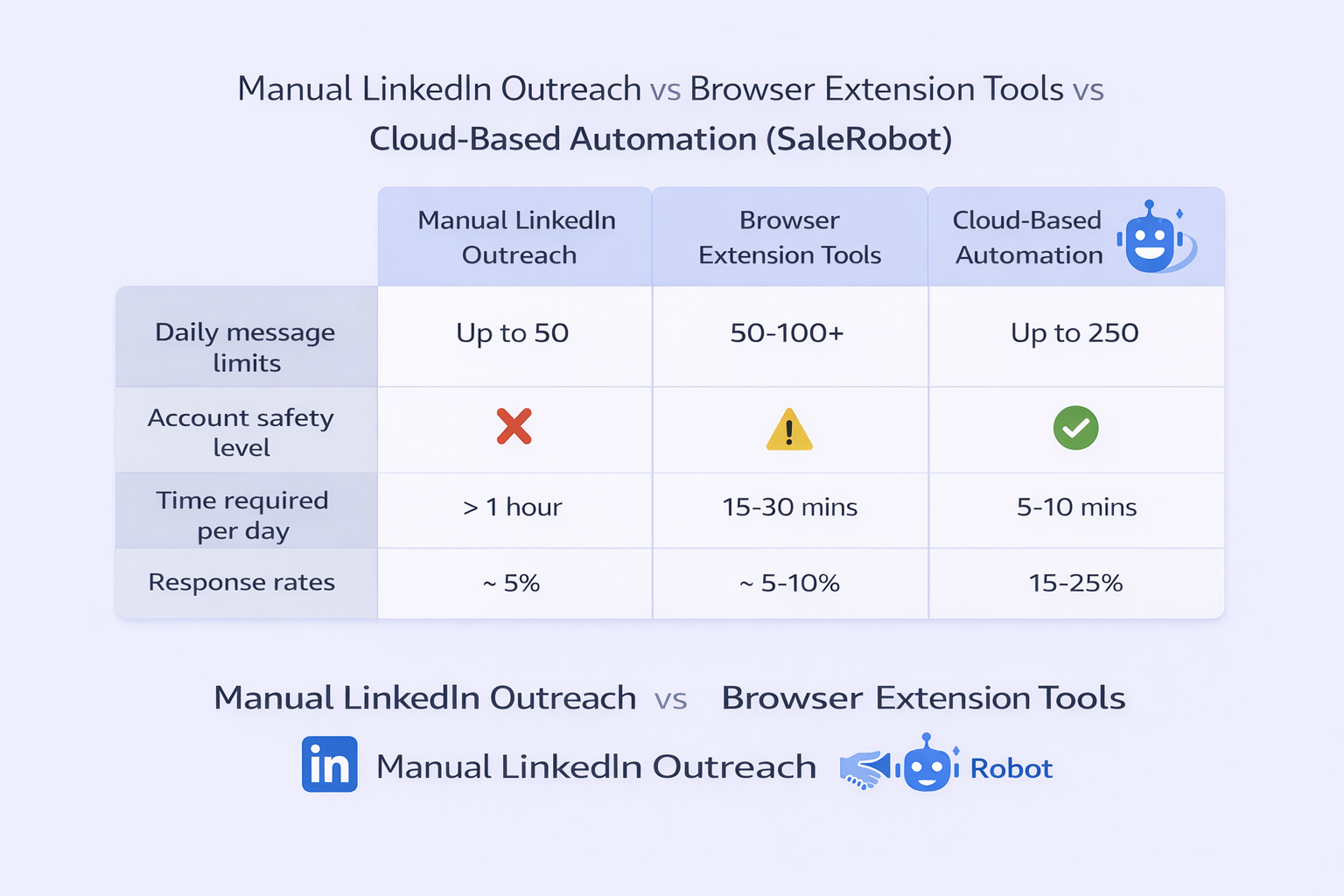
✅ Safety Architecture: The mobile API + residential IP setup is legitimately safer than browser extensions
✅ Multi-Channel Sequences: LinkedIn + email automation in one platform
✅ AI Personalization: Voice notes and video messages set you apart from generic outreach
✅ Customer Support: Users consistently praise the responsive support team
✅ Cloud-Based: Runs 24/7 even when your computer is off
What Could Be Better
❌ Higher Price Point: More expensive than basic browser extensions ($59+ vs $20-30/month)
❌ Learning Curve: Complex sequences take time to master
❌ Platform Stability: Occasional bugs when LinkedIn updates their code
❌ Not a Database: You still need to source leads elsewhere (unlike Apollo or ZoomInfo)
SaleRobot vs. Alternatives: How Does It Stack Up?
Let’s compare SaleRobot to the main alternatives:
SaleRobot vs. Apollo.io
Apollo is a data-first platform with 275+ million contacts. It’s great for finding leads, but its LinkedIn automation isn’t as sophisticated. Many teams use Apollo to build lists, then import them into SaleRobot for outreach.
SaleRobot vs. Saleshandy
Saleshandy specializes in cold email with 700 million contacts and excellent deliverability features. However, it lacks native LinkedIn automation. Given that LinkedIn content drives engagement far better than email, this is a significant limitation.
SaleRobot vs. ZoomInfo
ZoomInfo is the enterprise standard for data accuracy and intent signals. But it starts at $15k/year and doesn’t offer the deep LinkedIn automation workflows that SaleRobot provides.
SaleRobot vs. GrowMeOrganic
GrowMeOrganic is more affordable ($49/month) but lacks the safety-first architecture. It’s a good entry-level tool, but riskier for high-volume outreach.
SaleRobot Pricing: What Does It Cost?
SaleRobot isn’t the cheapest option, but the safety features justify the price for most teams.
Pricing Tiers (Per Account):
- Basic/Starter: ~$59-$99/month (1 account, AI features included)
- Advanced/Pro: ~$79-$397/month (unlimited campaigns, A/B testing)
- Professional/Pro+: ~$99-$497/month (team management, CRM sync)
For agencies managing 20+ accounts, SaleRobot offers volume discounts up to 45% off per seat.
Is It Worth the Cost?
If you’re serious about LinkedIn outreach and want to protect your account, yes.
The Better Alternative: Why Salesso Outperforms SaleRobot
Here’s what most SaleRobot reviews won’t tell you: there’s a better option.
Salesso offers everything SaleRobot does—but with a few key advantages:
1. Superior Deliverability Architecture
While SaleRobot focuses on LinkedIn safety, Salesso goes further with advanced email deliverability features. We integrate email validation tools that ensure your messages actually land in inboxes, not spam folders.
2. All-in-One Lead Generation
Unlike SaleRobot, which requires you to source leads separately, Salesso includes built-in prospecting similar to MailGenius alternatives. You can find, verify, and engage prospects all in one platform.
3. Complete Outbound Strategy
We don’t just give you a tool—we provide a complete system: targeting frameworks, campaign templates, and scaling playbooks. You’re not figuring it out alone.
4. Proven Results
Our clients consistently see 15-25% response rates on LinkedIn—significantly higher than the 10% industry average. That’s because we focus on the entire outreach strategy, not just automation.
5. Transparent Pricing
No confusing tiers or hidden fees. Salesso offers straightforward pricing with all features included—no need to upgrade for basic functionality.
Real-World Use Cases
Whether you’re in sales, recruiting, or agency work, here’s how automation tools like SaleRobot (or better yet, Salesso) fit into your workflow:
For Sales Teams: Automate initial outreach while your team focuses on demos and closing. One client saved 6 hours per week per rep by automating profile research and initial messaging.
For Recruiters: Reach passive candidates who might not respond to InMails. The multi-touch approach works especially well for competitive hiring markets. Some firms even apply scholarship programs to train new recruiters on these tools.
For Agencies: Manage dozens of client accounts from one dashboard. Track everything from bestbuy orders (if you’re in retail B2B) to complex enterprise deals.
For Relationship Building: Use personalization features creatively—send LinkedIn promotion posts congratulating prospects on achievements, or coordinate gifts through address store partnerships for VIP outreach.

